
Introduction
This manual provides detailed instructions for the proper setup, operation, and maintenance of your Andoer Mini Tabletop Ball Head. Please read this manual thoroughly before using the product to ensure optimal performance and longevity. This ball head is designed for use with tabletop tripods and is compatible with various cameras, including DSLRs, digital cameras, action cameras, and smartphones (with an appropriate phone holder).
Product Overview
The Andoer Mini Tabletop Ball Head is a compact and durable accessory crafted from aluminum alloy, designed to provide flexible camera positioning. It features a 25mm sphere head that allows for 360-degree rotation and up to 90-degree tilt, enabling precise angle adjustments for photography and videography. The integrated quick release plate with a 1/4-inch screw ensures fast and secure attachment of your device. A built-in bubble level assists in achieving accurate horizontal alignment.

Image: The Andoer Mini Tabletop Ball Head shown with its quick release plate detached.
Key Features:
- Compact Design: Bottom diameter of 4cm (1.6 inches), suitable for tabletop tripods.
- Flexible Positioning: 25mm sphere head allows 360-degree rotation and 90-degree tilt.
- Quick Release System: Features a 1/4-inch screw for rapid attachment and detachment of cameras or phone holders.
- Durable Construction: Made from strong aluminum alloy, supporting up to 5kg (11 lbs) of load.
- Integrated Bubble Level: For precise horizontal alignment.
- Versatile Mounting: Bottom thread is 3/8-inch, includes a 3/8-inch to 1/4-inch convertible screw adapter.

Image: Detailed dimensions of the ball head and quick release plate, including the 3/8-inch to 1/4-inch convertible screw.
Setup Instructions
- Attach Ball Head to Tripod:
- Identify the mounting screw on your tabletop tripod. The ball head has a 3/8-inch bottom thread.
- If your tripod has a 1/4-inch screw, use the provided 3/8-inch to 1/4-inch convertible screw adapter. Screw the adapter into the bottom of the ball head first, then attach the ball head to your tripod.
- Tighten securely by rotating the ball head clockwise onto the tripod's mounting screw until firm.
- Attach Quick Release Plate to Camera/Device:
- Locate the 1/4-inch screw on the quick release plate.
- Align the screw with the tripod mounting hole on the bottom of your camera, phone holder, or other compatible device.
- Rotate the screw clockwise using a coin or screwdriver until the plate is firmly attached to your device. Ensure it is tight to prevent wobbling.
- Mount Device onto Ball Head:
- Ensure the quick release clamp on the ball head is open. This is typically done by loosening the side knob or lever.
- Slide the quick release plate (with your device attached) into the clamp on the ball head.
- Once the plate is fully seated, tighten the quick release clamp knob/lever to secure your device. Verify that the device is stable and cannot be easily removed.
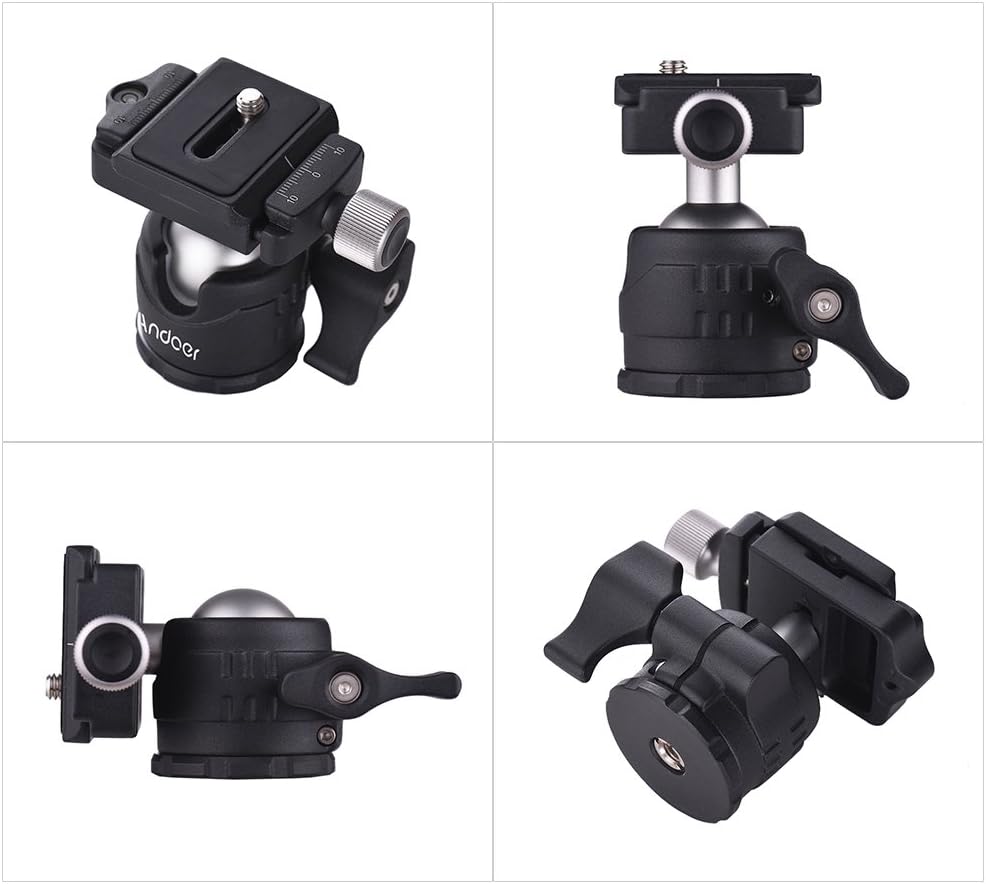
Image: Different perspectives of the ball head, illustrating its design and components.
Operating Instructions
- Adjusting the Ball Head Angle:
- To change the camera angle, loosen the main locking knob on the side of the ball head.
- Carefully tilt or rotate your camera to the desired position. The ball head allows for 360-degree horizontal rotation and up to 90-degree vertical tilt.
- Once the desired angle is achieved, tighten the main locking knob firmly to secure the camera in place.
- Using the Bubble Level:
- The integrated bubble level is located on the quick release clamp.
- To ensure your camera is perfectly level, adjust the tripod legs or the ball head's tilt until the bubble is centered within the level indicator.
- Panoramic Rotation:
- The base of the ball head can rotate independently for panoramic shots. Loosen the smaller knob at the base of the ball head to enable this rotation.
- Rotate the camera to capture your panoramic sequence. The base has degree markings for precise adjustments.
- Tighten the base rotation knob once finished.

Image: Visual representation of the 360-degree rotation capability for panoramic shots.
Maintenance
- Cleaning: Wipe the ball head with a soft, dry cloth to remove dust and dirt. For stubborn grime, a slightly damp cloth can be used, followed by immediate drying. Avoid abrasive cleaners or solvents.
- Lubrication: The ball mechanism is designed for smooth operation without requiring external lubrication. Do not apply oils or greases, as this can attract dust and impair performance.
- Storage: Store the ball head in a clean, dry environment away from extreme temperatures and humidity.
- Inspection: Periodically check all screws and knobs for tightness. Ensure the quick release plate mechanism operates smoothly.
Troubleshooting
- Issue: Ball head does not hold position.
- Solution: Ensure the main locking knob is tightened sufficiently. If the issue persists, check if the weight of your camera exceeds the maximum load capacity (5kg).
- Issue: Camera feels loose on the quick release plate.
- Solution: Verify that the 1/4-inch screw attaching the plate to your camera is securely tightened. Also, ensure the quick release clamp on the ball head is fully engaged and tightened.
- Issue: Ball head rotation is stiff.
- Solution: Check for any debris or dust around the ball. Clean as per maintenance instructions. Avoid applying lubricants.
Specifications
| Feature | Specification |
|---|---|
| Brand | Andoer |
| Material | Aluminum Alloy |
| Mounting Screw (Quick Release Plate) | 1/4 inch |
| Bottom Thread (Ball Head) | 3/8 inch (with 3/8" to 1/4" adapter) |
| Sphere Diameter | 25mm / 0.98 inches |
| Ball Head Height | 6.5cm / 2.5 inches |
| Ball Head Bottom Diameter | 4cm / 1.6 inches |
| Quick Release Plate Size | 4.3 x 3.8 cm / 1.7 x 1.5 inches |
| Item Weight | 201g / 7.1 oz |
| Maximum Weight Recommendation | 5 kg / 11 lbs |
| Compatible Devices | Cameras (DSLR, Digital, Action), Phone Holders |
Warranty and Support
Andoer products are manufactured to high-quality standards. For specific warranty information, please refer to the documentation included with your purchase or visit the official Andoer website. For technical support or inquiries, please contact Andoer customer service through their official channels.