
Ponkor SM-XB1
Ponkor Rechargeable Battery Packs for Xbox Controllers User Manual
Model: SM-XB1
Introduction
Thank you for choosing the Ponkor Rechargeable Battery Packs and High-Speed Charging Station. This product is designed to provide extended playtime and convenient charging for your Xbox Series X|S and Xbox One controllers. With high-capacity batteries and multiple safety features, you can enjoy uninterrupted gaming sessions.

Image: The Ponkor charging station with two 6200mWh rechargeable battery packs.
What's Included
- 2 x 2600mAh Rechargeable Battery Packs for Xbox
- 1 x Battery Charging Station
Key Features
- High Capacity: Each battery provides 2600 mAh capacity, offering extended playing time and rechargeable up to 2000 times. The product is advertised with a 6200 mWh energy rating.
- Wide Compatibility: Designed for Xbox One, Xbox Series X|S, Xbox One S, Xbox One X, and Xbox One Elite Wireless Controllers. The charging station is compatible with all USB chargers (5V 2A adapter recommended for best experience).
- Enhanced Safety: Built-in intelligent chip offers Over-Charging, Over-Heated, Over-Current, Over-Voltage, Short-Circuit, and Over-Discharge Protection. Constructed with fire-resistant material for safe use.
- Rapid Charging: Batteries fully charge in approximately 5 hours.
- Multiple Charging Ports: The charging station features Micro USB, Type-C, and standard USB input ports for versatile charging options.

Image: Illustration showing compatibility with various Xbox controllers including Xbox One, Xbox Series S, Xbox One S, Xbox One X, and Xbox One Elite.
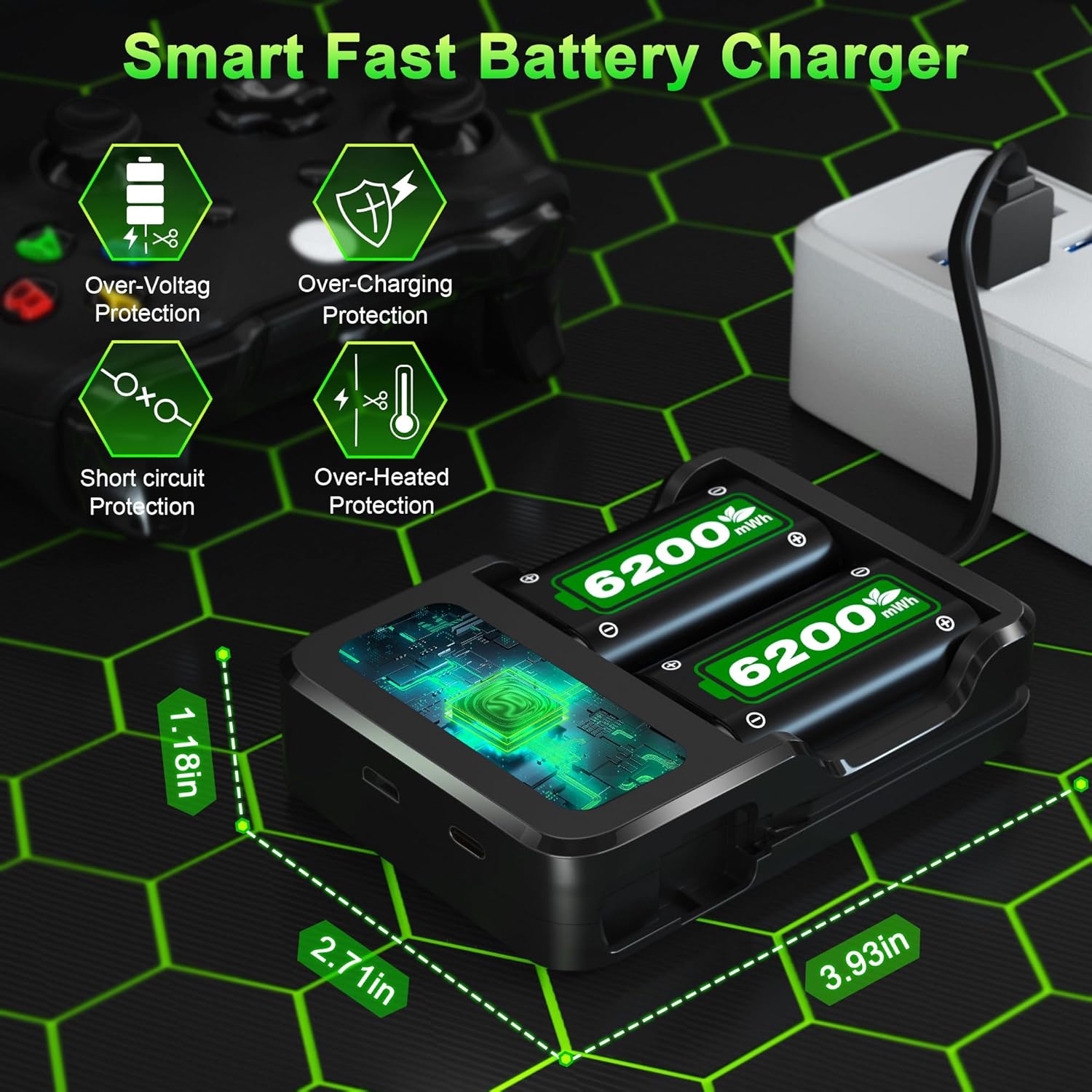
Image: Diagram highlighting the smart fast charger's built-in protections: Over-Voltage, Over-Charging, Short-Circuit, and Over-Heated Protection.
Setup
Follow these steps to set up your Ponkor battery packs and charging station:
- Unpack: Carefully remove all components from the packaging.
- Insert Batteries into Controller: Open the battery compartment of your Xbox controller. Insert a 2600mAh battery pack, ensuring the correct polarity (+ and -) is observed. The battery label should face inwards towards the controller's internal components.
- Prepare Charging Station: Place the charging station on a stable, flat surface.
- Connect Power: Connect the charging station to a USB power source using a Micro USB, Type-C, or standard USB cable. A 5V 2A adapter is recommended for optimal charging speed.
- Insert Batteries for Charging: Insert the battery packs into the charging slots of the station. Ensure the battery label faces outwards for proper connection.
Video: A demonstration of unboxing the Ponkor battery packs and charging station, showing how to insert batteries into an Xbox controller and into the charging station.
Operating Instructions
Using your Ponkor battery packs and charging station is straightforward:
- Charging Process: When a battery is inserted correctly into the charging station and power is supplied, the indicator light for that channel will turn red, indicating charging is in progress.
- Full Charge Indication: Once the battery is fully charged (approximately 5 hours), the indicator light will turn green.
- Using Batteries: Insert a charged battery pack into your Xbox controller. The controller will power on, providing extended gaming time.
- Swapping Batteries: When the battery in your controller runs low, simply swap it with a fully charged spare battery from the charging station to continue playing without interruption.

Image: Visual guide to the charging station's indicator lights: Red for charging, Green for fully charged, and Standby (lights off).

Image: Diagram illustrating the various USB input options for the charging station, including Micro-USB, Type-C, and a standard USB port, allowing charging from USB adapters, power banks, laptops, or car chargers.

Image: The charging station with batteries inserted, connected to a laptop via USB, demonstrating a common charging scenario.
Maintenance
To ensure the longevity and optimal performance of your Ponkor battery packs and charging station, consider the following maintenance tips:
- Regular Cleaning: Keep the charging station and battery contacts clean and free from dust or debris. Use a dry, soft cloth for cleaning.
- Proper Storage: When not in use for extended periods, store the batteries and charging station in a cool, dry place away from direct sunlight and extreme temperatures.
- Avoid Over-Discharge: While the batteries have over-discharge protection, it's good practice to recharge them when they are low rather than letting them completely drain frequently.
- Handle with Care: Avoid dropping or subjecting the batteries and charger to strong impacts.
Troubleshooting
| Problem | Possible Cause | Solution |
|---|---|---|
| Battery not charging (flashing red light) | Battery pole inversely connected. | Ensure the battery is inserted with the correct polarity (+ and -). The battery label should face outwards when in the charging station. |
| Controller not powering on with battery | Battery not fully charged or incorrectly inserted. | Ensure the battery is fully charged (green indicator light on charger). Re-insert the battery into the controller, ensuring correct polarity (label facing inwards). |
| Slow charging speed | Insufficient power supply from USB source. | Use a 5V 2A USB power adapter for optimal charging speed. Ensure the USB cable is not damaged. |

Image: A visual reminder to insert batteries correctly, paying attention to the right anode (+) and cathode (-), to ensure proper function and charging.
Specifications
- Model Number: SM-XB1
- Battery Capacity: 2600 mAh (6200 mWh energy rating)
- Battery Cell Composition: NiMH
- Recharge Cycles: Up to 2000 times
- Full Charge Time: Approximately 5 hours
- Charging Station Input: DC 5V/2A (Micro USB, Type-C, USB)
- Charging Station Output: DC 3.0V 500mA x 2
- Package Dimensions: 4.53 x 3.15 x 1.14 inches
- Item Weight: 4.5 ounces
- Manufacturer: SHENZHEN BETTERPOWER BATTERY CO LTD
- First Available: June 13, 2018
Warranty and Support
Ponkor products are manufactured with strict quality control. For any warranty claims, technical support, or product inquiries, please refer to the contact information provided with your purchase or visit the official Ponkor website. Please retain your proof of purchase for warranty purposes.
Ask a question about this manual
Ask about setup, troubleshooting, compatibility, parts, safety, or missing instructions. Manuals+ will review the question and use this page’s manual context to help answer it.