
Introduction
The VXDAS AM3011 is a multifunctional On-Board Diagnostics (OBD2) scanner designed to assist in diagnosing vehicle engine status. This tool provides essential information for both professional mechanics and vehicle owners, enabling efficient identification and resolution of engine-related issues. Its primary functions include reading and clearing Diagnostic Trouble Codes (DTCs), viewing freeze frame data, and checking I/M readiness status. The AM3011 also offers access to live data streams and comprehensive vehicle information such as the Vehicle Identification Number (VIN), calibration ID, and calibration verification numbers.
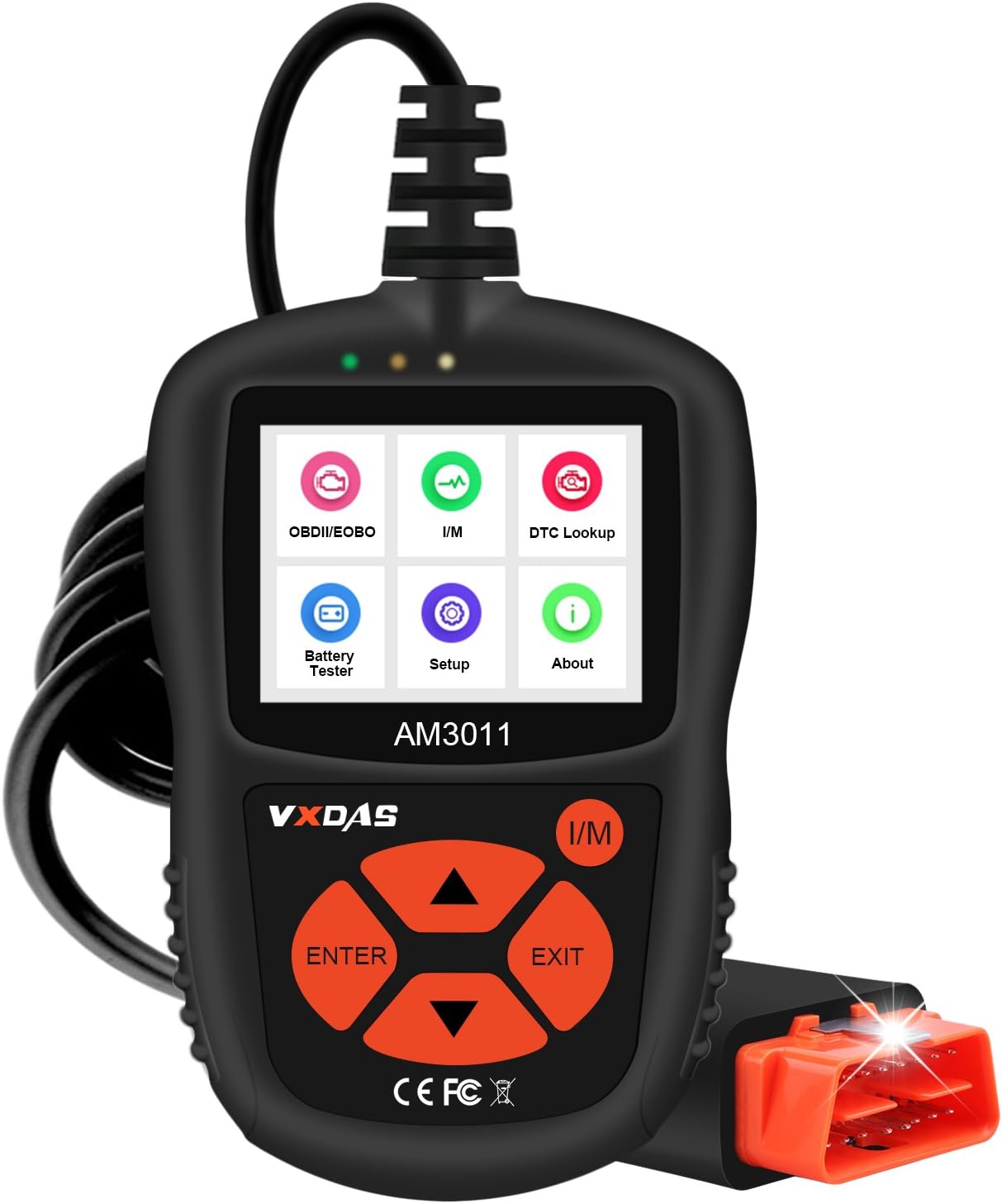
Figure 1: The VXDAS AM3011 OBD2 Scanner, showcasing its 2.4-inch color display, navigation buttons, and integrated OBDII connector cable.
Product Features
- User-Friendly Operation: Designed for ease of use, suitable for both professional technicians and novice users to quickly diagnose vehicle engine systems.
- Comprehensive Diagnostic Functions: Includes an integrated OBDII fault code lookup library to easily determine the cause of the Check Engine Light (MIL), clear codes, perform I/M monitor readiness tests, view freeze frame data, and retrieve vehicle information (VIN, CIN, CVN).
- Wide Vehicle Compatibility: Compatible with all US-based vehicles manufactured from 1996 onwards, EU-based and Asian vehicles from 2000 onwards, and newer OBDII and CAN compliant domestic or imported vehicles.
- Multi-Language Support: Supports English, Spanish, French, and Chinese languages for broader accessibility.
- Advanced Display and Indicators: Features a 2.4-inch color TFT display and a built-in speaker. Unique one-click I/M readiness status design with three-color LEDs (green, yellow, red) provides visual and audible notifications for emission monitor status.
- No External Power Required: The device is powered directly from the vehicle's OBDII Data Link Connector, eliminating the need for batteries. It includes a 3-foot flexible insulated cable with an integrated LED light for easy connection in various conditions.

Figure 2: An overview of the VXDAS AM3011's key functions, including Read Codes, Erase Codes, Freeze Frame, I/M Readiness, Live Data, Battery Tester, Vehicle Info, and Check Engine light status. It also highlights multi-language support.
Setup
- Locate the OBDII Port: Identify the 16-pin Data Link Connector (DLC) in your vehicle. This port is typically located under the dashboard on the driver's side, though its exact position may vary by vehicle model. Consult your vehicle's owner's manual if you cannot locate it.
- Connect the Scanner: With the vehicle's ignition off, firmly plug the AM3011 scanner's OBDII connector into the vehicle's DLC. Ensure a secure connection. The scanner will draw power directly from the vehicle's battery once connected.
- Turn On Ignition: Turn the vehicle's ignition to the "ON" position (do not start the engine unless instructed by a specific diagnostic procedure). The scanner's display should illuminate, indicating it has powered on.
- Initial Scan: The scanner will automatically establish communication with the vehicle's onboard computer. This process may take a few seconds. Once communication is established, the main menu will appear on the screen.

Figure 3: The VXDAS AM3011 scanner connected to a vehicle's OBDII port, demonstrating its compact size and ease of handling during operation. The image also displays icons for operating temperature, storage temperature, and external power requirements.
Operating Instructions
Navigate through the scanner's menu using the UP, DOWN, ENTER, and EXIT buttons. The I/M button provides quick access to I/M Readiness status.
1. Reading Diagnostic Trouble Codes (DTCs)
This function allows you to retrieve stored, pending, and permanent codes from the vehicle's ECU.
- From the main menu, select "OBDII/EOBD" or "Read Codes".
- Press ENTER. The scanner will display any detected codes along with their descriptions.
- Use the UP/DOWN buttons to scroll through multiple codes if present.

Figure 4: The AM3011 screen showing a Diagnostic Trouble Code (DTC) such as "P0445" and its direct meaning, "Evaporative Emission System Purge Control Valve Circuit Shorted," eliminating the need for external lookup.
2. Clearing Diagnostic Trouble Codes (DTCs)
Clearing DTCs will turn off the Check Engine Light (MIL) and reset all monitor status to "Not Ready." Ensure any underlying issues are resolved before clearing codes.
- From the main menu, select "OBDII/EOBD".
- Navigate to "Erase Codes" or "Clear DTCs".
- Press ENTER. A confirmation message will appear. Confirm to proceed.
- The scanner will indicate if the codes have been successfully cleared.
3. I/M Readiness Status
This function checks if all emission-related components have been evaluated by the OBDII system. It is crucial for emissions testing.
- Press the dedicated I/M button on the scanner for a quick check.
- Alternatively, from the main menu, select "I/M Readiness" and press ENTER.
- The display will show the status of various monitors (e.g., MIL, IGN, DTC, O2S, HTR). "OK" or "Complete" indicates the monitor has run and passed; "INC" or "Incomplete" means the monitor has not yet run or completed its diagnostic cycle.
4. Live Data Stream
View real-time operational parameters from the vehicle's sensors and components.
- From the main menu, select "Live Data" and press ENTER.
- You can view all data parameters or select specific ones for a customized view.
- The data will be displayed numerically. Some parameters may also show graphical representations.
5. Vehicle Information
Access important vehicle identification details.
- From the main menu, select "Vehicle Info" and press ENTER.
- The scanner will display information such as VIN (Vehicle Identification Number), CIN (Calibration Identification Number), and CVN (Calibration Verification Number).
Maintenance
- Cleaning: Use a soft, dry cloth to clean the scanner's display and casing. Avoid using abrasive cleaners or solvents, which can damage the device.
- Storage: Store the scanner in a clean, dry environment away from direct sunlight, extreme temperatures, and excessive moisture. The recommended storage temperature range is -20°C to 70°C (-4°F to 158°F).
- Cable Care: Avoid bending or twisting the OBDII cable excessively. Inspect the cable and connector periodically for any signs of damage.
- Software Updates: Check the official VXDAS website periodically for available software updates to ensure optimal performance and compatibility with newer vehicle models.
Troubleshooting
| Problem | Possible Cause | Solution |
|---|---|---|
| Scanner does not power on. |
|
|
| "Link Error" or "Communication Error" message. |
|
|
| Cannot clear DTCs. |
|
|
Specifications
General
- Model: AM3011
- Brand: VXDAS
- Display: 2.4-inch TFT Color Display
- Power Source: Corded Electric (via vehicle OBDII port)
- UPC: 656516800414
Environmental & Power
- Operating Temperature: 0°C to 60°C (32°F to 140°F)
- Storage Temperature: -20°C to 70°C (-4°F to 158°F)
- External Power: 8.0V to 18.0V DC (supplied by vehicle battery)
- Voltage: 12 Volts
Physical
- Dimensions (L x W x H): 117 mm x 72 mm x 18 mm (approx. 4.61 x 2.83 x 0.7 inches)
- Product Weight: 159 g (approx. 0.35 lbs)
- Cable Length: 3 feet (approx. 0.91 meters)

Figure 5: A diagram illustrating the physical dimensions of the VXDAS AM3011 scanner, including its length, width, and thickness, along with the 2.4-inch LCD display size and button layout.
Warranty and Support
The VXDAS AM3011 OBD2 Scanner comes with a two-year warranty from the date of purchase, covering manufacturing defects and malfunctions under normal use. For warranty claims or technical assistance, please refer to the official VXDAS website or contact their customer support. The independent brand website ensures that the AM3011 scanner can be continuously updated and optimized, providing ongoing support and improved functionality.
For the latest software updates, FAQs, and additional support resources, please visit the official VXDAS website.