
Maruson PRO-800LCD
MARUSON PRO-800LCD 800VA/450W UPS Instruction Manual
Line Interactive Uninterruptible Power Supply Battery Backup System
Product Overview
The MARUSON PRO-800LCD is an 800VA/450W Line Interactive Uninterruptible Power Supply (UPS) designed to provide reliable battery backup and surge protection for your electronic devices. It features Automatic Voltage Regulation (AVR) to maintain stable power output and an LCD panel for real-time status monitoring. This UPS is suitable for protecting computers, workstations, network devices, and other sensitive electronics from power disruptions.

Figure 1: Front view of the MARUSON PRO-800LCD UPS, showcasing its compact design and illuminated LCD display.
Key Features
- 800VA/450W Capacity: Provides sufficient power for typical home and office electronics.
- 6 Outlets: Includes 3 surge-protected + battery backup outlets and 3 additional surge-protected outlets.
- Automatic Voltage Regulation (AVR): Corrects minor voltage fluctuations without switching to battery power, preserving battery life.
- Smart Battery Management: Optimizes battery performance and extends lifespan.
- LCD Panel: Displays critical information such as input/output voltage, battery capacity, and load level.
- Power Management Software: Enables monitoring and automatic shutdown of connected computers via USB.
- TUV Certified: Ensures product safety and quality standards.
Safety Information
Before operating this device, please read and understand all safety instructions. Failure to follow these instructions may result in electric shock, fire, or serious injury.
- This product is not compatible with motorized equipment (e.g., laser printers, 3D printers, copy machines, water pumps, space heaters, vacuums, paper shredders, air conditioners).
- Do not connect to aquariums or any water-based equipment.
- Not intended for life support, medical, or patient care applications.
- Ensure the total load capacity of all connected equipment does not exceed 80% of the UPS capacity (450W for this model).
- Battery runtime will vary based on battery conditions, setup location, battery age, and operating temperatures.
- Do not open the UPS casing. There are no user-serviceable parts inside. Refer servicing to qualified service personnel.
Component Identification
Front Panel
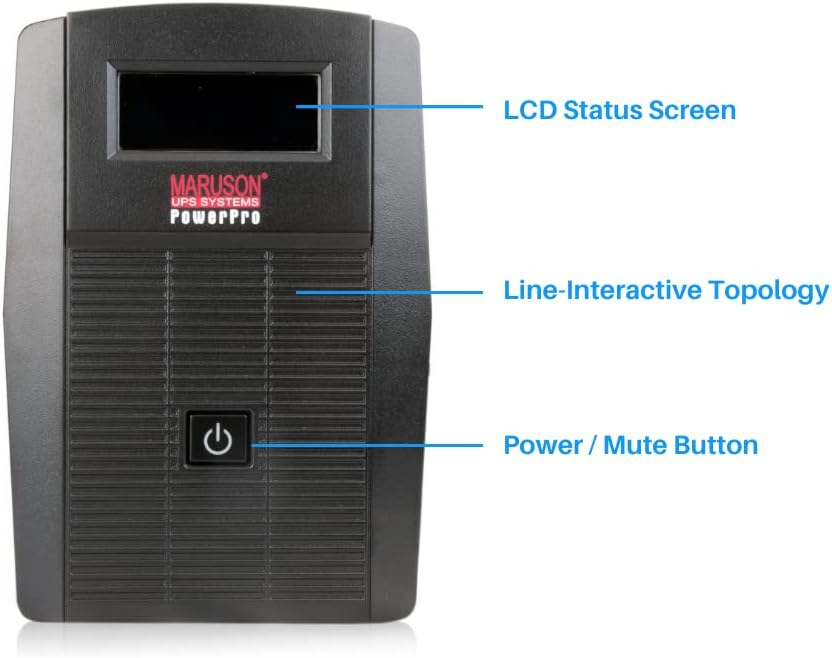
Figure 2: Front panel of the UPS, highlighting the LCD Status Screen and the Power/Mute Button.
- LCD Status Screen: Displays real-time operational status.
- Power / Mute Button: Used to turn the UPS on/off and to mute alarms.
Rear Panel

Figure 3: Rear panel of the UPS, showing the various outlets, USB port, and circuit breaker.
- Battery Backed Outlets with AVR & Surge Protection (3x NEMA 5-15R): Provides power from the battery during outages and protects against surges.
- Surge-Protected Outlets (3x NEMA 5-15R): Offers surge protection for connected devices but no battery backup.
- USB Port for Power Management: Connects to a computer for monitoring and automatic shutdown features.
- Overload Circuit Breaker: Resettable breaker to protect against overloads.
- Phone / Fax / Network Surge Suppression (RJ11/RJ45): Protects communication lines from surges.
Setup
- Unpack the UPS: Carefully remove the UPS from its packaging. Inspect for any shipping damage.
- Initial Charging: Connect the UPS to a standard wall outlet. Allow the unit to charge for at least 8 hours before connecting any devices to ensure optimal battery performance.
- Connect Devices:
- Connect critical devices requiring battery backup (e.g., computer, monitor) to the Battery Backed Outlets.
- Connect non-critical devices requiring only surge protection (e.g., printer, scanner) to the Surge-Protected Outlets.
- USB Connection (Optional): For power management software features, connect the provided USB cable from the UPS to your computer.
- Network/Phone Line Protection (Optional): Connect your network or phone line through the RJ11/RJ45 ports for surge suppression.
Operating Instructions
Turning On/Off
To turn the UPS on, press and hold the Power/Mute button for approximately 2 seconds until you hear a beep and the LCD screen illuminates. To turn off, press and hold the Power/Mute button again until the unit powers down.
Video 1: This video demonstrates how to properly turn on the battery-backed outlets of the Maruson Power Pro Series UPS.
LCD Display
The LCD panel provides real-time information about the UPS status. It typically displays input voltage, output voltage, battery charge level, and load percentage. Refer to the icons on the display for specific indicators such as AC mode, battery mode, fault, and overload.

Figure 4: A close-up view of the UPS LCD screen, displaying current input and output voltage, battery status, and load.
Power Management Software
The included power management software, accessible via the USB connection, allows for advanced monitoring and control. It can automatically shut down your computer during extended power outages, preventing data loss. The software provides detailed logs of power events and UPS status.

Figure 5: Screenshot of the power management software displaying the current status of the UPS, including voltage, frequency, battery, and load information.

Figure 6: Screenshot of the power management software's power problem summary, detailing past power events and voltage regulation activities.
Maintenance
- Battery Care: To maximize battery life, ensure the UPS is kept in a cool, dry environment. Avoid extreme temperatures. Periodically allow the UPS to discharge and recharge fully.
- Cleaning: Use a dry, soft cloth to clean the exterior of the UPS. Do not use liquid or aerosol cleaners.
- Battery Replacement: The internal battery is not user-replaceable. If battery performance degrades significantly, contact customer support for service options.
Troubleshooting
| Problem | Possible Cause | Solution |
|---|---|---|
| UPS does not turn on | No AC input power; Low battery; Power button not pressed long enough. | Ensure UPS is plugged into a live outlet; Allow UPS to charge for 8 hours; Press and hold power button for 2 seconds. |
| UPS beeps continuously in AC mode | Overload condition. | Reduce the load by unplugging non-essential equipment from battery-backed outlets. Check the circuit breaker. |
| Short battery runtime | Battery not fully charged; Battery nearing end of life; Excessive load. | Allow UPS to charge for 8 hours; Consider battery replacement if old; Reduce connected load. |
| No power to outlets | UPS is off; Circuit breaker tripped. | Turn on the UPS; Reset the circuit breaker on the rear panel. |
Specifications
| Feature | Detail |
|---|---|
| Model Number | PRO-800LCD |
| Capacity | 800VA / 450W |
| Topology | Line Interactive |
| Output Waveform | Simulated Sine Wave |
| Input Voltage | 120 Volts |
| Outlets | 3x Battery Backup + Surge, 3x Surge Only (NEMA 5-15R) |
| Battery Type | Sealed Lead Acid (1x 12V battery required) |
| Surge Energy Rating | 735 Joules |
| Product Dimensions | 11.3 x 3.8 x 5.4 inches |
| Item Weight | 11.2 pounds |
Warranty and Support
The MARUSON PRO-800LCD UPS comes with a 3-year warranty for the UPS unit and a 2-year warranty for the internal battery. Additionally, it includes a $25,000 connected-equipment policy, providing peace of mind for your protected devices.
For technical support, warranty claims, or further assistance, please refer to the contact information provided with your product packaging or visit the official Maruson website.
Ask a question about this manual
Ask about setup, troubleshooting, compatibility, parts, safety, or missing instructions. Manuals+ will review the question and use this page’s manual context to help answer it.