
1. Introduction
This manual provides essential information for the safe and effective installation, operation, and maintenance of the Fuji Electric AR22JR-2A11A 22mm Key Switch. Please read this manual thoroughly before using the product and retain it for future reference.
1.1 Safety Information
WARNING: Electrical shock hazard. Always disconnect power before installing, servicing, or removing this device. Failure to do so may result in serious injury or death.
- Installation and wiring should only be performed by qualified personnel.
- Ensure all local and national electrical codes are followed.
- Do not exceed the specified electrical ratings of the switch.
- Verify proper operation after installation.
2. Product Description
The Fuji Electric AR22JR-2A11A is a robust 22mm diameter key-operated switch designed for industrial control applications. This maintained-type switch features two stable positions, allowing it to remain in the selected position until manually changed. It is equipped with one Normally Open (NO) and one Normally Closed (NC) contact block, providing versatile control options for various circuits. The switch is identifiable by its orange color and is built for reliable performance in demanding environments.
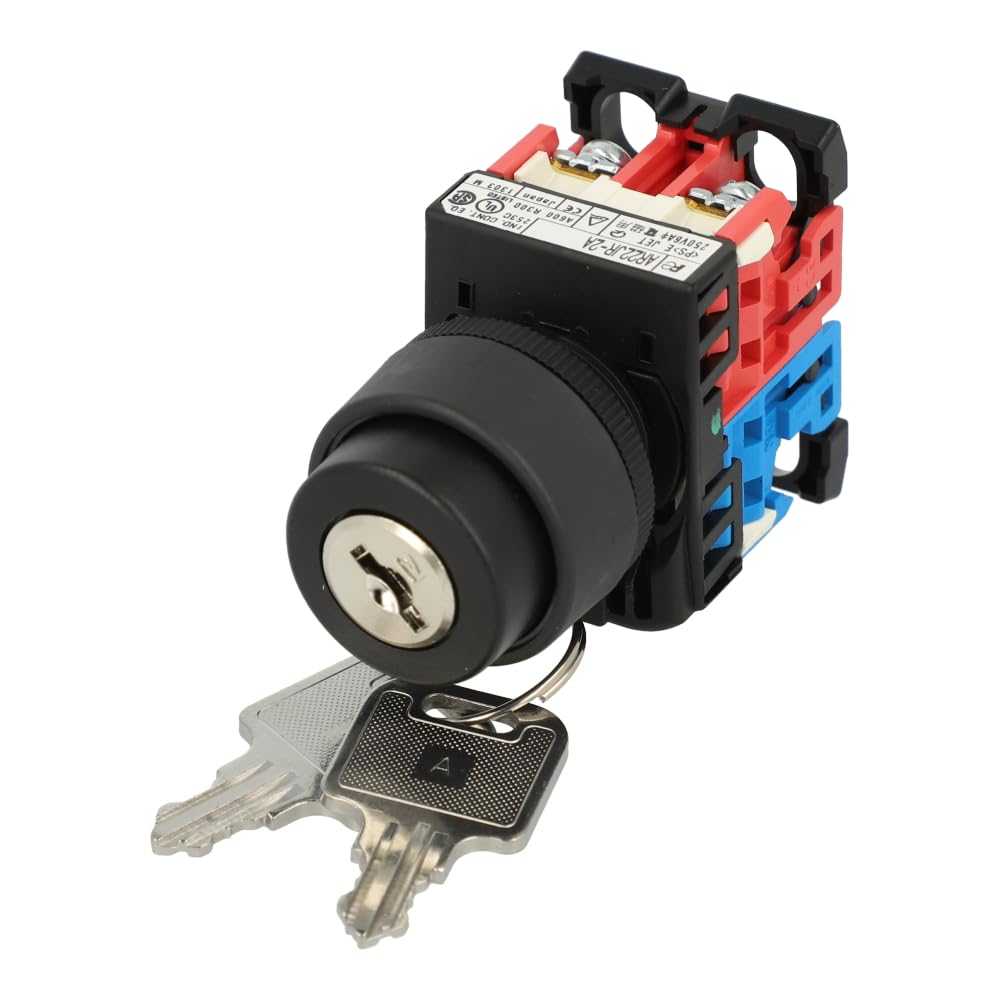
Figure 1: Fuji Electric AR22JR-2A11A 22mm Key Switch. This image shows the key switch assembly, including the black key barrel, the orange body, and the red and blue contact blocks attached at the rear. Two silver keys are inserted into the key barrel.
3. Components
The AR22JR-2A11A key switch typically includes the following components:
- Key Switch Actuator: The front part with the key barrel.
- Contact Blocks: Modular units (1NO and 1NC) that attach to the rear of the actuator, providing electrical contacts.
- Mounting Adapter: Secures the contact blocks to the actuator.
- Mounting Nut and Washer: Used to secure the switch to a control panel.
- Keys: Specific keys designed for the lock mechanism.
4. Installation and Setup
4.1 Preparation
- Ensure all power to the circuit is disconnected and locked out before beginning installation.
- Verify that the control panel has a 22mm diameter cutout for the switch.
- Gather necessary tools: screwdriver, wrench, wire strippers.
4.2 Mounting the Switch
- Insert the key switch actuator through the 22mm hole in the control panel from the front.
- Place the washer and then the mounting nut onto the threaded portion of the actuator from the rear of the panel.
- Tighten the mounting nut securely to hold the switch firmly in place. Do not overtighten.
4.3 Wiring the Contact Blocks
- Attach the 1NO and 1NC contact blocks to the mounting adapter at the rear of the switch actuator. Ensure they are correctly oriented and snap into place.
- Refer to your circuit diagram for proper wiring connections. The contact blocks are typically labeled for Normally Open (NO) and Normally Closed (NC) terminals.
- Strip approximately 7-9mm of insulation from the ends of the wires.
- Insert the stripped wires into the appropriate terminals on the contact blocks and tighten the terminal screws securely.
- Double-check all wiring for correct connections and secure fastening.
5. Operation
The Fuji Electric AR22JR-2A11A is a 2-position maintained key switch. This means the switch will remain in the position it is turned to until the key is used to turn it to the other position.
- Insert Key: Insert the provided key into the key barrel.
- Select Position: Turn the key to the desired position (e.g., ON/OFF, Position 1/Position 2). The switch will maintain this position.
- Remove Key: The key can typically be removed in one or both positions, depending on the specific lock mechanism. Refer to the key's markings or test gently.
When the key is turned, the internal contacts (1NO and 1NC) will change state, either opening or closing the connected circuits as per their design.
6. Maintenance
The AR22JR-2A11A key switch is designed for minimal maintenance. However, periodic checks can ensure long-term reliability.
- Visual Inspection: Regularly inspect the switch for any signs of physical damage, wear, or discoloration.
- Cleaning: If necessary, clean the exterior of the switch with a soft, dry cloth. Do not use abrasive cleaners or solvents.
- Connection Check: Periodically verify that all electrical connections are secure and free from corrosion. Ensure mounting nut remains tight.
- Key Mechanism: Keep the key barrel free from dust and debris. Do not force the key if it feels stiff; a small amount of graphite lubricant may be used if necessary, but avoid oil-based lubricants.
7. Troubleshooting
If the key switch is not functioning as expected, consider the following:
- Switch Not Actuating:
- Ensure the key is fully inserted and turned to a valid position.
- Check if the contact blocks are securely attached to the actuator.
- Circuit Not Responding:
- Verify that power is supplied to the circuit.
- Inspect all wiring connections for looseness or damage.
- Confirm that the correct NO/NC contacts are wired to the intended circuit.
- Test the continuity of the contact blocks with a multimeter (with power disconnected).
- Key Sticking or Difficult to Turn:
- Check for foreign objects in the key barrel.
- Apply a small amount of graphite lubricant if necessary.
If problems persist, contact Fuji Electric customer support or a qualified electrician.
8. Specifications
| Model | AR22JR-2A11A |
| Brand | Fuji Electric |
| Mounting Diameter | 22mm |
| Number of Positions | 2 (Maintained) |
| Contact Configuration | 1 Normally Open (NO) + 1 Normally Closed (NC) |
| Current Rating | 11 Amps |
| Operation Mode | Electric |
| International Protection Rating | IP54 |
| Color | Orange |
| Connectivity Protocol | X-10 (Note: This refers to a communication protocol, not a physical connection type for this switch.) |
| Manufacturer | Fuji |
| Date First Available | June 8, 2018 |
9. Warranty and Support
Fuji Electric products are manufactured to high-quality standards. For specific warranty information, please refer to the documentation provided with your purchase or visit the official Fuji Electric website. For technical support, service, or replacement parts, please contact your authorized Fuji Electric distributor or customer service representative.
Contact Information: Please refer to the Fuji Electric official website for the most up-to-date contact details.


