
KANOMAX 3889
KANOMAX Handheld Particle Counter Model 3889 User Manual
Your comprehensive guide to operation and maintenance.
1. Introduction
Welcome to the user manual for the KANOMAX Handheld Particle Counter, Model 3889. This device is designed for precise measurement of airborne particles in various environments, including cleanrooms, semiconductor manufacturing, pharmaceutical production, and food processing facilities. This manual provides detailed instructions on the setup, operation, maintenance, and troubleshooting of your particle counter to ensure optimal performance and longevity.
Please read this manual thoroughly before using the instrument and keep it for future reference.
2. Safety Information
To ensure safe and proper operation of the KANOMAX Handheld Particle Counter, please observe the following safety precautions:
- Always operate the device within the specified environmental conditions.
- Do not expose the device to extreme temperatures, humidity, or direct sunlight.
- Avoid dropping or subjecting the device to strong impacts.
- Do not attempt to disassemble or modify the device. Refer all servicing to qualified personnel.
- Use only accessories and power adapters approved by KANOMAX.
- Keep the device away from liquids and corrosive substances.
3. Product Overview
The KANOMAX Handheld Particle Counter Model 3889 is a highly portable and user-friendly instrument featuring a 4.3-inch color LCD touch screen panel. This design significantly enhances visibility and operability, making cleanliness measurements more straightforward. The device is engineered with a 'smartphone-like feel' concept, allowing for intuitive finger-based operation. For precise numerical input, the numeric keypad expands, reducing operational hassle. Its pressure-sensitive screen also allows for operation even while wearing cleanroom gloves.
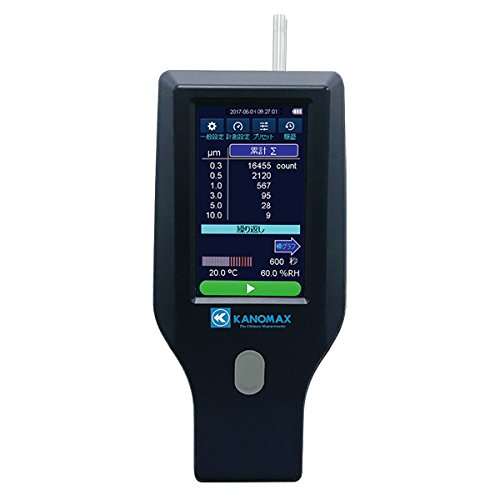
Front view of the KANOMAX Handheld Particle Counter, Model 3889. The 4.3-inch color LCD touch screen shows particle counts for six different sizes (0.3, 0.5, 1.0, 3.0, 5.0, 10.0 µm), with a total count of 16455 for 0.3 µm particles. The display also indicates current temperature at 20.0 °C and relative humidity at 60.0% RH. The device features a gray physical button below the screen and the KANOMAX logo at the bottom.
4. Setup
Follow these steps for initial setup of your particle counter:
- Unpacking: Carefully remove the particle counter and all accessories from its packaging. Verify that all components listed in the packing list are present.
- Charging the Battery: Connect the provided power adapter to the device and a power outlet. Allow the battery to fully charge before first use.
- Power On: Press and hold the power button until the display illuminates.
- Initial Settings: Upon first power-on, you may be prompted to set the date, time, and language. Follow the on-screen instructions to configure these settings.
5. Operating Instructions
The Model 3889 features an intuitive touch screen interface for easy operation.
5.1 Navigating the Interface
Use your finger to tap on icons and menu options. The touch screen is responsive and designed for ease of use, even with cleanroom gloves. The numeric keypad will automatically enlarge for precise data entry when needed.
5.2 Selecting Measurement Modes
The device offers six distinct measurement modes tailored to various applications. These modes are easily selectable and configurable directly from the main screen. Tap on the desired mode icon to activate it.
5.3 Performing a Measurement
- Ensure the device is placed in the environment to be measured.
- Select the appropriate measurement mode.
- Tap the 'Start' or 'Measure' button on the screen to begin the sampling process.
- The display will show real-time particle counts for the six specified particle sizes (0.3, 0.5, 1.0, 3.0, 5.0, 10.0 µm), along with temperature and relative humidity readings.
- Tap 'Stop' to end the measurement. Data will be automatically saved.
6. Data Management and Communication
The KANOMAX Handheld Particle Counter offers robust data management and communication capabilities.
6.1 Data Export via USB
The device is equipped with a USB port. You can copy saved data from the device's internal memory to a USB flash drive. Alternatively, use the included USB cable to connect the device directly to a PC and transfer data.
6.2 External Communication with Optional Cradle
For enhanced connectivity, an optional communication cradle (Model 3888-70) is available. When the device is placed on this cradle, it enables:
- Wireless Communication (WiFi): Connect to a Wi-Fi enabled PC for remote monitoring and data acquisition.
- Wired Communication (RS485, Ethernet): Establish a wired connection for stable remote control and data transfer.
Using the included software with the optional cradle allows for continuous monitoring of particle size changes over time on a PC, facilitating easy data storage and analysis.
7. Maintenance
Proper maintenance ensures the accuracy and longevity of your particle counter.
7.1 Cleaning
Wipe the exterior of the device with a soft, dry cloth. Do not use abrasive cleaners or solvents. Keep the sampling inlet and outlet free from dust and debris.
7.2 Calibration
Regular calibration is crucial for maintaining measurement accuracy. It is recommended to have the device calibrated annually by KANOMAX or an authorized service center. The product includes a calibration certificate and traceability system diagram.
7.3 Storage
When not in use, store the device in its protective case in a cool, dry place, away from direct sunlight and extreme temperatures.
8. Troubleshooting
This section addresses common questions and issues you might encounter.
8.1 Frequently Asked Questions (FAQ)
- Q: Can I export data from the Handheld Particle Counter (Model 3888/3889)?
A: Yes. The main unit has a USB connection terminal, allowing you to copy data saved on the unit to a USB memory stick. You can also copy data to a PC using the included USB cable. - Q: Can I monitor the device using a PC?
A: Yes. By combining the included software with the main unit and the separately sold cradle (Model 3888-70), you can continuously monitor particle size changes over time on your PC and save the data. - Q: Can I monitor the device remotely?
A: Yes. The cradle has a Wi-Fi function, allowing you to connect to a Wi-Fi enabled PC for remote monitoring.
9. Specifications
| Feature | Detail |
|---|---|
| Model Number | 3889 |
| ASIN | B07DJT99CR |
| Particle Sizes Measured | 6 particle sizes (e.g., 0.3, 0.5, 1.0, 3.0, 5.0, 10.0 µm) |
| Display | 4.3-inch Color LCD Touch Screen |
| Communication Interfaces | USB, Optional WiFi, RS485, Ethernet (via communication cradle) |
| First Available Date | 2018/12/18 |
10. Warranty and Support
For warranty information, technical support, or service inquiries regarding your KANOMAX Handheld Particle Counter Model 3889, please contact KANOMAX customer support or your authorized dealer. Ensure you have your model number and purchase details available when contacting support.
Related documents3889


Ask a question about this manual
Ask about setup, troubleshooting, compatibility, parts, safety, or missing instructions. Manuals+ will review the question and use this page’s manual context to help answer it.