1. Introduction
The DollaTek DFPlayer Mini is a compact and cost-effective MP3 module designed for easy integration into various projects. It features hardware decoding for MP3, WAV, and WMA audio formats, making it suitable for playing audio files from a TF card or U-disk. This module can operate standalone with a speaker and keypad, or be controlled via a serial port using microcontrollers like Arduino UNO.
Its simple serial command interface allows for straightforward control of music playback, volume adjustments, and other functions, providing a stable and reliable audio solution without complex low-level programming.
2. Features
- Supports sampling frequencies (KHz): 8, 11.025, 12, 16, 22.05, 24, 32, 44.1, 48.
- 24-bit DAC output with a dynamic range of 90 dB and SNR support of 85 dB.
- Full support for FAT16 and FAT32 file systems.
- Maximum support for 32GB TF cards and 32GB U-disks, along with 64M byte for NORFLASH.
- Multiple control modes available: IO control mode, serial mode, and AD key control mode.
- Broadcast language function allows pausing background music for announcements and resuming playback afterward.
- Audio data can be sorted by folder, supporting up to 100 folders, with each folder capable of holding up to 255 tracks.
- Adjustable volume with 30 levels and 6 adjustable EQ settings.
3. Setup
3.1 Package Contents
- 1x DollaTek DFPlayer Mini MP3 Player Audio Voice Module
3.2 Preparing Storage Media (TF Card / U-Disk)
The module supports TF cards and U-disks up to 32GB. Ensure your storage media is formatted to either FAT16 or FAT32 file system. Create folders for organizing your audio files. The module supports up to 100 folders, with each folder containing up to 255 tracks. For optimal performance, name your folders and files numerically (e.g., "01", "02", "001.mp3", "002.wav").
3.3 Physical Connections
Refer to the images below for connection points. The module typically requires a 3.2V-5V power supply. Connect a speaker to the SPK_1 and SPK_2 pins. For serial control, connect the RX and TX pins to your microcontroller's UART pins (e.g., Arduino's TX and RX, respectively).
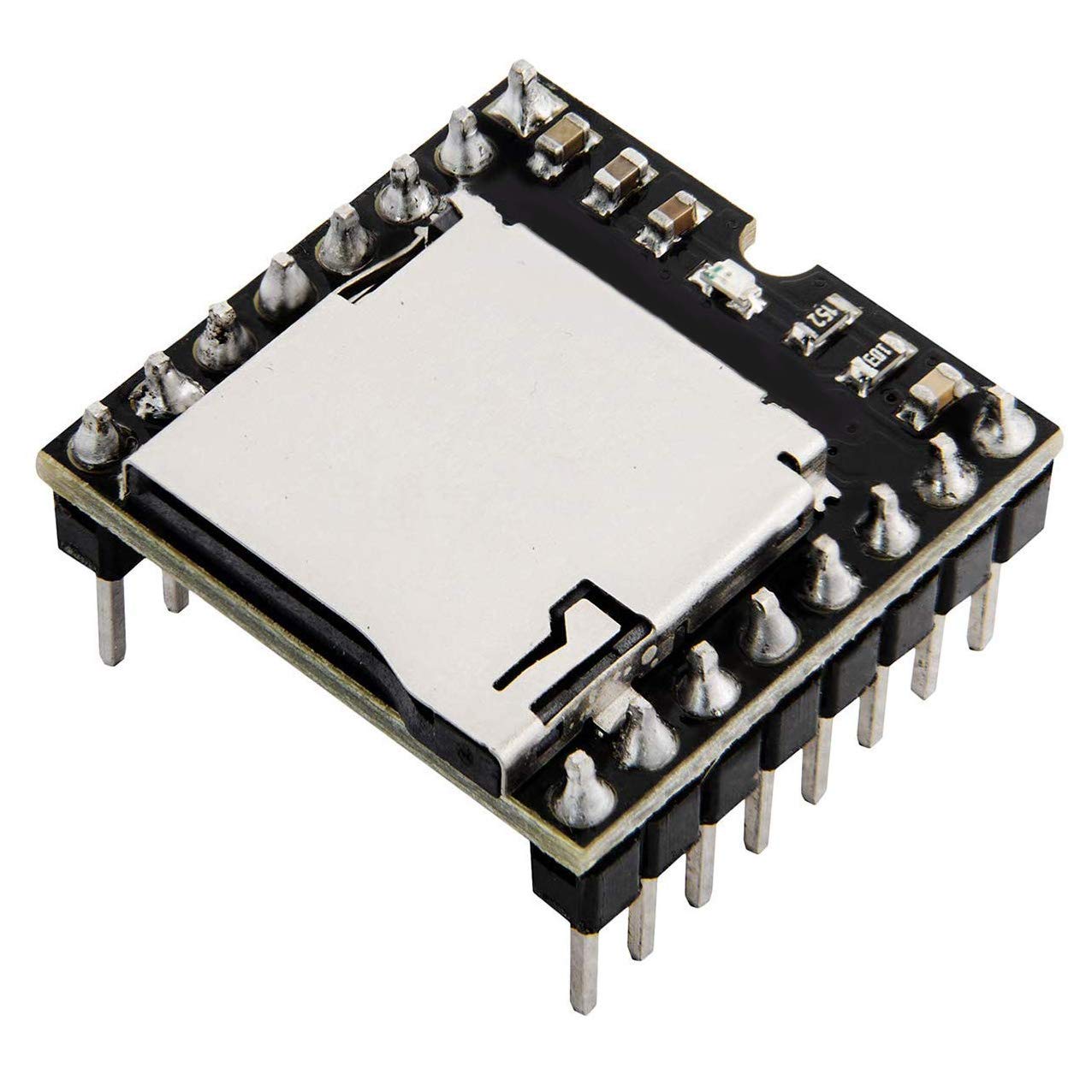
Figure 1: Angled view of the DollaTek DFPlayer Mini module, showing pin headers for power, data, and speaker connections. The main chip (YX5200-24SS) and other components are visible.

Figure 2: Top-down view of the DollaTek DFPlayer Mini module, highlighting the TF card slot. Ensure the TF card is inserted correctly into this slot.

Figure 3: Bottom view of the DollaTek DFPlayer Mini module, showing the various surface-mount components and solder pads. This view helps in identifying connection points for advanced users.
3.4 Power Supply
Provide a stable power supply between 3.2V and 5V to the VCC and GND pins. Ensure the power source can deliver sufficient current, especially when driving a speaker at higher volumes.
4. Operating Instructions
4.1 Control Modes
- IO Control Mode: Simple control using digital input/output pins. Specific pins can be configured to trigger playback of certain tracks or control basic functions.
- Serial Mode (UART): This is the most common and flexible control method. Connect the module's RX/TX pins to your microcontroller's UART. You can send specific commands to play tracks, adjust volume, set EQ, and query status. Libraries are often available for popular microcontrollers like Arduino to simplify this process.
- AD Key Control Mode: Allows control using analog input pins with a resistor ladder network, enabling multiple buttons to be read from a single analog pin. This is useful for standalone applications with physical buttons.
4.2 Basic Playback (Serial Mode Example)
To play an audio file in serial mode, you typically send a command packet to the module. For instance, to play the first track in the first folder, you would send a command specifying the folder and file index. Consult the module's detailed communication protocol or a dedicated library for exact command structures.
- Play: Start playback of a specified track.
- Pause: Temporarily stop playback.
- Next/Previous: Navigate through tracks.
- Volume Control: Adjust the output volume (30 levels available).
- EQ Settings: Apply different equalizer presets (6 settings available).
4.3 Broadcast Function
The broadcast function allows you to pause currently playing background music, play a specific announcement or sound effect, and then automatically resume the background music from where it left off. This is useful for interactive systems or public address applications.
5. Maintenance
- Environmental Conditions: Keep the module in a dry, clean environment. Avoid exposure to moisture, extreme temperatures, and direct sunlight.
- Static Discharge: Handle the module with care to prevent electrostatic discharge, which can damage sensitive electronic components.
- Power Supply: Always ensure a stable and correct voltage power supply (3.2V-5V). Incorrect voltage can lead to malfunction or permanent damage.
- Storage Media: Insert and remove TF cards and U-disks carefully to avoid damaging the slots. Periodically check the storage media for corruption or errors.
- Cleaning: If necessary, gently clean the module with a soft, dry cloth. Do not use liquid cleaners or solvents.
6. Troubleshooting
- No Sound Output:
- Verify that the speaker is correctly connected to the SPK_1 and SPK_2 pins.
- Check the volume level. Ensure it is not set to zero.
- Confirm the power supply is connected and providing the correct voltage (3.2V-5V).
- Ensure the audio files on the TF card/U-disk are in a supported format (MP3, WAV, WMA).
- Module Not Responding to Commands:
- Check the serial connections (RX/TX) to your microcontroller. Ensure they are not swapped.
- Verify the baud rate settings in your microcontroller code match the module's expected baud rate.
- Confirm the power supply is stable.
- Ensure the commands sent are correct according to the module's protocol.
- Audio Files Not Playing or Corrupted Sound:
- Ensure the TF card or U-disk is formatted to FAT16 or FAT32.
- Verify the audio file names and folder structure adhere to the module's requirements (e.g., numerical naming).
- Check for physical damage to the TF card/U-disk or the module's slot.
- Try using a different TF card or U-disk to rule out media issues.
- Playback Delay:
- If there is a noticeable delay before audio starts, ensure the module is receiving stable power.
- Verify that the audio files are correctly formatted and not excessively large, which might cause loading delays.
7. Specifications
| Feature | Specification |
|---|---|
| Supported Audio Formats | MP3, WAV, WMA |
| Sampling Frequencies | 8, 11.025, 12, 16, 22.05, 24, 32, 44.1, 48 KHz |
| DAC Output | 24-bit |
| Dynamic Range | 90 dB |
| SNR (Signal-to-Noise Ratio) | 85 dB |
| File System Support | FAT16, FAT32 |
| Storage Media Support | Max 32GB TF Card, Max 32GB U-Disk, 64M byte NORFLASH |
| Control Modes | IO Control, Serial Mode (UART), AD Key Control |
| Volume Levels | 30 adjustable levels |
| EQ Settings | 6 adjustable settings |
| Dimensions (approx.) | 6 x 5 x 2 cm |
| Weight (approx.) | 20 g |
| Operating Voltage | 3.2V - 5V |
8. Warranty Information
No specific warranty information is provided with this product. Please refer to the retailer's return policy or contact the seller directly for details regarding warranty and returns.
9. Support
For technical support or further inquiries, please refer to the product page on the retailer's website or contact the seller directly. Additional resources, such as detailed datasheets and programming examples, may be available online from the manufacturer or community forums dedicated to microcontroller projects.


