
Product Overview
The InnoGear MU038 Microphone Arm Stand is a heavy-duty suspension scissor boom stand designed for various microphones, including popular models like Blue Yeti, Blue Snowball, Hyper X QuadCast, and Shure SM7B. It features an upgraded length, flexible angle adjustments, built-in springs for durability, and enhanced load-bearing capacity. This manual provides detailed instructions for setup, operation, and maintenance to ensure optimal performance.

Figure 1: The InnoGear Microphone Arm Stand in a typical setup with a microphone and pop filter.
Key Features
- Upgraded Length & Flexible Angle: The boom arm is fully adjustable with 135° back and forth and 180° up and down movement, offering a maximum horizontal reach of 38 inches and vertical reach of 37 inches. This allows for precise microphone positioning without unwanted bouncing.
- Built-in Springs & Premium Appearance: Equipped with strong internal springs, this heavy-duty mic arm ensures extended lifespan and a professional aesthetic, unlike designs with exposed springs.
- Enhanced Load-bearing & Sturdy Material: Constructed from high-quality steel, the microphone arm tube has an improved thickness of 0.53 inches (from 0.39 inches), supporting a maximum load of 4.4 pounds. This robust design accommodates heavier microphones like the Blue Yeti and Shure SM7B.
- Desk Edge Compatibility: The solid desk clamp is designed to securely attach to squared desk edges up to 2 inches thick. A protective sponge on the clamp prevents scratches to your table. Ensure your desk edge is flat for optimal functionality.
- Microphone Compatibility: The 5/8" metal connector is compatible with a wide range of microphones, including Blue Yeti, Blue Snowball, Blue Snowball iCE, Hyper X QuadCast, SoloCast, Shure SM7B, MV7, FIFINE AM8, K669B, AmpliGame, AT2020, AT2020USB+, and ATR2500-USB.
Setup Instructions
- Attach the Desk Mounting Clamp:
Place the desk mounting clamp onto a flat, squared edge of your desk. Ensure the desk thickness is no more than 2 inches. Tighten the screw on the clamp until it is firmly secured to the desk. The integrated sponge will protect your desk surface.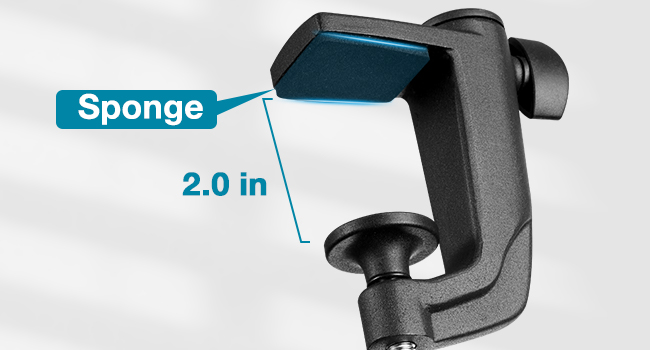
Figure 2: Securely attaching the desk clamp to a flat desk edge.
- Insert the Microphone Arm:
Insert the base of the microphone arm into the hole on the desk mounting clamp. Tighten the knob on the side of the clamp to secure the arm in place. - Attach Your Microphone:
The arm features a 5/8" metal connector. If your microphone has a 5/8" thread, screw it directly onto the arm. If your microphone requires a 3/8" thread, unscrew the preinstalled 3/8" to 5/8" adapter from your mic mount and then connect your mic mount to the arm. Refer to the 'Nut Compatibility' image for visual guidance.
Figure 3: Microphone attachment methods, including adapter use.
- Cable Management:
Use the provided Velcro ties to secure your microphone cable along the arm, ensuring a tidy setup and preventing cable interference during adjustments.
Operating the Microphone Arm
The InnoGear MU038 arm stand offers extensive flexibility for optimal microphone positioning.
- Adjusting Angles: The boom arm can be adjusted 135° back and forth and 180° up and down. Gently move the arm to your desired position. The internal springs are designed to hold the microphone securely in place without sagging.
- Horizontal and Vertical Reach: The arm provides a maximum horizontal reach of 38 inches and a vertical reach of 37 inches, allowing you to position your microphone precisely where needed for recording, streaming, or gaming.
- Rotation: The base of the arm allows for 360° rotation, providing full flexibility to orient your microphone as required.

Figure 4: Demonstrating the adjustable angles and rotational features of the arm.

Figure 5: The microphone arm stand is versatile for various professional and personal applications.
Maintenance
To ensure the longevity and optimal performance of your InnoGear MU038 Microphone Arm Stand, follow these simple maintenance guidelines:
- Regular Cleaning: Wipe down the arm and clamp with a soft, dry cloth to remove dust and debris. Avoid using harsh chemicals or abrasive cleaners, which can damage the finish.
- Check Connections: Periodically inspect the desk clamp and microphone attachment points to ensure they remain securely tightened. Loose connections can affect stability and performance.
- Avoid Overloading: Do not exceed the maximum load-bearing capacity of 4.4 pounds to prevent damage to the arm and ensure stability.
- Proper Storage: When not in use, the arm can be folded for compact storage. Ensure it is stored in a clean, dry environment.
Troubleshooting
- Arm is not stable or sags:
Ensure the desk clamp is securely tightened to a flat, squared desk edge. Verify that the microphone's weight does not exceed the 4.4-pound capacity. Check all pivot points on the arm for proper tension. - Microphone does not fit the connector:
The arm uses a 5/8" metal connector. If your microphone has a 3/8" thread, you will need to use a 3/8" to 5/8" adapter. Ensure the adapter is correctly installed. - Noise when adjusting the arm:
The internal spring design minimizes noise. If you hear excessive noise, ensure all joints are clean and free of debris. Avoid sudden, forceful movements.
Specifications
| Attribute | Detail |
|---|---|
| Brand | InnoGear |
| Model Number | MU038 |
| Color | Black |
| Material | Steel |
| Item Weight | 3.3 Pounds |
| Item Dimensions (L x W x H) | 22.44 x 7.09 x 0.79 inches |
| Maximum Height | 57 Centimeters |
| Base Type | Clamp |
| Mount Thread Size | 5/8" Inches (with 3/8" adapter compatibility) |
| Maximum Weight Recommendation | 4.4 Pounds |
| Included Components | InnoGear Spring Built-in Microphone Stand, InnoGear Desk Mounting Clamp, 5 Velcro Ties, User Manual |

Figure 6: Product dimensions and desk clamp compatibility.

Figure 7: The InnoGear arm stand offers superior load-bearing capacity.
Warranty and Support
The InnoGear MU038 Microphone Arm Stand comes with a 1-year manufacturer's warranty. For any support inquiries, technical assistance, or warranty claims, please contact InnoGear directly through their official support channels. Refer to the original product packaging or the InnoGear website for the most up-to-date contact information.