
Important Safety Information
Please read and understand all safety instructions before operating the VLOXO Cordless Electric Scissors. Failure to follow these instructions may result in electric shock, fire, or serious injury.
- Always keep the electric scissors out of reach of children.
- Wear appropriate safety gloves when handling or replacing blades to prevent cuts.
- Do not operate the tool while it is charging.
- Ensure the work area is well-lit and free from obstructions.
- Avoid cutting materials that exceed the tool's specified thickness or hardness.
- Do not expose the tool to water or operate in damp conditions.
- Unplug the charger from the power source when not in use or before performing any maintenance.
- If the tool shows any signs of damage or malfunction, discontinue use immediately and contact customer support.
Package Contents
Verify that all items listed below are included in your package:
- 1 x VLOXO 3.6V Electric Scissor Unit
- 2 x Type Blades (1 D-Blade, 1 O-Blade)
- 1 x Adapter Charger
- 1 x Storage Box
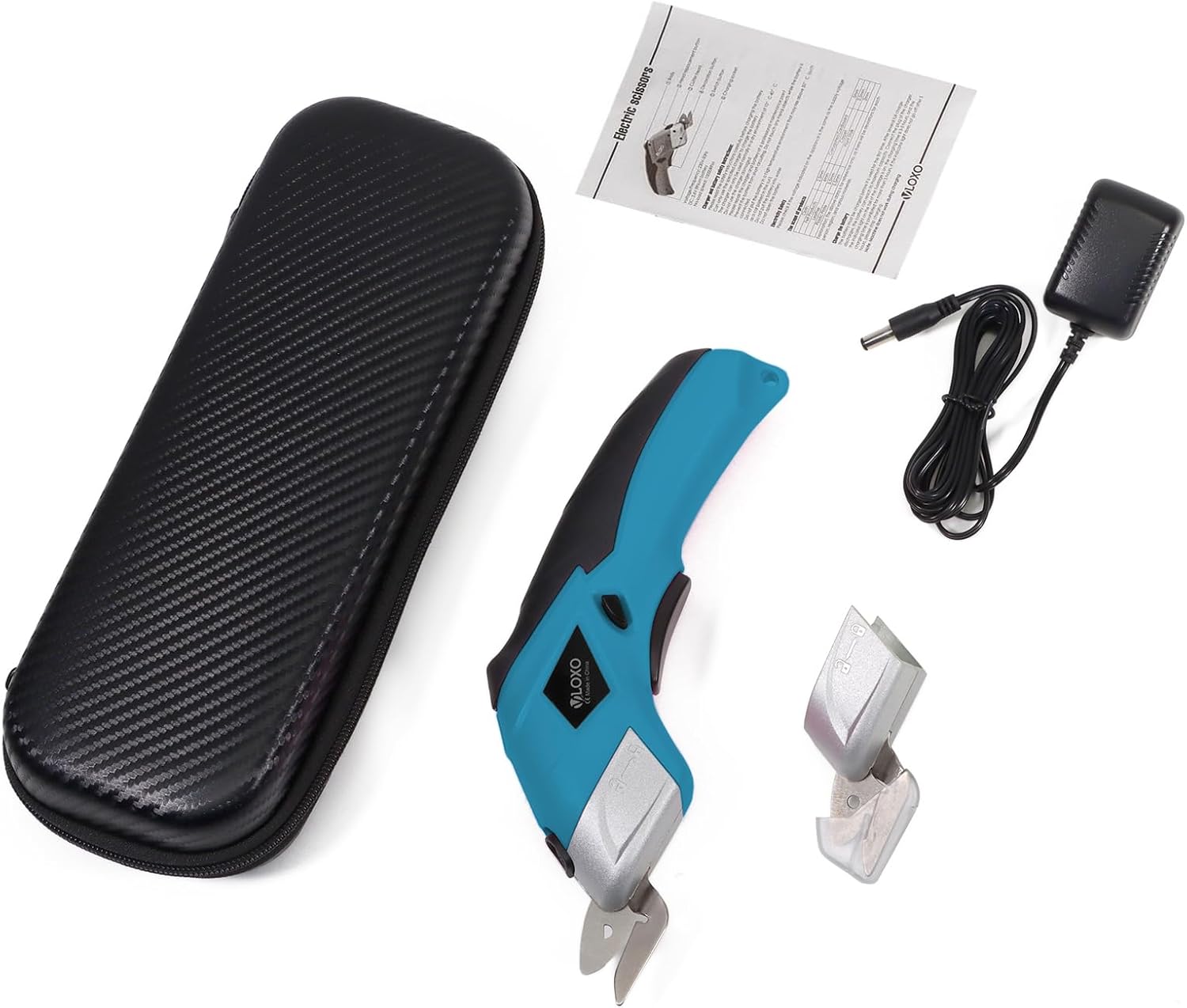
Image: All components included in the VLOXO Cordless Electric Scissors package.
Product Overview
The VLOXO Cordless Electric Scissors are designed for effortless cutting of various materials. Its compact and ergonomic design ensures comfortable handling for both left-handed and right-handed users.

Image: Labeled diagram of the VLOXO Cordless Electric Scissors, highlighting key components such as the blades, power switch, and charging port.
Key Components:
- O-Blade/D-Blade: Interchangeable cutting blades for different material types.
- Release Blade Button: Used to detach and attach blades.
- Power Switch: Activates and deactivates the cutting mechanism.
- Charging Port: Connects the adapter for recharging the battery.
- Charge Indicator: Light that indicates charging status.
Setup
Before first use, ensure the electric scissors are fully charged.
- Charge the Battery: Connect the adapter charger to the charging port on the scissors and plug it into a power outlet. The charge indicator light will illuminate red during charging. Once fully charged, the light will turn off. Refer to the 'Charging Instructions' section for more details.
- Select and Install Blade: Choose the appropriate blade (D-Blade or O-Blade) for the material you intend to cut. Refer to the 'Blade Types and Applications' and 'Blade Replacement' sections for detailed instructions.
- Remove Silicone Cover: If present, remove the protective silicone cover from the blade before operation.
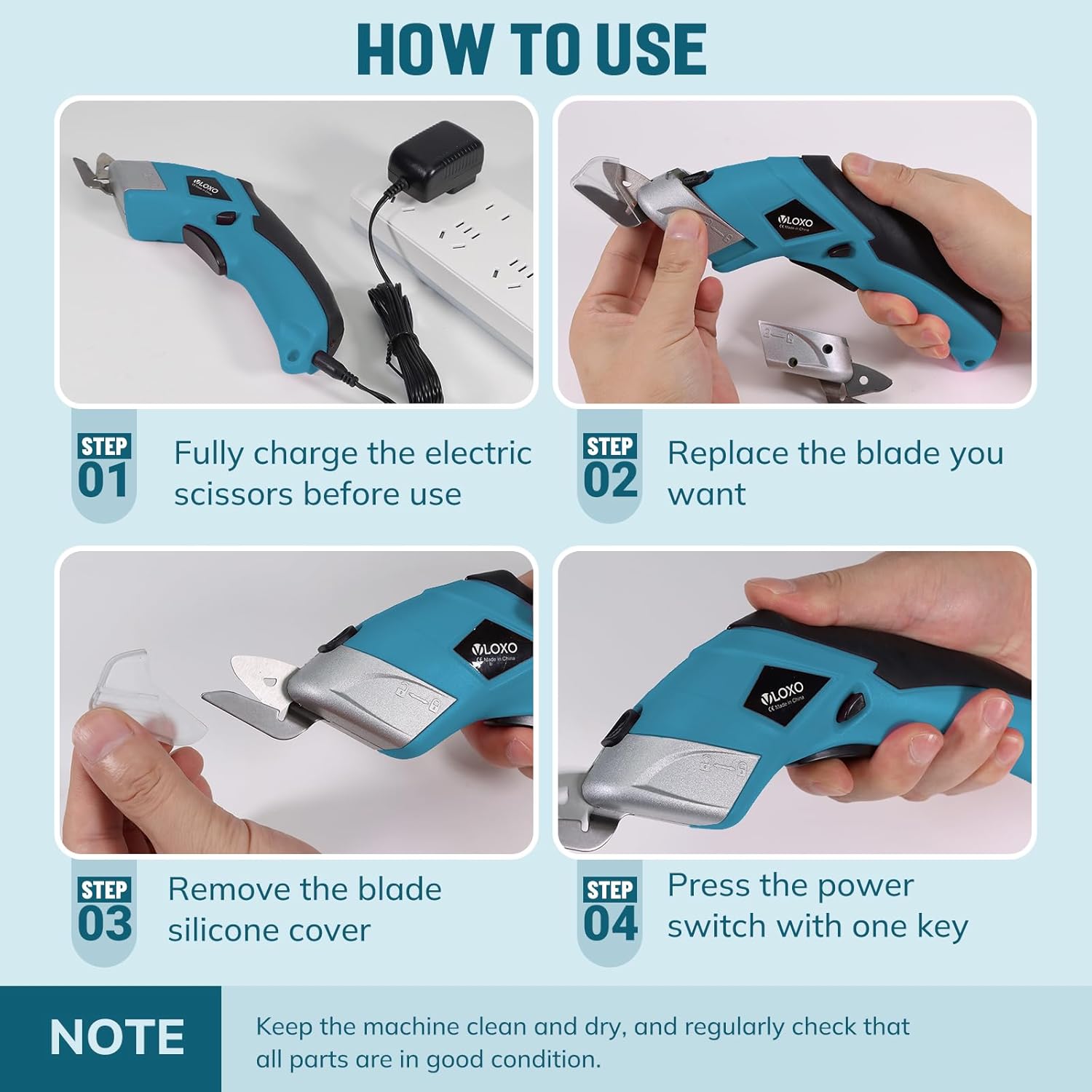
Image: Visual guide for initial setup and operation, including charging and blade preparation.
Operation
The VLOXO Cordless Electric Scissors feature a simple one-button operation for ease of use.
- Prepare Material: Place the material to be cut on a stable, flat surface.
- Activate Tool: Press and hold the Power Switch to start the cutting action. The blades will begin to rotate at up to 10000 RPM.
- Perform Cut: Guide the scissors along the desired cutting line. Apply gentle, steady pressure.
- Stop Operation: Release the Power Switch to stop the blades. This safety feature prevents accidental operation.
The cordless design provides excellent mobility, allowing you to work without the hindrance of wires.

Image: The electric scissors in use, cutting carpet, highlighting its powerful and cordless capabilities.
Blade Types and Applications
Your VLOXO electric scissors come with two distinct blade types, each optimized for different materials:
- D-Blade (5mm): Suitable for cutting rigid, tougher materials such as solid cardboard, plastic sheets, and thin tin sheets.
- O-Blade (9mm): Designed for cutting flexible, softer materials like cotton fabric, corrugated cardboard, felt fabric, carpet backing, and rose stems.

Image: Comparison of D-Blade and O-Blade, with examples of materials and their maximum cutting thicknesses.
Blade Replacement
Replacing the blade is a simple process. Always ensure the tool is off and unplugged before changing blades.
- Press Blade Button: Locate and press the blade release button on the side of the scissor head.
- Pull Out Old Blade: While holding the button, pull the existing blade unit out along its slot.
- Insert New Blade: Align the new blade unit with the slot and push it in firmly until it clicks into place. Ensure it is securely seated.
Important Tips:
- Before replacing a blade, wear safety gloves.
- The safety lock of the electric scissors is unavailable during blade replacement. Do not remove the blade protective cover when replacing the blade.

Image: Step-by-step instructions for safely replacing the cutting blade.
Charging Instructions
The VLOXO Cordless Electric Scissors are equipped with a rechargeable battery for extended use. A full charge provides 3-4 hours of continuous cutting time.
- Connect the adapter charger to the charging port on the scissors.
- Plug the adapter into a standard electrical outlet.
- The charge indicator light will illuminate red to indicate that the battery is charging.
- Once the battery is fully charged, the indicator light will turn off.
- Do not use the scissors while they are charging.
- If the item is not used for a long time, please charge it regularly to maintain battery health.

Image: Visual representation of the charging process and indicator lights.
Maintenance
Proper maintenance ensures the longevity and optimal performance of your electric scissors.
- Cleaning: After each use, wipe down the blades and the body of the scissors with a dry cloth to remove any debris or material residue. Ensure the tool is unplugged and off before cleaning.
- Storage: Store the electric scissors and its components in the provided storage box in a clean, dry place, away from direct sunlight and extreme temperatures.
- Blade Inspection: Regularly inspect the blades for any signs of wear, damage, or dullness. Replace blades as needed to maintain cutting efficiency.
- Battery Care: As mentioned in charging instructions, if not used for a long period, charge the battery periodically to prevent deep discharge and extend its lifespan.
Troubleshooting
If you encounter any issues with your VLOXO Cordless Electric Scissors, refer to the table below for common problems and solutions.
| Problem | Possible Cause | Solution |
|---|---|---|
| Scissors not turning on. | Battery is depleted. | Charge the battery fully. |
| Power switch not fully pressed. | Ensure the power switch is pressed and held firmly. | |
| Poor cutting performance. | Incorrect blade type for material. | Ensure you are using the correct blade (D-Blade for rigid, O-Blade for flexible). |
| Blade is dull or damaged. | Replace the blade. | |
| Material is too thick or hard. | Do not attempt to cut materials beyond the tool's capacity. | |
| Tool feels hot during use. | Prolonged continuous use. | Allow the tool to cool down before resuming operation. |
Specifications
Detailed technical specifications for the VLOXO Cordless Electric Scissors:
| Property | Value |
|---|---|
| Model Number | CS4001 |
| Brand | VLOXO |
| Color | Blue |
| Voltage | 3.6 Volts |
| Blade Material | Carbon Steel |
| Handle Material | Plastic |
| Product Dimensions | 9"L x 2.7"W |
| Item Weight | 454 Grams (1 pound) |
| Battery Type | Lithium Metal (1 included) |
| Max RPM | 10000 RPM |
| Hand Orientation | Ambidextrous |
Warranty and Support
VLOXO is committed to providing high-quality products and customer satisfaction. For any questions, concerns, or support needs regarding your VLOXO Cordless Electric Scissors, please contact VLOXO customer service through the retailer where the product was purchased or visit the official VLOXO brand store online.
Please retain your proof of purchase for warranty claims. Specific warranty terms and conditions may vary and are typically outlined at the point of purchase or on the official brand website.
For more information, you may visit the VLOXO Store on Amazon.
