
1. Introduction
Thank you for choosing the Mikado MD-236 FM Radio Music Box. This manual provides essential information for the safe and efficient operation of your device. Please read it thoroughly before use and keep it for future reference.
2. Product Overview
The Mikado MD-236 is a portable music box featuring FM radio functionality and Aux connectivity. It is designed for ease of use and portability, powered by a rechargeable battery.
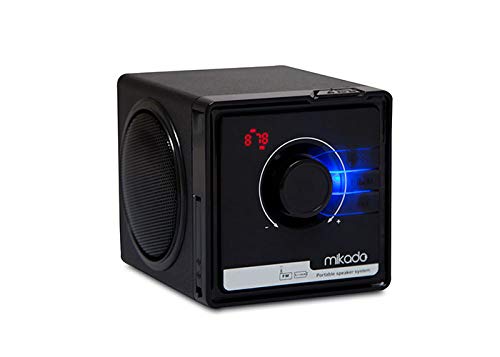
Figure 2.1: Front view of the Mikado MD-236, showing the main control dial, speaker, and telescopic antenna.

Figure 2.2: Side view of the Mikado MD-236, highlighting the speaker grille.

Figure 2.3: Rear view of the Mikado MD-236, showing the telescopic antenna in a folded position and potential port locations.
3. Setup
3.1. Charging the Battery
The Mikado MD-236 is powered by a rechargeable battery. Before initial use, ensure the battery is fully charged. Connect the provided charging cable to the device's charging port and to a suitable power source. The charging indicator light (if present) will illuminate during charging and turn off or change color when fully charged.

Figure 3.1: Illustration of the battery compartment, indicating battery insertion or removal, and the charging process.
3.2. Powering On/Off
To power on the device, locate the power switch or button, typically found on the side or top panel. Press and hold (or slide) it to the 'ON' position. To power off, repeat the action to the 'OFF' position.
4. Operating Instructions
4.1. FM Radio Operation
- Extend the Antenna: For optimal reception, fully extend the telescopic antenna.
- Select FM Mode: Use the mode button or switch to select FM radio mode.
- Tune Stations: Use the tuning dial or buttons to scan for available FM radio stations. Some models may feature an auto-scan function; refer to the device's specific controls.
- Adjust Volume: Use the volume control dial or buttons to set your desired listening level.
4.2. Aux Mode Operation
- Connect Aux Cable: Insert one end of a 3.5mm audio (Aux) cable into the Aux-in port on the MD-236.
- Connect External Device: Connect the other end of the Aux cable to the headphone jack or audio output of your external device (e.g., smartphone, MP3 player).
- Select Aux Mode: Use the mode button or switch on the MD-236 to select Aux input mode.
- Play Audio: Start playing audio from your external device. The sound will be output through the MD-236 speakers.
- Adjust Volume: Control the volume using both the MD-236's volume control and your external device's volume settings.
5. Maintenance
- Cleaning: Use a soft, dry cloth to clean the exterior of the device. Do not use liquid cleaners or abrasive materials.
- Storage: When not in use for extended periods, store the device in a cool, dry place away from direct sunlight and extreme temperatures.
- Battery Care: To prolong battery life, avoid fully discharging the battery frequently. Charge it regularly, even if not in constant use.
6. Troubleshooting
| Problem | Possible Cause | Solution |
|---|---|---|
| Device does not power on. | Battery is discharged. | Charge the battery fully. |
| No sound from speakers. | Volume is too low or muted. Incorrect mode selected. Aux cable not fully inserted. | Increase volume. Ensure correct mode (FM/Aux) is selected. Re-insert Aux cable firmly. |
| Poor FM radio reception. | Antenna not extended. Weak signal area. Interference. | Fully extend the antenna. Relocate the device to an area with better signal. Move away from other electronic devices. |
7. Specifications
- Brand: Mikado
- Model: MD-236
- Key Feature: Radio
- Connectivity Technology: Aux
- Radio Receiver Technology: FM
- Power Source: Battery Powered
- Output Power: 3W + 3W
8. Warranty and Support
For warranty information and technical support, please refer to the documentation provided with your purchase or contact your retailer. Keep your proof of purchase for any warranty claims.