
Product Overview
The REL Acoustics HT/1003 Subwoofer is engineered for high-performance home theater and immersive gaming environments. Featuring a 10-inch high-powered, long-throw driver and a 300W amplifier, this unit is designed to deliver robust and precise low-frequency effects. Its compact design allows for versatile placement while providing significant acoustic output. The HT/1003 is also compatible with the HT-Air Wireless system (sold separately) for enhanced setup flexibility.
What's in the Box
Upon unpacking, please ensure all the following components are present:
- REL Acoustics HT/1003 Subwoofer Unit
- Instruction Manual (this document)
- Power Cord
- Set of Optional Rubber Feet
- HT-Air MKII (sold separately, not included in the standard package)
Setup
1. Placement
Optimal placement of the HT/1003 subwoofer is crucial for achieving the best sound performance in your home theater or gaming setup. Consider corners or along walls for enhanced bass response. Experiment with different positions to find the ideal balance for your listening environment.

Image: The REL Acoustics HT/1003 Subwoofer positioned in a typical living room setting, demonstrating a common placement option.
2. Physical Dimensions
Before final placement, ensure adequate space for the subwoofer. The dimensions are approximately 12.5 inches (D) x 13.8 inches (W) x 13.7 inches (H).
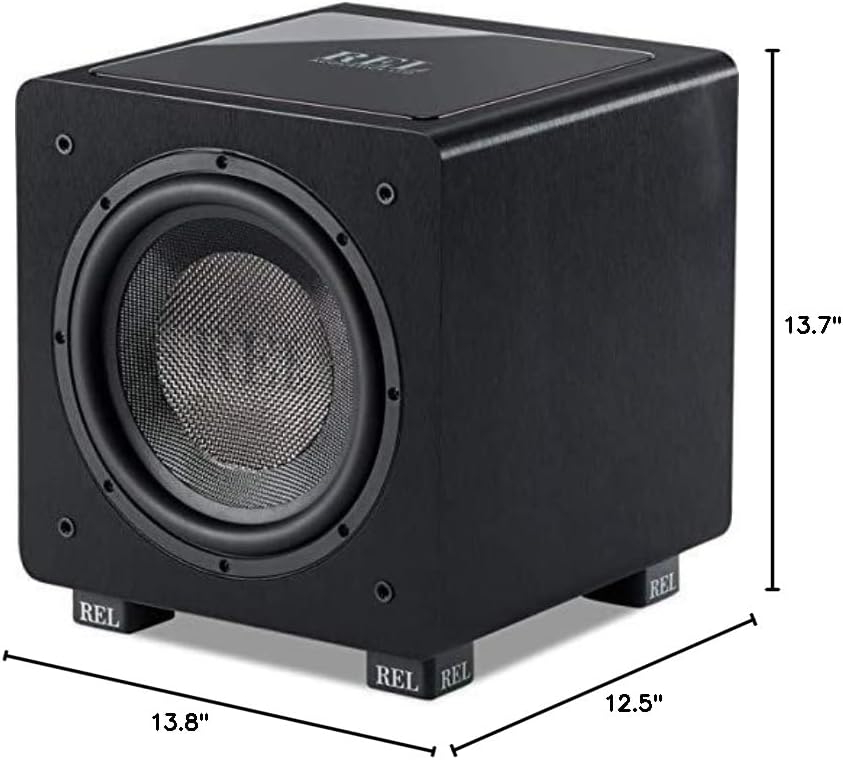
Image: A diagram illustrating the physical dimensions of the HT/1003 Subwoofer for precise placement planning.
3. Connections
The HT/1003 Subwoofer primarily uses wired RCA connectivity. For wireless operation, the optional HT-Air Wireless system is required. Refer to the HT-Air Wireless manual for specific setup instructions if using this accessory.
Connect the subwoofer to your audio receiver or amplifier's LFE (Low-Frequency Effects) output using a high-quality RCA cable. Ensure all connections are secure before powering on the unit.
4. Initial Power-On
Once connected, plug the power cord into the subwoofer and then into a wall outlet. Turn on the subwoofer using the power switch, typically located on the rear panel. The status indicator should illuminate.
5. Overview Video
For a visual guide to the HT/1003 Subwoofer, including its features and setup, please watch the official overview video:
Video: Official overview of the REL Acoustics HT/1003 Subwoofer, detailing its design and capabilities.
Operating Instructions
1. Volume Control
Adjust the volume knob on the rear panel of the subwoofer to blend its output seamlessly with your main speakers. Start with a low volume and gradually increase it until the bass sounds natural and integrated, not overpowering.
2. Crossover Frequency
The crossover control determines the highest frequency the subwoofer will reproduce. Set this based on the low-frequency capabilities of your main speakers. A common starting point is around 80Hz, but adjust to achieve the smoothest transition between your subwoofer and main speakers.
3. Phase Control
The phase switch (0 or 180 degrees) helps ensure the subwoofer's output is in sync with your main speakers. Listen to a familiar piece of music or movie scene and switch between 0 and 180 degrees. Choose the setting that provides the most impactful and coherent bass.
4. HT-Air Wireless Operation (Optional)
If you are using the optional HT-Air Wireless system, ensure it is properly paired and configured according to its dedicated instruction manual. This allows for wireless signal transmission to the subwoofer, offering greater flexibility in placement.
Maintenance
To ensure the longevity and optimal performance of your REL Acoustics HT/1003 Subwoofer, follow these maintenance guidelines:
- Cleaning: Use a soft, dry cloth to wipe the exterior surfaces. Avoid abrasive cleaners, solvents, or chemical sprays, as these can damage the finish.
- Ventilation: Ensure the subwoofer has adequate ventilation. Do not block any vents or place the unit in an enclosed space without proper airflow.
- Environment: Keep the subwoofer away from direct sunlight, heat sources, and excessive moisture.
- Power: If the subwoofer will not be used for an extended period, it is advisable to unplug it from the power outlet.
Troubleshooting
If you encounter issues with your HT/1003 Subwoofer, please refer to the following common troubleshooting steps:
- No Power:
- Check if the power cord is securely plugged into both the subwoofer and a working wall outlet.
- Verify that the power switch on the subwoofer is in the 'ON' position.
- Test the wall outlet with another device to ensure it is supplying power.
- No Sound:
- Ensure the RCA audio cable is securely connected to both the subwoofer and your receiver/amplifier.
- Check the volume setting on the subwoofer and your receiver/amplifier.
- Verify that the LFE output on your receiver/amplifier is enabled and configured correctly.
- If using HT-Air Wireless, ensure the transmitter and receiver are properly paired and functioning.
- Distorted Sound:
- Reduce the volume level on the subwoofer and/or your receiver/amplifier.
- Check for loose connections or damaged cables.
- Ensure the subwoofer is not placed too close to other electronic devices that might cause interference.
- Weak Bass:
- Adjust the volume and crossover frequency settings.
- Experiment with the phase switch (0/180 degrees).
- Try repositioning the subwoofer in your room.
If these steps do not resolve the issue, please contact REL Acoustics customer support for further assistance.
Specifications
| Feature | Detail |
|---|---|
| Brand | REL Acoustics |
| Model Name | HT/1003 |
| Speaker Type | Subwoofer |
| Special Feature | HT-Air Wireless Compatible |
| Recommended Uses | Home Theater, Immersive Gaming |
| Subwoofer Diameter | 10 Inches |
| Speaker Maximum Output Power | 300 Watts |
| Connectivity Technology | RCA (Wired), HT-Air (Wireless, with optional module) |
| Color | Black |
| Material | Wood |
| Product Dimensions | 12.5"D x 13.8"W x 13.7"H |
| Item Weight | 28 Pounds |
| Control Method | Touch |
| UPC | 857316005331 |
Warranty and Support
The REL Acoustics HT/1003 Subwoofer comes with a Full Warranty. For specific details regarding the warranty period, coverage, and terms, please refer to the warranty card included with your product or visit the official REL Acoustics website.
For technical support, service, or any inquiries not covered in this manual, please contact REL Acoustics customer support. Contact information can typically be found on the manufacturer's website or in the product packaging.


