Important Safety Instructions
Please read all instructions before using the appliance. Failure to follow these instructions may result in injury or damage.
- Do not immerse the appliance, power cord, or plug in water or other liquids.
- Keep out of reach of children.
- Unplug from outlet when not in use and before cleaning.
- Do not operate any appliance with a damaged cord or plug.
- Use only Nespresso Vertuo capsules.
- Do not open the brewing head during operation.
Product Overview
Components
- Water Tank (54 oz capacity)
- Brewing Head
- Capsule Container
- Cup Support
- Power Button
Key Features
- Centrifusion Technology: Extracts coffee with precision.
- Barcode Recognition: Automatically adjusts brewing parameters for each capsule.
- One-Touch Brewing: Simple operation.
- Automatic Capsule Ejection: Used capsules are stored in a dedicated container.
- Adjustable Cup Support: Accommodates various cup sizes.

Image: Nespresso Vertuo ENV135GY machine with a coffee cup and three capsule boxes (Stormio, Odacio, Melozio).

Image: Diagram illustrating the dimensions of the Nespresso Vertuo ENV135GY machine: 9 inches wide, 12.2 inches high, and 12.3 inches deep. It also highlights the removable 54 oz water tank.
Setup
- Unpacking: Carefully remove the machine and all components from the packaging.
- Placement: Place the machine on a flat, stable, and heat-resistant surface. Ensure adequate space around the machine for ventilation.
- Rinse the Water Tank: Wash the water tank with fresh drinking water before first use.
- Fill Water Tank: Fill the water tank with fresh drinking water and place it back on the machine.
- Plug In: Plug the power cord into a grounded electrical outlet.
- First Rinse Cycle: Before brewing your first coffee, perform a rinse cycle without a capsule. Fill the water tank, close the brewing head, place a container under the coffee outlet, and press the button. The machine will run water through the system. Repeat this process 2-3 times.
Operating Instructions
Brewing Coffee or Espresso
- Power On: Press the button to turn on the machine. The button will flash while heating up (approx. 15-20 seconds) and glow steady when ready.
- Fill Water Tank: Ensure the water tank is filled with fresh drinking water.
- Open Brewing Head: Lift the lever to open the brewing head.
- Insert Capsule: Place a Nespresso Vertuo capsule into the capsule holder. The machine will read the barcode on the capsule.
- Close Brewing Head: Close the brewing head and lock it by turning the lever to the left.
- Place Cup: Position a cup of appropriate size under the coffee outlet.
- Start Brewing: Press the button. The machine will automatically adjust brewing parameters based on the capsule's barcode and begin brewing.
- Enjoy: Once brewing is complete, the button will stop flashing. Lift the lever to open the brewing head; the used capsule will be automatically ejected into the capsule container.

Image: Illustration of the Nespresso Vertuo ENV135GY machine's blend-specific brewing process, highlighting how the machine automatically adapts parameters like coffee size, temperature, pressure, and brewing time based on the capsule's barcode.
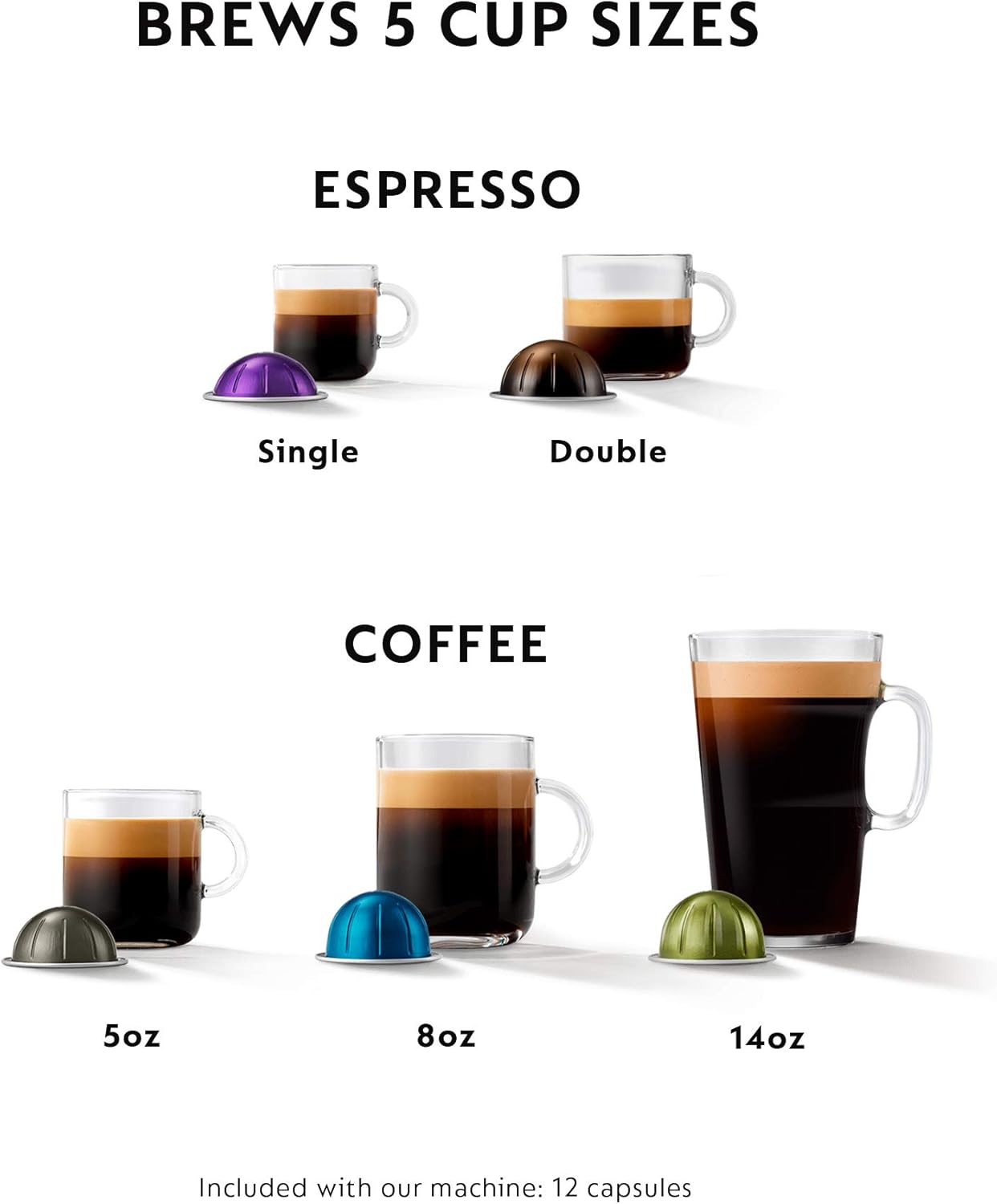
Image: Diagram illustrating the five different cup sizes the Nespresso Vertuo machine can brew: Single Espresso, Double Espresso, 5 oz Coffee, 8 oz Coffee, and 14 oz Coffee, each with a corresponding capsule.
Maintenance
Cleaning
- Daily Cleaning: After each use, empty and rinse the used capsule container and drip tray. Wipe the machine exterior with a damp cloth.
- Water Tank: Clean the water tank regularly with mild detergent and rinse thoroughly.
- Rinse Cycle: Perform a rinse cycle (without a capsule) daily or after several uses to clean the brewing system.
Descaling
Descaling is essential to maintain the machine's performance and ensure optimal coffee temperature. The machine will indicate when descaling is needed (refer to the full manual for specific light indicators).
- Prepare Descaling Solution: Use a Nespresso descaling kit or follow instructions for a suitable descaling agent.
- Initiate Descaling Mode: Follow the specific sequence of button presses to enter descaling mode (refer to the full manual for your model).
- Run Descaling Cycle: The machine will run the descaling solution through the system.
- Rinse Cycles: After descaling, perform several rinse cycles with fresh water to remove any descaling residue.
Troubleshooting
| Problem | Possible Cause | Solution |
|---|---|---|
| No coffee flows | Water tank empty; machine not heated; brewing head not closed properly. | Fill water tank; wait for button to stop flashing; ensure brewing head is locked. |
| Coffee is cold | Machine needs descaling; cup not preheated. | Perform descaling; preheat your cup with hot water. |
| Water leakage | Water tank not positioned correctly; damaged water tank. | Ensure water tank is seated firmly; inspect tank for cracks and replace if damaged. |
| Button flashes irregularly | Error or descaling required. | Refer to the full user manual for specific flash patterns or perform descaling. |
Specifications
- Brand: Nespresso
- Model: ENV135GY
- Coffee Maker Type: Espresso Machine
- Color: Graphite Metal
- Operation Mode: Fully Automatic
- Water Tank Capacity: 54 oz (approx. 1.6 liters)
- Coffee Input Type: Nespresso Vertuo capsules
- Dimensions: Approximately 9" W x 12.2" H x 12.3" D
- Included Components: Machine, Coffee Variety Pack (30 capsules)
Warranty and Support
This Nespresso machine is covered by a manufacturer's warranty. For specific warranty terms and conditions, please refer to the documentation included with your product or visit the official Nespresso website.
For technical assistance, troubleshooting beyond this manual, or to order accessories and descaling kits, please contact Nespresso Customer Service:
- Nespresso Official Website: www.nespresso.com
- Customer Service Phone: Refer to your regional Nespresso website for local contact numbers.