
Retevis RT3S
Retevis RT3S DMR Amateur Radio Transceiver with GPS and APRS User Manual
Model: RT3S
Introduction
This manual provides comprehensive instructions for the Retevis RT3S DMR Amateur Radio Transceiver. The RT3S is a versatile dual-band radio supporting both Digital Mobile Radio (DMR) and analog communication modes, compatible with Mototrbo Tier I & II digital systems. It features an integrated GPS for location services and APRS, a durable 2000 mAh lithium battery for extended operation, and a recording function to capture important conversations. Designed for ease of use, it includes a two-color LED, CTCSS/DCS, channel scanning, priority scanning, and a full DTMF keyboard for accessing its powerful features.
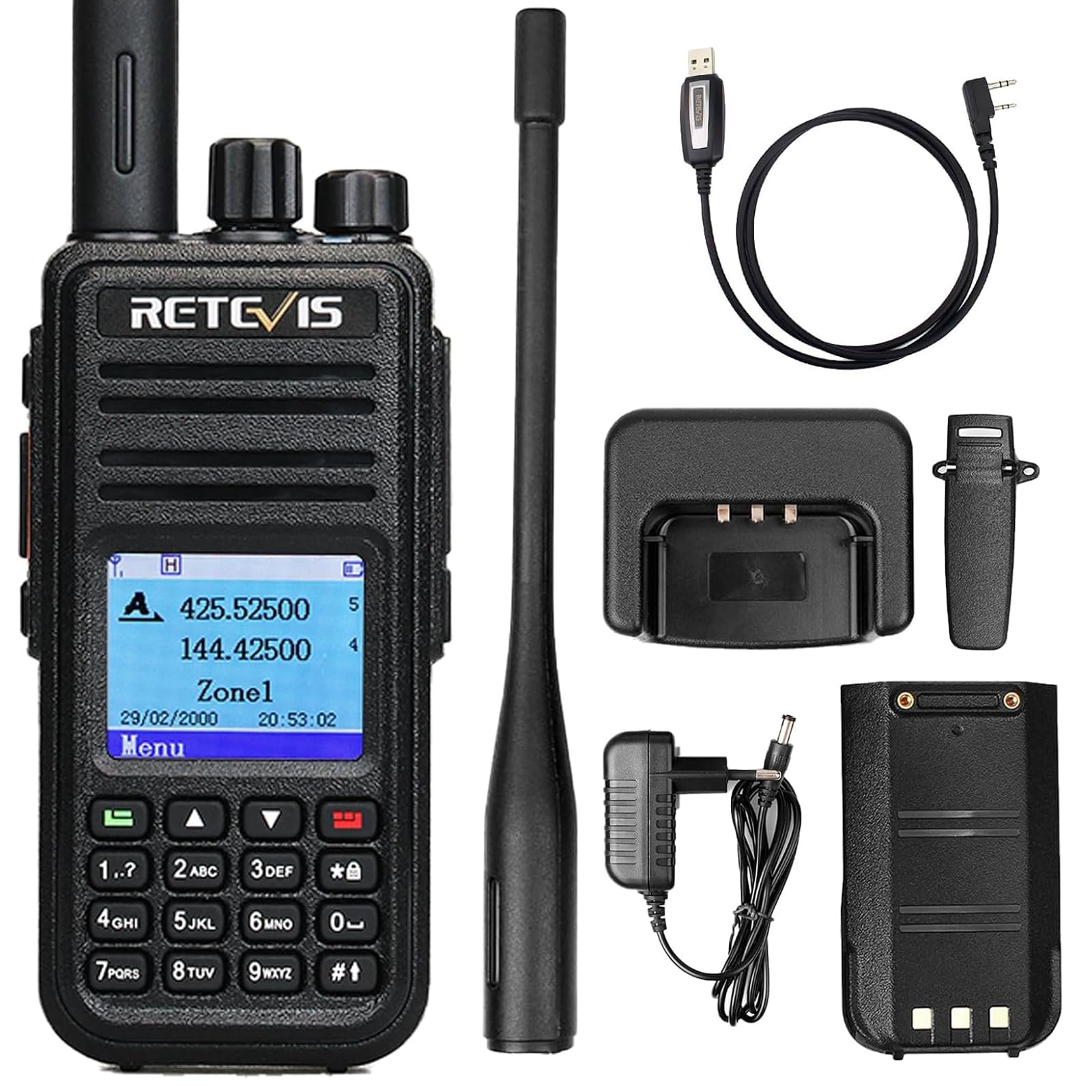
Image: The Retevis RT3S DMR Amateur Radio Transceiver, showcasing its compact design and display.
Package Contents
Please check the package carefully to ensure all items are present and in good condition:
- 1 x Retevis RT3S Walkie Talkie
- 1 x Battery (Lithium-ion, 2000 mAh)
- 1 x Antenna
- 1 x Adapter
- 1 x Charger
- 1 x Belt Clip
- 1 x Hand Strap
- 1 x User Manual

Image: All components included in the Retevis RT3S package: radio, battery, antenna, adapter, charger, belt clip, hand strap, and user manual.
Product Features
- Dual Band Operation: Supports both VHF (144-146 MHz) and UHF (430-440 MHz) frequency bands.
- DMR and Analog Modes: Seamlessly switch between digital and analog communication.
- Mototrbo Compatibility: Works with Mototrbo Tier I & II digital systems.
- 3000 Channels: Extensive channel capacity for diverse communication needs.
- Integrated GPS: Provides location tracking and APRS functionality for enhanced safety and coordination.
- 2000 mAh Lithium Battery: Offers up to 16 hours of continuous operation and 48 hours of standby time.
- Recording Function: Up to 8 hours of audio recording to review important conversations.
- Two-Color LED: Visual indicators for various radio states.
- CTCSS/DCS: Sub-audible tones for interference elimination.
- Channel and Priority Scanning: Efficiently monitor active channels.
- DTMF Keyboard: Full keypad for direct frequency input and menu navigation.
- Firmware Upgradeable: Supports alternative firmware like OpenGD-77 for advanced customization.

Image: A visual summary of the Retevis RT3S key features, including GPS, TDMA, 3000 channels, and recording.
Setup
1. Battery Installation and Charging
- Align the battery with the grooves on the back of the radio and slide it into place until it clicks.
- To charge, connect the charger adapter to a power outlet and place the radio (with battery installed) into the charging dock.
- The LED indicator on the charger will show charging status (typically red for charging, green for fully charged).
- Allow approximately 4-5 hours for a full charge.

Image: The Retevis RT3S radio placed in its charging dock, with the power adapter connected.
2. Antenna Attachment
- Screw the antenna clockwise onto the connector on the top of the radio until it is finger-tight. Do not overtighten.
3. Belt Clip and Hand Strap
- Attach the belt clip to the back of the radio using the provided screws.
- Thread the hand strap through the loop on the top side of the radio for secure carrying.
Operating Instructions
1. Power On/Off and Volume Control
- To power on, rotate the Power/Volume knob clockwise until you hear a click.
- To power off, rotate the Power/Volume knob counter-clockwise until you hear a click.
- Adjust the volume by rotating the same knob.
2. Channel Selection and Mode Switching
- Use the Channel Selector knob on top to change channels.
- The RT3S supports both DMR digital and analog FM modes. The mode can be switched via the menu or a programmable side key. Refer to the on-screen menu for specific settings.

Image: The Retevis RT3S display showing both DMR Digital and Analog FM modes, highlighting its dual-mode capability.
3. GPS and APRS Functionality
- The integrated GPS module allows the radio to determine its location.
- APRS (Automatic Packet Reporting System) can be configured to transmit your location data to other APRS-enabled devices or networks.
- Access GPS and APRS settings through the radio's menu. Ensure GPS is enabled for location services.

Image: The Retevis RT3S displaying GPS functionality, showing location pins on a map overlay, indicating its ability to track and share location.
4. Audio Recording
- The RT3S can record up to 8 hours of audio.
- To start/stop recording, navigate to the recording option in the menu or use a pre-programmed shortcut key.
- Recorded audio can be reviewed directly on the radio.

Image: The Retevis RT3S display indicating the 8-hour recording capability, with a microphone icon.
5. Menu Navigation and Programming
- Use the arrow keys and the MENU button to navigate through the radio's settings.
- The DTMF keyboard allows for direct frequency input and quick access to certain functions.
- For advanced programming, connect the radio to a computer using the programming cable and use the appropriate software (e.g., Chirp or the official Retevis CPS).

Image: The Retevis RT3S display showing a clear and simple menu for editing channel parameters like Rx Frequency and Tx Frequency.

Image: A Retevis RT3S radio next to a laptop running Chirp software, illustrating how to program the radio using an open-source tool compatible with macOS, Windows, and Linux.

Image: Comparison of the Retevis RT3S with its original firmware and with OpenGD-77 firmware, demonstrating its compatibility with various firmware options.
Maintenance
- Cleaning: Use a soft, damp cloth to clean the radio's exterior. Avoid harsh chemicals or abrasive cleaners.
- Battery Care:
- Do not expose the battery to extreme temperatures.
- Charge the battery fully before first use and periodically if stored for long periods.
- Replace the battery if its performance significantly degrades.
- Antenna Care: Ensure the antenna is securely attached. Do not bend or force the antenna, as this can damage the connector.
- Storage: Store the radio in a cool, dry place away from direct sunlight and moisture when not in use.
Troubleshooting
| Problem | Possible Cause | Solution |
|---|---|---|
| Radio does not power on. | Battery is low or not installed correctly. | Charge the battery fully. Reinstall the battery, ensuring it clicks into place. |
| No audio or weak audio. | Volume too low, squelch level too high, or incorrect frequency/channel. | Increase volume. Adjust squelch level. Verify correct frequency and channel settings. |
| Cannot transmit or receive. | Incorrect frequency/channel, antenna not connected, or radio in wrong mode (DMR/Analog). | Check frequency and channel. Ensure antenna is securely attached. Verify the radio is in the correct operating mode. |
| GPS not acquiring signal. | Operating indoors or in an area with poor satellite visibility. | Move to an open outdoor area with a clear view of the sky. Allow several minutes for satellite acquisition. |
| Programming software does not recognize the radio. | Driver issues, incorrect cable, or software version mismatch. | Install the correct USB driver for the programming cable. Ensure the cable is fully connected. Use the latest version of the programming software (CPS) or Chirp. |
Specifications
| Feature | Detail |
|---|---|
| Brand | Retevis |
| Model Number | EUA9110F |
| Color | Black |
| Number of Channels | 3000 |
| Frequency Range | VHF: 144-146 MHz; UHF: 430-440 MHz |
| Max Talk Range | 5 Kilometers |
| Battery Type | Lithium-ion (2000 mAh) |
| Average Battery Life | 16 Hours (operation), 48 Hours (standby) |
| Voltage | 7.4 Volts (DC) |
| Water Resistance Level | Not Water Resistant |
| Product Dimensions (DxWxH) | 10.9 x 17.5 x 22.3 cm |
| Item Weight | 258 Grams |
| Connectivity Protocol | TDMA |
| Compatible Devices | MOTOTRBO Tier I & II, other DMR radios, analog walkie talkies |
Warranty and Support
Retevis provides a 2-year warranty for the radio body and a 1-year warranty for accessories from the date of purchase. Additionally, a 30-day return policy is offered for any reason.
For support beyond the warranty period, maintenance services are available, with buyers responsible for associated costs. For any inquiries or assistance, please contact Retevis customer support via Amazon. Responses are typically provided within 12 hours.
For further information and resources, including firmware updates and programming software, please visit the official Retevis website or relevant amateur radio forums.
Related documentsRT3S


Ask a question about this manual
Ask about setup, troubleshooting, compatibility, parts, safety, or missing instructions. Manuals+ will review the question and use this page’s manual context to help answer it.