
1. Introduction
This manual provides detailed instructions for the installation, operation, and maintenance of your suptek MD6421TP004 Monitor and Laptop Desk Mount. This versatile mount is designed to securely hold a monitor or a laptop, offering adjustable positioning to enhance ergonomics and optimize desk space. Please read this manual thoroughly before installation and keep it for future reference.
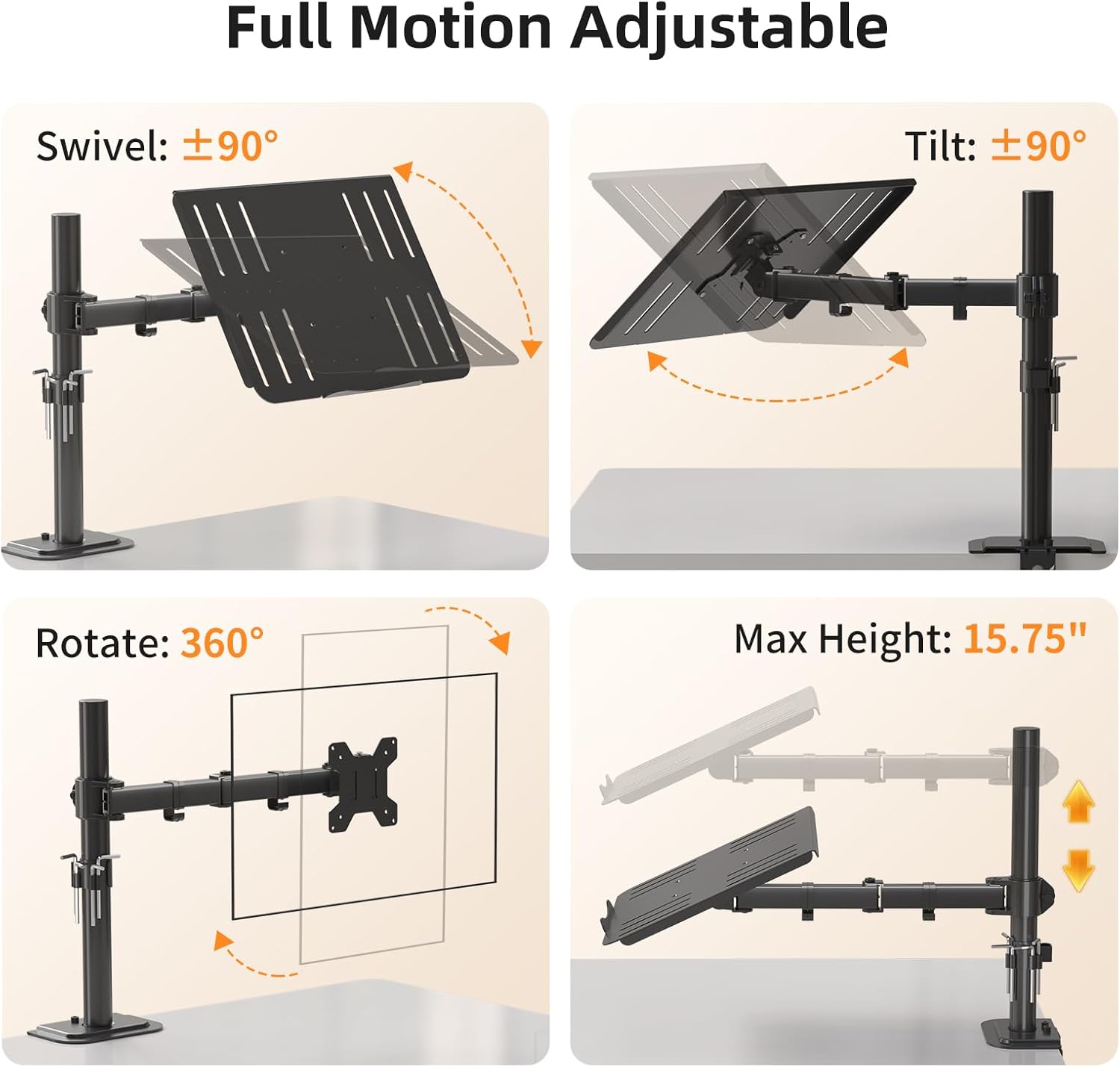
Image 1.1: The suptek MD6421TP004 Monitor and Laptop Desk Mount, showcasing its design and functionality.
2. Safety Information
Please observe the following safety precautions to prevent injury or damage to the product:
- Read all instructions before assembly. If you have any questions, contact customer support.
- Ensure your desk surface is strong enough to support the combined weight of the mount and your equipment.
- Do not exceed the maximum weight capacity of 10 kg (22 lbs).
- Tighten all screws firmly but do not overtighten. Overtightening can damage the threads or components.
- Keep children away from the assembly area. Small parts may be a choking hazard.
- Check all connections periodically to ensure they remain secure.
3. Package Contents
Verify that all components are present and undamaged before beginning installation. If any parts are missing or damaged, please contact suptek customer service.
- Main Pole
- Swivel Arm
- VESA Plate (for monitor attachment)
- Laptop Tray
- Desk Clamp (C-clamp)
- Grommet Base Components
- Hardware Kit (various screws, washers, Allen keys)
- Cable Management Clips
4. Setup and Installation
The suptek MD6421TP004 offers two installation methods: C-clamp and Grommet Base. Choose the method suitable for your desk.
4.1 Choose Your Mounting Method

Image 4.1: Illustration of the C-clamp and Grommet Base mounting options. Both support desk thicknesses from 0.39" to 3.85" (1cm to 9.8cm).
- C-Clamp: Ideal for desks without a pre-drilled hole. Clamps directly to the edge of the desk.
- Grommet Base: Requires a hole in the desk (diameter > 40mm / 1.57"). Provides a more flush and permanent installation.
4.2 Attaching the Base to Your Desk
Follow the instructions provided in the hardware kit for your chosen mounting method. Ensure the base is securely fastened to a stable desk surface with a thickness between 0.39" and 3.85" (1cm and 9.8cm).
4.3 Assembling the Arm and Pole
- Slide the swivel arm onto the main pole.
- Adjust the arm to your desired initial height and secure it with the provided collar and screw.
4.4 Attaching Your Monitor or Laptop
This mount supports both VESA-compatible monitors and laptops using the included tray.
- For Monitors: Attach the VESA plate to the back of your monitor using the appropriate screws from the hardware kit. The mount supports VESA patterns of 75x75mm and 100x100mm. Then, slide the monitor with the attached VESA plate onto the arm.
- For Laptops: Secure the laptop tray to the arm. Place your laptop on the tray, ensuring it is centered and stable. The tray features ventilation slots and secure lips to prevent the laptop from sliding.

Image 4.2: A laptop positioned on the mount's tray, demonstrating its secure placement and elevated viewing.
4.5 Cable Management
Utilize the integrated cable management clips along the arm and pole to route your power and AV cables. This helps maintain a tidy workspace and prevents cable clutter.

Image 4.3: Close-up of the cable management clips, designed to keep cables organized along the mount arm.
5. Operating Instructions
The suptek MD6421TP004 mount offers full motion adjustability to achieve your optimal viewing position.

Image 5.1: Visual representation of the mount's full motion capabilities, including swivel, tilt, rotation, and height adjustment.
- Height Adjustment: Loosen the collar on the main pole, slide the arm to the desired height (up to 15.75 inches / 400mm), and re-tighten the collar securely.
- Swivel: The arm can swivel ±90° horizontally, allowing you to easily share your screen or adjust your viewing angle.
- Tilt: The VESA plate or laptop tray can tilt ±90° (up and down) to reduce glare and find a comfortable viewing angle.
- Rotation: Your monitor or laptop can be rotated 360° for portrait or landscape orientation.
Adjust tension screws on the arm joints as needed to achieve the desired resistance for movement. Use the provided Allen keys for these adjustments.
6. Maintenance
To ensure the longevity and proper function of your mount:
- Periodically check all screws and connections to ensure they are tight and secure.
- Clean the mount's surfaces with a soft, damp cloth. Avoid using abrasive cleaners or solvents.
- Ensure cables are properly routed and not pinched or strained.

Image 6.1: The integrated Allen key holder, providing convenient storage for adjustment tools.
7. Troubleshooting
If you encounter any issues with your suptek MD6421TP004 mount, refer to the following common problems and solutions:
- Monitor/Laptop Sags or is Difficult to Adjust:
- Check the tension screws on the arm joints. Use the provided Allen keys to tighten them until the desired resistance is achieved.
- Ensure the weight of your monitor or laptop does not exceed the maximum capacity of 10 kg (22 lbs). - Mount is Unstable:
- Verify that the desk clamp or grommet base is securely tightened to the desk.
- Ensure your desk surface is sturdy and capable of supporting the mount and equipment. - Cables are Disorganized:
- Re-route all cables through the integrated cable management clips along the arm and pole.
8. Specifications
| Feature | Specification |
|---|---|
| Model Number | MD6421TP004 |
| Brand | suptek |
| Material | Alloy Steel |
| Compatible Screen Size | 13-27 inches (for monitors) |
| Weight Capacity | Up to 10 kg (22 lbs) |
| VESA Compatibility | 75x75mm, 100x100mm |
| Swivel Range | ±90° |
| Tilt Range | ±90° |
| Rotation | 360° |
| Maximum Height | 15.75 inches (400mm) |
| Mounting Options | C-clamp, Grommet Base |
| Compatible Desk Thickness | 0.39" - 3.85" (1cm - 9.8cm) |
| Cable Management | Integrated clips |

Image 8.1: Detailed dimensions, VESA compatibility, and weight capacity information for the mount.
9. Warranty and Support
For warranty information and technical support regarding your suptek MD6421TP004 mount, please contact suptek customer service. Our dedicated support team aims to respond to inquiries within 24 hours to provide prompt assistance and the best possible solution.
You can typically find contact information on the suptek official website or through your purchase platform.


