
1. Introduction
The Yatour BTA-BEK Digital Stereo Bluetooth Car Adapter is designed to integrate Bluetooth functionality into your vehicle's original car stereo system. This adapter allows for hands-free calling, wireless audio streaming (A2DP), and USB charging, enhancing your driving experience with modern connectivity while retaining your factory head unit.
Key features include:
- Plug & Play Installation: Connects directly to the original CD changer port for quick and easy setup without modifying vehicle interior wiring.
- Hands-Free Calling (HFP): Supports answering and ending calls via car radio buttons and steering wheel controls.
- Wireless Audio Streaming (A2DP): Effortlessly stream music from Bluetooth-enabled devices to your car stereo.
- Bluetooth Control: Manage tracks (next/previous), pause/play, and fast forward/rewind using car radio or steering wheel buttons.
- Auxiliary Input: A 3.5mm AUX input allows connection of external audio devices like MP3 players, smartphones, and tablets.
- USB Charging: A dedicated USB port provides charging capability for your smartphone and other USB-powered devices.
- LED Display: Provides visual indication of different operating statuses.
2. Package Contents
Please verify that all items are present in the package:
- 1 x Yatour BTA-BEK Module Unit
- 1 x Wiring Harness
- 1 x Microphone
- 1 x 3.5mm Auxiliary Cable
- 1 x User Manual

Image: Complete Yatour BTA-BEK kit, showing the main module, wiring harness, microphone, and user manual.
3. Compatibility
This adapter is compatible with specific Becker, Porsche, and Mercedes Benz car radio models. Please check the compatibility table below to ensure your vehicle's head unit is supported.

Image: Compatibility table detailing supported Becker, Porsche, and Mercedes Benz radio models and years.
Compatible Models:
- Becker (1994-2002): 2234, 2235, 2237, CDR 22, CR 22, Cascade Pro 7941, Cascade 7944, DTM, Grand Prix, Indianapolis Pro, Indianapolis 7920, Mexico Pro MP3, Monza, Online Pro 7800 (from Software version 1.5), Traffic Pro 7945 with Bluetooth, Traffic Pro 7949 with talk-dialog-system, Traffic Pro High Speed, Traffic Pro (from Software version 6.0).
- Porsche (1980-2002) OEM Becker Radios: CDR21, CDR-22, CDR210, CDR-220, CR11, CR21, Traffic Pro 4760, Traffic Pro BE4720.
- Mercedes Benz: BE2340 (Becker Mexico).
Note: Compatibility is not guaranteed with all Becker radios. The adapter may also be used with other radios in the Becker Indianapolis series.
Incompatible Models:
- Indianapolis, Monza 2130, Cascade 7907.
- Porsche CDR23 (fiber optic).
- Becker radios on Alfa Romeo 166 / Lancia Lybra with navigation (folder/track control not supported).
4. Setup and Installation
The Yatour BTA-BEK adapter is designed for a Plug & Play installation, connecting directly to your car's original CD changer port. No cutting of wires or extensive vehicle modification is required.
Installation Steps:
- Locate CD Changer Port: Identify the CD changer port on the back of your car's head unit. This typically requires removing the car stereo from the dashboard. Consult your vehicle's service manual for instructions on how to safely remove the head unit.
- Connect Wiring Harness: Plug the blue and green connectors of the Yatour wiring harness into the corresponding CD changer port on your car stereo. Ensure a secure connection.
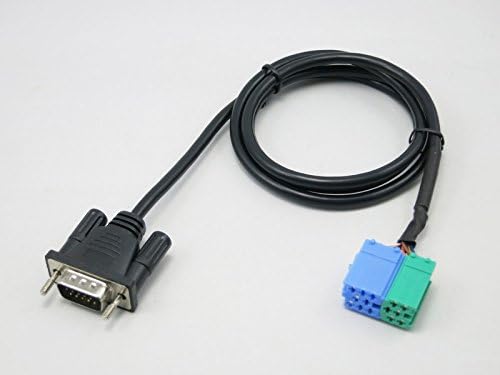
Image: The wiring harness with its blue and green connectors, designed to plug into the car's CD changer port.

Image: A close-up view of the blue and green connectors, highlighting their design for precise fitment.
- Connect Module Unit: Plug the other end of the wiring harness into the Yatour BTA-BEK module unit.
- Install Microphone: Connect the microphone to the designated port on the module. Route the microphone cable to a suitable location, such as near the rearview mirror or on the A-pillar, for optimal voice pickup during calls.
- Secure Module: Find a secure and discreet location for the module unit, such as behind the dashboard or in the glove compartment. Ensure it does not interfere with vehicle operation.
- Test Functionality: Before fully reassembling the dashboard, turn on your car stereo and test the adapter's functionality (Bluetooth pairing, audio playback, hands-free calls).
- Reassemble: Once confirmed working, carefully reassemble your car's dashboard components.
5. Operating Instructions
After successful installation, follow these steps to operate your Yatour BTA-BEK adapter.
5.1. Activating the Adapter
- Turn on your car stereo.
- Select the CD changer mode (often labeled as CD, CDC, or AUX) on your car stereo. The adapter will automatically activate.
5.2. Bluetooth Pairing
- Ensure the adapter is in CD changer mode. The LED indicator on the module will typically flash, indicating it's in pairing mode.
- On your mobile device, go to Bluetooth settings and search for available devices.
- Select "Yatour" or a similar name from the list of devices.
- Once paired, the LED indicator on the module will become solid, and you will hear a confirmation tone through your car speakers.
5.3. Hands-Free Calling (HFP)
- Answering/Ending Calls: When a call comes in, you can answer or end it using the designated buttons on your car stereo or steering wheel (if supported by your vehicle).
- Making Calls: Initiate calls from your paired smartphone. The audio will automatically route through the car speakers, and your voice will be picked up by the external microphone.
- Volume Adjustment: Adjust the HFP volume separately using your car stereo's volume controls.
5.4. Wireless Audio Streaming (A2DP)
- Once paired, play music from your smartphone or other Bluetooth device. The audio will stream wirelessly to your car stereo.
- Music Control: Use your car stereo buttons or steering wheel controls to skip tracks (forward/backward), pause, or play music.
- Volume Adjustment: Adjust the A2DP streaming volume separately using your car stereo's volume controls.
- Automatic Playback: The adapter supports automatic A2DP playback when switching from FM mode to CD mode.
5.5. Auxiliary Input (3.5mm AUX)
- Connect any external audio device (e.g., MP3 player, non-Bluetooth smartphone) to the 3.5mm AUX input port on the module using the provided auxiliary cable.
- Select the AUX input mode on your car stereo (if available) or ensure the adapter is active. Audio from the connected device will play through your car speakers.
5.6. USB Charging
- Connect your smartphone or other USB-powered device to the USB port on the Yatour module using a compatible USB cable.
- The port provides power for charging. Note that this port is for charging only and does not support USB audio playback.
6. Maintenance
The Yatour BTA-BEK adapter requires minimal maintenance. Follow these guidelines to ensure its longevity:
- Cleaning: Use a soft, dry cloth to clean the module and cables. Avoid using liquid cleaners or solvents, as they may damage the device.
- Environment: Keep the module in a dry environment, away from extreme temperatures, direct sunlight, and moisture.
- Cable Care: Avoid bending or crimping the cables excessively, as this can damage internal wiring.
7. Troubleshooting
If you encounter issues with your Yatour BTA-BEK adapter, refer to the following troubleshooting tips:
| Problem | Possible Cause | Solution |
|---|---|---|
| No sound from adapter. | Incorrect mode selected on car stereo. Loose connection. Device volume too low. | Ensure car stereo is in CD changer (CDC/AUX) mode. Check all cable connections to the module and car stereo. Increase volume on both your smartphone and car stereo. |
| Cannot pair Bluetooth device. | Adapter not in pairing mode. Bluetooth on device is off. Device already paired to another adapter. | Ensure car stereo is in CD changer mode and adapter LED is flashing. Turn on Bluetooth on your mobile device. Forget previous Bluetooth connections on your device and try again. |
| Hands-free calls not working. | Microphone not connected or faulty. HFP volume too low. | Check microphone connection. Adjust HFP volume on car stereo. |
| USB port not charging. | Loose USB cable. Device not compatible with charging port. | Ensure USB cable is securely connected to both the module and your device. Try a different USB cable or device to confirm port functionality. |
If the problem persists after trying these solutions, please contact customer support.
8. Specifications
| Feature | Specification |
|---|---|
| Model Number | BTA-BEK |
| Brand | Yatour |
| Connectivity Technology | Bluetooth, USB |
| Wireless Communication Standard | Bluetooth |
| Power Source | USB Powered |
| Voltage | 5 Volts (DC) |
| Special Feature | Hands-free calls via car controls |
| Compatible Devices | MP3 Player, Smartphone, Car Stereo, Bluetooth devices |
| Supported Standards | Bluetooth |
| Hardware Interface | Bluetooth, USB |
| Analog RGB Input | Auxiliary |
| Audio Input | AUX 3.5 mm |
| Audio Output Type | Auxiliary, Bluetooth |
| Audio Output Mode | Stereo |
| Number of Channels | 2 |
| Control Type | Bluetooth Controls |
| Control Method | Tactile |
| Input Human Interface | Microphone |
| Installation Type | Wired |
| Display Type | LED |
9. Warranty and Support
Specific warranty information for the Yatour BTA-BEK adapter is not provided in this manual. Please refer to the product packaging or the retailer's website for details regarding warranty coverage and terms.
For technical support, further assistance, or inquiries regarding your Yatour BTA-BEK adapter, please contact the manufacturer or your point of purchase. Keep your purchase receipt and product model number (BTA-BEK) readily available when seeking support.