
allen + roth Z1768T4-DBSN
allen + roth Cosgrove 4-Gang Satin Nickel Quad Toggle Wall Plate Instruction Manual
Introduction
This manual provides detailed instructions for the safe and proper installation, operation, and maintenance of your allen + roth Cosgrove 4-Gang Satin Nickel Quad Toggle Wall Plate. Please read all instructions carefully before beginning installation and retain this manual for future reference.
Safety Information
WARNING: Risk of electric shock. Improper installation can result in serious injury or death. Always turn off power at the circuit breaker or fuse box before installing or servicing this product.
- Ensure the power supply is completely disconnected before any work is performed.
- If you are unsure about any part of these instructions, consult a qualified electrician.
- Do not install in wet locations or where moisture may accumulate.
- Use only with compatible electrical devices and wiring.
Package Contents
- 1 x allen + roth Cosgrove 4-Gang Satin Nickel Quad Toggle Wall Plate
- Mounting Screws
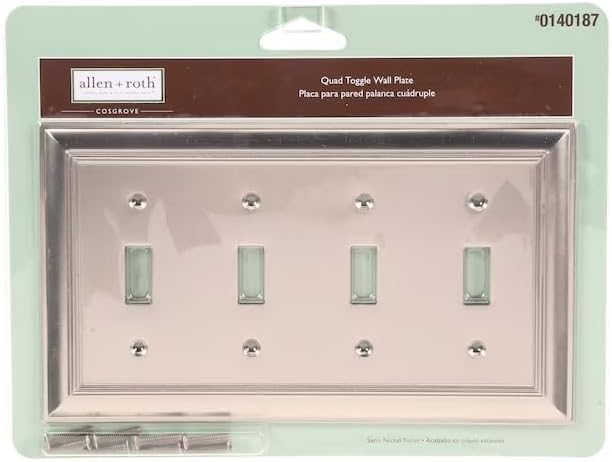
Image: The allen + roth Cosgrove 4-Gang Satin Nickel Quad Toggle Wall Plate shown in its retail packaging, including the wall plate and a small bag of mounting screws.
Tools Required
- Flathead Screwdriver
- Phillips Head Screwdriver
Setup and Installation
Follow these steps to safely install your new wall plate:
- Turn Off Power: Locate the circuit breaker or fuse box that controls the power to the outlet or switch where you will be installing the wall plate. Turn off the power completely. Verify power is off using a voltage tester.
- Remove Old Wall Plate: Carefully unscrew and remove the existing wall plate from the electrical box. Set aside any old screws or plates.
- Position New Wall Plate: Align the new allen + roth Cosgrove 4-Gang Satin Nickel Quad Toggle Wall Plate over the electrical box, ensuring the openings match the toggle switches or outlets.
- Secure Wall Plate: Use the provided mounting screws to attach the wall plate to the electrical box. Do not overtighten, as this can crack the plate or strip the screw threads. Tighten until snug.
- Restore Power: Once the wall plate is securely installed, return to your circuit breaker or fuse box and turn the power back on.
Operating
The wall plate serves as a protective and decorative cover for your electrical switches. Once installed, operate your toggle switches as normal. The plate does not affect the electrical function of the switches.
Maintenance
To clean your satin nickel wall plate, simply wipe it with a soft, damp cloth. Avoid using abrasive cleaners, harsh chemicals, or scouring pads, as these can damage the finish. Dry thoroughly after cleaning.
Troubleshooting
- Wall plate does not fit: Ensure you have purchased the correct gang configuration (e.g., 4-gang for four switches) and device type (e.g., toggle for toggle switches). Refer to the specifications section for dimensions.
- Screws do not tighten: Check if the screws are properly aligned with the holes in the electrical box. Do not force screws; if threads are stripped, you may need to replace the electrical box or use appropriate anchors.
Specifications
| Brand | allen + roth |
| Model Number | Z1768T4-DBSN |
| Material | Zinc |
| Color | Silver (Satin Nickel Finish) |
| Configuration | 4-Gang Quad Toggle |
| Switch Type | Toggle |
| Item Weight | 0.31 kg |
| UPC | 654880012518 |
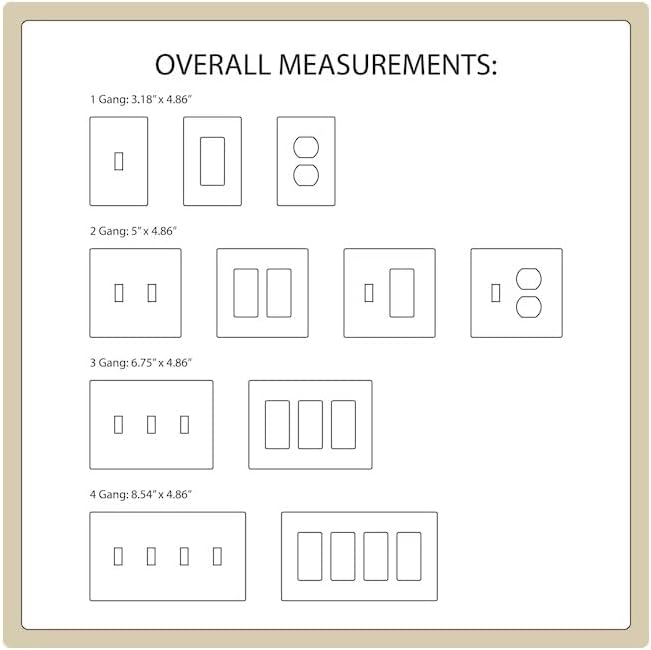
Image: Diagram illustrating the overall measurements for various wall plate configurations, including 4-gang, which measures 8.54" x 4.86".
Warranty and Support
For warranty information or technical support, please refer to the manufacturer's official website or contact their customer service department. Keep your purchase receipt for any warranty claims.
Related documentsZ1768T4-DBSN


Ask a question about this manual
Ask about setup, troubleshooting, compatibility, parts, safety, or missing instructions. Manuals+ will review the question and use this page’s manual context to help answer it.