
1. Important Safety Instructions
Please read all instructions carefully before using the appliance and keep them for future reference. Failure to follow these instructions may result in electric shock, fire, or serious injury.
- Ensure the power supply voltage matches the rating label on the vacuum cleaner.
- Do not use the vacuum cleaner to pick up water or wet materials. This is a dry vacuum cleaner.
- Do not pick up flammable or combustible liquids, such as gasoline, or use in areas where they may be present.
- Do not pick up burning or smoking objects, such as cigarettes, matches, or hot ashes.
- Always unplug the appliance from the power outlet before cleaning or performing maintenance.
- Keep hair, loose clothing, fingers, and all parts of the body away from openings and moving parts.
- Do not operate the vacuum cleaner with a damaged cord or plug. If the cord is damaged, it must be replaced by the manufacturer, its service agent, or similarly qualified persons to avoid a hazard.
- This appliance is not intended for use by persons (including children) with reduced physical, sensory or mental capabilities, or lack of experience and knowledge, unless they have been given supervision or instruction concerning use of the appliance by a person responsible for their safety.
2. Product Overview
The Fakir Veyron Turbo XL Premium is a powerful bagless dry vacuum cleaner designed for efficient cleaning of various surfaces. It features cyclonic technology and a HEPA 13 filter for superior dust retention.

Figure 1: Fakir Veyron Turbo XL Premium Bagless Dry Vacuum Cleaner. This image shows the red vacuum cleaner with its hose connected, dust container visible, and control dial on top.
3. Setup and Assembly
Follow these steps to assemble your vacuum cleaner before first use.
- Unpacking: Carefully remove all components from the packaging. Check for any damage during transit.
- Attach the Hose: Insert the flexible hose into the air inlet opening on the main unit until it clicks securely into place.
- Assemble the Telescopic Tube: Connect the telescopic tube to the handle end of the flexible hose. Adjust the length of the telescopic tube by pressing the release button and extending or retracting it.
- Attach the Floor Nozzle: Connect the desired floor nozzle (e.g., standard floor nozzle or hard floor attachment) to the end of the telescopic tube. Ensure it is firmly attached.
- Attach Special Nozzles: For specific cleaning tasks, attach the turbo nozzle or the 3-in-1 attachment directly to the telescopic tube or the hose handle.
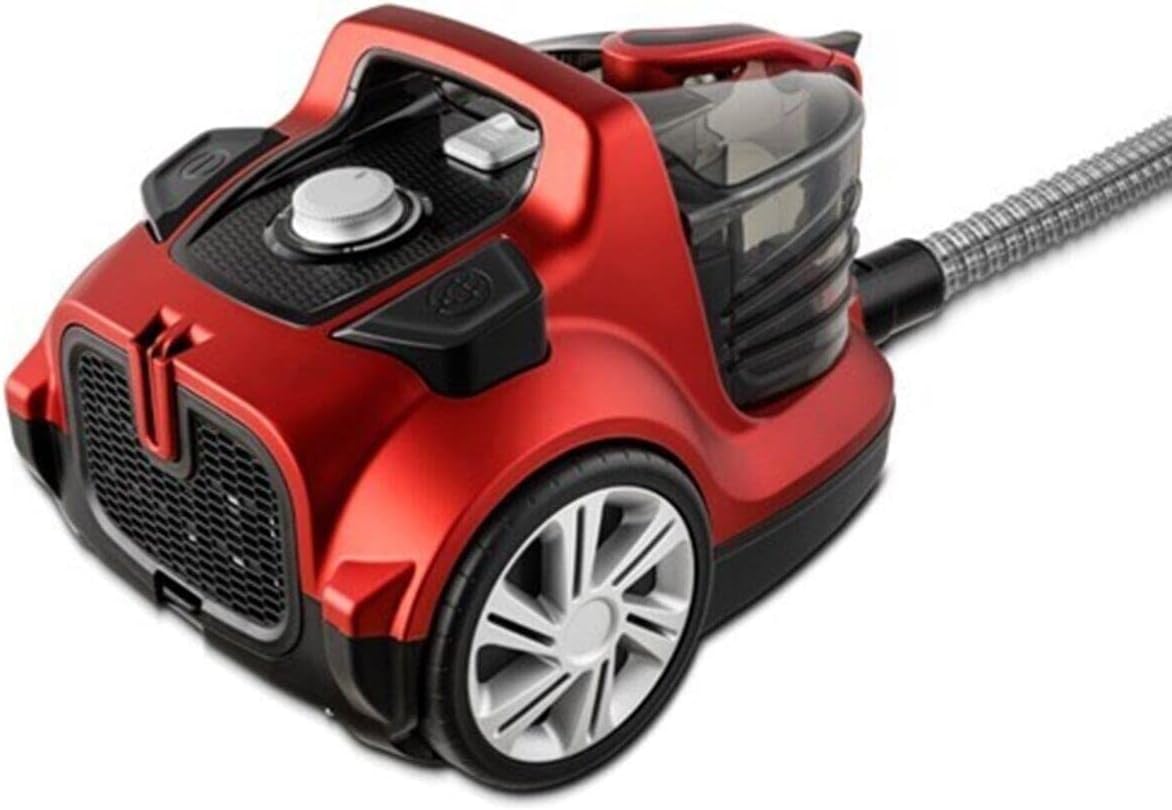
Figure 2: Fakir Veyron Turbo XL Premium with various attachments. This image displays the vacuum cleaner along with its hose, telescopic tube, and different cleaning nozzles.
4. Operating Instructions
Learn how to effectively use your vacuum cleaner for optimal cleaning results.
- Power Connection: Plug the power cord into a suitable electrical outlet.
- Power On/Off: Press the power button (usually located near the cord rewind button) to turn the vacuum cleaner on or off.
- Adjusting Suction Power: Rotate the power control dial, typically located on the top of the unit, to adjust the suction power according to the cleaning surface.
- Using Attachments:
- Floor Nozzle: Use for general cleaning of hard floors and carpets.
- Turbo Nozzle: Ideal for deep cleaning carpets and removing pet hair.
- 3-in-1 Attachment: A versatile tool for crevices, upholstery, and dusting.
- Hard Floor Attachment: Specifically designed for delicate hard floor surfaces.
- Cord Rewind: After use, press the cord rewind button to automatically retract the power cord into the unit.
5. Maintenance
Regular maintenance ensures the longevity and optimal performance of your vacuum cleaner.
- Emptying the Dust Container:
- When the dust container is full (indicated by the max fill line) or suction power decreases, it's time to empty it.
- Press the release button to detach the dust container from the main unit.
- Open the bottom lid of the dust container and empty the contents into a waste bin.
- Close the lid securely and reattach the dust container to the vacuum cleaner.
- Cleaning the HEPA 13 Filter:
- The HEPA 13 filter is located within the dust container assembly.
- Remove the HEPA filter and gently tap it to dislodge dust.
- If heavily soiled, rinse the HEPA filter under cold running water. Ensure it is completely dry before reinserting. Do not use detergents or hot water.
- Cleaning the Foam Filter:
- The foam filter is typically located before the motor. Refer to your specific model's diagram for exact location.
- Remove the foam filter and wash it with lukewarm water.
- Allow the foam filter to air dry completely before placing it back into the vacuum cleaner.
- General Cleaning: Wipe the exterior of the vacuum cleaner with a soft, damp cloth. Do not use abrasive cleaners or solvents.
6. Troubleshooting
If you encounter issues with your vacuum cleaner, refer to the following common problems and solutions.
| Problem | Possible Cause | Solution |
|---|---|---|
| Vacuum cleaner does not turn on. | No power supply. | Check if the plug is securely inserted into the outlet. Check the circuit breaker. |
| Low suction power. | Dust container full, filters clogged, or hose/nozzle blocked. | Empty the dust container. Clean or replace filters. Check hose and nozzles for obstructions. |
| Unusual noise during operation. | Foreign object in the hose or nozzle, or motor issue. | Turn off and unplug the vacuum. Check hose and nozzles for blockages. If noise persists, contact customer support. |
| Dust escaping from the vacuum. | Filters not properly installed or damaged, or dust container not sealed. | Ensure all filters are correctly installed and undamaged. Check that the dust container is securely closed. |
7. Specifications
- Model: Fakir Veyron Turbo XL Premium
- Power: 750W
- Filtration System: HEPA 13, Foam Filter
- Dust Container Capacity: 2 Liters
- Noise Level: 70 dB
- Technology: Cyclonic
- Product Dimensions: 39.5 x 59.5 x 38 cm
- Product Weight: 10 Kilograms
- Power Source: Corded Electric
- Recommended Surface: All floors
- Included Components: Vacuum cleaner unit, Turbo nozzle, Floor nozzle, 3-in-1 attachment, Telescopic tube, Hose, Hard floor attachment.
8. Warranty and Support
Your Fakir Veyron Turbo XL Premium Bagless Dry Vacuum Cleaner comes with a 2-year warranty from the date of purchase.
This warranty covers manufacturing defects and material faults under normal household use. It does not cover damage caused by misuse, neglect, accidental damage, or unauthorized repairs.
For warranty claims, technical support, or spare parts, please contact your authorized Fakir dealer or the customer service department. Please have your proof of purchase and product model number ready when contacting support.