
Product Overview
The Marathon 100 Minute Digital Timer is designed for precise timekeeping in various environments, including kitchens, offices, labs, and schools. It features a large, easy-to-read LCD display and a loud ring alarm for clear notification.
- Digital Timer: Capable of counting down from a set time or counting up to track elapsed time.
- Large LCD Display: High-contrast display ensures easy readability from a distance.
- Loud Ring Alarm: Audible alert designed to be heard across a room.
- Dual Functionality: Supports both countdown and count-up modes, up to 99 minutes and 59 seconds.
- Versatile Mounting: Equipped with a magnetic back for metal surfaces and a clip that doubles as a stand.
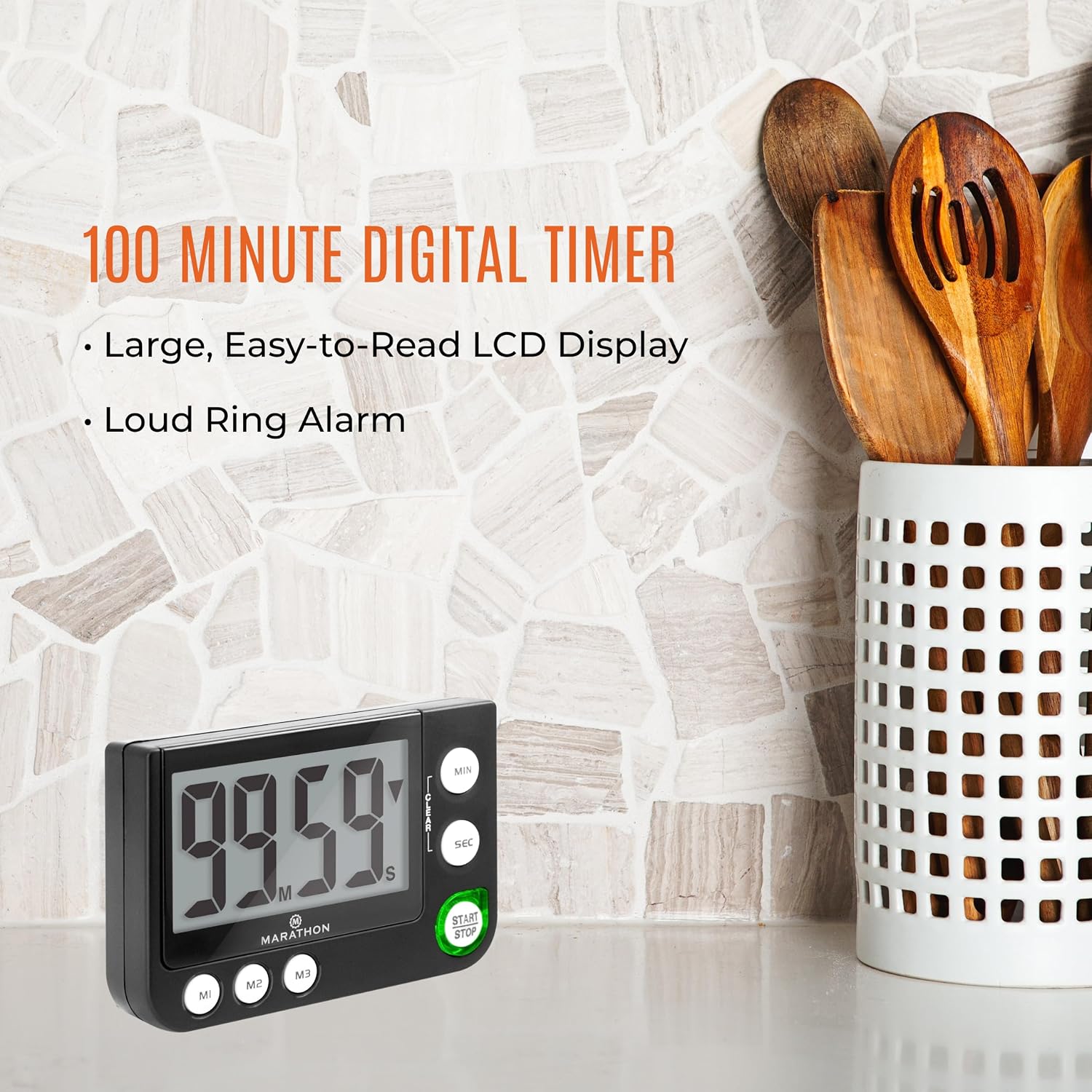
Image: The Marathon 100 Minute Digital Timer displayed on a kitchen counter, highlighting its compact size and clear display.
Getting Started
Battery Installation
Your timer requires one AAA battery (included). To install:
- Locate the battery compartment cover on the back of the timer.
- Slide the cover open.
- Insert one AAA battery, ensuring the correct polarity (+/-) as indicated inside the compartment.
- Replace the battery compartment cover securely.
Initial Power On
Once the battery is installed, the timer will automatically power on and display '00:00'.
Operating Instructions
Setting the Timer (Countdown)
To set a countdown time:
- Press the MIN button to set the desired minutes. Each press increases the minutes by one. Hold to rapidly advance.
- Press the SEC button to set the desired seconds. Each press increases the seconds by one. Hold to rapidly advance.
- To clear the set time, press the CLEAR button.
- Press the START/STOP button to begin the countdown.
- To pause the countdown, press START/STOP again. Press it once more to resume.
- When the countdown reaches zero, the alarm will sound, and the timer will begin counting up to show elapsed time since the alarm.
Count-Up Function
To use the timer as a stopwatch (count-up):
- Ensure the display shows '00:00'. If not, press the CLEAR button.
- Press the START/STOP button to begin counting up.
- To pause the count-up, press START/STOP again. Press it once more to resume.
- To reset the count-up timer to '00:00', press the CLEAR button while the timer is paused.
Memory Function (M1, M2, M3)
The timer includes three memory presets (M1, M2, M3) for frequently used times:
- To Save a Time: Set the desired time using the MIN and SEC buttons. While the time is displayed and not running, press and hold one of the memory buttons (M1, M2, or M3) until the display flashes, indicating the time is saved.
- To Recall a Time: Press the desired memory button (M1, M2, or M3) to load the saved time onto the display.
- Once a memory time is recalled, press START/STOP to begin the countdown.
Alarm Features
When the countdown reaches zero, the timer will emit a loud audible alarm. Additionally, a visual indicator (often a blinking red light) will activate to provide a silent alert, which is useful in noisy environments or when an audible alarm is not desired.

Image: Detailed view of the timer's control buttons for setting and operating the device.
Mounting Options
The Marathon Digital Timer offers flexible placement options:
- Magnetic Back: The timer features a strong magnetic back, allowing it to be securely attached to metal surfaces such as refrigerators, whiteboards, or oven doors.
- Clip/Stand: A built-in clip on the back can be used to attach the timer to a belt, pocket, or apron. This clip also functions as a foldable stand, enabling the timer to sit upright on a countertop or desk for easy viewing.

Image: Visual representation of the timer's versatile features, including its magnetic back and integrated stand/clip.
Care and Maintenance
To ensure the longevity and optimal performance of your Marathon Digital Timer:
- Cleaning: Wipe the timer with a soft, dry cloth. Avoid using abrasive cleaners or solvents, as these can damage the display or casing.
- Battery Replacement: When the display dims or the timer functions erratically, replace the AAA battery. Follow the battery installation steps outlined in the 'Getting Started' section.
- Storage: Store the timer in a cool, dry place when not in use. Avoid extreme temperatures or direct sunlight.
Troubleshooting
If you encounter issues with your timer, refer to the following common solutions:
- Timer Not Responding: Check if the battery is correctly installed and has sufficient power. Replace the battery if necessary.
- Display is Dim or Blank: This usually indicates a low battery. Replace the AAA battery.
- Alarm Not Audible: Ensure there are no obstructions blocking the speaker. If the timer has a volume setting (this model does not explicitly state one, but some timers do), ensure it is not set to mute or a very low volume.
- Timer Does Not Turn Off: This model is designed to always display the time (like a clock) and does not have an explicit 'off' switch to conserve battery. The display will remain active.
- LED Light is Too Bright/Distracting: The LED indicator is an integral part of the timer's functionality for visual alerts and cannot be turned off independently.
Specifications
| Feature | Detail |
|---|---|
| Brand | MARATHON |
| Model Number | TI030016 |
| Color | Black |
| Material | Metal |
| Item Weight | 3.2 ounces |
| Number of Settings | 3 (Memory Presets) |
| UPC | 063442000311 |

Image: Dimensions of the timer, indicating a width of 3.5 inches (8.9 cm) and a height of 2.3 inches (5.9 cm).
Warranty and Support
Manufacturer Warranty: This product is covered by a 2-year warranty from the date of purchase, covering manufacturing defects.
For technical support, warranty claims, or further assistance, please contact MARATHON customer service through their official website or the retailer where the product was purchased.


