
Aduro AY-MTSP-01
Aduro LED Wireless Speaker User Manual
Model: AY-MTSP-01
Introduction
Thank you for purchasing the Aduro LED Wireless Speaker. This portable speaker combines high-quality audio with dynamic LED lighting, creating an immersive experience for any setting. Designed for ease of use and portability, it features wireless connectivity, hands-free calling, and multiple light modes. Please read this manual carefully to ensure proper operation and to maximize your enjoyment of the product.
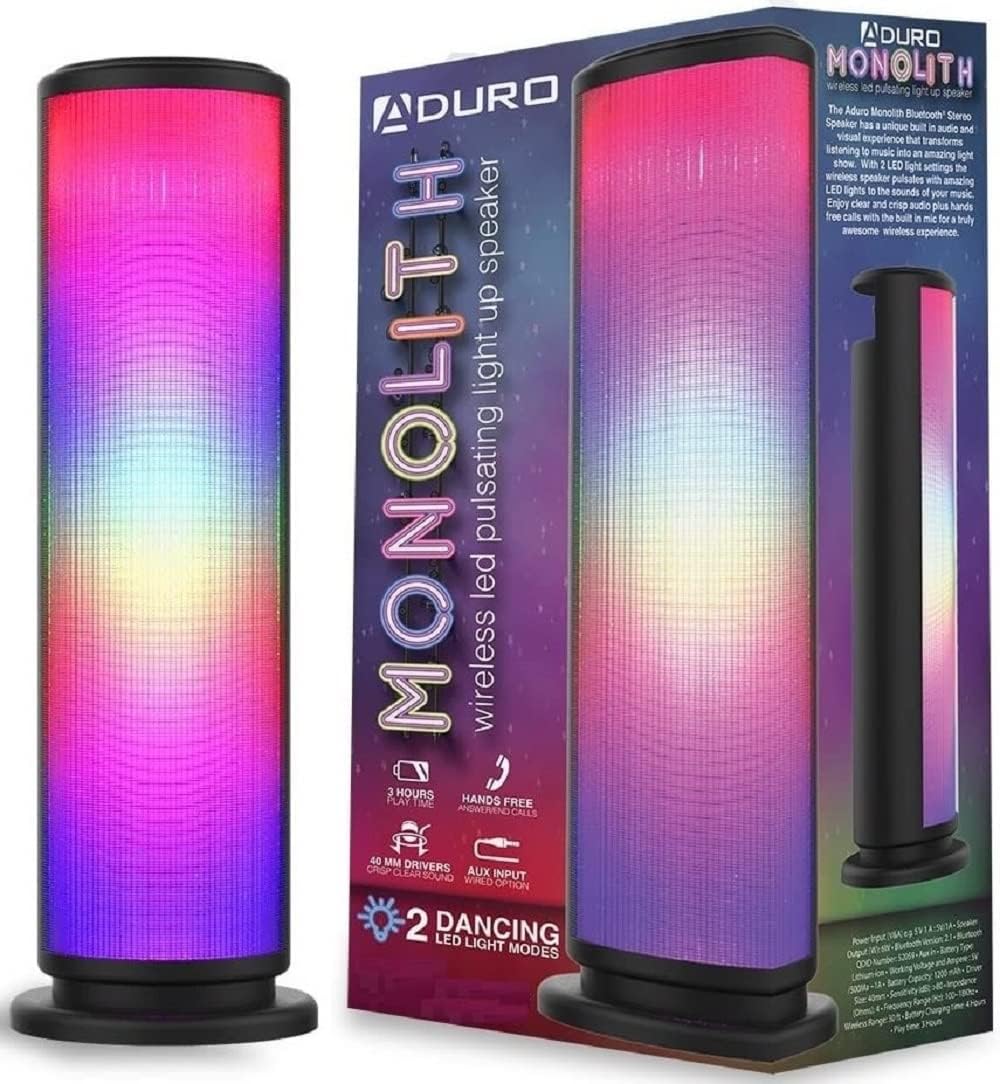
Image: The Aduro LED Wireless Speaker, showcasing its vibrant pulsating LED lights and sleek black design.
Safety Information
- Do not expose the speaker to extreme temperatures, direct sunlight, or high humidity.
- Avoid dropping or subjecting the speaker to strong impacts.
- Do not disassemble, repair, or modify the speaker yourself. Refer all servicing to qualified personnel.
- Keep the speaker away from water and liquids. This product is not waterproof.
- Use only the specified charging cable and power adapter.
- Do not operate the speaker near medical equipment or in environments where radio frequency interference is prohibited.
What's in the Box
Please check the package contents to ensure all items are present:
- Aduro LED Wireless Speaker (1 unit)
- USB Charging Cable (1 unit)
- User Manual (this document)
Note: Wall adapter for charging is not included.
Product Overview
Familiarize yourself with the speaker's components and controls:
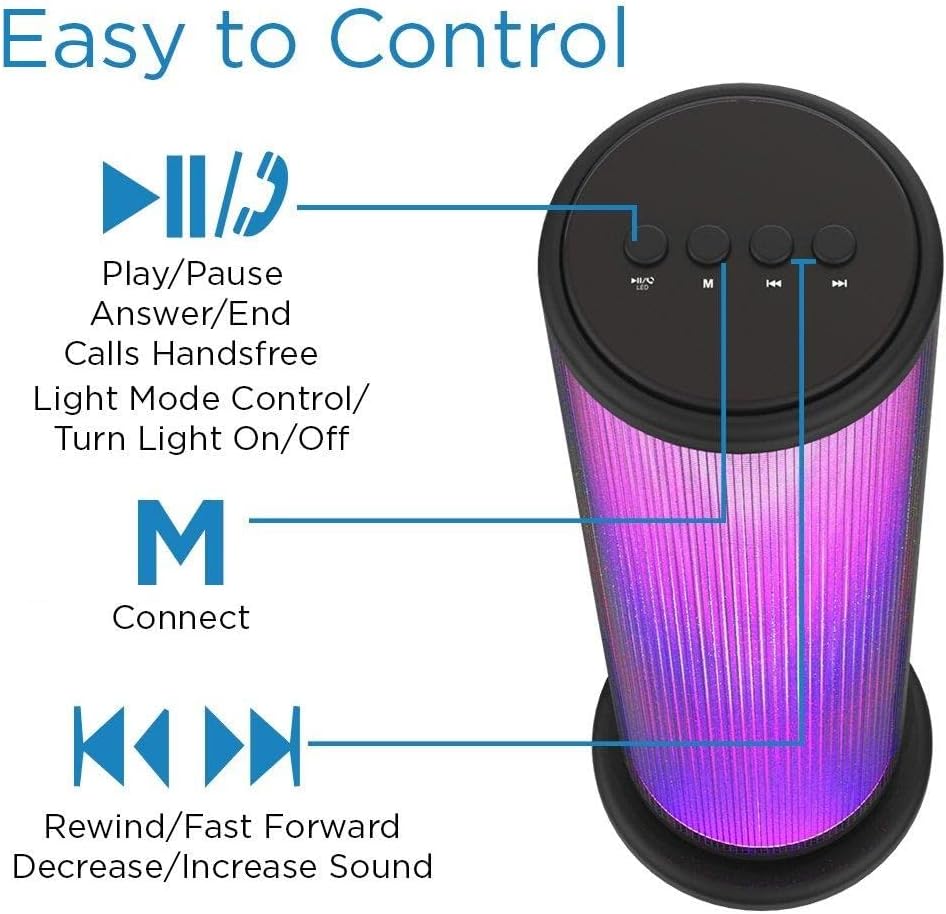
Image: Top panel of the Aduro speaker, illustrating the control buttons for play/pause, light mode, connect, and track/volume control.
Control Panel (Top)
- Play/Pause Button (►▮▮): Press to play or pause audio. Also used to answer/end calls.
- Light Mode Button (●/LED): Press to switch between LED light modes (Rhythmic Lights, Still Pattern) or turn lights on/off.
- Mode/Connect Button (M): Press to switch between Bluetooth and AUX input modes. Long press to enter Bluetooth pairing mode.
- Previous Track/Volume Down (◀◀): Short press for previous track. Long press to decrease volume.
- Next Track/Volume Up (►►): Short press for next track. Long press to increase volume.

Image: Bottom panel of the Aduro speaker, showing the Micro USB charging port and the AUX input port.
Ports (Bottom)
- Micro USB Port: For charging the speaker.
- AUX Input: For wired audio connection using a 3.5mm audio cable.
Setup
Charging the Speaker
- Connect the Micro USB end of the charging cable to the Micro USB port on the speaker.
- Connect the USB-A end of the charging cable to a USB power source (e.g., computer USB port, USB wall adapter).
- The LED indicator will illuminate during charging and turn off when fully charged.
- A full charge takes approximately 4 hours. The speaker provides up to 3 hours of playtime with LED lights active.
Operating Instructions
Power On/Off
- To power on, press and hold the Play/Pause button (►▮▮) for a few seconds until you hear an audible prompt.
- To power off, press and hold the Play/Pause button (►▮▮) again for a few seconds.
Bluetooth Pairing
- Ensure the speaker is powered on and in Bluetooth mode (indicated by a flashing blue LED). If not, press the 'M' button to switch modes.
- On your device (smartphone, tablet, etc.), enable Bluetooth and search for available devices.
- Select "Aduro Monolith" from the list of devices.
- Once paired, the speaker will provide an audible confirmation, and the blue LED will stop flashing and remain solid.
- The speaker will automatically attempt to reconnect to the last paired device when powered on.
Using AUX Input
- Connect one end of a 3.5mm audio cable (not included) to the AUX input port on the speaker.
- Connect the other end of the audio cable to the headphone jack or audio output of your device.
- The speaker will automatically switch to AUX mode.
- Control audio playback and volume from your connected device.
LED Light Modes
The speaker features two LED light modes. Press the Light Mode button (●/LED) to cycle through the options:
- Rhythmic Lights: Lights pulsate and change color in sync with the music.
- Still Pattern: Lights display a continuous, non-pulsating color pattern.
- Pressing the button again will turn the lights off.

Image: The Aduro speaker demonstrating its two distinct LED light modes: Rhythmic Lights and Still Pattern.
Hands-Free Calling
When connected via Bluetooth, the speaker's built-in microphone allows for hands-free calls:
- Answer Call: Press the Play/Pause button (►▮▮) once.
- End Call: Press the Play/Pause button (►▮▮) once during a call.
- Reject Call: Press and hold the Play/Pause button (►▮▮) for 2 seconds.
Maintenance
- Clean the speaker with a soft, dry cloth. Do not use abrasive cleaners or solvents.
- Store the speaker in a cool, dry place when not in use.
- Avoid prolonged exposure to direct sunlight or extreme temperatures.
- Charge the battery regularly, even if not in frequent use, to maintain battery health.
Troubleshooting
| Problem | Possible Cause | Solution |
|---|---|---|
| Speaker does not turn on. | Battery is depleted. | Charge the speaker fully. |
| Cannot pair via Bluetooth. | Speaker is not in pairing mode or too far from device. | Ensure speaker is in Bluetooth pairing mode (flashing blue LED). Move device closer to speaker (within 10 meters). Turn off and on Bluetooth on your device. |
| No sound from speaker. | Volume is too low or device is not connected properly. | Increase volume on both speaker and connected device. Re-pair Bluetooth or re-connect AUX cable. |
| LED lights are not working. | Lights are turned off or battery is low. | Press the Light Mode button (●/LED) to turn lights on. Charge the speaker. |
| Poor sound quality. | Device is too far, interference, or low battery. | Move device closer. Avoid obstacles. Charge the speaker. |
Specifications
| Feature | Detail |
|---|---|
| Model Name | Monolith |
| Model Number | AY-MTSP-01 |
| Speaker Type | Outdoor, Portable |
| Connectivity Technology | Bluetooth, AUX |
| Bluetooth Range | Up to 10 meters (33 feet) |
| Audio Output Mode | Stereo |
| Speaker Maximum Output Power | 6 Watts |
| Driver Size | 40mm |
| Battery Type | Lithium Ion |
| Battery Capacity | 1200mAh |
| Battery Life | Up to 3 hours (with LED lights active) |
| Charging Time | Approximately 4 hours |
| Dimensions (L x W x H) | 3.5 x 5.8 x 11.8 inches |
| Item Weight | 15 ounces (0.94 lbs) |
| Color | Black |
| Included Components | 40mm Drivers, rechargeable battery, sensitive control panel, speakers, built-in microphone |
Warranty and Support
Aduro products are designed with quality and reliability in mind. This product comes with a manufacturer's warranty. For specific warranty details and duration, please refer to the warranty card included with your purchase or visit the official Aduro website.
For technical support, troubleshooting assistance, or warranty claims, please contact Aduro customer service through their official channels. Please have your model number (AY-MTSP-01) and proof of purchase ready when contacting support.
You can find more information and contact details on the Aduro Store on Amazon.
Ask a question about this manual
Ask about setup, troubleshooting, compatibility, parts, safety, or missing instructions. Manuals+ will review the question and use this page’s manual context to help answer it.