
hisonic BS-SUN-690
Hisonic Kids Bluetooth Headphones User Manual
Model: BS-SUN-690 / BS-SUN--690/696
Introduction
Thank you for choosing Hisonic Kids Bluetooth Headphones. These headphones are designed with children's comfort and safety in mind, featuring volume limiting technology, a durable foldable design, and versatile connectivity options. This manual provides detailed instructions for setup, operation, maintenance, and troubleshooting to ensure optimal use of your new headphones.
Package Contents
Please check the box for the following items:
- Hisonic Kids Bluetooth Headphones (Blue)
- 3.5mm Audio Cable
- USB Charging Cable
- User Manual

Image: The product packaging, showing the headphones, cables, and manual. The packaging highlights "SUPER BASS HEADPHONES" and includes information about the manufacturer.
Product Overview
The Hisonic Kids Bluetooth Headphones are designed for comfort and ease of use, featuring soft ear pads and an adjustable headband suitable for children aged 2 to 12 years.

Image: A front-facing view of the blue Hisonic Kids Bluetooth Headphones, showcasing their foldable design and soft earcups.
Controls and Ports
The right earcup houses all the essential controls for easy operation:
- ON/OFF / Play/Pause Button: Central button for power and media playback control.
- VOL+ Button: Increases volume.
- VOL- Button: Decreases volume.
- Next Track Button: Skips to the next song.
- Previous Track Button: Goes back to the previous song.
- Microphone: Built-in for hands-free calls and online learning.
- 3.5mm Audio Jack: For wired connection and audio sharing.
- Charging Port: For recharging the internal battery.

Image: A detailed view of the control buttons on the right earcup, clearly labeled for volume, track navigation, and power/play functions. The buttons are large for easy use by children.
Setup
Charging the Headphones
Before first use, fully charge the headphones. Connect the USB charging cable to the charging port on the headphones and the other end to a USB power source (e.g., computer USB port, wall adapter). The indicator light will show charging status and turn off when fully charged.
The headphones are equipped with 1 Lithium-Ion battery (included).
Powering On/Off
- To Power On: Press and hold the central ON/OFF button until the indicator light turns on and you hear a power-on prompt.
- To Power Off: Press and hold the central ON/OFF button until the indicator light turns off and you hear a power-off prompt.
Operating Instructions
Bluetooth Pairing
To connect your headphones wirelessly via Bluetooth:
- Ensure the headphones are powered off.
- Press and hold the central ON/OFF button for approximately 5-7 seconds until the indicator light flashes red and blue, indicating pairing mode.
- On your device (smartphone, tablet, laptop, etc.), enable Bluetooth and search for available devices.
- Select "Hisonic" or the corresponding model name (e.g., "BS-SUN-690") from the list.
- Once connected, the indicator light will turn solid blue, and you will hear a confirmation sound.

Image: An illustration showing the headphones' compatibility with a range of devices including smartphones, tablets, laptops, MP3 players, Smart TVs, and other devices, highlighting their versatile connectivity.
Wired Connection
For devices without Bluetooth or when the battery is low, you can use the included 3.5mm audio cable:
- Plug one end of the 3.5mm audio cable into the audio jack on the headphones.
- Plug the other end into the audio output jack of your device.
- The headphones will automatically switch to wired mode.

Image: The headphones with a 3.5mm audio cable connected, illustrating the "Wired & wireless Freely switch" feature, allowing users to choose their preferred connection method.
Audio Sharing Feature
These headphones feature a unique audio sharing capability, allowing multiple children to listen to the same audio source:
- Connect the first Hisonic headphone to your device via Bluetooth or the 3.5mm audio cable.
- Using another 3.5mm audio cable, connect it from the 3.5mm audio jack of the first headphone to the 3.5mm audio jack of a second headphone.
- Both headphones will now play audio from the same source.
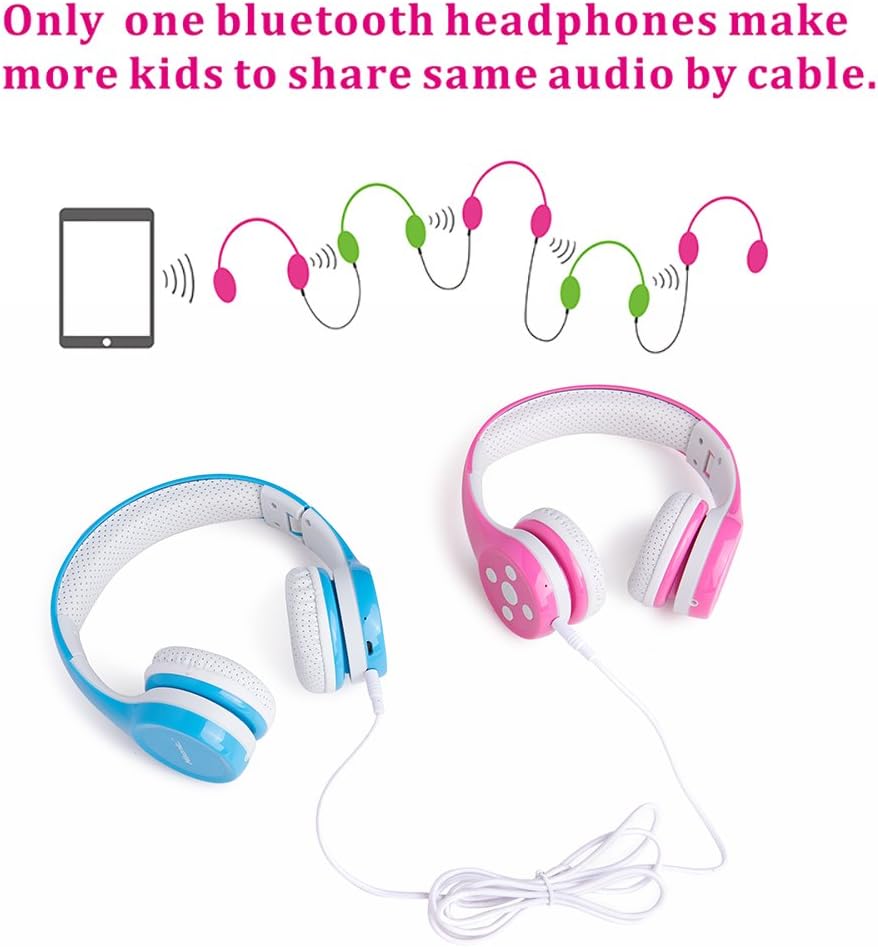
Image: A visual representation of the audio sharing function, where one pair of headphones is connected to a tablet, and a second pair is daisy-chained to the first via a 3.5mm cable, enabling shared listening.
Volume Control and Safety
The headphones integrate a volume limiting feature, restricting the maximum output to 85-93dB. This protects children's delicate ears from potential damage due to excessive volume, making them safe for long periods of use.
- Press the VOL+ button to increase the volume.
- Press the VOL- button to decrease the volume.

Image: A side view of the headphones, with annotations pointing to the 85-93dB volume limit for safe use and the comfortable, soft earmuffs with a hole design for breathability. It also mentions the PU surface treatment for durability.
Using the Microphone
The built-in microphone allows for hands-free communication and is ideal for online learning, video calls, or voice chats.
- When connected via Bluetooth, the microphone will automatically activate for calls or voice input.
- Press the central ON/OFF button once to answer an incoming call.
- Press the central ON/OFF button again to end a call.
Maintenance
Proper care will extend the life of your headphones:
- Cleaning: Use a soft, dry cloth to wipe the headphones. Do not use abrasive cleaners or solvents.
- Storage: When not in use, fold the headphones to save space and store them in a cool, dry place, away from direct sunlight and extreme temperatures.
- Ear Pads: The comfortable and soft ear pads are designed for maximum comfort and can be gently cleaned.

Image: A full view of the headphones emphasizing "ULTRA PROTECTION" and "Maximum comfort" for the ear pads, indicating their durable and child-friendly design.
Troubleshooting
If you encounter any issues, please refer to the table below for common problems and their solutions:
| Problem | Possible Cause | Solution |
|---|---|---|
| Headphones do not power on. | Low battery. | Charge the headphones fully. |
| Cannot pair via Bluetooth. | Headphones not in pairing mode; Bluetooth disabled on device; device too far. | Ensure headphones are in pairing mode (flashing red/blue); enable Bluetooth on your device; move device closer to headphones (within 10 meters). |
| No sound when connected. | Volume too low; incorrect audio source; wired cable not fully inserted. | Increase volume on headphones and device; ensure correct audio output is selected on your device; firmly insert the 3.5mm cable. |
| Sound quality is poor. | Weak Bluetooth signal; damaged audio cable. | Move closer to the Bluetooth device; try a different 3.5mm audio cable if using wired connection. |
Specifications
| Feature | Detail |
|---|---|
| Model Number | BS-SUN-690 / BS-SUN--690/696 |
| Brand | hisonic |
| Color | Blue |
| Connectivity Technology | Bluetooth / 3.5mm Cable Connection |
| Wireless Communication | Bluetooth |
| Ear Placement | On Ear |
| Form Factor | On-Ear |
| Impedance | 32 Ohm |
| Noise Control | None |
| Headphone Jack | 3.5 mm Jack |
| Product Dimensions | 15 x 15 x 5.5 cm |
| Item Weight | 258.55 Grams |
| Batteries | 1 Lithium-Ion battery (included) |
| Manufacturer | Shenzhen Hisonic Audio Products Co., Ltd. |
| Country of Origin | China |
Warranty and Support
Specific warranty information is not provided in the product details. For warranty claims, technical support, or further assistance, please refer to the contact information provided on the product packaging or contact your retailer. Keep your purchase receipt as proof of purchase.
Ask a question about this manual
Ask about setup, troubleshooting, compatibility, parts, safety, or missing instructions. Manuals+ will review the question and use this page’s manual context to help answer it.