
1. Introduction
Welcome to the user guide for the Beyblade Burst Vol. 1 DVD and accompanying book set. This product offers an immersive experience into the world of Beyblade Burst, featuring animated episodes and supplementary content in a physical book format. This guide provides essential information for setup, operation, and care of your product.

Figure 1: The Beyblade Burst Vol. 1 DVD and Book Set packaging. This image displays the front cover of the box set, featuring key characters and the Beyblade Burst logo, indicating the product's contents.
2. Setup
To begin enjoying your Beyblade Burst Vol. 1 DVD, ensure you have a compatible DVD player and a television or monitor. Follow these steps for initial setup:
- Connect your DVD Player: Ensure your DVD player is properly connected to your television or display device using appropriate cables (e.g., HDMI, RCA). Refer to your DVD player's manual for specific connection instructions.
- Power On: Turn on your television and DVD player. Select the correct input source on your television that corresponds to your DVD player's connection.
- Insert the DVD: Gently open the DVD tray or slot on your DVD player and insert the Beyblade Burst Vol. 1 DVD with the label side facing up. Close the tray or allow the player to pull the disc in.
- Access the Book: The accompanying book can be accessed directly from the set. No special setup is required for the book.
3. Operating Instructions
3.1. DVD Playback
Once the DVD is inserted, the main menu should appear automatically. Use your DVD player's remote control to navigate the menu options.
- Episode Selection: Select "Play" or choose specific episodes from the episode list.
- Language Options: The DVD supports audio in Japanese (Dolby Digital 2.0) and French (Dolby Digital 2.0). Navigate to the "Audio" or "Language" settings on the DVD menu to switch between these options.
- Subtitle Options: French subtitles are available. Select "Subtitles" from the DVD menu to enable or disable them.
- Scene Selection: If available, use the "Scene Selection" option to jump to specific moments within an episode.
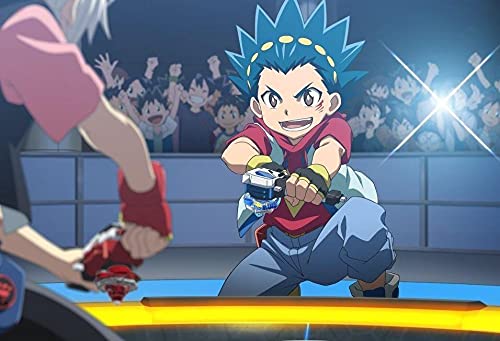
Figure 2: A dynamic scene from the Beyblade Burst anime, showing characters engaged in a Beyblade battle. This image illustrates the visual style and action content found on the DVD.
3.2. Accompanying Book
The book included in this set provides additional content related to the Beyblade Burst series. This may include:
- Character profiles and backstories.
- Episode summaries and key plot points.
- Information on Beyblades and their special abilities.
- Concept art or behind-the-scenes details.
Refer to the book's table of contents for specific sections and topics.
4. Maintenance
Proper care of your DVD and book set will ensure its longevity and continued enjoyment.
- DVD Cleaning: If the DVD surface becomes dirty or smudged, gently wipe it with a soft, lint-free cloth. Wipe from the center of the disc outwards in straight lines. Do not use abrasive materials or harsh chemicals.
- Storage: Store the DVD in its original case to protect it from scratches and dust. Keep both the DVD and the book away from direct sunlight, extreme temperatures, and high humidity.
- Handling: Always hold the DVD by its edges or by placing a finger through the center hole to avoid touching the playable surface.
5. Troubleshooting
If you encounter issues while using your Beyblade Burst Vol. 1 DVD, consider the following common solutions:
- Disc Not Playing / Skipping:
- Ensure the DVD is inserted correctly with the label side up.
- Check the disc for visible scratches or smudges. Clean the disc as described in the Maintenance section.
- Try playing the disc in another DVD player to rule out player issues.
- No Audio / Incorrect Language:
- Verify that your DVD player's audio output is correctly connected to your TV or sound system.
- Check the audio settings on your DVD player and TV.
- Access the DVD's language menu (as described in Section 3.1) to ensure the desired audio track (Japanese or French) is selected.
- No Subtitles / Incorrect Subtitles:
- Access the DVD's subtitle menu (as described in Section 3.1) to ensure French subtitles are enabled.
- Some DVD players have a dedicated subtitle button on the remote; try pressing it.
6. Specifications
Key technical specifications for the Beyblade Burst Vol. 1 DVD + Book Set:
| Model Number | 203107 |
| ASIN | B07D5159FH |
| Manufacturer / Studio | Citel |
| Number of Discs | 1 |
| Media Format | Import |
| Aspect Ratio | 16:9 - 1.77:1 |
| Audio Languages | Japanese (Dolby Digital 2.0), French (Dolby Digital 2.0) |
| Subtitles | French |
| Age Rating | Not checked |
| Package Dimensions | 18.03 x 13.76 x 1.48 cm |
| Item Weight | 83 Grams |
7. Warranty and Support
For information regarding product warranty or technical support, please refer to the contact details provided by the manufacturer, Citel, on the product packaging or their official website. As this is a media product, warranty typically covers manufacturing defects of the disc itself.
For general inquiries or further assistance, you may also contact the retailer from whom the product was purchased.