
1. Introduction
The Spartan Power SP-TS4500PLUS Automatic Transfer Switch is designed to manage power flow between a standalone solar or wind system (with an inverter) and an AC mains supply (utility power). This device automatically transfers the electrical load to utility power when the battery voltage drops below a user-defined threshold. It then switches back to the inverter when the battery recovers to a specified voltage. This ensures continuous power supply for critical loads in off-grid or hybrid power systems.
The SP-TS4500PLUS is compatible with 12V, 24V, or 48V DC input systems and can operate with 110-120Vac 60Hz or 220Vac 50Hz AC mains, making it suitable for various global applications.
2. Safety Information
Please read and understand all safety instructions before installing or operating the SP-TS4500PLUS Automatic Transfer Switch. Failure to follow these instructions may result in electric shock, fire, serious injury, or property damage.
- Qualified Personnel: Installation and maintenance must be performed by qualified electrical personnel familiar with electrical systems and safety procedures.
- Disconnect Power: Always disconnect all power sources (utility, inverter, battery) before performing any wiring, installation, or maintenance on the transfer switch. Verify power is off using a multimeter.
- Proper Grounding: Ensure the transfer switch is properly grounded according to local and national electrical codes.
- Environmental Conditions: Do not install or operate the unit in wet, damp, or excessively dusty environments. Ensure adequate ventilation around the unit.
- Correct Wiring: Verify all wiring connections are secure and correctly polarized. Incorrect wiring can cause damage to the unit or connected equipment.
- Overcurrent Protection: Install appropriate overcurrent protection (fuses or circuit breakers) on all input and output circuits as required by local codes.
3. Product Features
- User-defined Cut-off and Recovery Voltages for precise battery management.
- Supports 12V, 24V, and 48V DC input systems.
- Compatible with 110-120Vac 60Hz and 220Vac 50Hz AC mains.
- Maximum power handling of 5500 Watts at 110VAC.
- 50 Amp current rating.
- Rapid automatic transfer between power sources to minimize interruption.
- Integrated LCD display for real-time monitoring of system status and voltage.
- Wall-mountable design for convenient installation.
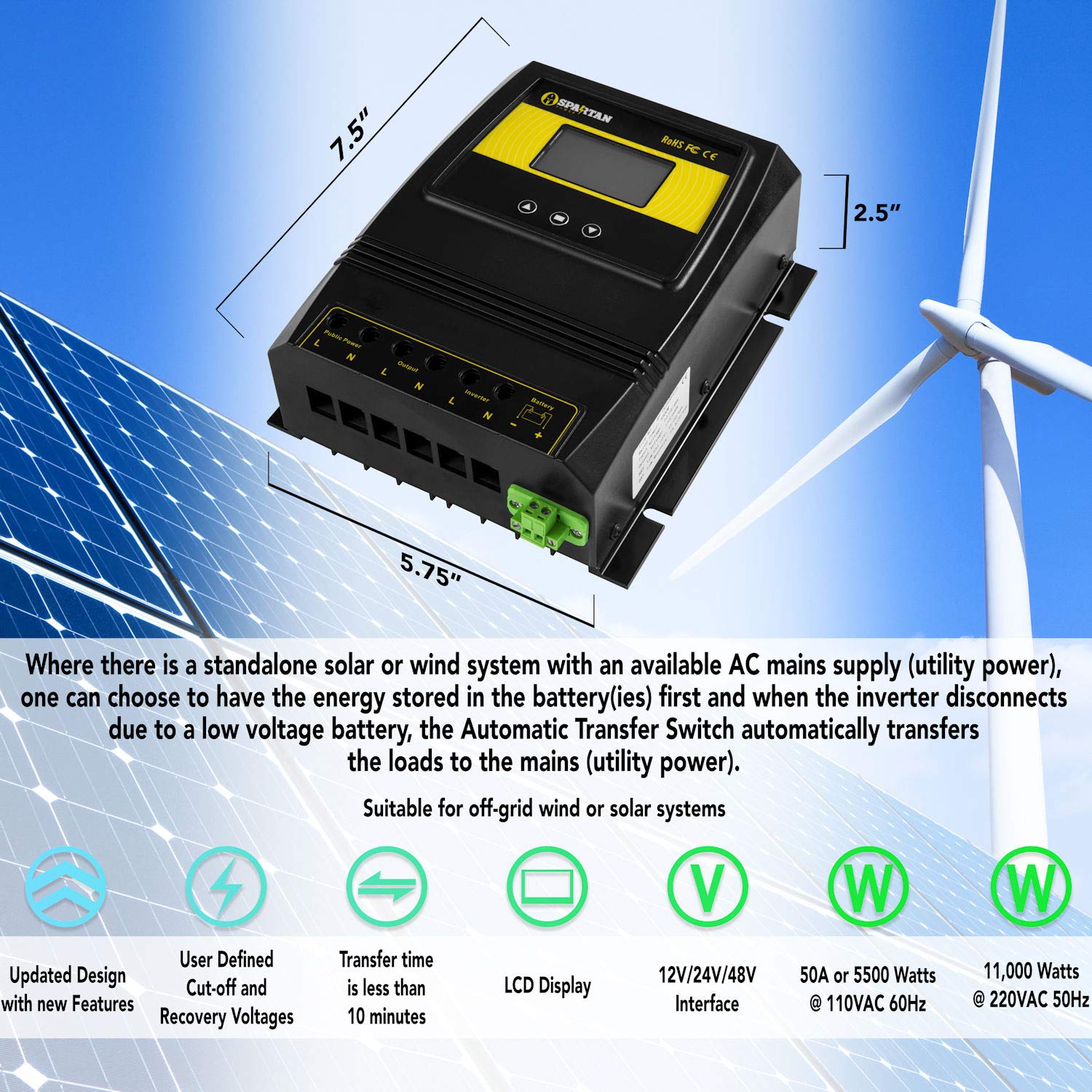
Figure 1: Spartan Power SP-TS4500PLUS Automatic Transfer Switch with key features and dimensions (7.5" x 5.75" x 2.5").
4. Package Contents
Verify that all items are present and undamaged upon opening the package. If any items are missing or damaged, contact Spartan Power customer support.
- Spartan Power SP-TS4500PLUS Automatic Transfer Switch Unit
- User Manual (this document)
- Mounting Hardware (screws, wall anchors)
5. Setup and Installation
Careful installation is crucial for the safe and efficient operation of the transfer switch. Refer to the wiring diagram for correct connections.
5.1 Mounting the Unit
- Select a suitable, dry, well-ventilated location for mounting the transfer switch. Ensure it is protected from direct sunlight, moisture, and extreme temperatures.
- Using the unit's dimensions (7.5 x 6.75 x 2.9 inches), mark the drilling points on the wall.
- Drill pilot holes and secure the unit to the wall using the provided mounting hardware. Ensure the unit is firmly attached.
5.2 Wiring Connections
WARNING: Ensure all power sources are disconnected before proceeding with wiring. Incorrect wiring can cause severe damage or injury.
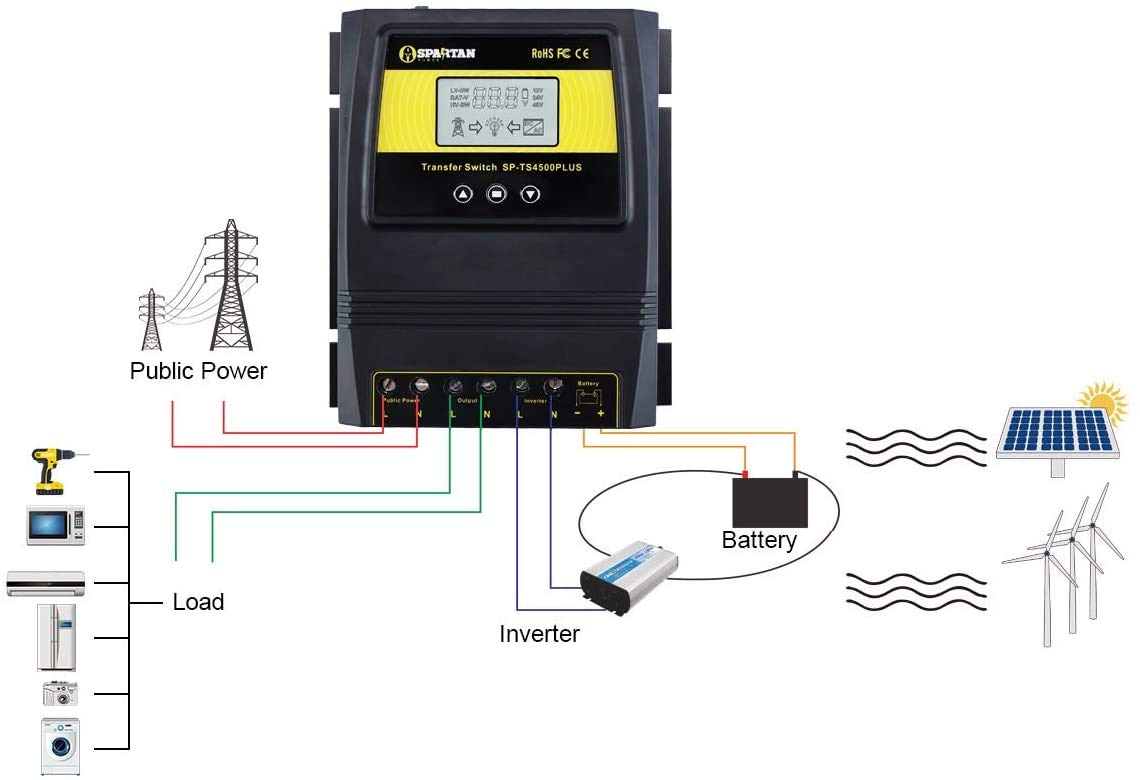
Figure 2: Typical wiring diagram for the SP-TS4500PLUS in a solar/wind off-grid system.
- Battery Connection: Connect the positive (+) and negative (-) terminals of your battery bank (12V, 24V, or 48V DC) to the corresponding BATTERY terminals on the transfer switch. Ensure correct polarity.
- Inverter Connection: Connect the AC output of your inverter to the INVERTER input terminals (L and N) on the transfer switch.
- Public Power (Utility) Connection: Connect the AC mains supply (utility power) to the PUBLIC POWER input terminals (L and N) on the transfer switch.
- Load Connection: Connect your electrical loads to the OUTPUT terminals (L and N) on the transfer switch.
- Grounding: Connect the ground wire from your electrical system to the grounding terminal on the transfer switch chassis.
5.3 Initial Power-Up and Settings
- After all wiring is complete and verified, turn on the power switch located on the top of the unit.
- The LCD display will illuminate. Use the control buttons to navigate the menu and set the desired battery cut-off and recovery voltages. Refer to the unit's on-screen instructions for specific parameter adjustments.
- Confirm that the display shows correct voltage readings for your battery and AC inputs.

Figure 3: LCD display of the SP-TS4500PLUS showing operational status.
6. Operating Instructions
Once installed and configured, the SP-TS4500PLUS operates automatically.
- Normal Operation: The transfer switch will prioritize power from your inverter (solar/wind system) as long as the battery voltage remains above the set cut-off threshold.
- Automatic Transfer to Utility: If the battery voltage drops below the user-defined cut-off voltage, the transfer switch will automatically switch the load from the inverter to the public power (utility) supply. This ensures your loads continue to receive power.
- Automatic Transfer to Inverter: When the battery voltage recovers to the user-defined recovery voltage (e.g., through solar charging), the transfer switch will automatically switch the load back to the inverter.
- LCD Monitoring: The LCD display provides real-time information on battery voltage, input status (inverter or utility), and output status. Regularly check the display to monitor system performance.
7. Maintenance
The SP-TS4500PLUS is designed for minimal maintenance. Regular checks can help ensure long-term reliability.
- Visual Inspection: Periodically inspect the unit for any signs of damage, loose connections, or overheating.
- Cleanliness: Keep the unit clean and free from dust and debris. Use a dry, soft cloth for cleaning. Do not use liquid cleaners.
- Ventilation: Ensure that the ventilation openings are not obstructed to prevent overheating.
- Connection Integrity: Annually, or as needed, verify that all electrical connections are tight and secure.
8. Troubleshooting
This section addresses common issues you might encounter with the SP-TS4500PLUS.
| Problem | Possible Cause | Solution |
|---|---|---|
| Unit does not power up / LCD is off | Power switch is off; Loose battery connection; No power from battery. | Ensure the power switch on top of the unit is in the ON position. Check battery connections for tightness and correct polarity. Verify battery voltage is within operating range. |
| Inaccurate voltage reading on LCD | Minor calibration discrepancy. | Some units may show a slight deviation (e.g., 0.2V) from actual voltage. Adjust your cut-off and recovery voltage settings to compensate for this difference if precise thresholds are critical. |
| Noticeable delay during power transfer | System configuration; Inverter response time. | While designed for rapid transfer, external factors can influence perceived delay. Ensure your inverter is functioning optimally. If the delay is excessive and impacts sensitive electronics, consider a UPS for those specific devices. |
| GFCI (Ground Fault Circuit Interrupter) trips | Grounding issue; Inverter incompatibility; Faulty wiring. | Verify all grounding connections are correct and secure. Consult your inverter's manual for compatibility with transfer switches. Inspect all wiring for shorts or damage. If the problem persists, consult a qualified electrician. |
| No transfer to utility power if inverter fails completely | Transfer switch relies on 12V control power from battery, which may still be present even if inverter fails to produce AC. | For enhanced safety and reliability, consider installing an external relay that monitors the inverter's AC output. If the inverter's AC output fails, this relay can interrupt the 12V control line to the transfer switch, forcing it to switch to utility power. |
9. Specifications
| Feature | Specification |
|---|---|
| Model | SP-TS4500PLUS |
| Operation Mode | ON-NONE-ON |
| Current Rating | 50 Amps |
| Operating DC Voltage | 12V, 24V, 48V (User Selectable) |
| AC Input Voltage | 110-120Vac 60Hz or 220Vac 50Hz |
| Maximum Wattage | 5500 Watts (at 110VAC) |
| Item Dimensions (L x W x H) | 7.5 x 6.75 x 2.9 inches |
| Mounting Type | Wall Mount |
| Contact Type | Normally Open |
| Connector Type | Screw Terminal |
| Control Method | Touch (via buttons and LCD) |
| Material | Metal |
| Certification | ETL |
| UPC | 852874008435 |
10. Warranty Information
The Spartan Power SP-TS4500PLUS Automatic Transfer Switch is covered by a 2-year warranty from the original date of purchase. This warranty covers defects in materials and workmanship under normal use and service conditions. It does not cover damage resulting from improper installation, misuse, abuse, neglect, accident, or unauthorized repair or modification.
To make a warranty claim, please retain your proof of purchase and contact Spartan Power customer support.
11. Customer Support
For technical assistance, troubleshooting guidance, or inquiries regarding your warranty, please visit the official Spartan Power website. You can find up-to-date contact information and additional resources there.
Website: www.spartanpower.com

