
Introduction
Thank you for choosing the Auna TT-30 BT Turntable. This manual provides essential information for the safe and efficient operation of your new device. Please read it thoroughly before use and keep it for future reference.
The Auna TT-30 BT is a belt-driven turntable designed for playing vinyl records, featuring an integrated Bluetooth receiver for wireless audio streaming from compatible devices.
Safety Instructions
- Read all instructions carefully before operating the device.
- Keep the manual for future reference.
- Do not expose the device to rain or moisture to prevent fire or electric shock.
- Ensure proper ventilation. Do not block any ventilation openings.
- Place the device on a stable, level surface.
- Use only attachments/accessories specified by the manufacturer.
- Unplug the device during lightning storms or when unused for long periods.
- Refer all servicing to qualified service personnel.
Package Contents
Please check that all items listed below are present in the packaging:
- Auna TT-30 BT Turntable Unit
- Platter (Metal)
- Dust Cover
- Power Adapter
- Operating Instructions (this manual)
Product Overview
The Auna TT-30 BT Turntable features a robust design with a metal platter for stable playback. Key components include the tonearm with cartridge and stylus, speed selector, cueing lever, and an integrated Bluetooth receiver.
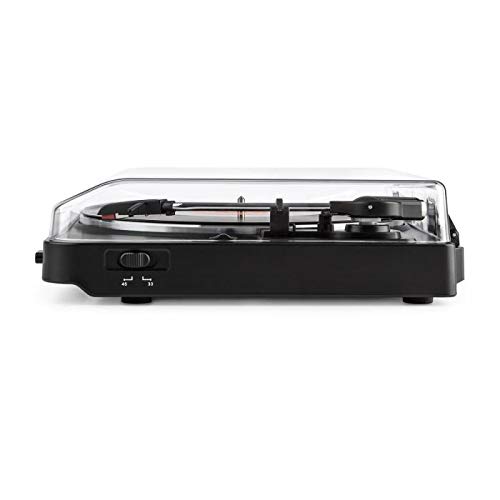
Image of the Auna TT-30 BT Turntable, showcasing its design and components.
Setup
1. Placement
Place the turntable on a flat, stable, and vibration-free surface away from direct sunlight, heat sources, and strong magnetic fields. Ensure there is enough space around the unit for proper ventilation and operation of the dust cover.
2. Platter Assembly
- Carefully place the metal platter onto the center spindle.
- Locate the drive belt (usually pre-installed or found separately). Stretch the belt around the motor pulley and the inner rim of the platter.
- Place the felt mat (if included) on top of the platter.
3. Power Connection
Connect the power adapter to the DC input on the rear of the turntable, then plug the adapter into a suitable wall outlet.
4. Stylus Protection
Remove the stylus protector from the cartridge before playing any records. Ensure the tonearm is properly balanced and the tracking force is set according to the cartridge manufacturer's recommendations (if adjustable).
Operating Instructions
1. Playing Records
- Open the dust cover.
- Place a record on the platter.
- Select the correct speed (33 1/3 or 45 RPM) using the speed selector switch. For 45 RPM records, place the 45 RPM adapter over the spindle if needed.
- Release the tonearm lock.
- Lift the tonearm using the cueing lever.
- Move the tonearm over the desired starting groove of the record.
- Gently lower the tonearm using the cueing lever. The stylus will make contact with the record, and playback will begin.
- At the end of the record, the turntable may feature an auto-stop function, which will stop the platter rotation. Lift the tonearm and return it to its rest, then engage the tonearm lock.
2. Bluetooth Playback (Receiving Audio)
The Auna TT-30 BT Turntable features an integrated Bluetooth receiver, allowing you to stream audio wirelessly from your smartphone, tablet, or other Bluetooth-enabled devices to the turntable's output (e.g., connected speakers).
- Ensure the turntable is powered on.
- Activate Bluetooth on your external audio device (e.g., smartphone).
- Search for available Bluetooth devices. The turntable should appear as "Auna TT-30 BT" or similar.
- Select the turntable from the list to pair. Once paired, audio from your device will be routed through the turntable's audio output.
Note: The turntable acts as a Bluetooth receiver, meaning it receives audio from other devices. It does not transmit audio wirelessly to Bluetooth headphones or speakers.
Maintenance
1. Cleaning the Turntable
- Always unplug the turntable from the power outlet before cleaning.
- Use a soft, dry cloth to wipe the exterior surfaces. Do not use abrasive cleaners or solvents.
- For the dust cover, use a soft cloth and a mild, non-abrasive cleaner if necessary.
- Regularly dust the stylus with a soft brush, moving from back to front.
2. Stylus Replacement
The stylus (needle) is a delicate component and will wear out over time, typically after 300-500 hours of playback. A worn stylus can damage your records and degrade sound quality. Consult your retailer or Auna support for information on replacement styli compatible with your TT-30 BT turntable.
Troubleshooting
| Problem | Possible Cause | Solution |
|---|---|---|
| No power | Power adapter not connected; outlet not active. | Check power connections; try a different outlet. |
| No sound or low volume | External amplifier/speakers not connected or turned on; volume too low; stylus dirty or damaged. | Ensure audio cables are connected; turn on amplifier/speakers and adjust volume; clean or replace stylus. |
| Skipping or distorted sound | Record dirty or damaged; stylus dirty or worn; turntable not level; excessive vibration. | Clean record; clean or replace stylus; ensure turntable is on a level, stable surface; reduce vibrations. |
| Bluetooth pairing failure | Turntable not in pairing mode; device too far; interference. | Ensure turntable is discoverable; move device closer; restart both devices. |
Specifications
| Brand | Auna |
| Model Number | TTS10-2300-plat |
| Dimensions (L x W x H) | 45.5 x 43 x 16.5 cm |
| Weight | 3.7 kg |
| Material | Metal |
| Special Feature | Integrated Bluetooth Receiver |
| Connector Type | USB (for connectivity, not necessarily for audio output) |
Note: Specifications are subject to change without prior notice.
Warranty and Support
For warranty information, please refer to the warranty card included with your product or contact your retailer. For technical support or service inquiries, please visit the official Auna website or contact their customer service department. Keep your proof of purchase for any warranty claims.
Auna Official Website: www.auna.de (Example link, actual link may vary by region)