
Introduction
Thank you for choosing PowerLocus P2 Bluetooth Over-Ear Headphones. These headphones are designed to provide a premium audio experience with versatile connectivity options, including Bluetooth, wired, Micro SD/TF card, and FM radio modes. This manual will guide you through the setup, operation, maintenance, and troubleshooting of your new headphones to ensure optimal performance and longevity.

Image: PowerLocus P2 Bluetooth Over-Ear Headphones in blue/white, shown with their protective hard-shell carrying case.
Product Features
- Amazing Sound Quality: High Definition Stereo Headphones with deep bass and dynamic power sound.
- Great Comfort: Foldable and stretchable design to fit various head sizes, featuring super soft memory-protein foam leather earmuffs and headband for extended wear.
- Quick Connectivity: Bluetooth 5.3 for stable wireless connection. Compatible with all Bluetooth or 3.5mm plug cable enabled devices.
- Multi-functional: Built-in microphone for hands-free communication with noise reduction technology, Micro SD/TF card slot for direct music playback, and FM radio function.
- Durable Design: Constructed from quality materials for a premium look and feel.
- Flexible Usage: Rechargeable with up to 15 hours of playtime, with the option to switch to wired mode when the battery is low.
- Portability: Comes with a protective premium case for safe transport and storage.
What's in the Box
Upon opening your PowerLocus P2 package, you should find the following items:
- 1x PowerLocus P2 Wireless Headphones
- 1x 3.5mm Audio Cable
- 1x USB-C Charging Cable
- 1x Elegant Hard Shell Carry Case

Image: Visual representation of the PowerLocus P2 package contents, including the headphones, audio cable, charging cable, and protective case.
Setup Guide
Powering On/Off
- To power on, slide the On/Off button located on the right earcup. An indicator light will illuminate.
- To power off, slide the On/Off button back to the off position.
Bluetooth Pairing
- Ensure the headphones are powered on and in pairing mode (indicated by a flashing LED).
- On your device (smartphone, tablet, PC), enable Bluetooth and search for available devices.
- Select "PowerLocus P2" from the list of devices.
- Once connected, the LED indicator will stop flashing and remain solid.
Wired Connection
For a wired connection, use the included 3.5mm audio cable.
- Insert one end of the 3.5mm audio cable into the Audio Cable port on the headphones.
- Insert the other end into the 3.5mm audio jack of your device.
- The headphones will automatically switch to wired mode. This mode can be used even if the headphone battery is depleted.
Micro SD/TF Card Mode
The PowerLocus P2 headphones support Micro SD/TF cards for direct music playback.
- Insert a Micro SD/TF card (up to 32GB) with MP3 audio files into the Micro SD slot on the headphones.
- The headphones will automatically detect the card and begin playing music.
FM Radio Mode
To use the built-in FM radio:
- Press the 'M' (Mode) button to switch to FM radio mode.
- Use the Volume +/- buttons to scan for stations.

Image: The headphones are universally compatible with laptops, phones, and Bluetooth devices, and support Micro SD card playback.
Operating Instructions
Controls Overview
All control buttons are located on the right earcup for easy access.
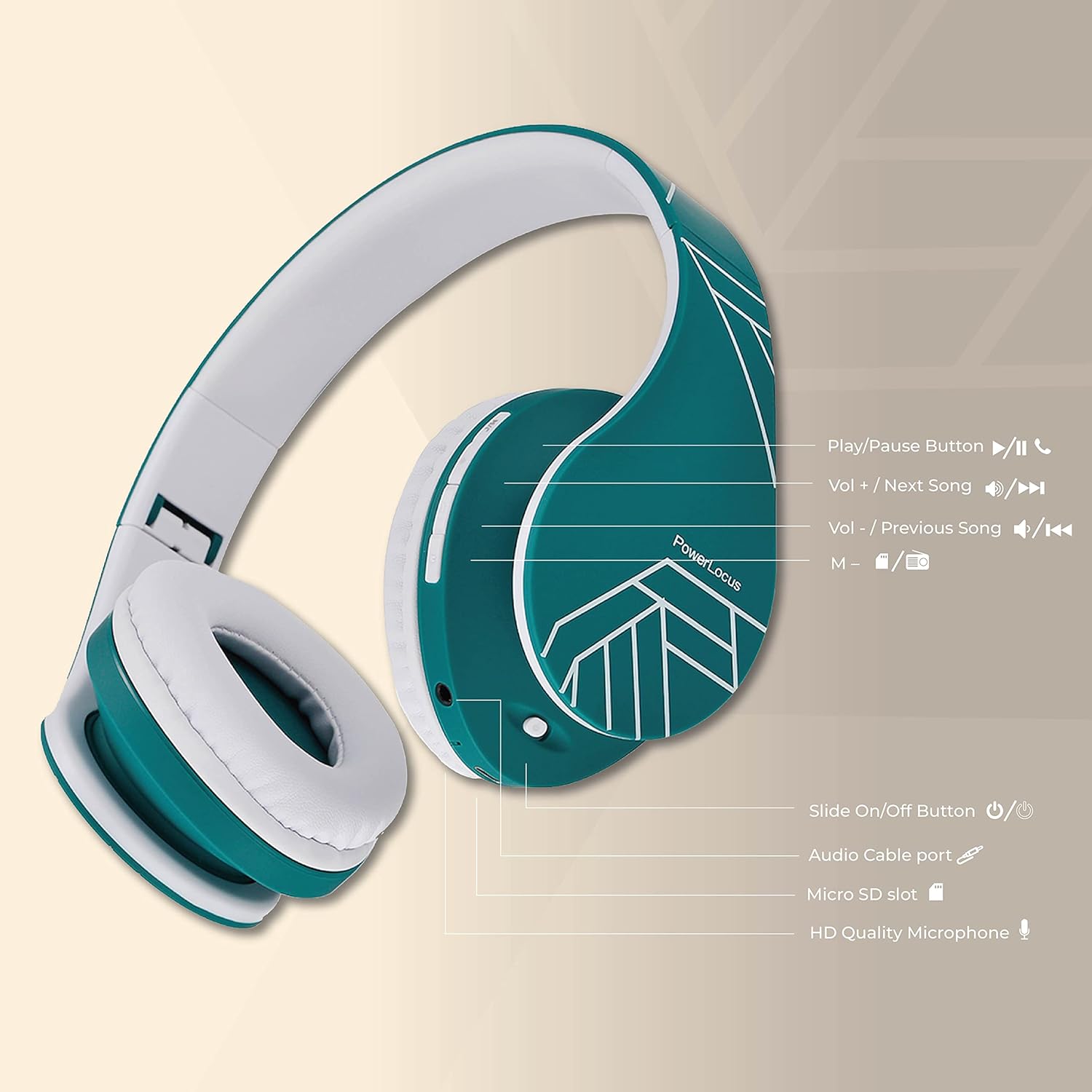
Image: A detailed diagram illustrating the location and function of each button and port on the PowerLocus P2 headphones.
- Play/Pause Button (►▮▮): Press once to play or pause music. Press to answer/end calls.
- Volume + / Next Song (►►): Short press for Volume Up. Long press for Next Song.
- Volume - / Previous Song (◄◄): Short press for Volume Down. Long press for Previous Song.
- M (Mode) Button: Press to switch between Bluetooth, FM Radio, and Micro SD modes.
- On/Off Button: Slide to power the headphones on or off.
- Audio Cable Port: For wired connection using the 3.5mm audio cable.
- Micro SD Slot: For inserting a Micro SD/TF card for direct music playback.
- HD Quality Microphone: For hands-free calls.
Charging
To charge your PowerLocus P2 headphones:
- Connect the included USB-C charging cable to the charging port on the headphones.
- Connect the other end of the cable to a USB power source (e.g., computer USB port, wall adapter).
- The LED indicator will show charging status (e.g., red while charging, off when fully charged).
- A full charge takes approximately 2.5 hours and provides up to 15 hours of playtime.

Image: The headphones offer up to 15 hours of wireless playtime and can seamlessly switch to wired mode for continuous use.
Maintenance
- Cleaning: Use a soft, dry cloth to clean the headphones. Do not use abrasive cleaners or solvents.
- Storage: When not in use, store the headphones in the provided protective case to prevent scratches and damage.
- Avoid Moisture: Keep the headphones away from water and excessive humidity.
- Temperature: Avoid exposing the headphones to extreme temperatures.
- Cable Care: Handle cables gently to prevent damage to connectors and wires.
Troubleshooting
| Problem | Possible Solution |
|---|---|
| Headphones do not power on. | Ensure the battery is charged. Connect to a power source using the USB-C cable. |
| Cannot pair via Bluetooth. | Ensure headphones are in pairing mode (flashing LED). Turn off and on Bluetooth on your device. Move closer to the device. Clear previous Bluetooth connections on your device. |
| No sound in Bluetooth mode. | Check volume levels on both headphones and connected device. Ensure headphones are correctly paired. Try re-pairing. |
| No sound in wired mode. | Ensure the 3.5mm audio cable is fully inserted into both the headphones and the device. Test with a different audio cable if available. |
| Micro SD card not playing. | Ensure the card is inserted correctly. Verify that the audio files are in a supported format (e.g., MP3). Check if the card is damaged. |
| FM radio not working or poor reception. | Ensure you are in FM radio mode. Try moving to an open area for better reception. Scan for stations again. |
Specifications
- Model Name: P2
- Connectivity Technology: Wireless (Bluetooth), Wired (3.5mm Jack)
- Wireless Communication Technology: Bluetooth 5.3
- Bluetooth Range: Up to 36 feet (approx. 11 meters)
- Audio Driver Type: Dynamic Driver
- Audio Driver Size: 40 mm
- Impedance: 32 Ohm
- Frequency Response: 20 Hz - 20,000 Hz
- Sensitivity: 110 dB
- Noise Control: Sound Isolation
- Battery Life: Up to 15 Hours (Playtime)
- Charging Time: Approximately 2.5 Hours
- Control Type: Media Control (Buttons)
- Microphone: Built-in, HD Quality
- Special Features: Foldable, Lightweight, Micro SD/TF Card Slot, FM Radio
- Material: Leather (earmuffs, headband)
- Item Weight: 165 Grams (5.8 ounces)
- Product Dimensions: 4.4 x 6.1 x 8.1 inches
- UPC: 600174204220

Image: Key comfort features of the PowerLocus P2 headphones, including soft memory foam earcups and an adjustable, flexible design.
Warranty and Support
PowerLocus provides a 24-month warranty for your P2 headphones, ensuring peace of mind regarding product quality and performance. We are committed to 100% customer satisfaction.
For any questions, concerns, or support needs, please contact PowerLocus customer support. Our team is available 24/7 to assist you.
Contact Information:
- Website: PowerLocus.com
- Email: info@powerlocus.com
Please retain your proof of purchase for warranty claims.


