
1. Introduction
The Sperry Instruments DM6800 Thin Digital Multimeter is engineered for professional electricians, offering a durable, ergonomic, and impact-resistant design. This full-sized multimeter is less than 3/4 inch thick, making it exceptionally portable. It is designed to accurately test AC/DC voltage, amperage, resistance, and continuity, featuring improved audible and visual indicators, and a backlit display for enhanced readability in various conditions.
This manual provides essential information for the safe and effective use of your DM6800 multimeter. Please read it thoroughly before operation.
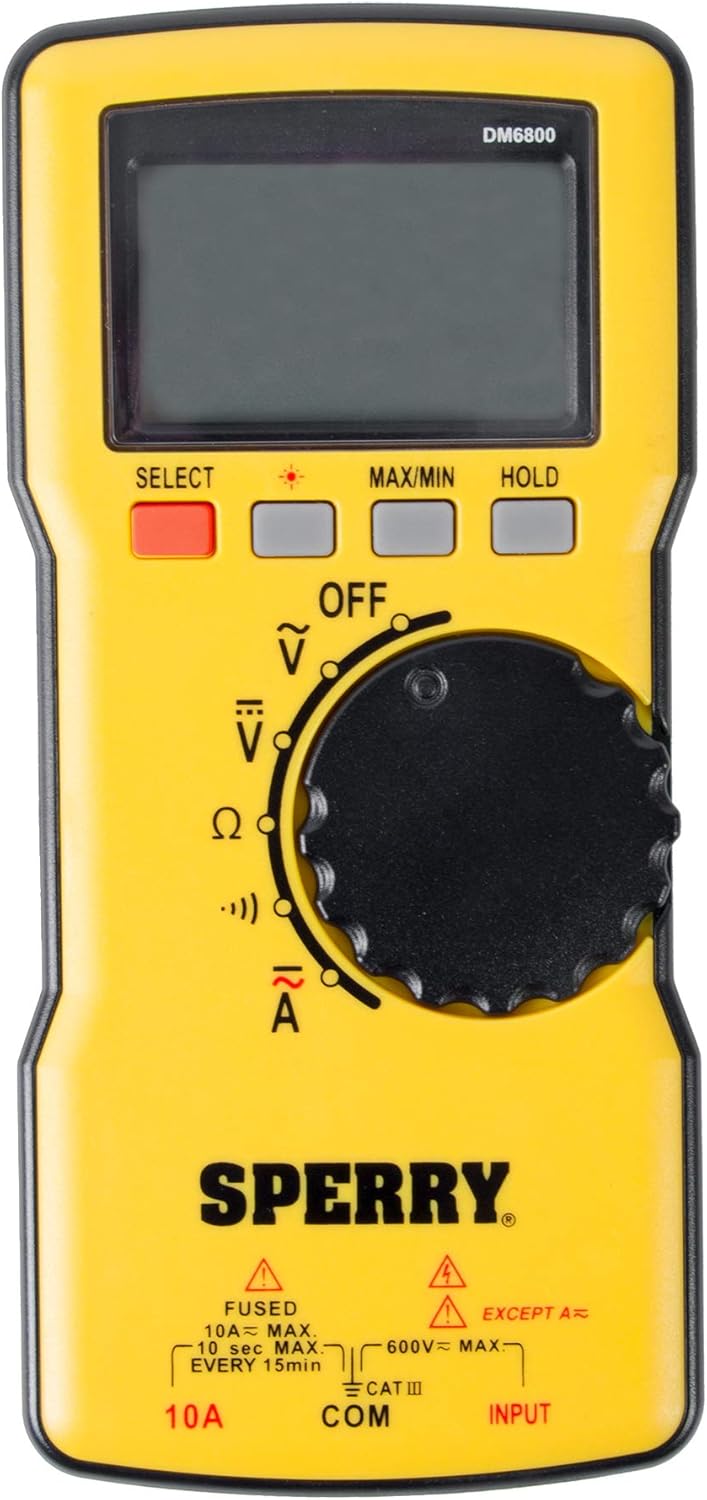
Figure 1.1: Front view of the Sperry Instruments DM6800 Thin Digital Multimeter.
2. Safety Information
WARNING: Always observe safety precautions when working with electrical systems. Failure to do so may result in injury or death.
- This device is rated CAT III 600V. Do not attempt to measure voltages exceeding 600V AC/DC.
- Ensure test leads are in good condition, free from cracks or damage, before each use.
- Always disconnect power to the circuit before making resistance or continuity measurements.
- Do not use the multimeter if it appears damaged or is not operating properly.
- Wear appropriate personal protective equipment (PPE), such as insulated gloves and safety glasses, when working with live circuits.
- Keep hands and fingers behind the probe barriers during measurements.
- Avoid working alone when performing electrical measurements.
3. Product Features
- Thin Design: Less than 3/4-inch thick for enhanced portability.
- Auto Ranging: Automatically determines the correct measurement range, simplifying operation.
- Backlit Display: Improves readability in low-light conditions.
- Data Hold Function: Freezes the current reading on the display.
- Min/Max Function: Records the minimum and maximum values during a measurement session.
- Auto-Off Function: Conserves battery life by automatically powering down after a period of inactivity.
- Low Battery Indicator: Alerts the user when batteries need replacement to prevent inaccurate readings.
- Durable Construction: 10 ft drop rating and 250lb crush rating for robust performance in demanding environments.
- Measurement Capabilities: AC/DC Voltage (up to 600V), AC/DC Amperage (up to 10A), Resistance (up to 20M Ohm), and Continuity.

Figure 3.1: Side view highlighting the thin profile of the DM6800 multimeter.
4. Package Contents
Upon opening the package, verify that all items listed below are present and undamaged:
- Sperry Instruments DM6800 Digital Multimeter
- 40-inch CAT II/III 600V Test Leads (1 red, 1 black)
- Soft Carrying Case
- 2 x AAA Batteries

Figure 4.1: The DM6800 multimeter shown with its included test leads.
5. Setup
5.1 Battery Installation
- Locate the battery compartment on the back of the multimeter.
- Using a Phillips head screwdriver, loosen the screw securing the battery cover.
- Remove the battery cover.
- Insert the two AAA batteries, observing the correct polarity (+/-) as indicated inside the compartment.
- Replace the battery cover and tighten the screw.
5.2 Connecting Test Leads
The DM6800 features three input jacks at the bottom of the unit:
- COM (Common) Jack: For the black test lead.
- INPUT Jack: For the red test lead when measuring voltage, resistance, or continuity.
- 10A Jack: For the red test lead when measuring current up to 10A.
To connect the test leads:
- Insert the black test lead into the COM jack.
- For most measurements (voltage, resistance, continuity), insert the red test lead into the INPUT jack.
- For current measurements (amperage), insert the red test lead into the 10A jack.

Figure 5.1: Close-up of the input jacks (10A, COM, INPUT) on the DM6800.
6. Operating Instructions
The DM6800 features a rotary dial for selecting measurement functions and several buttons for additional features.
6.1 Function Selection
Turn the central rotary dial to select the desired measurement function:
- OFF: Powers off the multimeter.
- V~: AC Voltage measurement.
- V-: DC Voltage measurement.
- Ω: Resistance measurement.
- •))): Continuity test (audible beep for low resistance).
- A~: AC Amperage measurement (ensure red lead is in 10A jack).
- A-: DC Amperage measurement (ensure red lead is in 10A jack).
6.2 Button Functions
- SELECT: Toggles between AC/DC modes for voltage and amperage, or other sub-functions if applicable.
- Light Bulb Icon: Activates/deactivates the display backlight.
- MAX/MIN: Enters Max/Min recording mode. Press once to display maximum value, press again for minimum value. Press and hold to exit.
- HOLD: Freezes the current reading on the display. Press again to release.
6.3 Performing Measurements
General Steps:
- Ensure the multimeter has fresh batteries and test leads are correctly connected for the desired measurement.
- Turn the rotary dial to the appropriate function (e.g., V~ for AC Voltage).
- Carefully place the test probes across the circuit or component to be measured.
- Read the measurement on the digital display. The auto-ranging feature will automatically select the optimal range.
- When finished, remove the test probes from the circuit and turn the dial to OFF.

Figure 6.1: The DM6800 multimeter in use, measuring voltage at an electrical outlet.
7. Maintenance
7.1 Cleaning
To clean the multimeter, wipe the case with a damp cloth and a mild detergent. Do not use abrasives or solvents. Ensure the unit is completely dry before storage or next use.
7.2 Storage
When not in use, store the multimeter and its test leads in the provided soft carrying case. Store in a cool, dry place, away from direct sunlight and extreme temperatures. If storing for extended periods, remove the batteries to prevent leakage.
7.3 Battery Replacement
Replace batteries when the low battery indicator appears on the display. Refer to Section 5.1 for battery installation instructions.
8. Troubleshooting
| Problem | Possible Cause | Solution |
|---|---|---|
| Multimeter does not power on. | Dead or incorrectly installed batteries. | Check battery polarity or replace batteries. |
| Inaccurate readings. | Low battery; damaged test leads; incorrect function selected. | Replace batteries; inspect and replace test leads if damaged; ensure correct function is selected for measurement. |
| No continuity beep. | Circuit resistance is too high; test leads not making good contact. | Ensure circuit is closed and probes are making firm contact. |
| Display shows "OL" (Overload). | Measurement exceeds the selected range or meter's maximum capacity. | The DM6800 is auto-ranging, but if the value is extremely high, it may still show OL. Ensure the measurement is within the meter's specified limits (e.g., 600V, 10A). |
9. Specifications
| Feature | Specification |
|---|---|
| Model Number | DM6800 |
| Measurement Type | Digital Multimeter |
| Voltage (AC/DC) | 600V Max |
| Amperage (AC/DC) | 10A Max |
| Resistance | 200Ω, 2kΩ, 20kΩ, 200kΩ, 2MΩ, 20MΩ |
| Continuity | Audible |
| Power Source | 2 x AAA Alkaline Batteries (included) |
| Display Style | Digital, Backlit |
| Safety Rating | CAT III 600V, cETLus, CE |
| Drop Rating | 10 ft |
| Crush Rating | 250 lb |
| Dimensions (L x W x H) | 6.93 x 3.18 x 0.68 inches |
| Item Weight | 13.6 ounces |
| Material | ABS |
10. Warranty and Support
10.1 Limited Lifetime Warranty
The Sperry Instruments DM6800 Thin Digital Multimeter comes with a Limited Lifetime Warranty. For details regarding warranty coverage and claims, please refer to the official Gardner Bender or Sperry Instruments website, or contact their customer support directly.
10.2 Customer Support
For technical assistance, product inquiries, or warranty service, please visit the official Gardner Bender website or contact their customer support department. Contact information can typically be found on the product packaging or the manufacturer's website.


