
1. Product Overview
The antizer Flameless LED Real Wax Candles provide a safe and convenient way to enjoy the ambiance of traditional candles. Made with genuine wax and featuring LED technology, these battery-operated candles include a remote control for easy operation and a timer function for automated lighting.

Image: A set of nine antizer flameless LED candles, ranging in height, illuminated with a warm glow. Two remote controls are visible in front of the candles. This image illustrates the complete product package and its primary function.
Key Features:
- Real Wax Construction: Each candle is crafted from genuine wax, providing an authentic look and feel.
- LED Illumination: Energy-efficient LED bulbs emit a warm, natural-looking light.
- Flameless Design: Eliminates fire hazards, smoke, and dripping wax, making them safe for homes with children and pets.
- Remote Control: Includes a 10-key remote for convenient operation.
- Timer Function: Set candles to automatically turn off after 2, 4, 6, or 8 hours.
- Multiple Heights: Set includes candles of varying heights (4", 5", 6", 7", 8", 9") with a 2.2" diameter.
- Battery Operated: Each candle requires 2 AA batteries (not included).
2. Setup
Battery Installation:
Each antizer flameless candle requires two (2) AA batteries for operation. Batteries are not included with the product.
- Locate the battery compartment on the bottom of each candle.
- Open the battery compartment cover by sliding or gently prying it open.
- Insert two (2) AA batteries, ensuring the correct polarity (+/-) as indicated inside the compartment.
- Close the battery compartment cover securely.
- Repeat for all candles in the set.

Image: A detailed view of the base of an antizer flameless candle, illustrating the battery compartment. The cover is removed, revealing slots for two AA batteries and a small black power switch. This image guides users through the battery installation process.
3. Operating Instructions
Your antizer flameless candles come with a convenient remote control to manage their functions. Ensure batteries are correctly installed in both the candles and the remote before use.
Remote Control Functions:
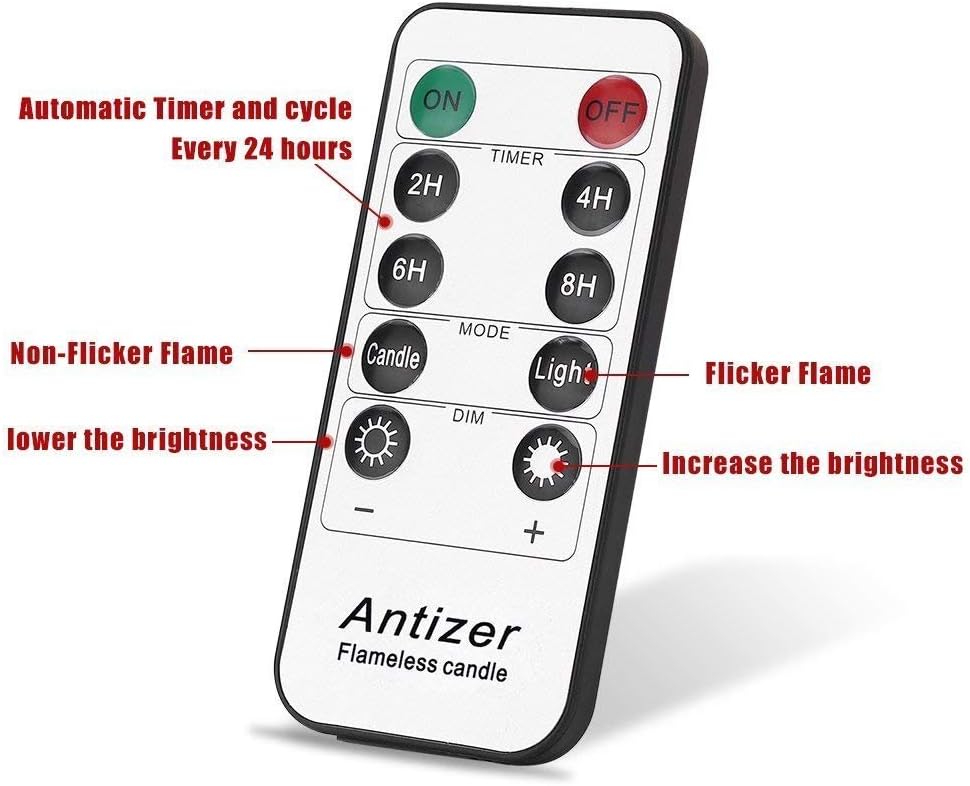
Image: A clear view of the antizer remote control. Buttons are labeled for power (ON/OFF), timer settings (2H, 4H, 6H, 8H), mode selection (Candle, Light), and brightness adjustment (DIM +/-). This image helps users identify and understand the remote's controls.
- ON/OFF: Press the green 'ON' button to turn on all candles within range. Press the red 'OFF' button to turn off all candles.
- Timer (2H/4H/6H/8H): Select a timer duration. The candles will remain lit for the chosen period and then automatically turn off. They will then turn on again at the same time the next day for the set duration.
- Mode (Candle/Light):
- Candle: Activates a realistic flickering flame effect.
- Light: Provides a steady, constant illumination without flickering.
- Dimmer (+/-): Adjust the brightness of the LED light. Press '+' to increase brightness and '-' to decrease brightness.
4. Maintenance
- Battery Replacement: Replace batteries when the light dims significantly or the candle stops responding to the remote. Always replace both batteries in a candle at the same time.
- Cleaning: Gently wipe the wax exterior with a soft, dry cloth. Avoid using abrasive cleaners or solvents, as they may damage the wax finish.
- Storage: When not in use for extended periods, remove batteries from the candles to prevent leakage and store them in a cool, dry place away from direct sunlight or extreme temperatures.
5. Troubleshooting
| Issue | Possible Cause | Solution |
|---|---|---|
| Candle does not light up. | Batteries are dead or incorrectly inserted. | Check battery polarity and replace with fresh AA batteries. Ensure the power switch on the bottom of the candle is in the 'ON' position. |
| Remote control is not working. | Remote battery is dead or out of range. | Replace the remote control battery. Ensure you are within the remote's operating range (typically 10-20 feet) and pointing it towards the candles. |
| Candle light is dim. | Low battery power. | Replace batteries in the affected candle(s). |
| Timer function is inconsistent. | Interference or multiple remote signals. | Ensure only one remote is being used at a time. Reset the timer by turning the candles off and then on again, then setting the timer. |
6. Specifications
| Feature | Detail |
|---|---|
| Brand | antizer |
| Model Name | Flameless candles (AC-BT0091) |
| Material | Real Wax |
| Light Source Type | LED |
| Power Source | Battery Powered (2 AA batteries per candle) |
| Control Method | Remote Control (Infrared) |
| Timer Functions | 2H, 4H, 6H, 8H |
| Candle Dimensions | 2.2" Diameter; Heights: 4", 5", 6", 7", 8", 9" |
| Included Components | 9 Flameless Candles, 2 Remote Controls |
| Indoor/Outdoor Usage | Indoor |
| Water Resistance Level | Not Water Resistant |
7. Safety Information
- These flameless candles are designed for indoor use only.
- Do not expose candles to water or high humidity, as they are not water-resistant.
- Avoid placing candles in direct sunlight or near heat sources, which can cause the wax to melt or deform.
- Keep out of reach of small children and pets.
- Do not mix old and new batteries, or different types of batteries.
- Dispose of used batteries responsibly according to local regulations.
8. Warranty and Support
For warranty information or product support, please refer to the documentation included with your purchase or contact antizer customer service directly. Contact details can typically be found on the product packaging or the official antizer website.