RDSJ CS03XL

RDSJ CS03XL Laptop Battery Instruction Manual

Model: CS03XL

1. Product Overview

This manual provides essential information for the safe and effective use of your RDSJ CS03XL laptop battery. The CS03XL is a Li-ion battery designed for specific HP laptop models, offering a voltage of 11.4V and a capacity of 46Wh.
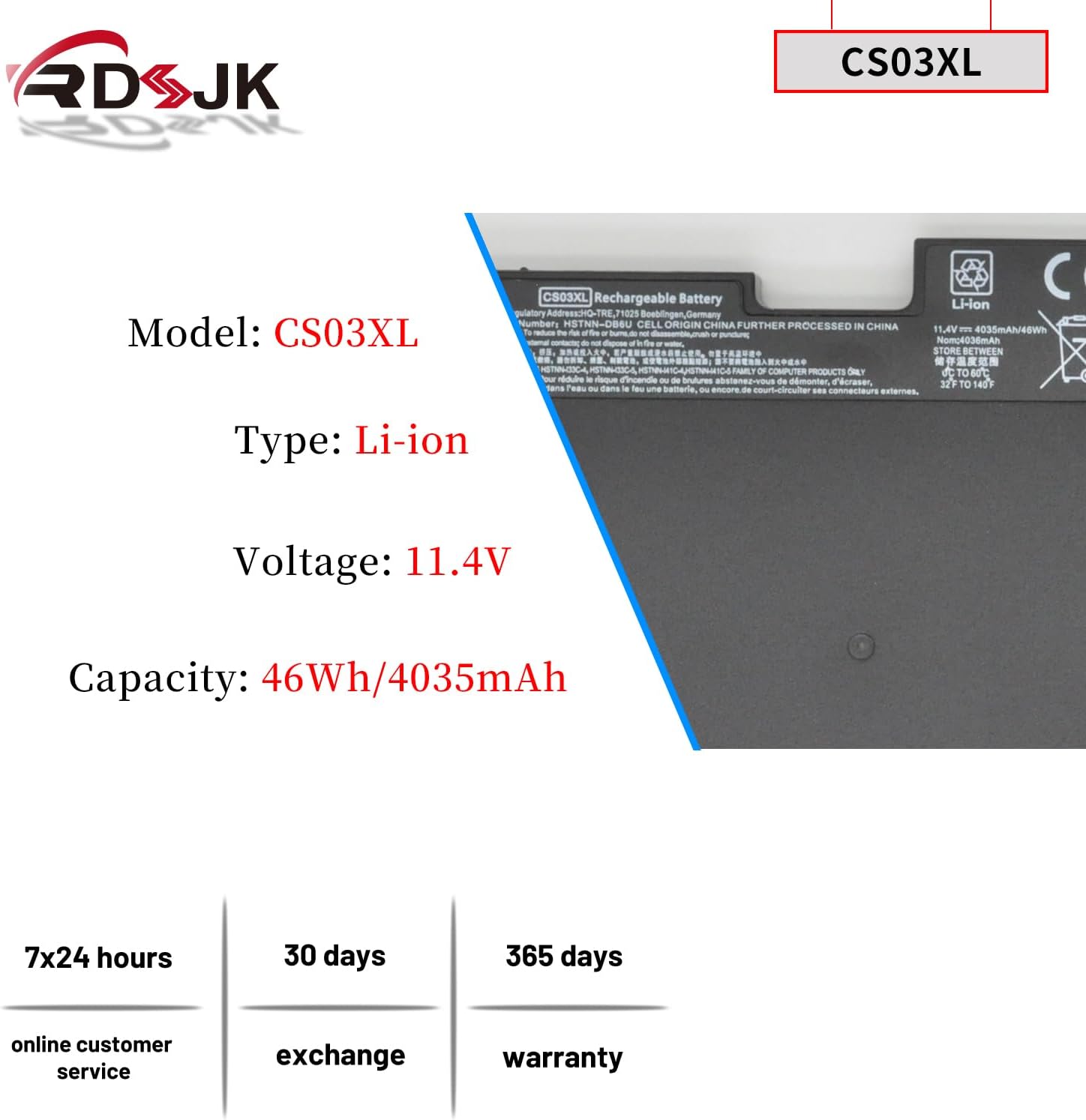
RDSJ CS03XL Laptop Battery showing model, type, voltage, and capacity.

Image 1.1: Overview of the CS03XL battery, detailing its model number, Li-ion type, 11.4V voltage, and 46Wh/4035mAh capacity. This image also indicates 7x24 hours online customer service, 30 days exchange, and 365 days warranty.

2. Compatibility

The CS03XL battery is compatible with a range of HP laptop models and can replace several part numbers. Please verify your laptop model and existing battery part number before installation to ensure compatibility.

2.1 Compatible Machine Models

  • HP Elitebook 745 G3, G4 Series
  • HP Elitebook 755 G3, G4 Series
  • HP Elitebook 840 G3, G4 Series
  • HP Elitebook 850 G3, G4 Series
  • HP ZBook 15u G3, G4 Mobile Workstation Series
  • HP mt42 Mobile Thin Client Series
  • HP mt43 Mobile Thin Client Series

2.2 Compatible Part Numbers

  • CS03, CSO3, CS03XL, CSO3XL
  • HSTNN-I33C-4, HSTNN-I33C-5
  • HSTNN-I41C-4, HSTNN-I41C-5
  • HSTNN-IB6Y, HSTNN-UB6S
  • 3ICP6/65/79
  • 800231-141, 800513-001, 800231-1C1, T7B32AA, CS03046XL
Image showing compatible HP laptop models and replacement part numbers for the CS03XL battery.

Image 2.1: Visual representation of compatible HP laptop models and a list of corresponding replacement part numbers for the CS03XL battery. A laptop is shown with its screen open, and a separate image of the battery is included.

3. Setup and Installation

Proper installation is crucial for the battery's performance and safety. Always ensure your laptop is powered off and disconnected from any power source before beginning installation.

  1. Power Off and Disconnect: Shut down your laptop completely and unplug the AC adapter.
  2. Access Battery Compartment: Depending on your HP model, you may need to remove the back panel of your laptop. Refer to your laptop's specific service manual for detailed instructions on accessing the battery.
  3. Remove Old Battery: Carefully disconnect the old battery's connector from the motherboard. If your laptop uses screws to secure the battery, remove them. Some models may feature a pull tab or snap system for removal.
  4. Install New Battery: Align the CS03XL battery with the battery compartment. Connect the battery cable to the motherboard. Secure the battery in place using any screws or the snap system as appropriate for your laptop model. The battery features a gold-plated connector for reliable current transfer and a screw clip for secure fitting. A mini Philips screwdriver may be included to assist with installation.
  5. Reassemble Laptop: Reattach the back panel and any other components removed during the process.
  6. Initial Charge Cycle: For the first use, discharge the battery to approximately 5% (do not let it drain to 0%) and then charge it fully to 95%. Repeat this discharge-charge cycle 3-4 times to calibrate the battery.
Detailed view of the CS03XL battery's connector, ABS+PC casing, and screw clip.

Image 3.1: Close-up details of the CS03XL battery, highlighting its gold-plated connector for efficient current transfer, the durable ABS+PC material used for its casing, and the special heat-resistant screw clip for secure installation.

4. Operating Instructions

To maximize the performance and lifespan of your CS03XL battery, follow these operating guidelines:

5. Maintenance

Proper maintenance helps ensure the longevity and reliability of your battery.

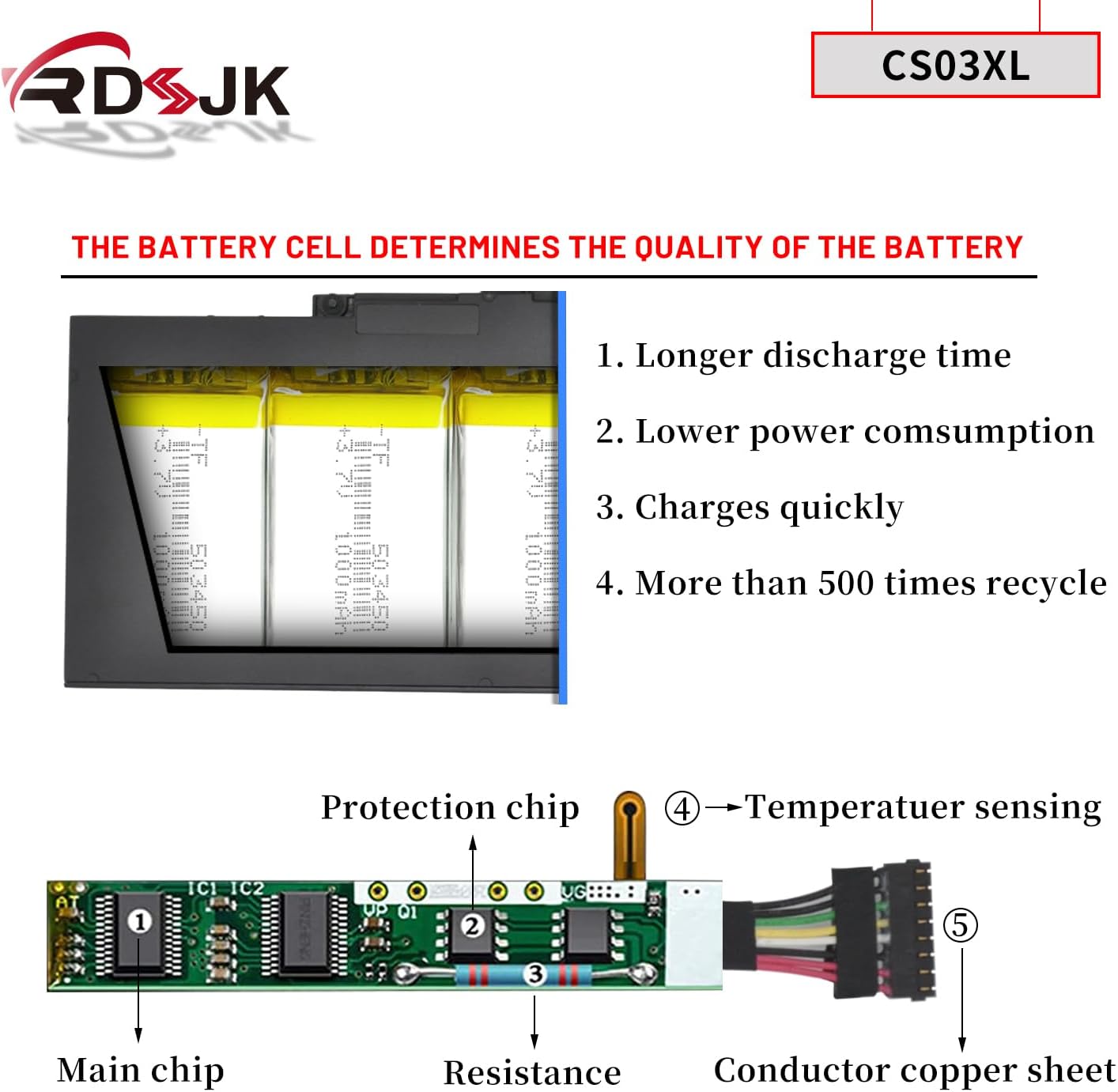
Internal view of a battery cell structure and a diagram of a protection circuit board.

Image 5.1: Illustration of the internal battery cell structure, emphasizing features like longer discharge time, lower power consumption, quick charging, and over 500 recycle times. Below, a diagram shows the protection chip, main chip, resistance, temperature sensing, and conductor copper sheet, which contribute to battery quality and safety.

6. Troubleshooting

If you encounter issues with your CS03XL battery, consider the following common solutions:

Diagram illustrating the multiple protection features of the CS03XL battery, including over-temperature, over-current, over-discharge, over-voltage, and over-charge protection.

Image 6.1: This diagram highlights the integrated safety features of the CS03XL battery, which include protection against over-temperature, over-current, over-discharge, over-voltage, and over-charge, ensuring safe operation.

7. Specifications

FeatureDetail
Battery TypeLi-ion
Voltage11.4V
Capacity46Wh
Cells4-cell
Model NumberCS03XL
Item Weight9.9 ounces
Package Dimensions9.13 x 5.59 x 1.18 inches
ManufacturerRDSJ
Date First AvailableMay 12, 2018

8. Warranty and Support

Your RDSJ CS03XL battery comes with the following assurances:

For any inquiries or support, please contact the seller or manufacturer through the platform where the product was purchased.

Documents - RDSJ – CS03XL

no relevant documents