
innomaker InnoMaker Rasp Pi HiFi DAC Hat
InnoMaker HiFi DAC HAT User Manual
For Raspberry Pi 5, 4, 3B+, Zero (PCM5122)
1. Introduction
The InnoMaker HiFi DAC HAT is an audio expansion board designed for seamless integration with various Raspberry Pi models, including Raspberry Pi 5, 4, 3B+, Zero, and Zero W. This HAT (Hardware Attached on Top) provides high-fidelity audio output, bypassing the Raspberry Pi's onboard audio capabilities to deliver superior sound quality.
Featuring a PCM5122 DAC chip, the board supports audio up to 384kHz/32bit and includes dual ultra-low jitter oscillators for precise clocking. It offers both RCA line-level outputs and a 3.5mm headphone output, making it suitable for a wide range of audio applications.

Figure 1: InnoMaker HiFi DAC HAT Overview
2. Key Features
- Direct-Connect HiFi DAC: Integrates with Raspberry Pi via 40-pin GPIO, eliminating the need for soldering or external wiring.
- High-Resolution Audio: Utilizes PCM5122 DAC for 384kHz/32bit audio, with dual ultra-low jitter oscillators (45.158MHz/49.152MHz).
- Reference-Class Performance: Achieves 112dB SNR and -78dB THD+N, supporting DSD over PCM (DOP) and 8kHz-384kHz sampling.
- Dual Output Interface: Gold-plated RCA line-level outputs (2.1Vrms) and a dedicated 3.5mm headphone amplifier (138mW@32Ω via TPA6133).
- Broad OS Compatibility: Tested with Volumio, Moode, RuneAudio, LibreELEC, and Raspberry Pi OS.
- Developer-Optimized: Features ultra-low-noise power regulation and a reserved IR port (GPIO26).
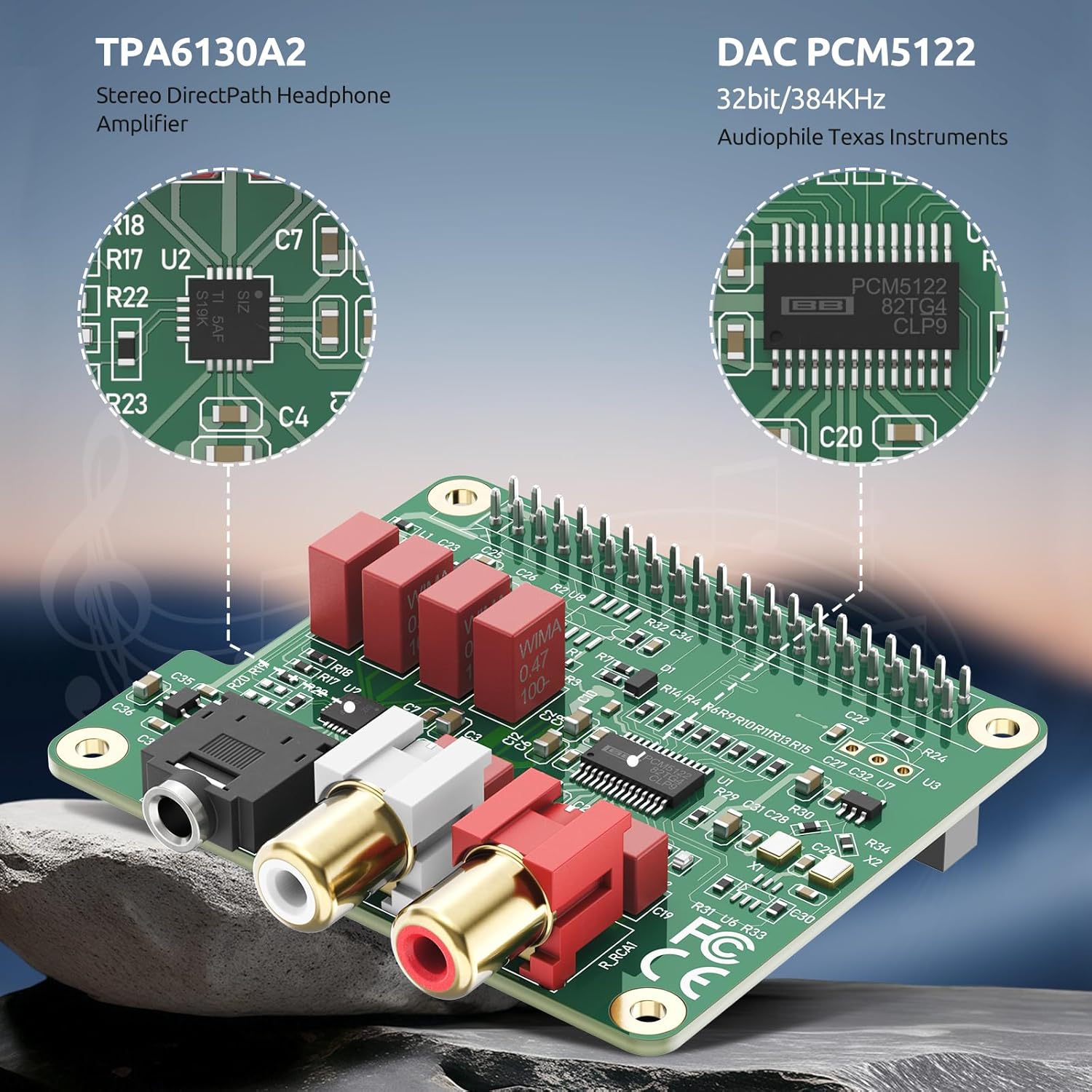
Figure 2: Key Audio Components (PCM5122 DAC and TPA6130A2 Amplifier)
3. Package Contents
Please verify that all items are present in your package:
- InnoMaker HiFi DAC HAT
- Mounting hardware (standoffs and screws)
Note: Raspberry Pi board is not included and must be purchased separately.
4. Setup Instructions
Follow these steps to install and configure your InnoMaker HiFi DAC HAT with your Raspberry Pi.
4.1 Hardware Installation
- Ensure your Raspberry Pi is powered off and disconnected from any power source.
- Carefully align the 40-pin GPIO connector on the DAC HAT with the GPIO pins on your Raspberry Pi.
- Gently press the DAC HAT onto the Raspberry Pi's GPIO header until it is securely seated.
- Use the provided standoffs and screws to secure the DAC HAT to the Raspberry Pi board, ensuring a stable connection.

Figure 3: DAC HAT Mounted on Raspberry Pi
4.2 Software Configuration
The InnoMaker HiFi DAC HAT is compatible with various audio operating systems for Raspberry Pi. The following instructions provide general guidance for common systems like Volumio and Moode.
- Install your preferred audio operating system (e.g., Volumio, Moode, RuneAudio, LibreELEC, Raspberry Pi OS) onto an SD card and boot your Raspberry Pi.
- Access the system's web interface or command line.
- Navigate to the audio output settings.
- Important: For optimal performance and correct functionality, the Output Device/DAC Model must be set to "Allo BOSS". This setting ensures the system correctly recognizes and utilizes the PCM5122 DAC. Incorrect settings may lead to abnormal playback, such as double speed audio.
- Save the settings and reboot your Raspberry Pi if prompted.

Figure 4: Software Configuration Example (Volumio & Moode)
After configuration, connect your audio system (speakers, amplifier, or headphones) to the RCA or 3.5mm output jacks on the DAC HAT.
5. Operating Instructions
Once the InnoMaker HiFi DAC HAT is installed and configured, you can begin enjoying high-quality audio playback.
5.1 Audio Playback
- Use your chosen audio software (e.g., Volumio, Moode) to play music files from local storage, network shares, or streaming services.
- The DAC HAT supports various audio formats, including high-resolution files up to 384kHz/32bit and DSD over PCM (DOP).
- Connect your speakers or amplifier to the gold-plated RCA outputs for line-level audio.
- Connect headphones to the 3.5mm stereo audio jack. The dedicated headphone amplifier provides sufficient power for most headphones.
5.2 Volume Control
Volume control is typically managed through the software interface of your chosen audio operating system. The DAC HAT supports software-based volume adjustments, allowing precise control over your audio output.
6. Maintenance
To ensure the longevity and optimal performance of your InnoMaker HiFi DAC HAT, consider the following maintenance guidelines:
- Keep Clean: Periodically clean the board with a soft, dry, anti-static cloth. Avoid using liquids or abrasive cleaners.
- Handle with Care: When handling the board, avoid touching the electronic components directly. Static electricity can damage sensitive parts.
- Environmental Conditions: Operate the device in a dry environment, away from extreme temperatures, humidity, and direct sunlight.
- Firmware Updates: Regularly check for software and firmware updates for your Raspberry Pi operating system and audio player software, as these may include performance improvements or bug fixes related to DAC support.
7. Troubleshooting
If you encounter issues with your InnoMaker HiFi DAC HAT, refer to the following common problems and solutions:
- No Sound Output:
- Verify that the DAC HAT is securely connected to the Raspberry Pi's GPIO pins.
- Check your audio software settings to ensure the correct DAC model ("Allo BOSS") is selected as the output device.
- Confirm that your speakers or headphones are properly connected to the DAC HAT's output jacks and are powered on.
- Ensure the volume level in your audio software is not muted or set too low.
- Distorted or Incorrect Speed Audio:
- This often indicates an incorrect DAC model selection in your software. Re-check the audio output settings and ensure "Allo BOSS" is selected.
- Ensure your audio files are not corrupted.
- DAC HAT Not Recognized:
- Ensure your Raspberry Pi's operating system is up to date.
- Consult the specific documentation for your audio operating system for DAC HAT detection procedures.
For further technical assistance, please refer to the InnoMaker Wiki or contact customer support.
8. Technical Specifications
| Feature | Specification |
|---|---|
| Model Number | InnoMaker Rasp Pi HiFi DAC Hat |
| DAC Chip | PCM5122 (Texas Instruments) |
| Sampling Rate | Up to 384kHz/32bit |
| Signal-to-Noise Ratio (SNR) | 112dB |
| Total Harmonic Distortion + Noise (THD+N) | -78dB |
| Output Interfaces | Gold-plated RCA (2.1Vrms), 3.5mm Stereo Audio Jack |
| Headphone Amplifier | TPA6133 (138mW@32Ω) |
| Oscillators | Dual ultra-low jitter (45.158MHz, 49.152MHz) |
| Compatible Raspberry Pi Models | Raspberry Pi 5, 4, 3B+, Zero, Zero W |
| Hardware Platform | Raspberry Pi |
| Dimensions | Approximately 65mm x 57mm x 14mm (HAT dimensions) |
| Weight | Approximately 2.11 ounces |

Figure 5: Technical Features Overview
9. Warranty Information
InnoMaker products are covered by a limited warranty against defects in materials and workmanship. For specific warranty terms and conditions, please refer to the official InnoMaker website or contact customer support. Keep your proof of purchase for warranty claims.
10. Support and Contact
For additional information, technical support, or to access open-source SDK and documented API, please visit the official InnoMaker Wiki:
If you require further assistance, please contact InnoMaker customer support through their official website.
Related documentsInnoMaker Rasp Pi HiFi DAC Hat


Ask a question about this manual
Ask about setup, troubleshooting, compatibility, parts, safety, or missing instructions. Manuals+ will review the question and use this page’s manual context to help answer it.