
1. Product Overview
The Topstar Point60 G260 Office Chair is designed to provide a relaxed and comfortable sitting experience for work environments. This chair features a blue fabric seat and a black mesh back, offering both ergonomic support and breathability.
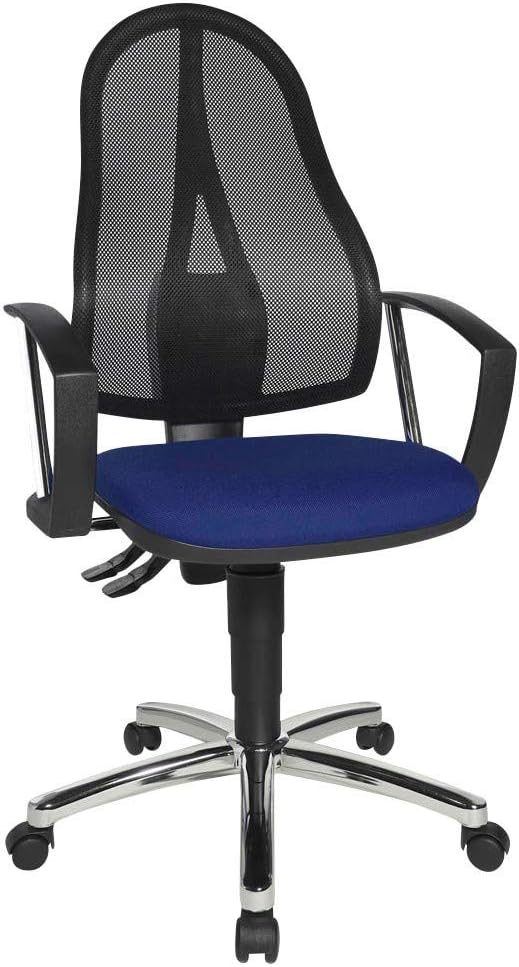
Figure 1: Front view of the Topstar Point60 G260 Office Chair. The chair features a blue upholstered seat, black mesh backrest, black armrests, and a chrome five-star base with casters.
2. Setup and Initial Use
The Topstar Point60 G260 Office Chair comes pre-assembled, requiring no complex setup. Follow these steps for initial use:
- Unpacking: Carefully remove the chair from its packaging. Ensure all protective materials are removed.
- Placement: Position the chair on a flat, stable surface in your desired office or workspace. The chair is suitable for both carpeted and hard floor surfaces.
- Inspection: Before first use, inspect the chair for any visible damage or loose components. If any issues are found, contact customer support.
3. Operating Instructions
The Point60 G260 chair offers several adjustment features to customize your seating experience for optimal comfort and support.
3.1 Seat Height Adjustment
To adjust the seat height:
- Locate the lever on the right side, beneath the seat.
- To raise the seat, lift the lever while taking your weight off the seat. The seat will rise automatically.
- To lower the seat, lift the lever while remaining seated. The seat will lower under your weight.
- Release the lever to lock the seat at the desired height.

Figure 2: Side view of the chair, highlighting the levers for seat height and backrest adjustments located beneath the seat.
3.2 Backrest Adjustment
The backrest can be adjusted for tilt and height to provide lumbar support.
- Backrest Tilt: Locate the second lever (if present, typically on the left side or a separate lever on the right). Lift or push the lever to unlock the backrest tilt. Lean back or forward to find your preferred angle, then release the lever to lock.
- Backrest Height: The backrest height is typically adjusted by lifting the backrest upwards until it clicks into the desired position. To reset to the lowest position, lift it to its highest point, and it will drop down.

Figure 3: Rear view of the chair, illustrating the mesh backrest design and the sturdy frame that supports it.
4. Maintenance and Care
Proper maintenance ensures the longevity and appearance of your office chair.
- Cleaning: Wipe clean with a damp cloth. For fabric parts, use a mild upholstery cleaner if necessary, testing on an inconspicuous area first. Avoid harsh chemicals or abrasive cleaners.
- Casters: Periodically check the casters for hair or debris buildup and clean as needed to ensure smooth movement.
- Fasteners: Occasionally check all screws and bolts to ensure they are tight. Do not overtighten.
- Weight Limit: Do not exceed the maximum weight recommendation of 110 kilograms (approximately 242 pounds).
5. Troubleshooting
If you encounter any issues with your chair, refer to the following common problems and solutions:
| Problem | Possible Cause | Solution |
|---|---|---|
| Chair does not raise or lower. | Gas lift malfunction or lever not fully engaged. | Ensure the lever is fully pulled. If the issue persists, the gas lift may need replacement. Contact customer support. |
| Casters do not roll smoothly. | Debris (hair, lint) caught in casters. | Turn the chair over and carefully remove any debris from the caster wheels. |
| Chair is wobbly or unstable. | Loose screws or bolts in the base or seat mechanism. | Inspect all visible screws and bolts and tighten them securely. Do not overtighten. |
6. Specifications
| Feature | Detail |
|---|---|
| Model Name | Point60 G260 |
| Brand | Topstar |
| Color | Blue (Seat), Black (Mesh Back) |
| Product Dimensions (D x W x H) | 18.11"D x 18.11"W x 38.19"H |
| Item Weight | 2.2 pounds (approx. 1 kg) |
| Maximum Weight Recommendation | 110 Kilograms (approx. 242 pounds) |
| Back Style | Solid Back with Mesh |
| Special Features | Arm Rest, Cushion Availability |
| Furniture Finish | Chrome (Base) |
| Assembly Required | No |
| Recommended Surface | Carpet, Hard Floor |
7. Warranty and Support
For warranty information or technical support regarding your Topstar Point60 G260 Office Chair, please refer to the documentation included with your purchase or visit the official Topstar website. You may also contact Topstar customer service directly for assistance with product inquiries, parts, or service.
Note: Specific warranty terms and conditions may vary by region and retailer. Please retain your proof of purchase for warranty claims.