
Sound Devices MX-USBY
Sound Devices MX-USBY USB-C to Dual USB-A Y-Cable Instruction Manual
Model: MX-USBY
1. Product Overview
The Sound Devices MX-USBY is a specialized Y-cable designed to provide both power and data connectivity for Sound Devices MixPre-3 and MixPre-6 audio recorders when connecting to a computer. This cable features one USB-C connector for the MixPre device and two USB-A connectors for the host computer, separating power and data lines for optimal performance.

Figure 1: Sound Devices MX-USBY Y-Cable
2. Key Features
- Designed specifically for powering and data transfer with Sound Devices MixPre-3 and MixPre-6 recorders.
- Features one USB Type-C connector for connection to the MixPre device.
- Includes two distinct USB Type-A connections: one dedicated for power and the other for data transfer.
- Generous length of 71 inches (1800 mm) for flexible setup.
3. Setup and Connection
To properly connect your Sound Devices MixPre-3 or MixPre-6 recorder using the MX-USBY cable, follow these steps:
- Identify the connectors on the MX-USBY cable. There is one USB-C connector and two USB-A connectors. The USB-A connectors are typically labeled for their function.
- Connect the USB-C connector (labeled "3 MIXPRE") into the USB-C port on your Sound Devices MixPre-3 or MixPre-6 recorder.
- Connect the USB-A connector labeled "1 DATA" into an available USB-A port on your computer. This connection facilitates data transfer between the MixPre device and your computer.
- Connect the USB-A connector labeled "2 POWER" into another available USB-A port on your computer or a suitable USB power source (e.g., a USB wall adapter or power bank). This connection provides power to the MixPre device.
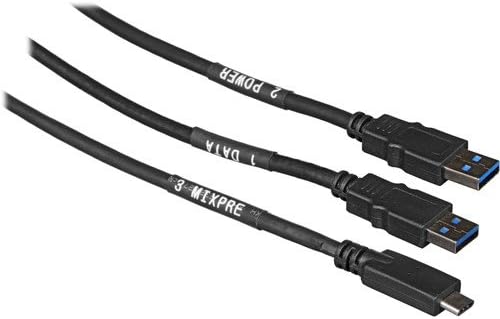
Figure 2: Labeled Connectors of the MX-USBY Cable
Ensure both USB-A connectors are securely plugged in for the MixPre device to receive adequate power and establish a stable data connection.
4. Operating Instructions
Once the MX-USBY cable is correctly connected, your Sound Devices MixPre-3 or MixPre-6 recorder will draw power from the "2 POWER" USB-A connection and communicate data via the "1 DATA" USB-A connection. This setup allows for simultaneous recording, monitoring, and file transfer to and from your computer.
Compatibility Notes:
- Older MacBooks: Connect both data and power lines to the available USB-A ports.
- iPhone Connectivity: Requires an Apple Lightning to USB3 Camera Adapter. Plug a Lightning cable into the adapter for power, and connect the "1 DATA" USB-A to the adapter. The "2 POWER" USB-A should connect to a separate USB power brick. Ensure the MixPre is set to 24-bit mode.
- iPad Pro (USB-C Port): Requires an Apple USB-C Digital AV Multiport Adapter. Plug a USB-C power cable into the adapter for power. Connect the "1 DATA" USB-A to the adapter. The "2 POWER" USB-A should connect to a separate power brick. Only 24-bit mode is supported for the MixPre.
Always refer to your MixPre device's user manual for specific operational modes and settings related to USB connectivity.
5. Maintenance and Care
To ensure the longevity and optimal performance of your MX-USBY cable, follow these maintenance guidelines:
- Storage: Store the cable in a clean, dry place, away from extreme temperatures and direct sunlight. Avoid tightly coiling or bending the cable, especially near the connectors, to prevent internal damage.
- Cleaning: Use a soft, dry cloth to wipe the cable and connectors. Do not use liquid cleaners or solvents, as they may damage the cable's outer material or internal components.
- Handling: Always grasp the connector housing when plugging or unplugging the cable. Avoid pulling on the cable itself, as this can strain the connections and lead to damage.
- Inspection: Periodically inspect the cable for any signs of wear, fraying, or damage to the insulation or connectors. If damage is observed, discontinue use and consider replacement.
6. Troubleshooting
If you encounter issues while using your MX-USBY cable, consider the following troubleshooting steps:
- No Power to MixPre:
- Ensure the "2 POWER" USB-A connector is securely plugged into a functioning USB port or power source.
- Verify that the power source (computer USB port, wall adapter, power bank) can supply sufficient power. Some USB ports may not provide enough current for the MixPre device.
- Try a different USB port or power source.
- No Data Connection:
- Ensure the "1 DATA" USB-A connector is securely plugged into a functioning USB data port on your computer.
- Check your computer's device manager or system information to see if the MixPre device is recognized.
- Restart your computer and the MixPre device.
- Ensure the MixPre device's firmware is up to date.
- For specific data transfer issues, consult the MixPre device's user manual.
- Intermittent Connection:
- Check for any physical damage to the cable or connectors.
- Ensure all connections are firm and not loose.
- Avoid placing the cable near sources of electromagnetic interference.
If problems persist after following these steps, contact Sound Devices customer support for further assistance.
7. Specifications
| Attribute | Detail |
|---|---|
| Model Name | MX-USBY |
| Brand | Sound Devices |
| Connector Type | USB Type C (1), USB Type A (2) |
| Cable Type | Component Y-Cable |
| Compatible Devices | Sound Devices MixPre-3, MixPre-6, PC |
| Special Feature | Y-cable design, Separate power and data lines, Long length |
| Recommended Uses | Powering Sound Devices MixPre-3 and MixPre-6 audio recorders from a computer |
| Color | Black |
| Connector Gender | Male-to-Female |
| Length | 71 inches (1800 mm) |
| Item Weight | 6.1 ounces |
| Manufacturer | Sound Devices LLC |
| UPC | 854454006336 |
8. Warranty and Support
For information regarding warranty coverage, technical support, or service for your Sound Devices MX-USBY cable, please visit the official Sound Devices website or contact their customer support directly. Keep your purchase receipt as proof of purchase for warranty claims.
Official Sound Devices Website: www.sounddevices.com
Ask a question about this manual
Ask about setup, troubleshooting, compatibility, parts, safety, or missing instructions. Manuals+ will review the question and use this page’s manual context to help answer it.