
LEICESTERCN C11
LEICESTERCN 12V 1100mA Smart Battery Charger User Manual
Model: C11
1. Introduction
This user manual provides essential information for the safe and effective operation of your LEICESTERCN 12V 1100mA Smart Battery Charger. This versatile charger is designed for 12V lead-acid batteries (including Flood, Gel, SLA, AGM, VRLA) and 12V Lithium (LiFePO4) batteries with BMS. It functions as both a battery charger and a maintainer, offering features like automatic charging, low-voltage repair, and comprehensive safety protections.
Please read this manual thoroughly before using the product and retain it for future reference.

Image: The charger's multi-functionality, including charging lead-acid and lithium batteries, maintaining charge, and performing repair functions.

Image: The wide compatibility of the charger, suitable for various 12V applications such as cars, SUVs, motorcycles, RVs, lawn mowers, ATVs, and lawn tractors.
2. Safety Information
WARNING: Read all safety warnings and instructions before using this product. Failure to follow the warnings and instructions may result in electric shock, fire, and/or serious injury.
- Always connect the charger to the battery terminals correctly: positive (+) to positive (+), and negative (-) to negative (-).
- Ensure the charger is disconnected from the AC power outlet before making or breaking connections to the battery.
- Do not charge frozen batteries.
- Do not charge damaged batteries.
- Use the charger in a well-ventilated area.
- Keep out of reach of children.
- This charger is designed for 12V lead-acid and 12V Lithium (LiFePO4) batteries only. Do not use with other battery types.
- The charger features multi-protection against reverse polarity, short circuit, over voltage, over current, overload, and overheat. It is spark-proof during lead connection.
3. Product Overview and What's in the Box
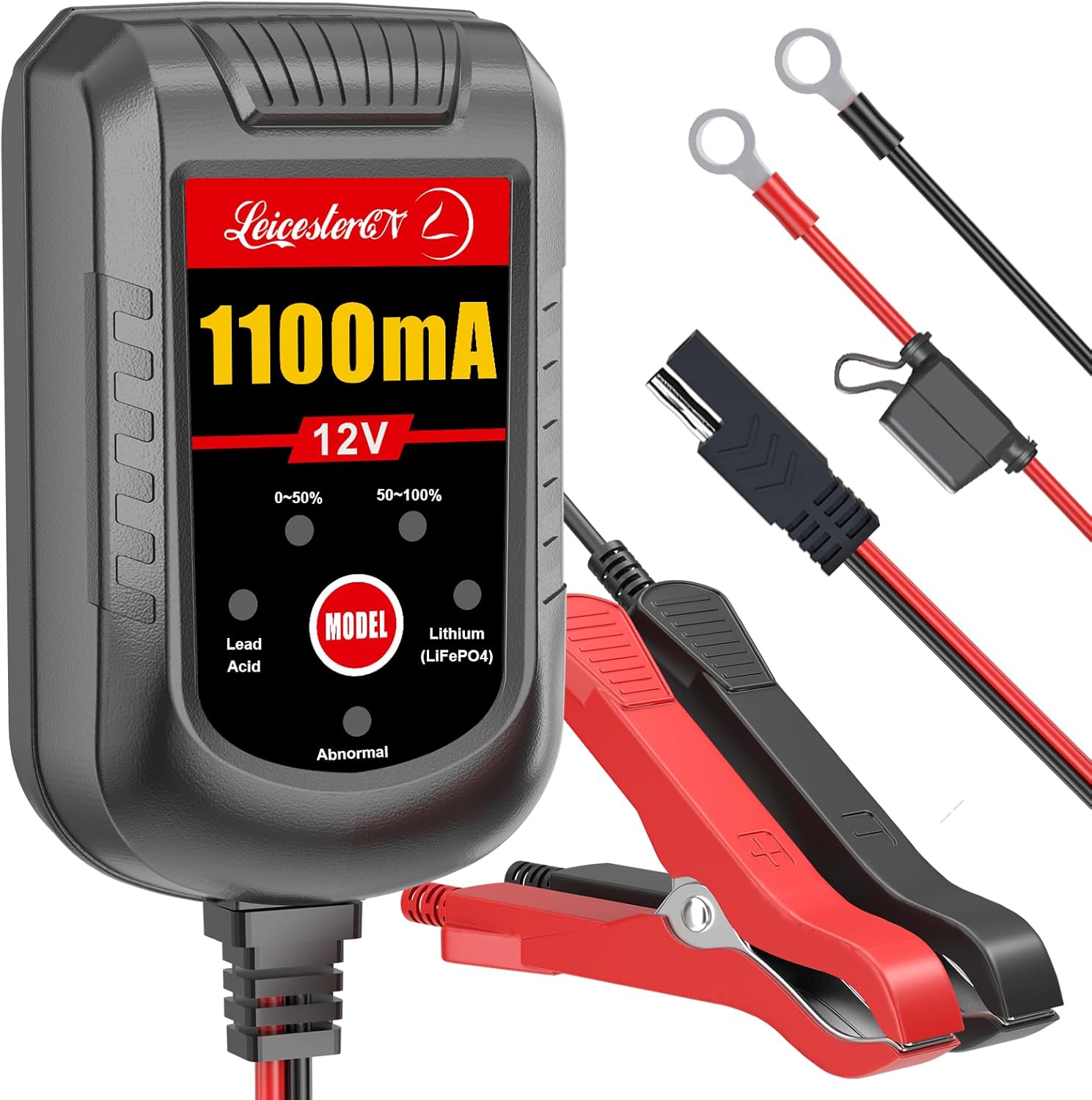
Image: The LEICESTERCN 12V 1100mA Smart Battery Charger unit with its detachable alligator clips and ring terminal connectors, showcasing the main display and connection options.

Image: Diagram illustrating the contents of the product package, including the battery charger unit, fused ring terminal harness, alligator clips, and the instruction manual.
Package Contents:
- LEICESTERCN 12V 1100mA Smart Battery Charger & Maintainer
- Fused Ring Terminal Harness (for hard-to-reach spaces)
- Alligator Clips (for alternate connection)
- Instruction Manual (this document)
The total cable length is 8FT (AC power cord is 6FT, DC output cable is 2FT).
4. Setup and Connection
Before connecting the charger, ensure the vehicle or equipment is turned off and in a safe location. Identify the battery type (Lead-Acid or Lithium LiFePO4) you intend to charge.
- Choose Connection Method: Select either the alligator clips or the ring terminal harness based on your application. The ring terminal harness can be permanently attached to the battery for convenient, quick connection.
- Connect to Battery:
- Connect the RED (+) positive connector from the charger to the RED (+) positive battery terminal.
- Connect the BLACK (-) negative connector from the charger to the BLACK (-) negative battery terminal.
- Ensure connections are secure and free from corrosion.
- Connect to AC Power: Plug the charger's AC power cord into a standard 100-240V AC wall outlet.

Image: The battery charger connected to a vehicle battery using alligator clips, demonstrating proper connection for charging.
5. Operating Instructions
The charger automatically detects the battery type and initiates the appropriate charging process. The display panel provides status indicators.
5.1. Charging Process Indicators

Image: The charger's display panel indicating "0-50%" and "50-100%" charge levels, along with "Lead Acid" and "Lithium (LiFePO4)" indicators.
- 0-50% Light ON: Battery is charging and is below 50% capacity.
- 50-100% Light ON: Battery is charging and is between 50% and 100% capacity.
- Both 0-50% and 50-100% Lights ON: Battery is fully charged, and the charger has switched to float mode.
- Lead Acid Light ON: Charger is operating in Lead-Acid battery mode.
- Lithium (LiFePO4) Light ON: Charger is operating in Lithium battery mode.
- Abnormal Light ON: Indicates a fault (e.g., reverse polarity, short circuit, damaged battery). Disconnect and check connections.
5.2. Low-Voltage Repair Mode
This mode is specifically for 12V lead-acid batteries with voltage lower than 8V. It attempts to restore deeply discharged batteries.
- Connect the charger to the low-voltage 12V lead-acid battery as described in Section 4.
- Press and hold the MODE button for 3 seconds.
- The charger will enter low-voltage charging mode. The repair process is completed when both the 0-50% and 50-100% lights are ON.
Tip: If the battery voltage is lower than 4V, it is generally recommended to replace the battery as it may be beyond repair.
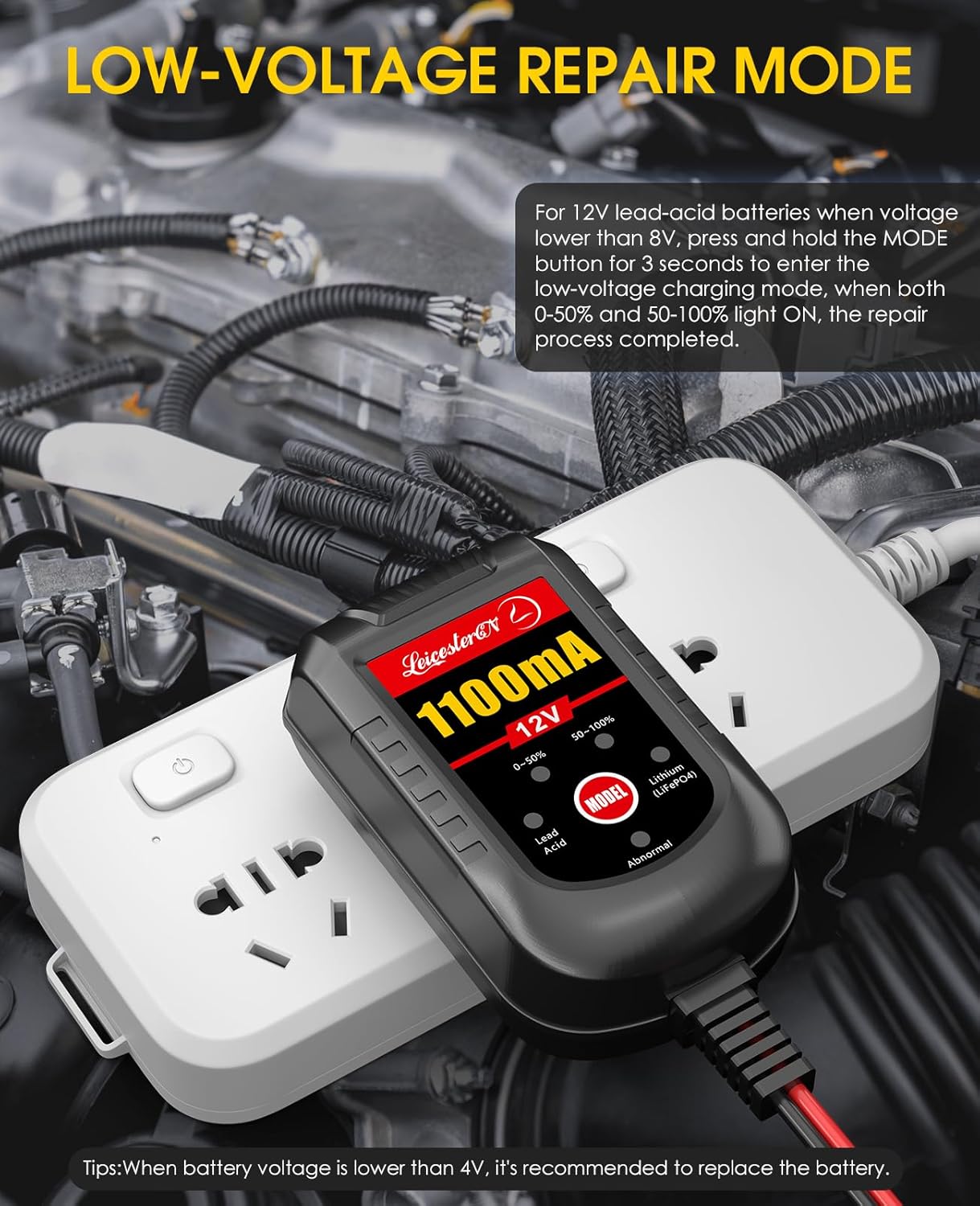
Image: The battery charger connected to a battery, illustrating the low-voltage repair mode function.
5.3. Automatic Float Charging
Once the battery is fully charged, the charger automatically switches to float mode. In this mode, it maintains the battery at an optimal charge level without overcharging, preventing sulfation and extending battery life. This allows the charger to be left connected indefinitely.

Image: A graph illustrating the 4-stage charging process: Desulfation, Bulk Charge, Absorption, and Float, demonstrating how the charger maintains battery health.
5.4. Temperature Compensation
The charger features an integrated thermal sensor that detects ambient temperature. It automatically adjusts the charge to prevent over-charging in hot climates and under-charging in cold climates, ensuring optimal battery health and performance across various environmental conditions.

Image: Visual representation of the charger's ability to adjust charging parameters based on ambient temperature, preventing overcharging in hot weather (up to 104°F/40°C) and undercharging in cold weather (down to 58°F/10°C).
6. Maintenance
- Cleaning: Disconnect the charger from power and battery before cleaning. Wipe the exterior with a soft, damp cloth. Do not use harsh chemicals or abrasives.
- Storage: Store the charger in a cool, dry place when not in use. Ensure cables are neatly coiled to prevent damage.
- Cable Inspection: Periodically inspect the AC power cord and DC output cables for any signs of damage, fraying, or exposed wires. Do not use if damaged.
- Fuse Replacement: The ring terminal harness includes a 5A fuse. If the charger is not receiving power through this connection, check and replace the fuse if necessary.
7. Troubleshooting
| Problem | Possible Cause | Solution |
|---|---|---|
| Charger not turning on / No lights | No AC power; Faulty outlet; Damaged cable/fuse. | Check AC power connection; Try a different outlet; Inspect cables for damage; Check/replace fuse on ring terminal harness. |
| "Abnormal" light is ON | Reverse polarity connection; Short circuit; Battery voltage too low (below 4V); Damaged battery. | Disconnect and re-connect ensuring correct polarity (+ to +, - to -); Check for short circuits; If battery is below 4V, it may need replacement; Test battery condition. |
| Battery not charging or charging slowly | Poor connection; Battery sulfation (for lead-acid); Battery capacity too large for charger; Extremely cold temperatures. | Ensure all connections are clean and secure; For lead-acid, try Low-Voltage Repair Mode (if applicable); Note that charging time varies with battery size and discharge level; Charger adjusts for temperature, but extreme cold can slow charging. |
| Charger feels warm during operation | Normal operation; Insufficient ventilation. | Some warmth is normal. Ensure the charger is in a well-ventilated area and not covered. If excessively hot, disconnect and contact support. |
8. Specifications
| Model Number | C11 |
| Input Voltage | 100-240V AC |
| Output Voltage | 12 Volts |
| Output Current | 1100mA (1.1 Amp) |
| Battery Types Supported | 12V Lead-Acid (Flood, Gel, SLA, AGM, VRLA), 12V Lithium (LiFePO4 with BMS) |
| Product Dimensions | 3.2 x 1.7 x 1.3 inches (8.1 x 4.3 x 3.3 cm) |
| Item Weight | 9.6 ounces (0.27 kg) |
| Cable Length | Total 8FT (AC power cord 6FT, DC output cable 2FT) |
| Safety Features | Spark Proof, Reverse Polarity Protection, Short Circuit Protection, Over Voltage Protection, Over Current Protection, Overload Protection, Overheat Protection, Automatic Stop. |

Image: Visual representation of the charger's comprehensive protection features, including low voltage, over current, over voltage, over charge, reverse polarity, overtemperature, short circuit, and full electric automatic stop.
9. Warranty and Support
LEICESTERCN offers a 3-Year quality assurance and 12-Month refund policy for this product. For any questions, concerns, or technical support, please contact LEICESTERCN customer service.
You can typically find contact information on the product packaging or through the retailer where the product was purchased.
Online support and FAQs may also be available on the official LEICESTERCN brand store or website: LEICESTERCN Amazon Store
Related documentsC11

Ask a question about this manual
Ask about setup, troubleshooting, compatibility, parts, safety, or missing instructions. Manuals+ will review the question and use this page’s manual context to help answer it.