
XtremepowerUS 81010-XP
XtremepowerUS 52cc Gas Fence Post Driver Instruction Manual
Model: 81010-XP | Brand: XtremepowerUS
1. Product Overview
The XtremepowerUS 52cc Gas Fence Post Driver is a heavy-duty, 2-stroke gasoline-powered tool designed for efficiently driving fence posts, sign posts, ground rods, and stakes. Its robust design and portable nature make it suitable for various agricultural, construction, and landscaping applications.
Key features include:
- Powerful 2-Stroke Engine: 52cc displacement providing 1500W power with 700 to 1350 BPM impact force and 9000 r/min speed.
- Wide Application: Ideal for highway guardrails, farm fences, forestry seedlings, vineyard supports, and more.
- Durable & Portable: Metal body construction with large cooling vents for extended use. Features a rubber grip handle to reduce recoil and a carrying case for transport.
- EPA Certified: Designed for environmental protection.

Image 1.1: The XtremepowerUS 52cc Gas Fence Post Driver with its robust design.
2. Safety Information
WARNING: Read and understand all safety warnings and instructions before operating this product. Failure to follow the warnings and instructions may result in electric shock, fire, and/or serious injury.
General Safety Precautions
- Always wear appropriate personal protective equipment (PPE), including safety glasses, hearing protection, gloves, and sturdy footwear.
- Keep bystanders, children, and animals at a safe distance (at least 50 feet) from the operating area.
- Operate the post driver only in well-ventilated areas to avoid inhalation of exhaust fumes.
- Inspect the tool before each use for loose parts, damage, or fuel leaks. Do not operate a damaged tool.
- Maintain a firm grip on the handles during operation. Be aware of the tool's weight and potential for kickback.
- Avoid operating the tool in wet conditions or on unstable ground.
Fuel Safety
- Mix fuel and oil in a well-ventilated area, away from sparks or open flames.
- Use a 25:1 ratio of gasoline to 2-stroke engine oil.
- Store fuel in an approved container and away from heat sources.
- Never refuel a hot engine. Allow the engine to cool down before adding fuel.
- Wipe up any spilled fuel immediately.
3. Package Contents
Your XtremepowerUS 52cc Gas Fence Post Driver package should include the following items:
- 52cc Gas Fence Post Driver Unit
- Carrying Case
- Instruction Manual
- Fuel Mixing Bottle
- Tool Kit (for basic assembly and maintenance)
- Various Post Adapters/Sleeves (typically 2-3 sizes)

Image 3.1: The post driver unit, carrying case, and included accessories.
4. Setup Instructions
4.1 Fuel Mixture
- Prepare a fuel mixture of unleaded gasoline and 2-stroke engine oil at a 25:1 ratio. Use the provided mixing bottle for accurate measurement.
- Ensure the fuel cap is securely tightened after filling.
4.2 Lubrication Check
Before initial use and periodically thereafter, check the lubrication level in the drive mechanism. There is an oil inspection window on the side of the unit. If lubrication is low, add a suitable gear oil (e.g., SEA 80w90) to the reservoir. Consult the manufacturer for specific lubricant recommendations if unsure.
4.3 Attaching Post Adapters
Select the appropriate post adapter/sleeve for the size of the post you intend to drive. Securely attach it to the driving head of the unit according to the instructions in your specific manual. Ensure it is firmly seated to prevent dislodgement during operation.

Image 4.1: Close-up of the driving mechanism where post adapters are attached.
5. Operating Instructions
5.1 Starting the Engine
- Place the post driver on a flat, stable surface.
- Ensure the ignition switch is in the 'ON' position.
- Repeatedly press the transparent fuel primer bulb until it is full of fuel.
- Engage the choke (if applicable, refer to engine diagram).
- Pull the recoil starter handle several times until the engine starts.
- Once started, disengage the choke and allow the engine to warm up for a few minutes at idle speed.

Image 5.1: Engine controls, including the primer bulb and choke lever.
5.2 Driving Posts
- Position the post vertically at the desired location.
- Carefully lift the post driver and place it over the top of the post, ensuring the adapter fits snugly.
- Maintain a firm, balanced grip on both handles.
- Gradually apply throttle to begin driving the post. Guide the post driver to keep the post straight.
- Allow the machine to do the work; avoid forcing it. If the post encounters significant resistance (e.g., a rock), reposition the post or use a manual method to clear the obstruction.
- Continue driving until the post reaches the desired depth.
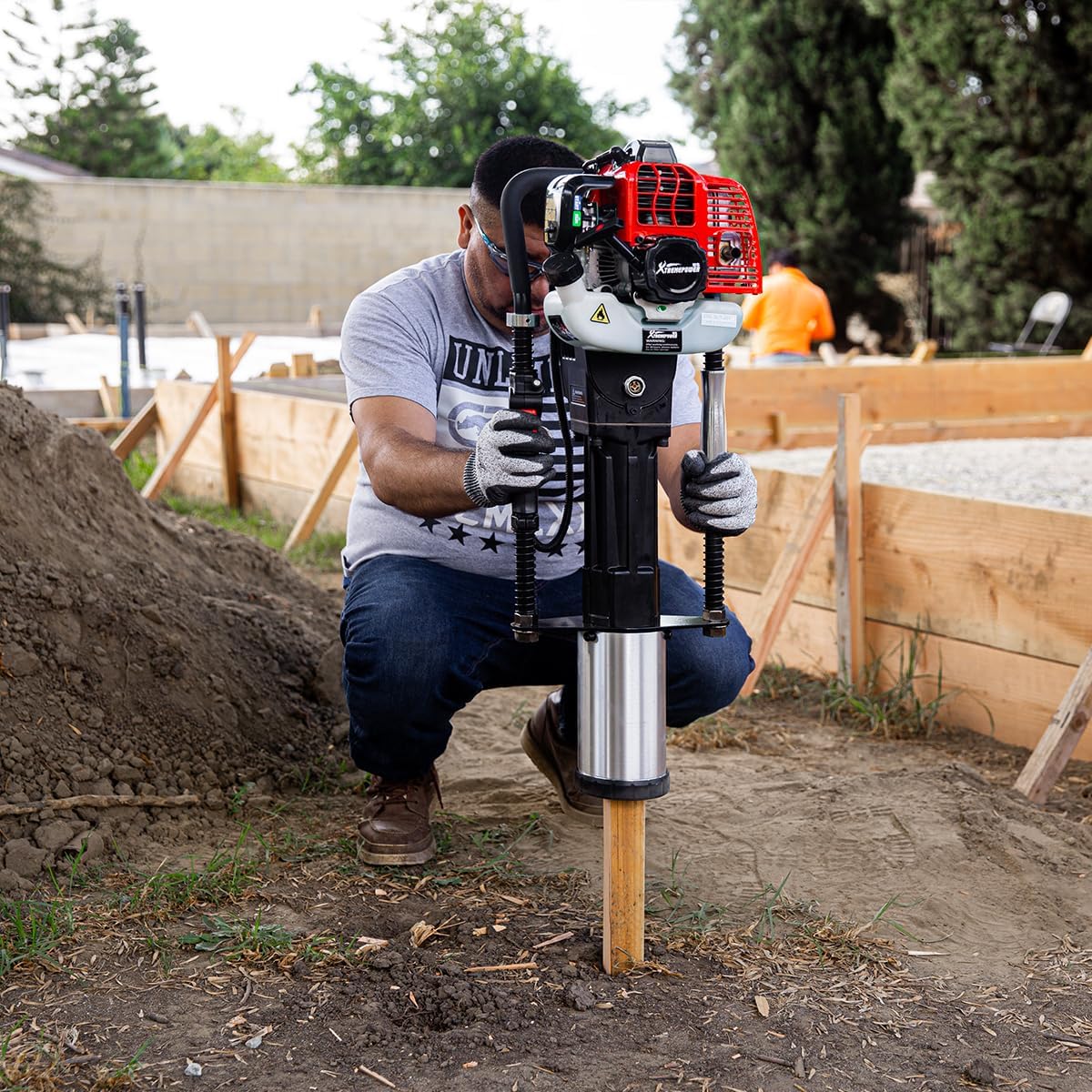
Image 5.2: Operating the post driver to install a wooden post.
Video 5.1: Official product video demonstrating the XtremepowerUS 52cc Gas-Powered T-Post Driver in action.
5.3 Stopping the Engine
To stop the engine, move the ignition switch to the 'OFF' position.
6. Maintenance
6.1 Cleaning
After each use, clean the exterior of the post driver with a damp cloth. Remove any dirt, debris, or grass from the engine cooling fins and air filter area to ensure proper ventilation.
6.2 Air Filter
Regularly inspect and clean the air filter. A clogged air filter can reduce engine performance and lead to premature wear. Refer to your specific manual for air filter removal and cleaning instructions.
6.3 Spark Plug
Inspect the spark plug periodically. Clean or replace it as needed to ensure reliable starting and optimal engine performance.
6.4 Lubrication
Regularly check the oil level in the drive mechanism via the sight glass. Replenish with appropriate gear oil (e.g., SEA 80w90) as necessary. Proper lubrication is crucial for the longevity of the hammering mechanism.
6.5 Storage
When storing the post driver for an extended period, drain the fuel tank completely or use a fuel stabilizer. Store the unit in a clean, dry place, preferably in its carrying case, away from direct sunlight and extreme temperatures.

Image 6.1: The durable carrying case for storage and transport.
7. Troubleshooting Guide
| Problem | Possible Cause | Solution |
|---|---|---|
| Engine does not start | No fuel, incorrect fuel mixture, ignition switch OFF, clogged fuel filter, fouled spark plug, choke not set. | Check fuel level and mixture. Ensure ignition is ON. Clean/replace fuel filter. Clean/replace spark plug. Adjust choke. |
| Reduced impact force | Low lubrication in drive mechanism, worn internal components, clutch slipping. | Check and replenish gear oil. Inspect for wear. If clutch is slipping, professional service may be required. |
| Excessive vibration / Loose parts | Loose fasteners due to vibration. | Regularly check all bolts and screws. Apply thread locker (e.g., Loctite) to critical fasteners as needed. |
| Fuel leaks | Loose fuel lines, damaged fuel tank/cap, carburetor issue. | Inspect all fuel connections. Tighten or replace damaged components. Seek professional service for carburetor issues. |
8. Technical Specifications
| Specification | Value |
|---|---|
| Brand | XtremepowerUS |
| Model Number | 81010-XP |
| Power Source | Gas Powered |
| Engine Type | 2-Stroke |
| Engine Displacement | 52cc |
| Maximum Power | 1500 watts |
| Impact Force (BPM) | 700 to 1350 |
| Maximum Rotational Speed | 9000 rpm |
| Maximum Torque | 2.5 N·m |
| Fuel Mix Ratio | 25:1 (Gasoline to 2-Stroke Oil) |
| Item Weight | 40.8 pounds |
| Item Dimensions (L x W x H) | 11.75"L x 11.25"W x 32.75"H |
| Material Type | Steel, Metal, Aluminum |
| Color | Red/Black |
9. Warranty Information
This XtremepowerUS product is covered by a 60-day manufacturer's warranty. Please retain your proof of purchase for any warranty claims. The warranty covers defects in materials and workmanship under normal use. It does not cover damage resulting from misuse, abuse, neglect, unauthorized repairs, or normal wear and tear.
10. Customer Support
For further assistance, technical support, or to inquire about replacement parts, please visit the official XtremepowerUS store or contact their customer service department.
Related documents81010-XP

Ask a question about this manual
Ask about setup, troubleshooting, compatibility, parts, safety, or missing instructions. Manuals+ will review the question and use this page’s manual context to help answer it.