1. Product Overview
The Lenovo M83 Small Form Factor (SFF) Desktop PC is a high-performance computer designed for business and general productivity tasks. It features an Intel Quad Core i5-4570 processor, 16GB of DDR3 RAM, and a fast 240GB Solid State Drive (SSD) for quick boot times and application loading. This renewed unit comes with Windows 10 Pro pre-installed, offering a robust and secure operating environment.
Its compact design makes it suitable for various office and home setups, providing ample connectivity options for peripherals and external displays.
2. Package Contents
Before you begin, ensure all items are present in the package:
- Lenovo M83 SFF Desktop PC
- Power Cable
- Keyboard
- Documentation (this manual)
Note: Additional peripherals such as a monitor, mouse, and speakers are typically sold separately.
3. Setup Guide
3.1 Connecting Your PC
- Place the PC: Position your Lenovo M83 SFF PC on a stable, flat surface with adequate ventilation.
- Connect the Monitor: Connect your monitor to one of the available video output ports (VGA, DisplayPort, or HDMI) on the rear of the PC using an appropriate cable.
- Connect Peripherals: Plug in your keyboard and mouse to the available USB ports on the front or rear of the PC.
- Connect to Network (Optional): For a wired connection, plug an Ethernet cable into the RJ-45 port on the rear. For wireless, the PC includes built-in WiFi.
- Connect Power: Plug the power cable into the PC's power input and then into a grounded electrical outlet.
3.2 Initial Power On
- Press the power button on the front of the PC.
- The system will boot into Windows 10 Pro. Follow any on-screen prompts for initial setup, such as language selection and user account creation.
3.3 Front and Rear Panel Overview

Figure 1: Front view of the Lenovo M83 SFF Desktop PC, showing USB ports, optical drive, and power button.
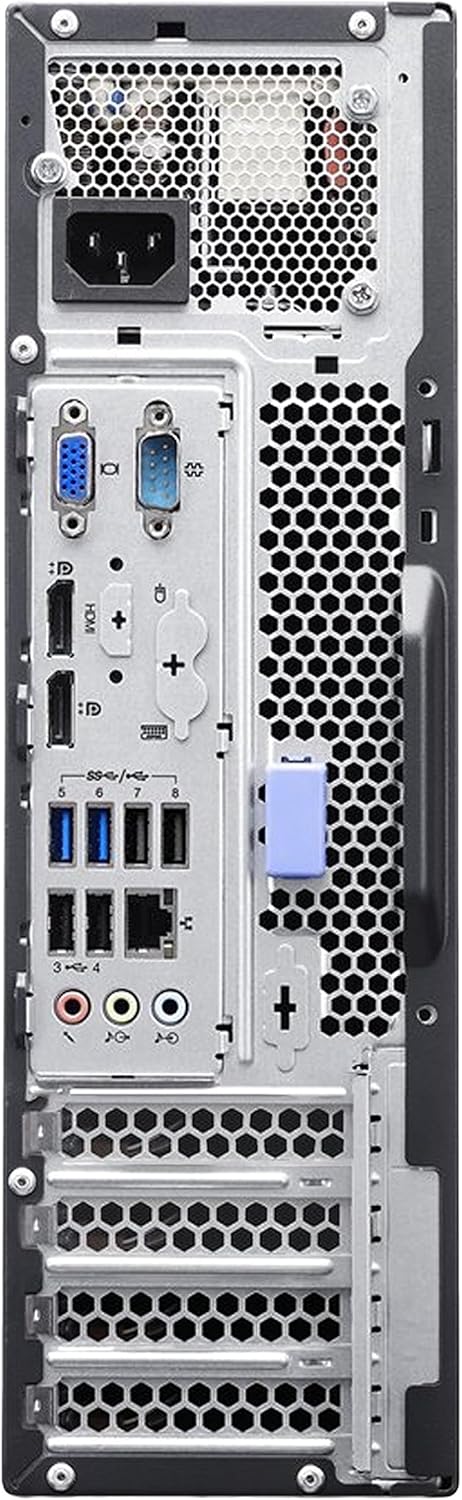
Figure 2: Rear view of the Lenovo M83 SFF Desktop PC, illustrating various connectivity ports including video outputs, USB, and Ethernet.
4. Operating Instructions
4.1 Using Windows 10 Pro
Your Lenovo M83 SFF PC comes with Windows 10 Pro, offering a familiar and efficient user experience. You can access pre-installed applications, browse the internet, manage files, and customize your desktop environment.
4.2 Connectivity
- USB Ports: Use the multiple USB ports (including USB 3.0 for faster data transfer) to connect external devices like flash drives, external hard drives, printers, and other peripherals.
- Video Outputs: Connect up to two monitors simultaneously using the DisplayPort, VGA, or HDMI ports for extended desktop functionality.
- Audio Ports: Front and rear audio jacks allow for connecting headphones, microphones, and external speakers.
- Optical Drive: The integrated DVD drive supports reading and writing CDs and DVDs.
- WiFi & Bluetooth: Connect to wireless networks and Bluetooth devices (e.g., headphones, speakers) for enhanced flexibility.
5. Maintenance and Upgrades
5.1 General Maintenance
- Keep it Clean: Regularly clean the exterior of the PC with a soft, dry cloth. Ensure ventilation grilles are free from dust to prevent overheating.
- Software Updates: Keep your Windows operating system and drivers updated to ensure optimal performance and security.
- Backup Data: Periodically back up important data to an external drive or cloud storage to prevent data loss.
5.2 Potential Upgrades
The Lenovo M83 SFF is designed for easy maintenance and potential upgrades:
- RAM: The system supports DDR3 RAM. You can upgrade the existing 16GB to a higher capacity if needed for more demanding applications.
- Storage: The 240GB SSD provides fast performance. Additional storage can be added via an internal hard drive (HDD) or external USB drives.
- Graphics Card: For enhanced graphics performance, a low-profile PCI-e graphics card can be installed, provided it fits the SFF chassis and power supply limitations.
6. Troubleshooting
If you encounter issues with your Lenovo M83 SFF PC, try the following steps:
- No Power: Ensure the power cable is securely connected to both the PC and the electrical outlet. Check if the outlet is functional.
- No Display: Verify that the monitor is powered on and correctly connected to the PC's video output. Try a different video cable or port if available.
- System Slowdown: Close unnecessary applications. Check for background processes consuming high resources (Task Manager in Windows). Ensure sufficient free space on the SSD.
- Peripheral Not Working: Disconnect and reconnect the peripheral. Try a different USB port. Check device drivers in Windows Device Manager.
- Bluetooth Issues: Ensure Bluetooth is enabled in Windows settings. Check for updated Bluetooth drivers.
- Operating System Errors: Restart the PC. If issues persist, consider using Windows troubleshooting tools or performing a system restore.
For persistent problems, consult the Lenovo support website or a qualified technician.
7. Specifications
| Feature | Specification |
|---|---|
| Brand | Lenovo |
| Series | Lenovo M83 |
| Model Number | Lenovo M83 SFF |
| Processor | Intel Quad Core i5-4570 (3.2 GHz) |
| RAM | 16 GB DDR3 |
| Storage | 240 GB SSD |
| Graphics Coprocessor | Integrated Graphics (Intel) |
| Operating System | Windows 10 Pro |
| Optical Drive | DVD |
| Connectivity | HDMI, WiFi, Bluetooth 4.0 |
| Max Screen Resolution | 3840x2160 |
| Item Weight | 15 pounds |
| Product Dimensions (LxWxH) | 20 x 14 x 8 inches |
8. Warranty and Support
This Lenovo M83 SFF Desktop PC is a renewed product and typically comes with a 90-day refund/replacement policy. Please refer to your purchase documentation for specific warranty details and terms provided by the seller.
For technical support or service inquiries, please contact the vendor from whom you purchased this renewed product. They can provide assistance with troubleshooting, warranty claims, and general product support.


