
1. Introduction
Thank you for choosing SUNPIE H6054 5x7/7x6 LED Headlights with RGB Halo. These headlights are designed to provide superior illumination and customizable aesthetics for your vehicle. This manual provides detailed instructions for installation, operation, and maintenance to ensure optimal performance and longevity of your product.
2. Product Features
- Universal Fit: Designed for vehicles with 6014/H6052/H6054/6054/H5054/H6054LL/69822/6052/6053 sockets.
- RGB Halo with APP Control: Multicolored and multi-effect halos controllable via a dedicated smartphone application or remote. Features music sync, flash modes, and customizable colors.
- High Brightness: Built-in bright LED chips with 80W power and 6000K color temperature. High beam (5600 Lumens) and low beam (2500 Lumens) options.
- Street Legal: DTO and FCC approved for road use.
- Durable Design: Waterproof construction with a moisture vent (breathing hole) on the backside to prevent condensation.
- Quality LEDs: Utilizes CREE LEDs for reliable performance and consistent color output.
3. Compatibility
These headlights are a direct plug-and-play replacement for vehicles equipped with 5x7 inch (also known as 7x6 inch) sealed beam headlights. They are compatible with the following common vehicle models and socket types:
- Jeep Cherokee XJ (1984-2001)
- Jeep Wrangler YJ (1987-1995)
- Jeep Comanche MJ (1986-1992)
- GMC models with 5x7 inch headlights (e.g., Savana, Safari, K3500, K2500, K1500, C2500)
- Vehicles with 6014/H6052/H6054/6054/H5054/H6054LL/69822/6052/6053 sockets.
4. Installation Instructions
Please follow these steps carefully for proper installation. Professional installation is recommended if you are unfamiliar with automotive electrical systems.
- Safety First: Ensure your vehicle's engine is off and the battery is disconnected before beginning installation.
- Remove Old Headlights: Carefully remove your existing 5x7/7x6 sealed beam headlights from their housing.
- Connect Wiring: The SUNPIE LED headlights come with an H4 adapter and relay harness for direct plug-and-play connection to the original socket. Connect the H4 plug from the new headlight to your vehicle's headlight harness.
- Verify Pin Configuration: For some vehicles, the pin configuration on the headlamp may differ. Refer to the diagram below. If necessary, you may need to swap the pins on your vehicle's harness to match the standard H4 configuration (High Beam+, Ground-, Low Beam+).
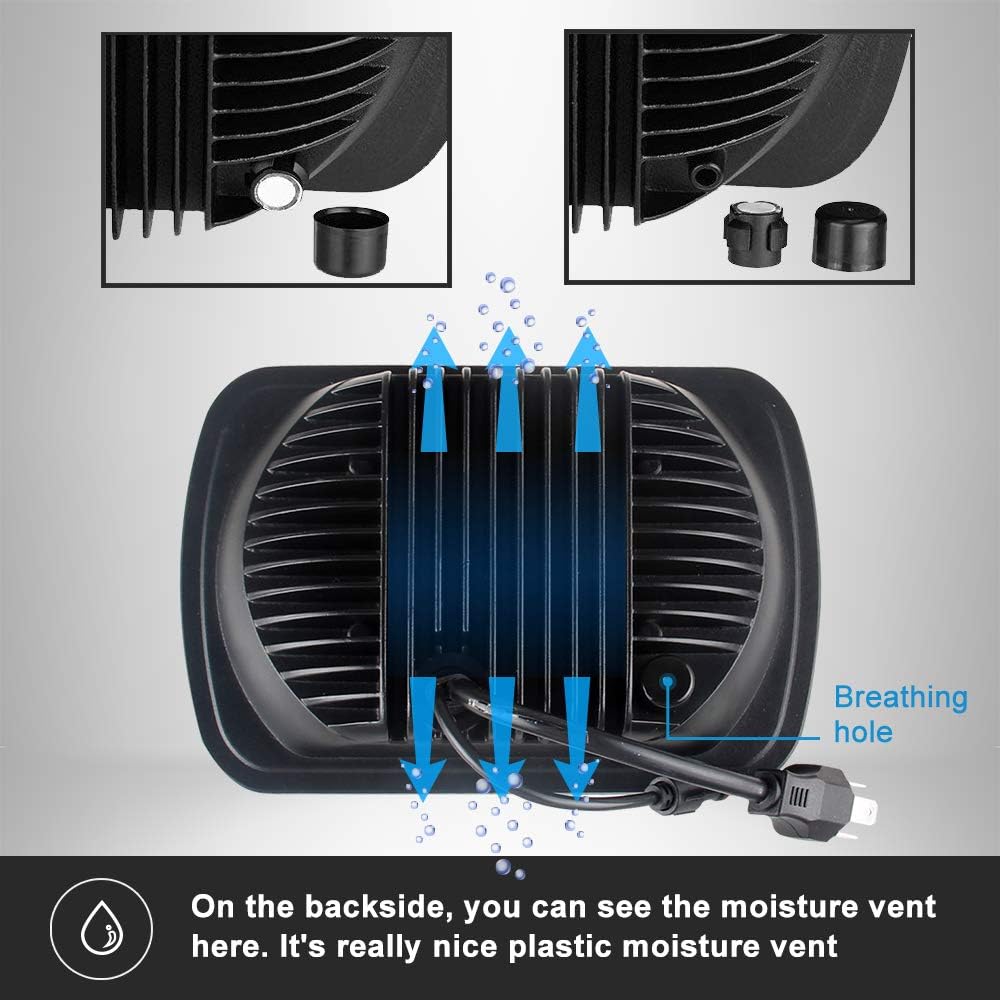
Image: Wiring diagram illustrating standard and non-standard H4 socket pin configurations (High Beam+, Ground-, Low Beam+). Users may need to swap pins for proper function.
- Secure Headlights: Once wired, carefully place the new LED headlights into the housing and secure them according to your vehicle's specifications.
- Connect RGB Controller: Connect the Bluetooth control unit for the RGB halo feature. Ensure it is placed in a secure, dry location.
- Reconnect Battery: Reconnect your vehicle's battery.
- Test Functionality: Turn on your headlights to test both high and low beams, as well as the RGB halo functions. Adjust headlight aim if necessary.
5. Operating Instructions
5.1 Headlight Operation (High/Low Beam)
The headlights feature both high and low beam functions. The low beam utilizes 6 LED chips, while the high beam activates all 15 LED chips for maximum illumination.

Image: Visual comparison of low beam (2500 Lumens) and high beam (5600 Lumens) light output.
5.2 RGB Halo Control
The RGB halo can be controlled via a smartphone application or the included remote control.
5.2.1 APP Control
Download the dedicated APP to control the RGB halo functions. The APP allows for extensive customization, including color selection, various lighting modes, music synchronization, and brightness adjustment.
- Download APP: Scan the QR code on the Bluetooth control unit or visit the Google Play Store for Android devices: https://play.google.com/store/apps/details?id=com.forwell.bledim
- Connect via Bluetooth: Ensure your phone's Bluetooth is enabled and connect to the headlight's Bluetooth control unit.
- Functions: The APP provides options for light list, scene modes, music mode, clock, and settings. You can adjust brightness, change colors (red, green, white, blue, etc.), and select from hundreds of modes.

Image: Demonstrates APP control features including user guide access, color selection, music sync mode, and brightness adjustment.
5.2.2 Remote Control
The included remote control offers quick access to common RGB halo functions. Please note that the remote requires batteries (not included).
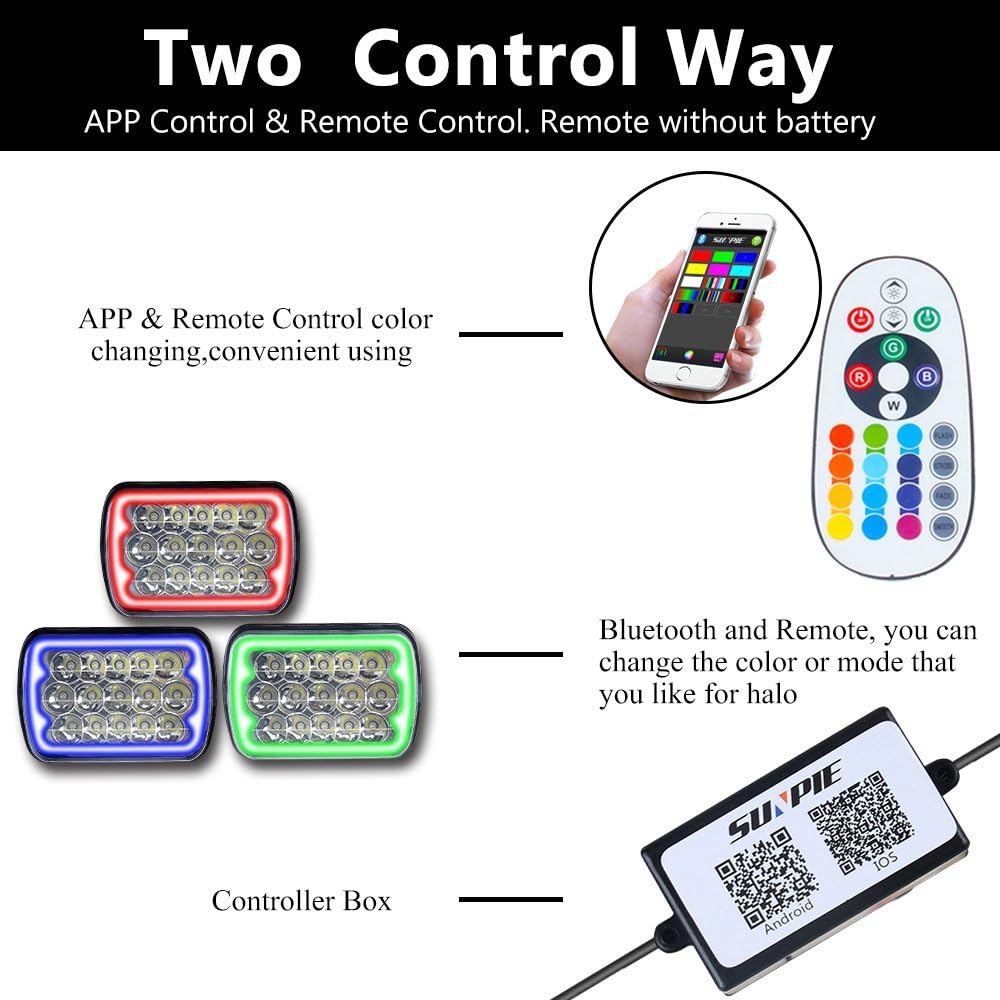
Image: Illustrates the two control methods for the RGB halo: smartphone APP and dedicated remote control.
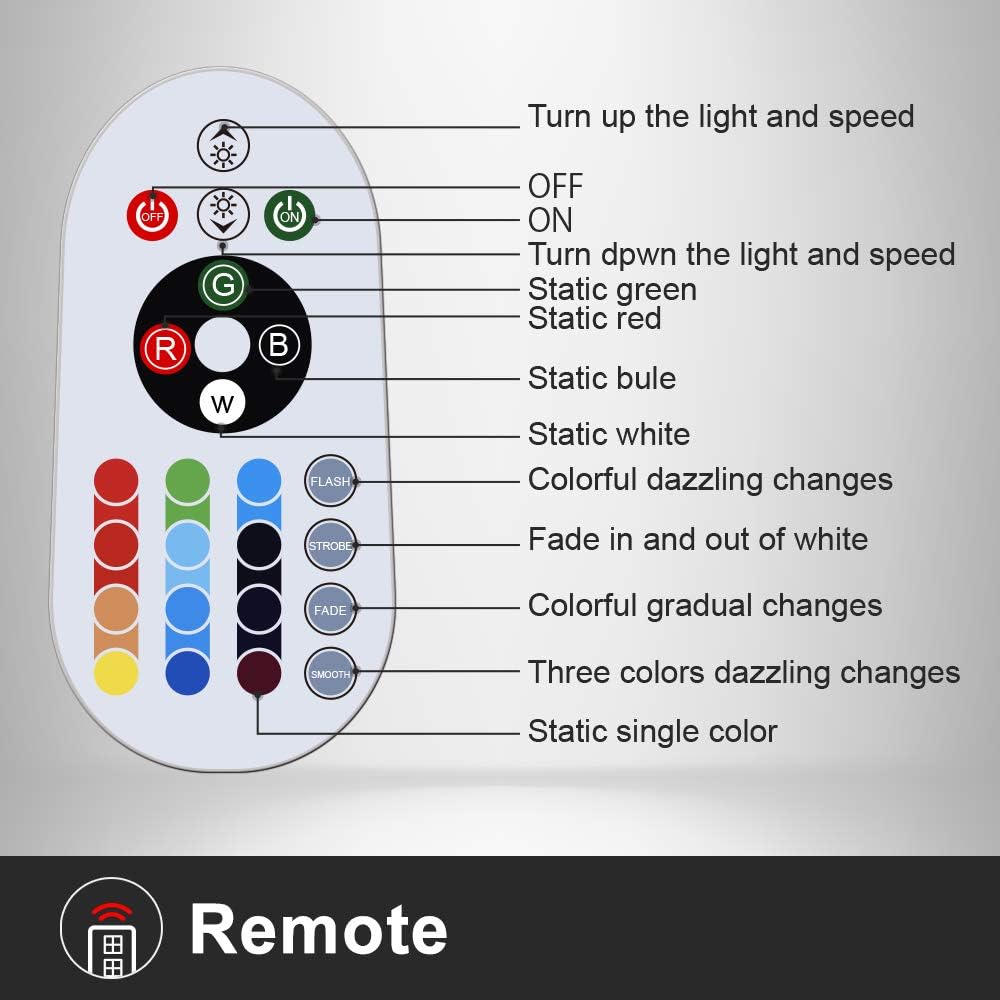
Image: Detailed breakdown of remote control buttons and their corresponding functions for the RGB halo.
- ON/OFF: Power the halo on or off.
- Brightness/Speed: Adjust the brightness of static colors or the speed of dynamic modes.
- Static Colors: Select static green, red, blue, or white. Additional color buttons for other static colors.
- Dynamic Modes: Choose from Flash, Strobe, Fade in and out of white, Colorful dazzling changes, Colorful gradual changes, Three colors dazzling changes, and Static single color.
6. Maintenance
To ensure the longevity and optimal performance of your SUNPIE LED headlights, consider the following maintenance tips:
- Cleaning: Clean the headlight lenses regularly with a soft cloth and mild soap solution to remove dirt and debris. Avoid abrasive cleaners.
- Moisture Vent: The headlights are equipped with a moisture vent (breathing hole) on the backside. This vent allows for air exchange to prevent condensation buildup inside the lens. Ensure this vent remains clear and unobstructed.

Image: Illustration of the moisture vent (breathing hole) located on the backside of the headlight.
- Wiring Inspection: Periodically check all wiring connections for tightness and signs of wear or corrosion.
7. Troubleshooting
If you encounter issues with your SUNPIE LED headlights, refer to the following common problems and solutions:
- Headlights Not Turning On:
- Check all wiring connections to ensure they are secure.
- Verify that the vehicle's fuses for the headlights are intact.
- Ensure the H4 adapter pins are correctly configured for your vehicle (refer to Installation Instructions).
- RGB Halo Not Working/Connecting:
- Ensure the Bluetooth control unit is properly connected and powered.
- Check your smartphone's Bluetooth settings and ensure it is paired with the control unit.
- If using the remote, check if batteries are installed and functional.
- Try restarting the APP and reconnecting.
- Condensation Inside Lens:
- Ensure the moisture vent (breathing hole) is not blocked.
- Small amounts of condensation are normal and should dissipate. If excessive or persistent, contact support.
For further assistance, please contact SUNPIE customer service.
8. Specifications
| Attribute | Specification |
|---|---|
| Brand | SUNPIE |
| Model | H6054 (5x7/7x6 inch) |
| Light Source Type | LED (CREE LEDs) |
| Color Temperature | 6000K |
| Wattage | 80W (per pair) / 45W (per light) |
| Voltage | 12 Volts (DC) |
| High Beam Lumens | 5600 Lumens |
| Low Beam Lumens | 2500 Lumens |
| Special Features | Waterproof, RGB Halo with APP/Remote Control |
| Auto Part Position | Front Outside |
Note: Dimensions are approximately 7.79 inches (198mm) width, 5.57 inches (140mm) height, and 2.95 inches (75mm) depth.
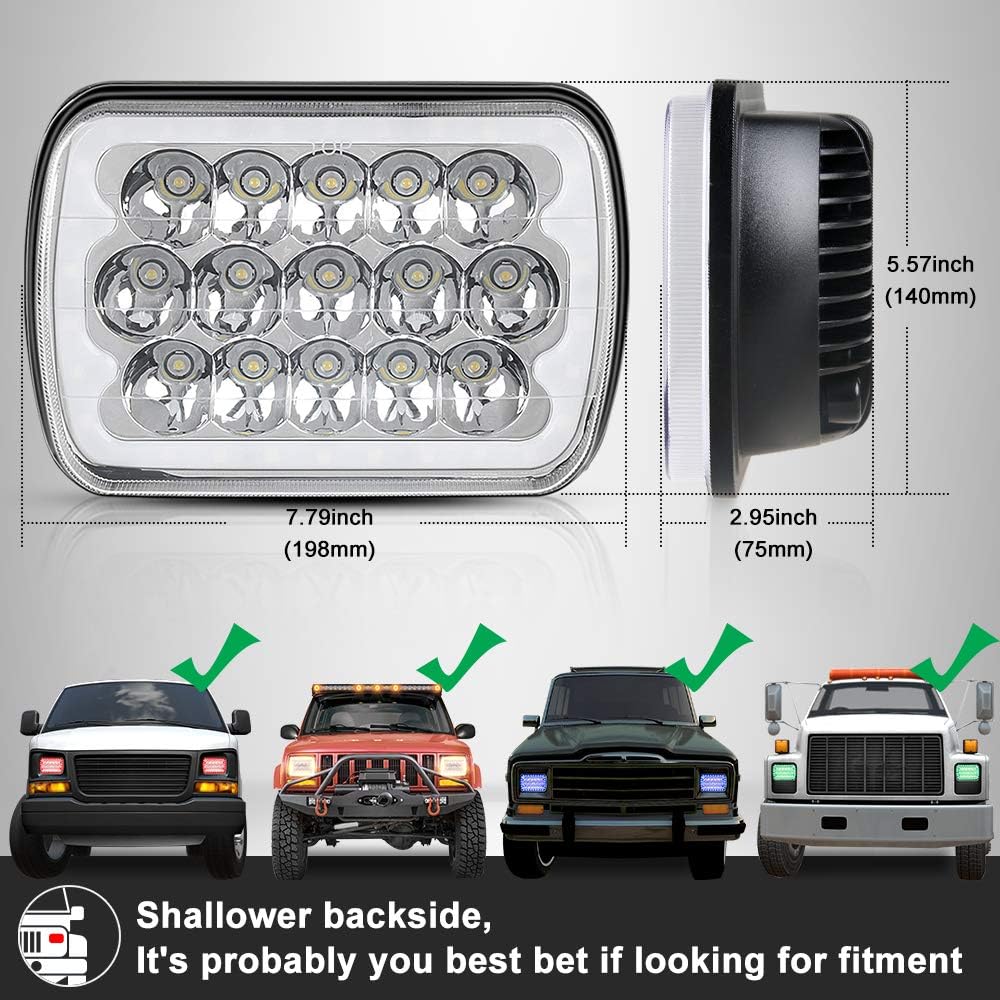
Image: Headlight dimensions and visual examples of vehicle fitment.

Image: Detail of the CREE LED chip used in the headlight.
9. Warranty and Support
SUNPIE provides the following support for this product:
- Free Service: 365 days of free service.
- Returns: 30-day return policy.
- Money Back Guarantee: 45-day money-back guarantee.
If your 5x7 LED headlight is damaged during delivery or if you encounter any issues, please contact SUNPIE customer service for assistance or a replacement.