
1. Product Overview
The CINCOM Leg Massager CM-010A is an air compression device designed to provide comprehensive leg massage for circulation and pain relief. It features multiple airbags that inflate and deflate to simulate kneading and stroking, aiding in muscle relaxation, improved blood circulation, and relief from conditions such as Restless Leg Syndrome (RLS) and edema.

Image 1.1: The CINCOM Leg Massager CM-010A, showing the two leg wraps and the handheld controller.
What's in the Box?

Image 1.2: Packaging contents including leg wraps, controller, adapter, mesh bag, and user manual.
- 2 x Air Leg Wraps (a pair)
- 1 x Hand-Held Controller
- 1 x Adapter (UL plug)
- 1 x Mesh Storage Bag
- 1 x User Manual
2. Safety Information
Read all instructions carefully before using the device. Failure to follow safety guidelines may result in injury or device malfunction.
- Consult a doctor before use if you have blood clots, severe vein issues, or unhealed wounds.
- Do not use while sleeping or unattended.
- Keep the power cord away from heat sources and liquids to prevent electrical hazards.
- Always unplug the massager after use and allow it to cool before storing.
- This device is not intended for medical diagnosis or treatment.

Image 2.1: Key features including adjustable wraps, comfortable materials, and the 20-minute auto shut-off safety function.
3. Setup
Follow these steps to set up your CINCOM Leg Massager for first use:
- Connect Air Hoses: Ensure the air hoses from the leg wraps are securely connected to the corresponding holes marked "L" (Left) and "R" (Right) on the handheld controller.
- Apply Leg Wraps: Place the leg wraps around your calves, thighs, or arms. Adjust the wraps using the Velcro fasteners to achieve a comfortable and secure fit. The maximum calf circumference supported is 21 inches.
- Connect Power: Plug the 12V/1A adapter into the handheld controller, then plug the adapter into a standard electrical outlet.

Image 3.1: Overview of components and connections for setup.

Image 3.2: The adjustable leg wraps accommodate various sizes, with a maximum extension from 14" to 22".
4. Operating Instructions
The CINCOM Leg Massager offers 2 massage modes and 3 intensity levels for a customizable experience.
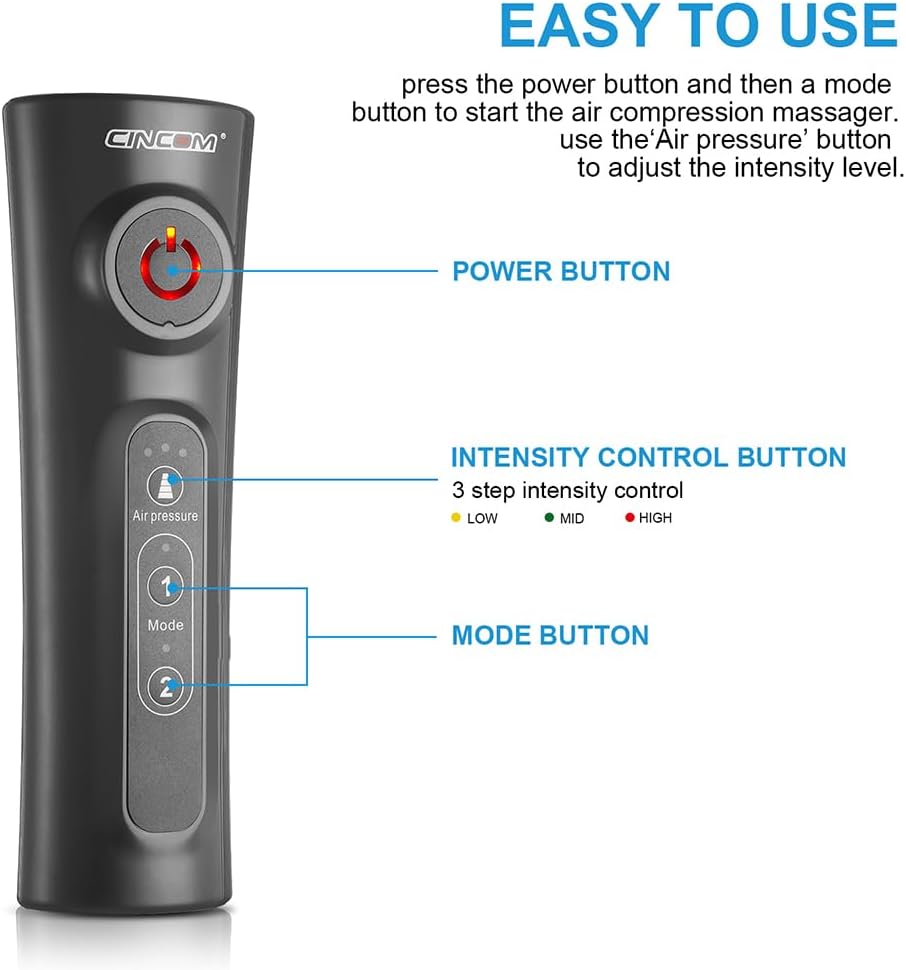
Image 4.1: Handheld controller with clearly marked Power, Intensity, and Mode buttons.
- Power On: Press the Power Button (circular button with power symbol) on the handheld controller to turn on the device. The indicator light will illuminate.
- Select Mode: Press the Mode Button (labeled 'Mode' with '1' and '2') to cycle between the two available massage modes. Each mode offers a different sequence of inflation and deflation.
- Adjust Intensity: Press the Air Pressure Button (labeled 'Air pressure' with three dots) to select one of the three intensity levels: Low, Mid, or High. The corresponding indicator light will show the selected intensity.
- Enjoy Massage: Relax and allow the massager to operate. The device will automatically shut off after 20 minutes.
- Power Off: To stop the massage before the auto shut-off, press the Power Button again.
Automatic Shut-Off
For safety and convenience, the massager is equipped with a 20-minute automatic shut-off function. This prevents overuse and is particularly useful if you fall asleep during use.

Image 4.2: The 20-minute auto-off feature ensures safe operation.
5. Maintenance
Proper care and maintenance will extend the lifespan of your CINCOM Leg Massager.
- Cleaning: Disconnect the power adapter before cleaning. Wipe the surface of the leg wraps and controller with a soft, damp cloth. Do not use abrasive cleaners or immerse the device in water.
- Storage: Store the massager in a cool, dry place, away from direct sunlight and moisture. Use the provided mesh storage bag to keep components organized and protected. Ensure the air hoses are not kinked or bent during storage.
- Inspection: Periodically check the power cord, adapter, and air hoses for any signs of damage. If any damage is found, discontinue use and contact customer support.
6. Troubleshooting
If you encounter issues with your CINCOM Leg Massager, refer to the following common solutions:
| Problem | Possible Cause | Solution |
|---|---|---|
| Device does not power on | Power adapter not connected or faulty; power outlet issue. | Ensure adapter is securely plugged into the controller and a working power outlet. Try a different outlet. |
| No air compression or weak compression | Air hoses not properly connected; wraps not securely fastened; air leak. | Check that air hoses are firmly inserted into the controller. Ensure leg wraps are tightly secured with Velcro. Inspect hoses and wraps for any visible damage or leaks. |
| Device is noisy | Normal operation sound of the air pump. | A certain level of motor noise is normal for air compression devices. If the noise is excessive or unusual, contact customer support. |
| Pressure feels too high or too low | Incorrect intensity setting; wraps too tight/loose. | Adjust the intensity level using the Air Pressure Button. Ensure wraps are fastened comfortably, not too tight or too loose. |
If the problem persists after attempting these solutions, please contact CINCOM customer support for further assistance.
7. Specifications
Detailed technical specifications for the CINCOM Leg Massager CM-010A:
- Model Number: CM-010A
- Brand: CINCOM
- Power Source: Corded Electric
- Input: 12V/1A Adapter
- Material: Velvet
- Product Dimensions: 21.65 x 9.45 x 9.06 inches
- Item Weight: 2.31 Pounds
- Applicable Body Parts: Legs, Calves, Arms
- Massage Modes: 2
- Intensity Levels: 3
- Automatic Shut-off: 20 minutes
- Max Calf Circumference: 21 inches (adjustable)
- Date First Available: July 26, 2018
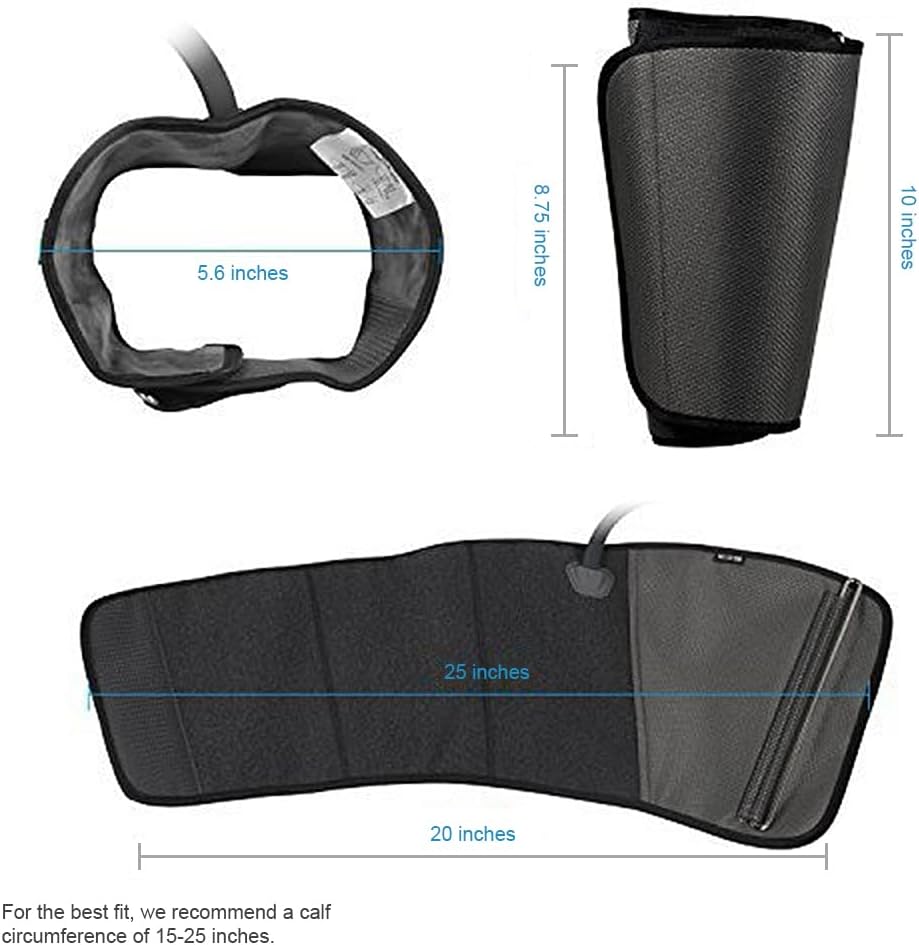
Image 7.1: Dimensions of the leg wraps for proper fit.
8. Warranty and Support
CINCOM is committed to providing high-quality products and customer satisfaction. If you experience any issues with your Leg Massager or require assistance, please contact our customer support team.
For support, please refer to the contact information provided in your product packaging or visit the official CINCOM website. Please have your model number (CM-010A) and purchase details ready when contacting support.
Legal Disclaimer: Statements regarding dietary supplements have not been evaluated by the FDA and are not intended to diagnose, treat, cure, or prevent any disease or health condition. This product is not a medical device.


