
1. Product Overview
The ANCEL X7HD is a 10-inch heavy-duty truck diagnostic scanner designed for comprehensive vehicle system analysis. It supports full HDOBD/OBD2 functions, over 42 reset functions, active tests, bidirectional control, and ECU coding. This device is equipped with a 6000 mAh battery, 2G RAM, 32G ROM (expandable to 128GB), and runs on Android 10.0, offering a user-friendly interface in 14 languages.
Key capabilities include OEM DPF forced regeneration, cylinder cutout tests, and advanced ECU coding for various adjustments and programming tasks. It provides extensive compatibility with over 100 brands and 10,000+ models of heavy trucks, semi-trucks, light trucks, buses, construction vehicles, and agricultural vehicles, covering major engine manufacturers like Cummins, Detroit, Caterpillar, Volvo, and Paccar.
The scanner also features remote diagnostic support and 2 years of free software updates, ensuring it remains current with the latest vehicle data and functionalities.
2. What's in the Box
Your ANCEL X7HD package includes the following components:
- ANCEL X7HD Truck Scanner (1 unit)
- DIESEL-9 Connector (1 unit)
- CAT-9 Connector (1 unit)
- OBD-R16 Connector (1 unit)
- BENZ-14 Connector (1 unit)
- Bluetooth VCI Connector (1 unit)
- Battery Tester Clamps (1 unit)
- ECU OBD Jumper Cables (1 unit)
- ECU Jumper Leads (1 unit)
- USB Cable (1 unit)
- US Power Plug (1 unit)
- Protective Carrying Case (1 unit)
- ISUZU-3 Connector (1 unit)
- ISUZU-20 Connector (1 unit)
- CUMMINS-6 Connector (1 unit)
- VOLVO-8 Connector (1 unit)
- DENSO-12 Connector (1 unit)
- MAN-37 Connector (1 unit)
- Cigarette Lighter Cable (1 unit)
- Printer Lead USB A - USB B (1 unit)
- OBD Extension Cable (1 unit)
- EU Plug (1 unit)
- UK Power Plug (1 unit)
- User Manual (1 unit)
The comprehensive kit ensures compatibility with a wide range of heavy-duty vehicles and provides all necessary accessories for diagnostic tasks.

Image: ANCEL X7HD Kit Packing List. This image displays the various components included in the ANCEL X7HD package, such as the main scanner unit, multiple diagnostic connectors, cables, power adapters, and a protective carrying case.
3. Setup
3.1 Initial Charging and Power On
Before initial use, ensure the ANCEL X7HD scanner is fully charged using the provided USB cable and power adapter. The device has a built-in 6000 mAh battery. To power on, press and hold the power button located on the device.
3.2 Wi-Fi Connection and Software Updates
Connect the scanner to a stable Wi-Fi network to download the latest software updates. Regular updates ensure compatibility with new vehicle models and access to the most current diagnostic functions. The device comes with 2 years of free software updates.
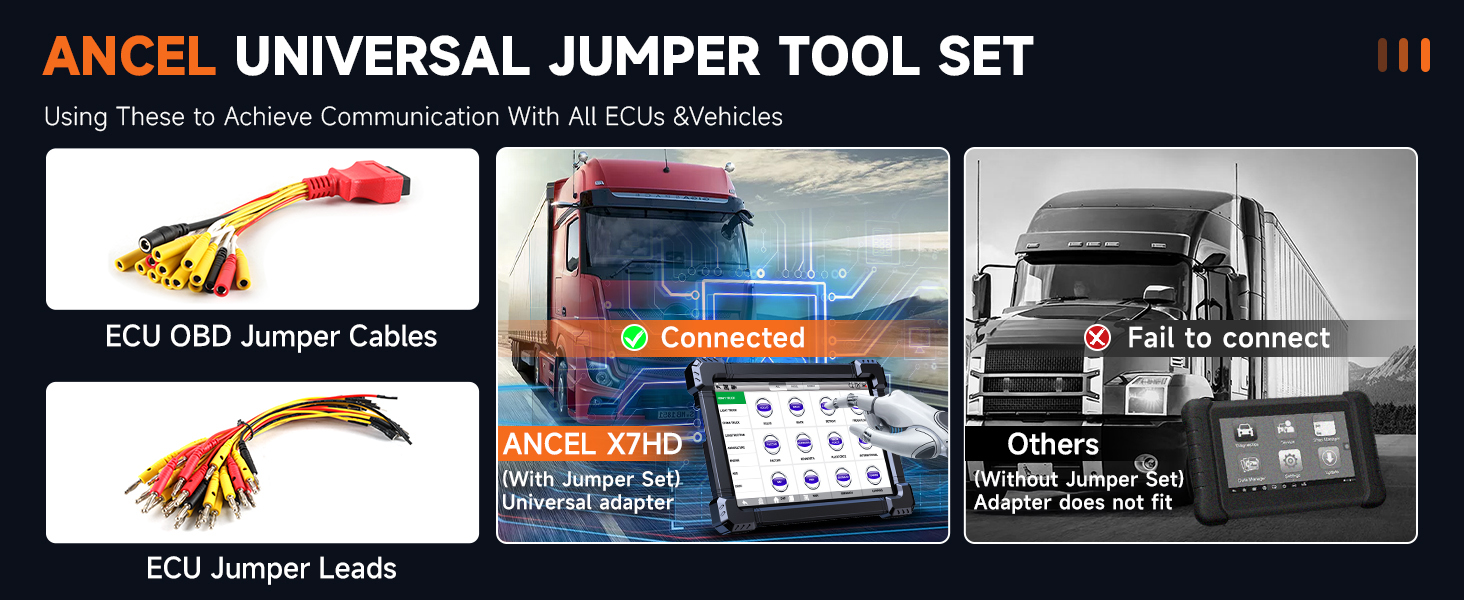
Image: ANCEL X7HD One-Click Free Update. This image illustrates the scanner's interface for performing one-click software updates via Wi-Fi, showing a cloud icon with an arrow pointing down to an 'Update' button.
3.3 Connecting to the Vehicle
Select the appropriate diagnostic connector (e.g., DIESEL-9, CAT-9, OBD-R16) from the kit based on your vehicle's diagnostic port. Connect the VCI (Vehicle Communication Interface) to the scanner and then to the vehicle's diagnostic port. Ensure a secure connection before proceeding with diagnostics.

Image: ANCEL X7HD Scanner Connected to Truck. This image shows the ANCEL X7HD scanner connected to a heavy-duty truck's diagnostic port, illustrating the physical connection process.
4. Operating Instructions
4.1 All System Diagnostic Scan
The ANCEL X7HD supports comprehensive scanning of all vehicle systems, including Engine, Brake, Retarder, TECU Transmission, Tachograph, ABS, SRS, TPMS, EPB, SAS, and ESP. Navigate to the 'Diagnose' menu on the scanner to initiate a full system scan.

Image: ANCEL X7HD All Systems Diagnostic Scan. This image displays the scanner's interface showing various vehicle systems that can be diagnosed, such as Engine, ABS, Suspension, and more.
4.2 HDOBD/OBD2 Modes
Access 10 OBD2 service modes for detailed diagnostics, including reading/erasing error codes, viewing data streams, I/M readiness, vehicle information, actuations, DTC lookup, EVAP tests, and freeze frame data.

Image: ANCEL X7HD Perform Universal HD OBD/OBDII/EOBD Function. This image shows the scanner's screen with options for various OBD functions like Read ECU Info, Read Codes, Erase Codes, Data Stream, and more.
4.3 Special Functions and Bidirectional Control
The X7HD offers over 42 special services and bidirectional control capabilities. These include:
- DPF Forced Regeneration & Reset: Supports DPF regeneration, reset, related information reset, and DPD forced regeneration.
- Cylinder Cutout Test: Activate motors for exhaust air in ABS automatically and perform cylinder cut-off tests.
- ECU Coding & Programming: Perform level calibration, idle speed learning and adjustment, camshaft timing control learning, control unit adaptations, injector codes, Read/Write VIN, and road speed limit settings.
- Bidirectional Control: Execute active tests such as pump & valve tests, radiator fan activation, and other component tests to verify system integrity.

Image: ANCEL X7HD Active Test Bi-Directional Control. This image illustrates the bidirectional control features, showing the scanner interacting with truck components like pumps, valves, and radiator fans.
Video: ANCEL X7HD All-In-One Heavy Duty Truck Scanner. This video provides a comprehensive overview of the ANCEL X7HD scanner's features and capabilities, demonstrating its use in a truck environment.
Video: ANCEL X7HD Heavy Duty Truck Scanner for All Systems. This video demonstrates the ANCEL X7HD's ability to perform all-system diagnostics on heavy-duty trucks, showcasing its interface and functionality.
5. Maintenance
5.1 Software Updates
Keep your ANCEL X7HD scanner updated to ensure optimal performance and compatibility. Connect the device to Wi-Fi and use the 'Update' function to download the latest software versions. Two years of free updates are included with your purchase.
5.2 General Care
Store the scanner in its protective carrying case when not in use. Keep the device and connectors clean and free from dust, dirt, and moisture to prolong its lifespan.
6. Troubleshooting
6.1 Compatibility Issues
If you encounter compatibility issues with specific vehicle models or functions, please contact ANCEL's technical support. You can also use the


