1. Introduction
This manual provides detailed instructions for the setup, operation, and maintenance of your FD F560X 56W 2.1 Bluetooth Multimedia Speaker system. Please read this manual thoroughly before using the product to ensure proper functionality and to maximize your listening experience. The FD F560X system delivers powerful bass and clear sound, featuring Bluetooth connectivity and a fully remote-controlled interface.
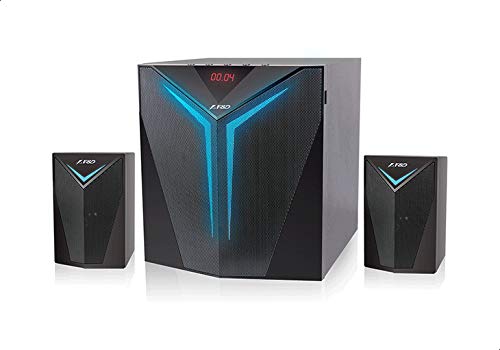
Image 1.1: The FD F560X 2.1 Multimedia Speaker System, consisting of one subwoofer and two satellite speakers.
2. Package Contents
Verify that all items listed below are included in your package:
- 1 x 2.1 Speaker System (1 Subwoofer, 2 Satellite Speakers)
- 1 x User Manual
- 1 x Warranty Card
- 1 x Remote Control
- 1 x RCA to 3.5mm Audio Input Cable
- 1 x FM Antenna Cable
3. Product Overview
The FD F560X speaker system features a robust design and intuitive controls for an enhanced audio experience.
3.1 Main Unit (Subwoofer)
The subwoofer houses the primary controls and connections. It features a high-contrast digital LED display for easy readability and a rust-proof metal grill for durability and protection of the internal components.
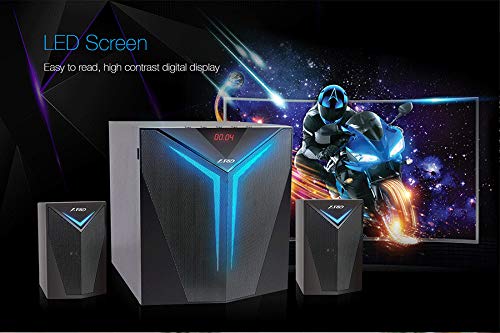
Image 3.1: The subwoofer's front panel displaying the digital LED screen.
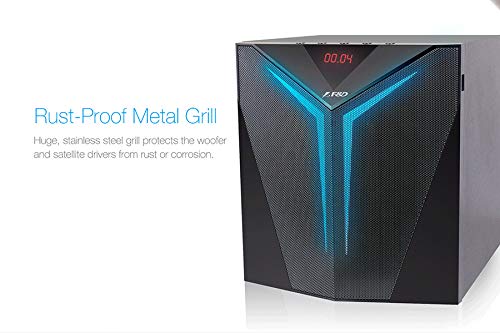
Image 3.2: Close-up of the subwoofer's rust-proof metal grill.
3.2 Satellite Speakers
Two satellite speakers complement the subwoofer, providing stereo sound. The system features an elegant exterior with a progressive, square design.

Image 3.3: The FD F560X speaker system showcasing its elegant design.
3.3 Remote Control
The included remote control allows for convenient operation of all speaker functions from a distance.

Image 3.4: The F560X remote control.
4. Setup
Follow these steps to set up your FD F560X speaker system:
- Placement: Place the subwoofer on a stable surface. Position the two satellite speakers to the left and right of your listening area for optimal stereo separation.
- Connect Satellite Speakers: Connect the cables from the satellite speakers to the 'AUDIO OUTPUT' ports on the rear panel of the subwoofer. Ensure correct left and right channel connections.
- Connect FM Antenna: If you intend to use the FM radio function, connect the provided FM antenna cable to the 'FM ANT' port on the subwoofer's rear panel. Extend the antenna for better reception.
- Power Connection: Connect the power cord to the AC power input on the rear of the subwoofer, then plug it into a standard wall outlet.
- Power On: Flip the 'POWER' switch on the rear panel of the subwoofer to the 'ON' position. The LED display on the front of the subwoofer will illuminate.
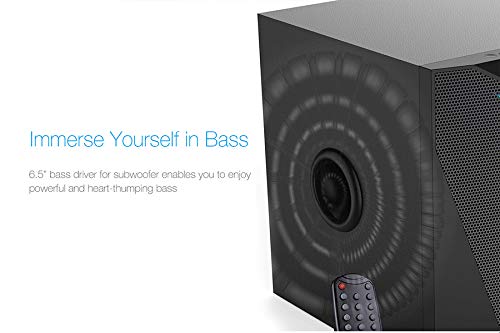
Image 4.1: Rear panel connections of the FD F560X subwoofer.
5. Operating Instructions
The FD F560X offers multiple input options and can be controlled via the front panel or the remote control.
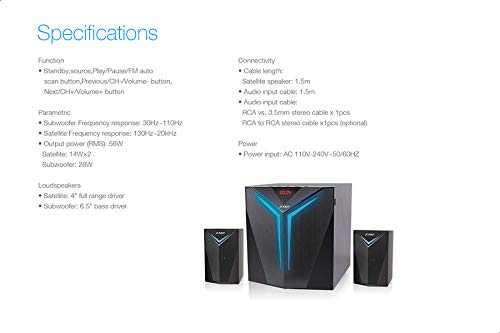
Image 5.1: The FD F560X supports multiple input sources including Bluetooth, USB, and AUX.
5.1 Power On/Off
- To power on, ensure the rear power switch is 'ON', then press the 'POWER' button on the remote or the front panel.
- To power off, press the 'POWER' button on the remote or the front panel.
5.2 Input Source Selection
Press the 'SOURCE' button on the remote control or the front panel to cycle through available input modes: Bluetooth, AUX, USB, and FM.
5.3 Bluetooth Pairing
- Switch the speaker system to Bluetooth mode using the 'SOURCE' button. The LED display will show 'BT' and flash, indicating it is in pairing mode.
- On your mobile device (smartphone, tablet, etc.), enable Bluetooth and search for available devices.
- Select 'F&D F560X' from the list of devices.
- Once paired, the speaker will emit a confirmation tone, and the 'BT' indicator on the LED display will stop flashing. You can now play audio from your device through the speakers.
5.4 USB Playback
- Insert a USB drive containing MP3 audio files into the USB port on the front panel of the subwoofer.
- Switch the speaker system to USB mode using the 'SOURCE' button. The LED display will show 'USB'.
- Playback will begin automatically. Use the 'PLAY/PAUSE', 'PREVIOUS', and 'NEXT' buttons on the remote or front panel to control playback.
5.5 AUX Input
- Connect your external audio device (e.g., TV, DVD player, computer) to the 'AUDIO INPUT' ports on the rear panel of the subwoofer using the provided RCA to 3.5mm cable or an appropriate RCA to RCA cable.
- Switch the speaker system to AUX mode using the 'SOURCE' button. The LED display will show 'AUX'.
- Play audio from your connected device.
5.6 FM Radio
- Ensure the FM antenna is properly connected and extended.
- Switch the speaker system to FM mode using the 'SOURCE' button. The LED display will show the FM frequency.
- Press the 'SCAN' button on the remote or front panel to automatically scan and save available FM stations.
- Use the 'PREVIOUS' and 'NEXT' buttons to navigate through saved stations.
5.7 Volume, Bass, and Treble Control
- Volume: Use the 'VOLUME +/-' buttons on the remote or the main volume knob on the subwoofer to adjust the overall volume.
- Bass: Use the 'BASS +/-' buttons on the remote or the bass control knob on the subwoofer to adjust the bass level.
- Treble: Use the 'TREBLE +/-' buttons on the remote or the treble control knob on the subwoofer to adjust the treble level.
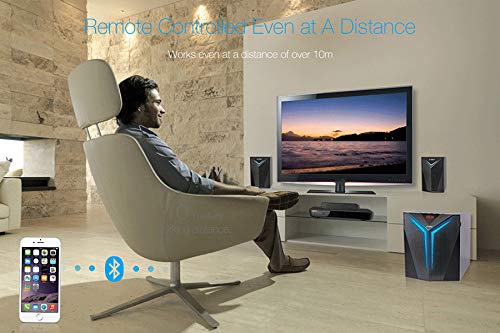
Image 5.2: The remote control allows for convenient operation from a distance.
6. Maintenance
Proper maintenance ensures the longevity and performance of your speaker system.
- Cleaning: Use a soft, dry cloth to clean the surfaces of the speakers. Do not use liquid cleaners or abrasive materials, as they may damage the finish.
- Ventilation: Ensure that the subwoofer and satellite speakers have adequate ventilation. Do not block any vents or place the speakers in enclosed spaces.
- Environment: Avoid exposing the speakers to extreme temperatures, humidity, direct sunlight, or dusty environments.
- Power Off: Always power off the system and unplug it from the wall outlet before cleaning or if it will be unused for an extended period.
7. Troubleshooting
If you encounter issues with your FD F560X speaker system, refer to the following common problems and solutions:
| Problem | Possible Cause | Solution |
|---|---|---|
| No power | Power cord not connected; Rear power switch off; Power outlet malfunction | Ensure power cord is securely plugged in; Turn on the rear power switch; Test the power outlet with another device. |
| No sound | Incorrect input source; Volume too low; Cables loose; Mute activated | Select the correct input source; Increase volume; Check all audio cables; Deactivate mute function on remote. |
| Bluetooth not connecting | Speaker not in pairing mode; Device Bluetooth off; Interference | Ensure speaker is in Bluetooth pairing mode (flashing 'BT'); Turn on Bluetooth on your device; Move device closer to speaker; Disconnect other Bluetooth devices. |
| Remote control not working | Batteries depleted; Obstruction; Remote out of range | Replace remote batteries; Remove any obstructions between remote and speaker; Ensure remote is within operating range (approx. 10m). |
8. Specifications
Detailed technical specifications for the FD F560X 2.1 Multimedia Speaker System:
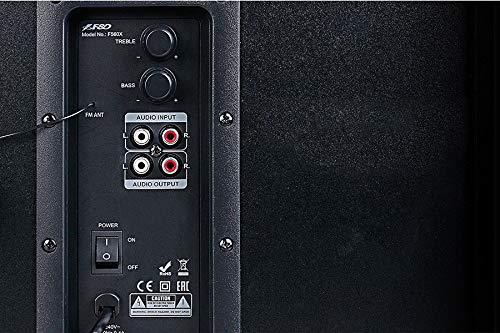
Image 8.1: Diagram illustrating key specifications and connectivity options.
| Feature | Specification |
|---|---|
| Model Name | F560X |
| Speaker Type | Bookshelf |
| Surround Sound Channel Configuration | 2.1 |
| Total Output Power | 56 Watts (Subwoofer: 28W, Satellites: 14W x 2) |
| Subwoofer Driver Size | 6.5 Inches |
| Satellite Driver Size | 4 Inches (Full Range) |
| Frequency Response (Subwoofer) | 30Hz - 110Hz |
| Frequency Response (Satellite) | 130Hz - 20kHz |
| Signal-to-Noise Ratio | ≥65dB |
| Connectivity Technology | Bluetooth, USB, Auxiliary (RCA), FM Radio |
| Wireless Communication Technology | Bluetooth |
| Control Method | Remote, Integrated Controls |
| Power Source | AC 110V-240V~50/60Hz |
| Product Dimensions (Subwoofer) | Approximately 32.1 x 29.9 x 44.7 cm |
| Item Weight | 5.6 kg |
| Material | High-Density MDF (Subwoofer), Plastic/Metal (Satellites) |
| Color | Black |
9. Warranty and Support
Your FD F560X 2.1 Bluetooth Multimedia Speaker comes with a 1-year warranty provided by the manufacturer from the date of purchase. Please retain your purchase receipt and warranty card for any warranty claims.
For technical support or service inquiries, please refer to the contact information provided on your warranty card or visit the official FD website.