
BUNKER INDUST ADCR-50A4
BUNKER INDUST Battery Quick Connect Disconnect Plug Kit
Model: ADCR-50A4
User Instruction Manual
1. Product Overview
The BUNKER INDUST Quick Connect Battery Set provides a simple and convenient method for connecting and disconnecting power to various electrical devices. This multipurpose kit is ideal for applications requiring high-current, quick-disconnect connectors, such as winches, remote battery chargers, power inverters, solar setups, and trailers.
The connectors are designed for durability and safety, featuring sturdy PC fire-retardant materials and copper-silver terminal pins for strong electrical conductivity.

Figure 1: BUNKER INDUST 50A Quick Connect Disconnect Plug Kit (4 Pack, Red)
2. Product Components
Each BUNKER INDUST 50A (4 Pack) kit includes the following components:
- 4x Quick Connect/Disconnect Plugs (Red)
- 8x Terminal Pins (Red Copper coated with Silver)
- 4x Rubber Boot Covers
The combined shell is made from sturdy PC fire-retardant materials, allowing for over 10,000 connect/disconnect actions. The fitted rubber boot covers protect against dust and moisture.

Figure 2: Included components: Connectors, Terminal Pins, and Boot Caps.

Figure 3: Detailed view of materials: Rubber boot caps, PC fire-retardant housing, and Copper silver terminals.
3. Specifications
| Attribute | Value |
|---|---|
| Model Number | ADCR-50A4 |
| Current Rating | 50A |
| Rated Voltage | UL rated at 600 volts DC or AC |
| Fire Rating | 94-V0 |
| Gauge Compatibility | 6-10 A.W.G |
| Product Dimensions | 3.39 x 1.87 x 0.5 inches |
| Item Weight | 6.74 ounces |
| Operating Temperature Range | -4°F-221°F / -20°C-105°C |
| Vibration Resistance | Excellent |
| Impact Resistance | High |

Figure 4: Detailed dimensions of the quick connect plug.

Figure 5: Overview of product specifications including current, gauge, and color options.
4. Setup and Installation
The quick connect/disconnect system is designed for easy installation. Follow these steps to properly assemble your connectors:
- Prepare Wires: Strip the insulation from the ends of your 6-10 gauge wires to expose the copper strands. Ensure the stripped length is appropriate for the terminal pins.
- Attach Terminal Pins: Insert the prepared wires into the terminal pins. You can either solder or crimp the wires to the pins to ensure a secure and conductive connection. For soldering, ensure the solder completely fills the cup of the terminal pin for optimal contact.
- Insert Terminal Pins into Housing: Carefully insert the terminal pins into the connector housing. Ensure the pins are oriented correctly. The small lip on the terminal pin should face downwards to properly hook over the internal metal flanges of the housing. Push the pins firmly until they click and lock securely into place.
- Verify Connection: Gently tug on the wires to confirm that the terminal pins are fully seated and locked within the housing.
- Install Boot Covers: Slide the rubber boot covers over the assembled connectors to provide protection against dust and moisture.
Important Note on Polarity: The connectors are designed to connect only one way, making it impossible to connect the wrong polarities to one another. This feature helps prevent accidental reverse polarity when hooking up a charger or other electrical devices.

Figure 6: Visual guide for installing the quick connect plugs.
5. Operating Instructions
Once installed, the BUNKER INDUST Quick Connect Disconnect Plugs offer a straightforward method for power management:
- Connecting: Align the two connectors, ensuring the correct orientation (they are designed to only connect one way to prevent reverse polarity). Push them firmly together until they are fully seated.
- Disconnecting: Simply pull the two connectors apart. The quick-disconnect design allows for rapid and easy separation of power sources.
- Applications: These connectors are suitable for a wide range of high-current applications, including connecting and disconnecting power to winches, remote battery chargers, power inverters, solar panel setups, and trailer wiring.
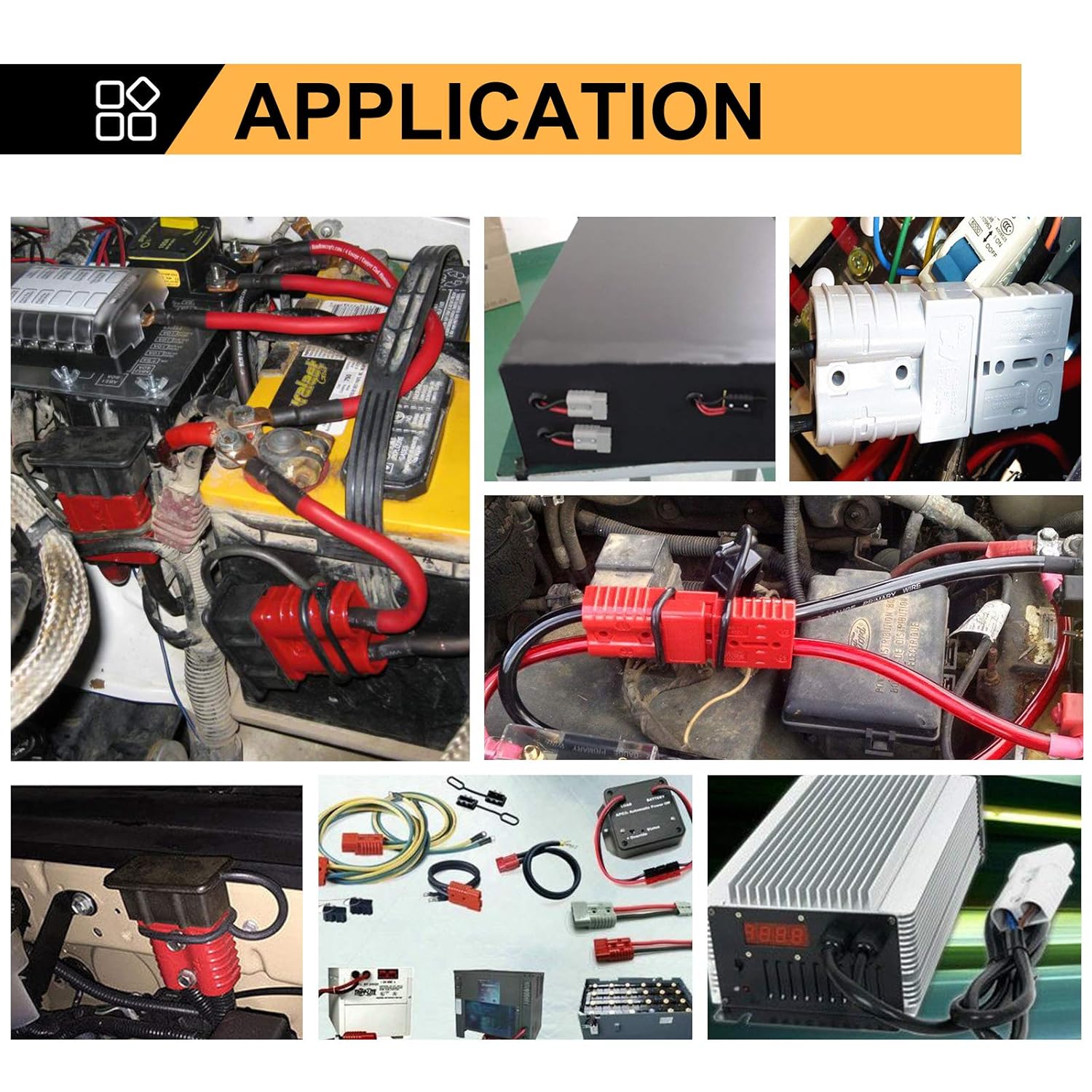
Figure 7: Examples of common applications for the quick connect system.
6. Maintenance
To ensure the longevity and optimal performance of your BUNKER INDUST Quick Connect Disconnect Plugs, consider the following maintenance tips:
- Keep Clean: Regularly inspect the connectors for dirt, dust, or debris. Clean them with a dry cloth if necessary.
- Protect from Elements: Always use the provided rubber boot covers when the connectors are not in use to protect against dust, moisture, and corrosion.
- Inspect for Damage: Periodically check the housing and terminal pins for any signs of wear, corrosion, or physical damage. Replace damaged components immediately.
- Secure Connections: Ensure that the terminal pins remain securely locked within the housing. If a pin becomes loose, it can be re-seated by pushing it firmly forward until it clicks.
7. Troubleshooting
If you encounter issues with your quick connect plugs, consider these common troubleshooting steps:
- No Power/Intermittent Connection:
- Check if the terminal pins are fully inserted and locked into the housing. A loose pin can cause poor contact.
- Inspect the wire-to-pin connection (solder or crimp) for any breaks or corrosion.
- Ensure the connectors are fully mated and properly aligned.
- Difficulty Inserting/Removing Pins:
- Ensure the wire gauge matches the terminal pin size.
- Verify that the terminal pins are oriented correctly before insertion. The design allows for proper insertion only when the small lip is facing the correct direction (downwards, towards the internal metal flanges).
- Overheating:
- Ensure the current draw does not exceed the 50A rating of the connectors.
- Verify that the wire gauge is appropriate for the current being drawn (6-10 AWG for 50A). Undersized wires can lead to overheating.
- Check for loose connections, which can create resistance and heat.
8. Warranty and Support
Warranty information for the BUNKER INDUST 50A 6-10 Gauge Battery Quick Connect Disconnect Wire Harness Plug Kit is not available in the provided product data. For specific warranty details or technical support, please refer to the manufacturer's official website or contact their customer service directly.
Manufacturer: BUNKER INDUST
Date First Available: May 1, 2018
Ask a question about this manual
Ask about setup, troubleshooting, compatibility, parts, safety, or missing instructions. Manuals+ will review the question and use this page’s manual context to help answer it.