
1. Important Safety Instructions
Read all safety warnings and instructions before operating this hedge trimmer. Failure to follow the warnings and instructions may result in electric shock, fire, and/or serious injury. Save all warnings and instructions for future reference.
General Safety
- Wear Eye Protection: Always wear safety glasses or goggles with side shields that comply with applicable standards.
- Keep Hands Away: Never touch the blades while the tool is operating. Keep all body parts away from the blade.
- Secure Grip: Always hold the hedge trimmer firmly with both hands when operating.
- Work Area: Keep the work area clean and well-lit. Cluttered or dark areas invite accidents.
- Avoid Dangerous Environments: Do not use power tools in damp or wet locations, or expose them to rain.
- Safety Switch: The electric hedge trimmer requires pressing both the start button and the trigger switch simultaneously to operate, ensuring intentional activation.
- Hand Guard: The hedge trimmer is equipped with a hand guard to prevent hands from slipping onto the blade during operation.
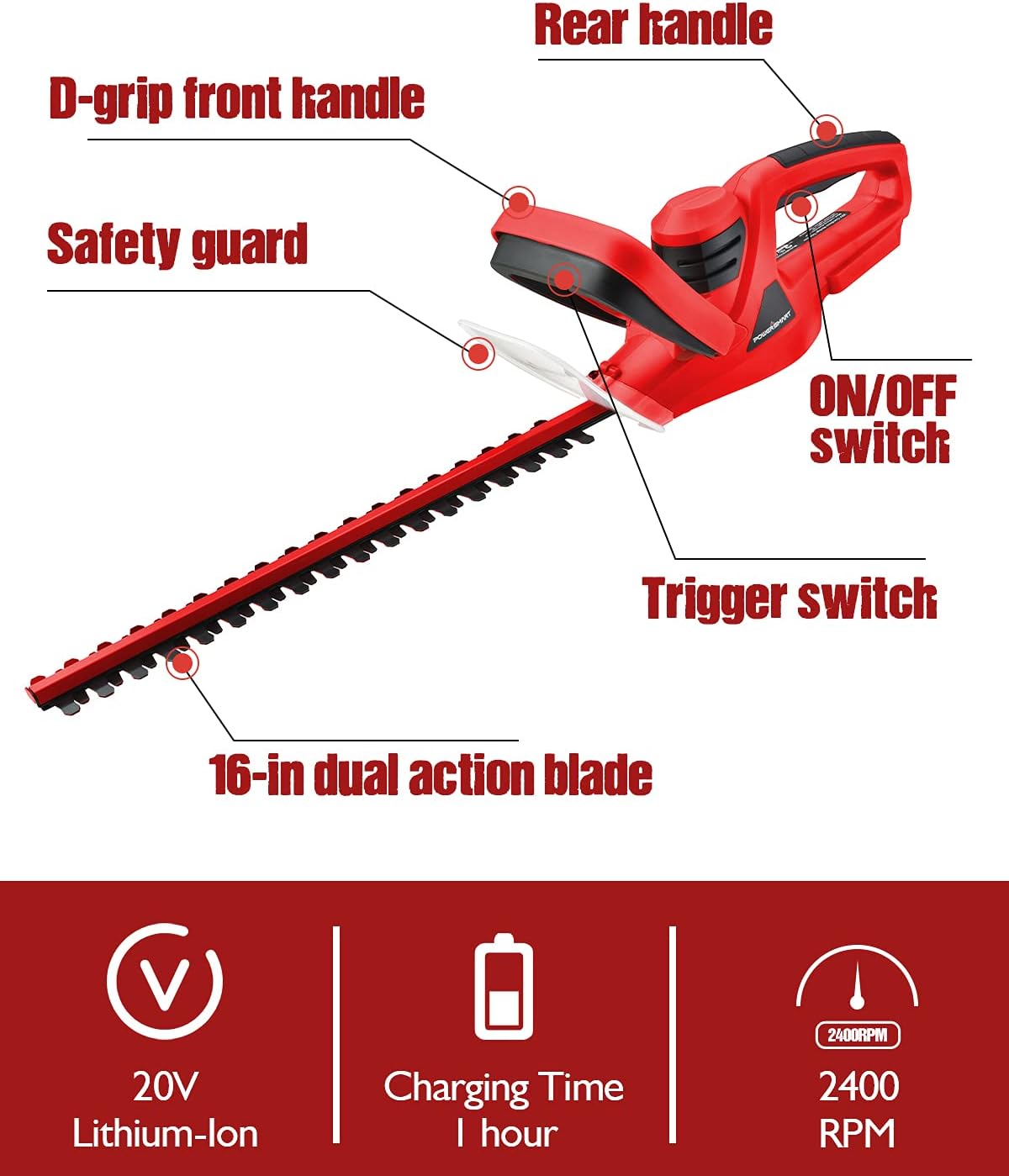
Image: User demonstrating the safety switch and hand guard on the PowerSmart hedge trimmer. The image highlights the two-button activation system and the protective hand guard.
2. Product Overview
Familiarize yourself with the components of your PowerSmart Cordless Hedge Trimmer before use.

Image: Diagram illustrating the key components of the PowerSmart hedge trimmer, including the D-grip front handle, rear handle, ON/OFF switch, trigger switch, safety guard, and the 16-inch dual-action blade.
Key Components:
- 16-inch Dual-Action Blade: Designed for efficient cutting and reduced vibration.
- D-Grip Front Handle: Provides multiple gripping positions for comfort and control.
- Rear Handle: Main gripping area for operation.
- ON/OFF Switch: Controls power to the unit.
- Trigger Switch: Activates the blade when pressed with the ON/OFF switch.
- Safety Guard: Protects the user's hands from the blade.
- 20V Lithium-Ion Battery: Provides cordless power.
- Battery Charger: For recharging the 20V battery.
3. Setup and Assembly
Battery Charging
- Ensure the battery is fully charged before first use.
- Connect the charger to a standard power outlet.
- Insert the battery into the charger. The charging indicator light will show the charging status.
- A full charge typically takes approximately 1 hour.
- Remove the battery once fully charged to prevent overcharging.
Battery Installation
- Align the charged battery with the battery port on the hedge trimmer.
- Slide the battery into the port until it clicks securely into place.
- To remove the battery, press the release button and slide the battery out.
Handle Assembly (if required)
Some units may require the D-grip handle to be attached. Use appropriate screws and a screwdriver to securely fasten the handle to the main body of the trimmer. Ensure all screws are tightened before operation.
4. Operating Instructions
Starting and Stopping the Trimmer
- Ensure the battery is installed and fully charged.
- Grip the trimmer firmly with both hands, one on the D-grip front handle and one on the rear handle.
- To start, simultaneously press the ON/OFF switch and the trigger switch.
- To stop, release either the ON/OFF switch or the trigger switch.
Trimming Techniques
The 16-inch dual-action blade and 2400 RPM no-load speed allow for efficient trimming of hedges and bushes. The trimmer can cut branches up to 5/8 inch in diameter.
- Horizontal Trimming: Hold the trimmer level and sweep it across the top of the hedge in smooth, even strokes.
- Vertical Trimming: Hold the trimmer vertically and sweep it along the sides of the hedge, moving from bottom to top or top to bottom.
- Cutting Capacity: The blade is designed to cut branches up to 5/8 inch (approximately 1.6 cm) in diameter. Do not force the trimmer through thicker branches.

Image: A user operating the PowerSmart 16-inch cordless hedge trimmer to trim a hedge, demonstrating its use in a garden setting.
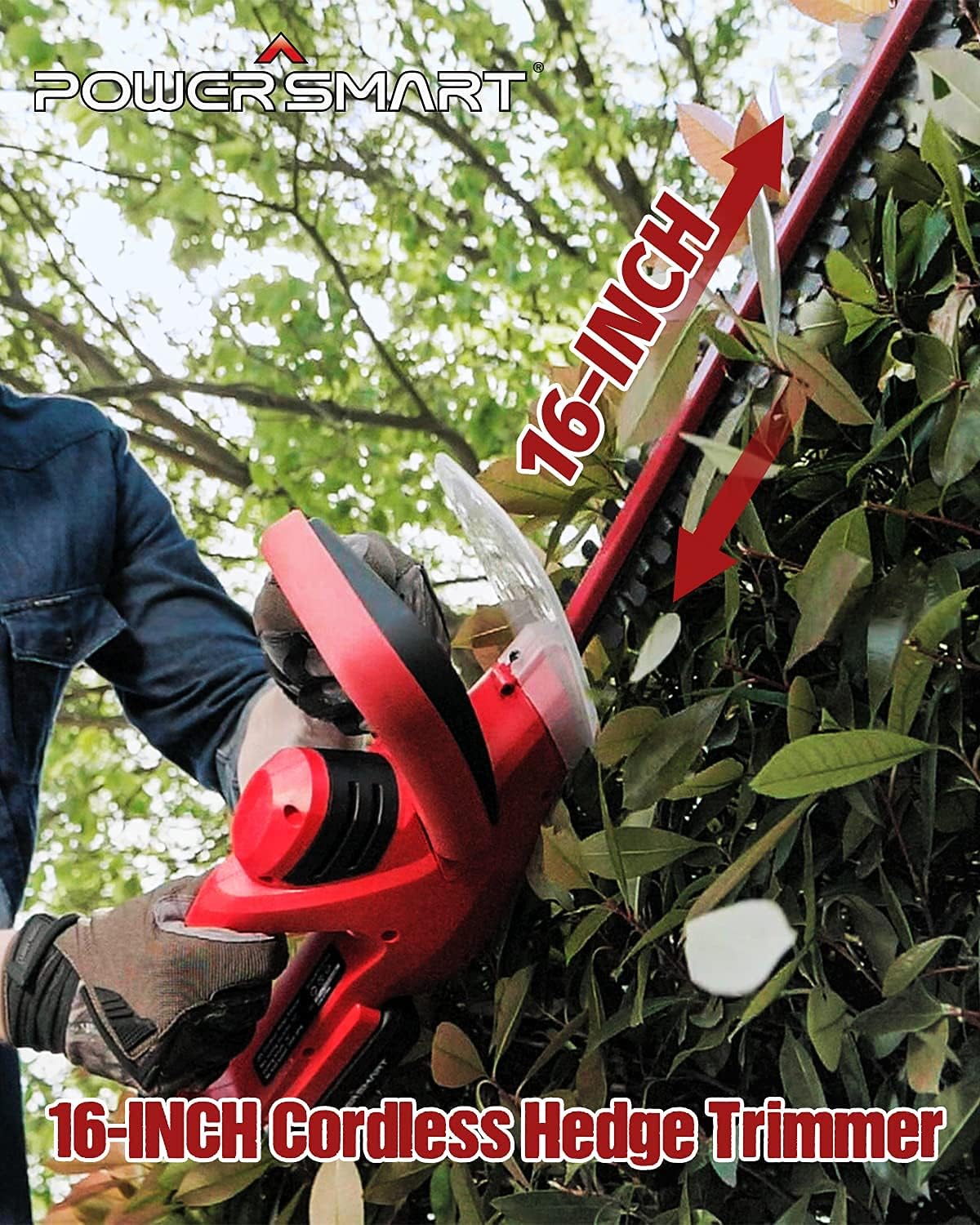
Image: A user holding the PowerSmart hedge trimmer, highlighting the ergonomic D-grip front handle which provides a comfortable gripping area for various cutting orientations.

Image: A close-up view of the hedge trimmer blade demonstrating its cutting capacity, indicating it can cut branches up to 5/8 inch in diameter.
Instructional Videos
Video: This video demonstrates the PowerSmart 20V Cordless Hedge Trimmer in action, showcasing its features and ease of use for trimming hedges.
Video: A short video highlighting the key operational aspects and benefits of the PowerSmart Cordless Hedge Trimmer.
5. Maintenance
Blade Care
- Cleaning: After each use, ensure the trimmer is off and the battery is removed. Clean the blades with a stiff brush to remove debris, sap, and leaves.
- Lubrication: Periodically apply a light machine oil or blade lubricant to the blades to reduce friction and prevent rust.
- Sharpening: If the blades become dull, they can be sharpened by a qualified service technician.
Battery and Charger Care
- Store batteries in a cool, dry place away from direct sunlight and extreme temperatures.
- Do not store batteries in a discharged state for extended periods.
- Keep the charger clean and free from debris.
Storage
- Store the hedge trimmer in a dry, secure location out of reach of children.
- Always remove the battery before storing the tool.
- Use the blade cover (if included) to protect the blades during storage.
6. Troubleshooting
| Problem | Possible Cause | Solution |
|---|---|---|
| Trimmer does not start | Battery not charged or improperly installed. Safety switches not engaged. | Ensure battery is fully charged and correctly inserted. Press both the ON/OFF switch and trigger simultaneously. |
| Reduced cutting performance | Dull or dirty blades. Attempting to cut branches too thick. | Clean and lubricate blades. Sharpen blades if necessary. Only cut branches within the specified 5/8 inch diameter. |
| Excessive vibration | Damaged or bent blade. Loose components. | Inspect blades for damage; replace if necessary. Check all fasteners for tightness. |
| Battery not charging | Charger not plugged in. Faulty battery or charger. | Verify charger is securely plugged into a working outlet. Contact customer support if battery or charger is suspected to be faulty. |
7. Specifications
| Feature | Specification |
|---|---|
| Brand | PowerSmart |
| Model Number | PS76105A |
| Power Source | Battery Powered |
| Voltage | 20 Volts (18 Volts nominal) |
| Blade Length | 16 Inches |
| Cutting Width | 16 Inches |
| Cutting Diameter (Max) | 5/8 Inches |
| Speed (No Load) | 2400 RPM |
| Item Weight | 8 Pounds |
| Blade Material | Alloy Steel |
8. Warranty and Support
Warranty Information
This PowerSmart product qualifies for a 2-year limited warranty. This warranty covers defects in materials and workmanship under normal use.
Customer Support
For any issues, questions, or to claim warranty service, please contact PowerSmart customer support. Our service team is dedicated to providing premium assistance.
PowerSmart maintains a network of certified repair centers and provides full replacement parts through its headquarters. Please refer to your product packaging or the official PowerSmart website for the most current contact information.

