
Volt Polska 5UP0800090
VOLT Micro UPS 800VA 480W Uninterruptible Power Supply User Manual
Model: 5UP0800090
1. Introduction
This user manual provides essential information for the safe and efficient operation of your VOLT Micro UPS 800VA 480W Uninterruptible Power Supply. Please read this manual thoroughly before installation and use, and retain it for future reference. The UPS is designed to provide backup power to connected electronic devices during power outages, protecting them from data loss and hardware damage.
2. Safety Instructions
Always observe the following safety precautions to prevent injury and damage to the UPS or connected equipment:
- Do not open the UPS casing. There are no user-serviceable parts inside. Refer all servicing to qualified service personnel.
- Do not operate the UPS in environments with excessive dust, humidity, or extreme temperatures.
- Ensure the UPS is connected to a grounded power outlet.
- Do not connect appliances that draw high current, such as laser printers, heaters, or vacuum cleaners, to the UPS output.
- Position the UPS in a well-ventilated area, away from direct sunlight or heat sources.
- In case of fire, use a dry chemical extinguisher. Water can cause electrical shock.
- The internal battery is not user-replaceable. Contact qualified service personnel for battery replacement.
3. Package Contents
Verify that all items are present in the package:
- VOLT Micro UPS 800VA 480W 9Ah Unit
- 1 x USB Type B to USB Type B Cable
- 1 x Power Cord for Peripheral/Computer Connection
- 1 x CD with UPSILON 2000 Software
- 1 x User Manual (this document)
4. Product Overview
The VOLT Micro UPS 800VA 480W features a compact design with an intuitive LCD display for monitoring operational status.
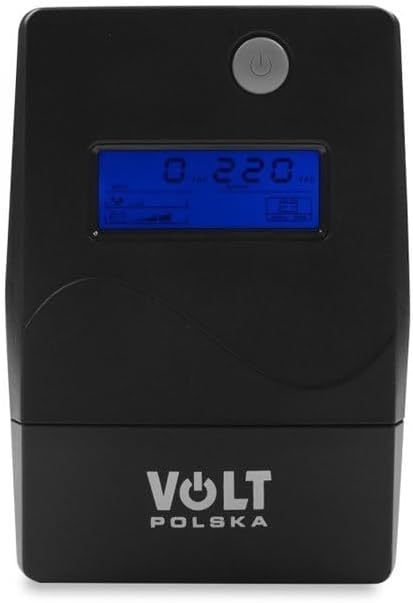
Figure 4.1: Front view of the VOLT Micro UPS 800VA 480W, showing the power button and the LCD screen which displays real-time operational parameters.

Figure 4.2: Side view of the UPS unit, illustrating its compact form factor and potential ventilation grilles.

Figure 4.3: Rear view of the UPS, highlighting the various input and output connection ports for devices and power.
4.1. LCD Display Information
The LCD display provides real-time status updates:
- Input Voltage: Displays the current voltage from the utility power.
- Output Voltage: Shows the voltage supplied by the UPS to connected devices.
- Battery Status: Indicates the charge level of the internal battery.
- Load Level: Shows the percentage of the UPS's capacity being used by connected devices.
- Operating Mode: Indicates whether the UPS is operating on utility power, battery power, or in bypass mode.
5. Setup
5.1. Unpacking and Initial Placement
- Carefully remove the UPS from its packaging.
- Place the UPS on a flat, stable surface in a well-ventilated area, away from direct sunlight, heat, and moisture.
- Ensure there is adequate space around the unit for proper airflow.
5.2. Initial Charging
Before initial use, connect the UPS to a standard wall outlet and allow it to charge for at least 6 hours without any load. This ensures the internal battery is fully charged and ready to provide optimal backup time.
5.3. Connecting Equipment
- Connect the UPS to a grounded wall outlet using the provided power cord.
- Plug your computer, monitor, and other critical electronic devices into the output sockets on the rear of the UPS. Ensure the total power consumption does not exceed the UPS's 480W capacity.
- For communication with your computer, connect the USB Type B to USB Type B cable from the UPS to an available USB port on your computer.
5.4. Software Installation (UPSILON 2000)
The included CD contains the UPSILON 2000 monitoring software. Install this software on your computer to enable advanced features such as:
- Real-time monitoring of UPS status.
- Scheduled shutdown of connected devices during extended power outages.
- Customizable alerts and notifications.
Follow the on-screen instructions provided by the software installer.
6. Operating Instructions
6.1. Turning the UPS On/Off
- To Turn On: Press and hold the power button on the front panel for approximately 3 seconds until you hear a beep and the LCD display illuminates.
- To Turn Off: Press and hold the power button for approximately 3 seconds until the UPS powers down.
6.2. Normal Operation
When connected to utility power, the UPS will charge its battery and provide conditioned power to your connected devices. The LCD will display input/output voltage, battery status, and load level.
6.3. Battery Mode Operation
In the event of a power outage, the UPS will automatically switch to battery mode, providing uninterrupted power to your connected devices. An audible alarm will sound, and the LCD will indicate battery operation. The duration of battery backup depends on the load connected.
6.4. Overload Warning
If the connected load exceeds the UPS's capacity (480W), an overload warning will be displayed on the LCD, and an alarm will sound. Immediately disconnect non-essential equipment to prevent damage to the UPS.
7. Maintenance
7.1. Battery Care
- To maximize battery life, ensure the UPS is always connected to a power source to keep the battery charged.
- Avoid frequent deep discharges.
- If the UPS is to be stored for an extended period, fully charge it, then disconnect it from the power source. Recharge every 3 months to prevent battery degradation.
7.2. Cleaning
Periodically clean the exterior of the UPS with a soft, dry cloth. Do not use liquid or aerosol cleaners, as they may contain flammable substances or cause electrical shock.
8. Troubleshooting
Refer to the table below for common issues and their solutions:
| Problem | Possible Cause | Solution |
|---|---|---|
| UPS does not turn on | Battery discharged; Power cord not connected | Connect to utility power and charge for 6 hours; Ensure power cord is securely connected. |
| UPS beeps continuously in normal mode | Overload condition | Disconnect non-essential equipment until the alarm stops. |
| Short backup time | Battery not fully charged; Battery nearing end of life; Excessive load | Charge UPS for 6 hours; Reduce connected load; Consider battery replacement by qualified personnel. |
| UPS does not provide power during outage | UPS not turned on; Battery completely discharged | Ensure UPS is turned on; Allow UPS to charge fully. |
9. Specifications
| Feature | Specification |
|---|---|
| Brand | Volt Polska |
| Model Number | 5UP0800090 |
| Nominal Power | 480 Watts |
| Apparent Power | 800 VA |
| Input/Output Voltage | 230 Volts |
| Battery Amperage | 9 A |
| Battery Capacity | 9 Ah |
| Rechargeable Battery | Yes |
| Waveform (Battery Mode) | Approximation of sine wave |
| Charge Time (to 90%) | 6 hours |
| Dimensions (LxWxH) | 298 x 101 x 142 mm |
| Item Weight | 4.9 Kilograms |
| Color | Black |
10. Warranty and Support
For warranty information, please refer to the documentation provided at the time of purchase or contact your retailer. For technical support or service inquiries, please contact Volt Polska customer service through their official website or the contact details provided with your product.
Related documents5UP0800090


Ask a question about this manual
Ask about setup, troubleshooting, compatibility, parts, safety, or missing instructions. Manuals+ will review the question and use this page’s manual context to help answer it.