
Introduction
This manual provides detailed instructions for the proper setup, operation, and maintenance of your NEWTRY 100g 0.001g Digital Lab Scale. This high-precision analytical balance is designed for accurate weighing in various applications, including laboratory, jewelry, and industrial settings. Please read this manual thoroughly before using the device to ensure optimal performance and longevity.

Figure 1: NEWTRY 100g 0.001g Digital Lab Scale with its protective wind-proof cover.
Setup
- Unpacking: Carefully remove all components from the packaging. Verify that all parts are present: the scale unit, weighing pan, wind-proof cover (for 0.001g models), power adapter, and calibration weight (for 0.001g and 0.01g models).
- Placement: Place the scale on a stable, level surface free from vibrations, drafts, and direct sunlight. Ensure the surface is clean and dry. Uneven surfaces or environmental disturbances can affect measurement accuracy.
- Leveling: Use the adjustable feet at the bottom of the scale to ensure it is perfectly level. Check the bubble level indicator (if present) to confirm proper leveling.
- Power Connection: Connect the provided power adapter to the scale's power input port and then to a suitable electrical outlet.
- Wind-Proof Cover Installation: For 0.001g precision models, carefully place the wind-proof cover over the weighing pan and platform. This cover is crucial for maintaining accuracy by minimizing air currents.

Figure 2: The robust chassis and anti-skid feet contribute to measurement stability.
Operating Instructions
1. Power On/Off
- Press the ON/OFF button to turn the scale on. The display will show "8.8.8.8.8.8" and then "0.000g".
- To turn off the scale, press and hold the ON/OFF button until the display turns off.
2. Basic Weighing
- Ensure the scale is on and displaying "0.000g".
- Carefully place the item to be weighed onto the center of the weighing pan.
- Wait for the reading to stabilize. The stable weight will be displayed.
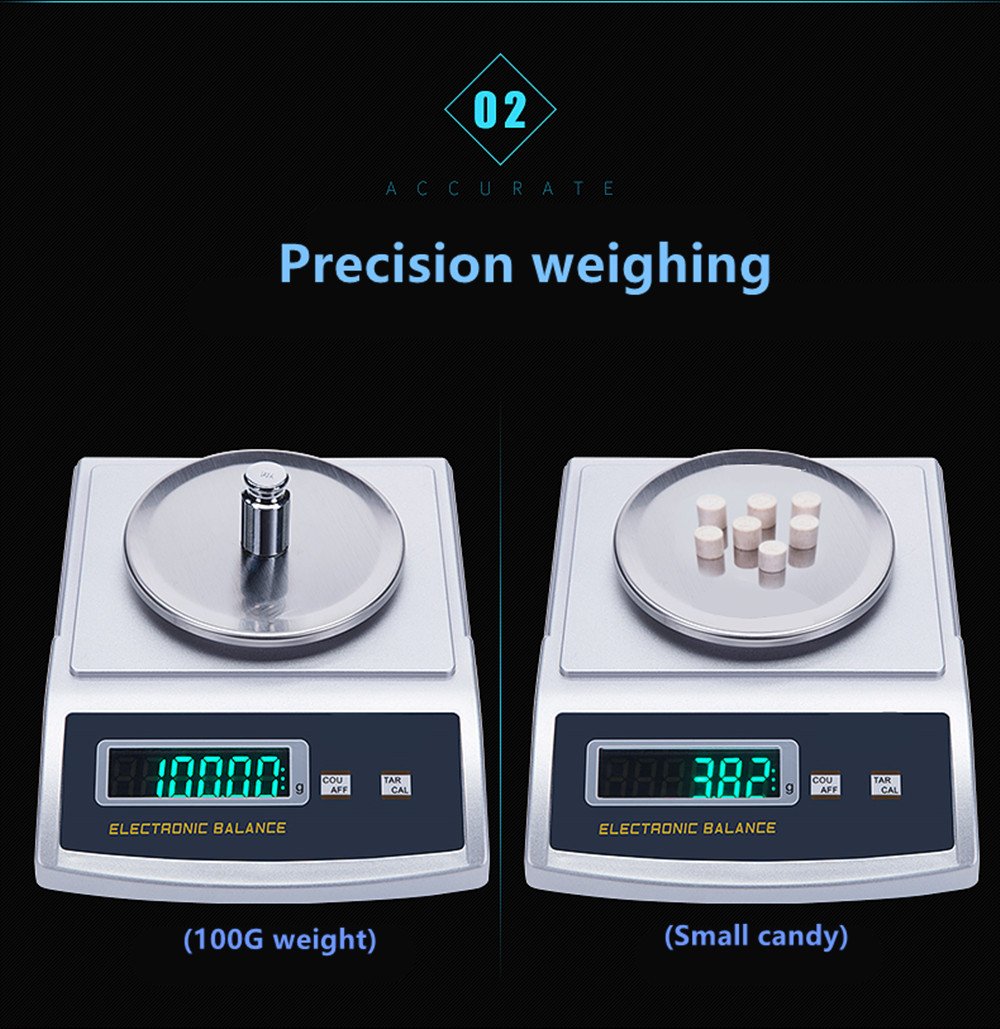
Figure 3: Example of precision weighing with a 100g weight and multiple small items.
3. Tare Function
The Tare function allows you to subtract the weight of a container, so only the net weight of the contents is measured.
- Place an empty container on the weighing pan. The display will show its weight.
- Press the TARE button. The display will reset to "0.000g".
- Add the items to be weighed into the container. The display will show the net weight of the items.
4. Counting Function
This function allows you to count a quantity of small, uniform items based on a sample weight.
- Place a sample quantity of items (e.g., 10, 20, 50, or 100 pieces) on the weighing pan.
- Press the COU/AFF button. The display will prompt you to select the sample size (e.g., "P10", "P20").
- Use the TARE button to cycle through the sample size options.
- Once the desired sample size is selected, press COU/AFF again to confirm. The display will now show the count of the sample.
- Add more items to the pan, and the scale will display the total count.
- To exit counting mode, press COU/AFF again.
5. Calibration
The scale is factory calibrated. However, if you suspect inaccuracies or after significant environmental changes, manual calibration can be performed using the provided calibration weight.
- Ensure the scale is on a stable surface and the wind-proof cover is in place.
- With the scale displaying "0.000g" and nothing on the pan, press and hold the CAL button until "CAL" appears on the display.
- The display will then show the required calibration weight (e.g., "100.000g").
- Carefully place the specified calibration weight (e.g., 100g) onto the center of the weighing pan.
- Wait for the display to show "PASS" or return to "0.000g", indicating successful calibration.
- Remove the calibration weight. The scale is now calibrated and ready for use.

Figure 4: Calibration process using the provided weight.
Maintenance
- Cleaning: Regularly clean the weighing pan and the scale's body with a soft, damp cloth. Do not use abrasive cleaners, solvents, or immerse the scale in water. Ensure no liquids enter the internal components.
- Storage: When not in use, store the scale in a clean, dry environment, away from extreme temperatures, humidity, and direct sunlight. Keep the wind-proof cover in place to protect the weighing mechanism.
- Handling: Handle the scale with care. Avoid dropping it or subjecting it to sudden shocks, as this can damage the internal precision sensor.

Figure 5: The scale features a durable stainless steel weighing tray and ABS material body for longevity.
Troubleshooting
| Problem | Possible Cause | Solution |
|---|---|---|
| Scale does not turn on. | No power or faulty connection. | Check power adapter connection to both scale and outlet. Ensure outlet is functional. |
| Inaccurate readings or fluctuating display. |
|
|
| Display shows "OVERLOAD" or "E". | Weight exceeds maximum capacity. | Remove excess weight immediately to prevent damage. Ensure items are within the 100g limit. |
| Counting function is incorrect. | Incorrect sample size selected or non-uniform items. | Ensure items are uniform in weight. Re-select the correct sample size during the counting setup. |

Figure 6: The scale's high sensitivity can detect even minute changes, making environmental factors critical for accuracy.
Specifications
- Model: 100g 0.001g
- Brand: NEWTRY
- Capacity: 100g
- Readability (Scale Value): 0.001g
- Division Value: 0.001g
- Weighing Pan Diameter: 90mm (for 100g/0.001g model)
- Material: Acrylonitrile Butadiene Styrene (ABS) body, Stainless Steel weighing tray
- Rated Power: 1.5W
- Ambient Temperature: -15℃ to 40℃
- Relative Humidity: 55-75%
- Windproof Cover Size: 175*150*90mm (applicable for 0.001g models)
- Functions: Weighing, Tare, Counting, Calibration
- Package Dimensions: 12.71 x 10.39 x 6.81 inches
- Package Weight: 5.14 Pounds

Figure 7: Detailed product parameters and specifications for different models.
Warranty and Support
For any questions, technical assistance, or warranty claims regarding your NEWTRY Digital Lab Scale, please contact NEWTRY customer support through the retailer's platform or the official NEWTRY website. Please have your product model and purchase date available when contacting support.
While specific warranty details are not provided in this manual, NEWTRY is committed to product quality. Refer to your purchase documentation or the NEWTRY official website for the most current warranty information.
For additional resources and product information, you may visit the NEWTRY Store on Amazon.