
1. Introduction
Thank you for choosing the VOYOR BM310 3-in-1 Hair Removal Device. This versatile tool is designed for effective hair epilation, shaving, and callus removal, providing a comprehensive solution for your personal care needs. Please read this manual carefully before first use to ensure safe and optimal performance.
2. Important Safety Information
To reduce the risk of electric shock, burns, fire, or injury, please observe the following precautions:
- Keep the device dry. It is not water-resistant.
- Do not use the device while charging.
- Keep out of reach of children.
- Do not use on irritated, sunburnt, or broken skin.
- If you have sensitive skin, consult a dermatologist before use.
- Do not press too hard on the skin during use to avoid irritation.
- Ensure the device is switched off before changing attachment heads.
3. Package Contents
The VOYOR BM310 package includes the following items:
- 1 x Main Device Unit
- 1 x Epilator Head
- 1 x 2-in-1 Shaver & Trimmer Head
- 1 x Callus Remover Head
- 1 x USB Charging Cable
- 1 x Cleaning Brush
- 1 x User Manual (this document)
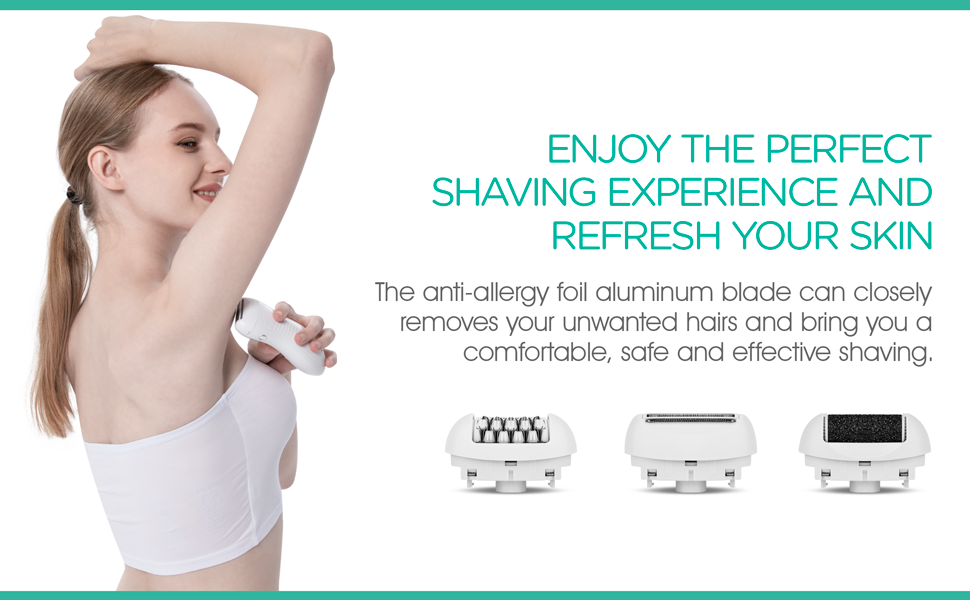
Image: All components included in the VOYOR BM310 3-in-1 Epilator Set.
4. Product Overview
The VOYOR BM310 features a main ergonomic body and three interchangeable heads for various functions:
- Epilator Head: Equipped with 32 micro-grip tweezers for precise hair removal from the root.
- 2-in-1 Shaver & Trimmer Head: For quick and gentle hair trimming or shaving. Features protective knife nets and hypo-allergenic stainless-steel blades.
- Callus Remover Head: Designed to remove hard skin and calluses from your feet, leaving them soft and smooth.

Image: The three multi-functional and exchangeable heads of the VOYOR BM310 device.
5. Setup and Charging
5.1 Charging the Device
Before first use, fully charge the device. Connect the USB charging cable to the charging port at the bottom of the device and plug the other end into a compatible USB power adapter (not included). The charging indicator light will illuminate. A full charge takes approximately 2 hours and provides up to 3.5 hours of operating time.
5.2 Attaching/Detaching Heads
To change the attachment heads:
- Ensure the device is switched off.
- Press the release buttons located on both sides of the device head.
- Gently pull the current head upwards to detach it.
- Align the desired head with the main unit, ensuring the bulge on the head matches the hollow on the main unit.
- Push the head down until you hear a click, indicating it is securely in place.
Video: Demonstrates how to attach and detach the various heads on the VOYOR BM310 device, including the epilator, shaver, and callus remover heads.
6. Operating Instructions
The device features two speed levels. Slide the power switch to position '1' for gentle operation or '2' for a more powerful setting.

Image: The VOYOR BM310 device with its two adjustable speed levels (Level 1 for gentle, Level 2 for stubborn hair/callus).
6.1 Epilation (Epilator Head)
For best results, ensure hair is shorter than 1cm. Stretch your skin with your free hand to make hairs stand upright. Hold the epilator at a 90-degree angle to your skin and move it slowly against the direction of hair growth. Do not press too hard.

Image: The 32 micro-grip tweezers of the epilator head designed for precise hair removal.
Video: Demonstrates the VOYOR BM310 epilator in use, showing how to move the epilation head in a Z-shaped direction for effective hair removal.
6.2 Shaving (2-in-1 Shaver & Trimmer Head)
Attach the shaver head. For dry shaving, ensure skin is clean and dry. For wet shaving, use with foam or gel. Move the shaver gently against the direction of hair growth. The protective knife nets ensure a smooth and comfortable shave, suitable for sensitive skin.
6.3 Callus Removal (Callus Remover Head)
Attach the callus remover head. Use on dry, hard skin on your feet. Gently move the roller over the callused areas. Do not apply excessive pressure. Stop if skin becomes red or irritated. Moisturize your feet after use.

Image: The callus remover head, featuring an abrasive roller for smoothing rough skin on feet.
7. Maintenance and Cleaning
Regular cleaning ensures optimal performance and hygiene.
- Cleaning Heads: After each use, switch off the device and detach the head. Use the provided cleaning brush to remove any trapped hairs or skin particles. For the epilator head, you can turn the gears clockwise to open them for easier cleaning.
- Main Unit: Wipe the main unit with a dry cloth. Do not rinse the main unit under water as it is not water-resistant.
- Storage: Store the device and its accessories in a cool, dry place, away from direct sunlight and moisture.
Video: Demonstrates how to clean the epilator head using the provided brush and by rotating the gears to open them for thorough cleaning.
8. Troubleshooting
| Problem | Possible Cause | Solution |
|---|---|---|
| Device does not turn on. | Low battery or not charged. | Charge the device fully (approx. 2 hours). |
| Device stops during use. | Low battery or excessive pressure. | Recharge the device. Use lighter pressure during operation. |
| Ineffective hair removal/shaving. | Hair too long, incorrect angle, or dirty head. | Trim hair to < 1cm before epilation. Hold at 90-degree angle. Clean the head thoroughly. |
| Skin irritation after epilation. | Sensitive skin, excessive pressure, or not moisturizing. | Use lighter pressure. Moisturize skin after epilation. Consider using the shaver head for sensitive areas. |
9. Specifications
| Model Name | BM310 |
| Brand Name | VOYOR |
| Power Source | Battery Powered |
| Battery Type | 1 AAA batteries required (included) |
| Voltage | 3.7 Volts |
| Charging Time | 2 Hours |
| Operating Time | 3.5 Hours |
| Item Weight | 148 Grams |
| Water Resistance Level | Not Water Resistant |
| Included Components | Battery, Cleaning Brush |
10. Warranty and Support
VOYOR products are designed for quality and reliability. For warranty information, product support, or any inquiries, please refer to the contact details provided on the product packaging or visit the official VOYOR website. Please retain your proof of purchase for warranty claims.
For further assistance, you may contact VOYOR Customer Service via their Amazon store page: VOYOR Store on Amazon.