
Omron HBF-222T
Omron HBF 222T Complete Digital Body Composition Monitor
Model: HBF-222T
Brand: Omron
Introduction
The Omron HBF-222T is a complete digital body composition monitor designed to provide comprehensive insights into your body's health metrics. This device utilizes 4-sensor accuracy technology and connects via Bluetooth to the Omron Connect Application for easy data tracking and management. It measures various parameters including body weight, BMI, body fat percentage, visceral fat level, skeletal muscle percentage, resting metabolism, and body age.

Image: The Omron HBF-222T Body Composition Monitor, a white square device with a digital display and four silver foot electrodes.
Safety Information
- Do not use this device if you have a pacemaker or other implanted medical device.
- Do not use this device on wet surfaces, such as in a bathroom, to prevent slipping.
- Keep the device out of reach of children.
- Ensure the device is placed on a hard, flat surface for accurate measurements.
- Do not disassemble or attempt to repair the device. Refer to qualified service personnel.
Package Contents
Upon opening the package, verify that all components are present:
- Omron HBF-222T Body Composition Monitor Device
- 4 x AAA Batteries
- User Manual (this document)
Product Overview
Familiarize yourself with the components of your Omron HBF-222T Body Composition Monitor:
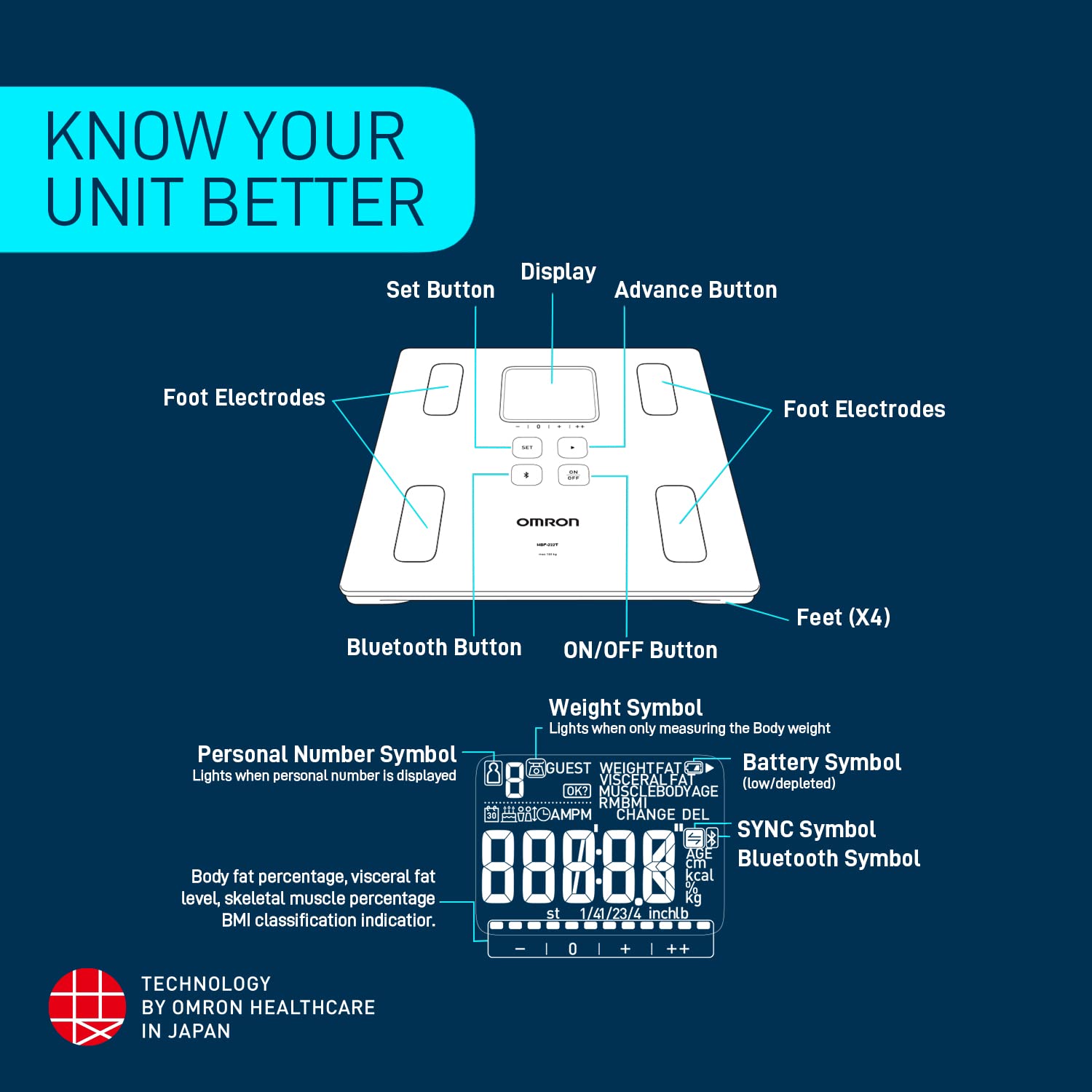
Image: A detailed diagram of the Omron HBF-222T monitor, labeling its key parts including the display, set button, advance button, ON/OFF button, Bluetooth button, foot electrodes, and feet. The display symbols for personal number, weight, battery, SYNC, and Bluetooth are also explained.
- Display: Shows measurements and indicators.
- Set Button: Used for setting up user profiles and confirming selections.
- Advance Button: Used to navigate through settings and options.
- ON/OFF Button: Powers the device on or off.
- Bluetooth Button: Initiates Bluetooth pairing and data transfer.
- Foot Electrodes (x4): Conduct electrical signals for body composition analysis.
- Feet (x4): Provide stability and support for the device.
Setup
- Install Batteries: Open the battery compartment on the underside of the monitor. Insert the 4 AAA batteries, ensuring correct polarity (+/-). Close the compartment securely.
- Placement: Place the monitor on a hard, flat, and stable surface. Avoid carpets or uneven flooring, as this can affect accuracy.
- Initial Power On: Press the ON/OFF button to turn on the device. The display will light up.
- User Profile Setup: The device will prompt you to set up a user profile. Use the SET and Advance buttons to input your personal data (e.g., age, height, gender). The monitor can store up to 4 user profiles.
Operating Instructions
Taking a Measurement
- Ensure the monitor is on a flat, hard surface.
- Step onto the monitor barefoot, ensuring your feet are positioned on the four metal electrodes. Stand still and balanced.
- The monitor will automatically detect your user profile (if set up) and begin measurement. If multiple profiles are similar, you may need to select yours using the Advance button.
- Remain still until all measurements are displayed on the screen.
- Step off the monitor. The measurements will remain on the display for a short period before the device automatically turns off.
Bluetooth Connectivity and Omron Connect App
The Omron HBF-222T can transfer your measurement data to your smartphone via Bluetooth using the Omron Connect Application. This allows for easy tracking and management of your health data over time.
- Download the App: Download the "Omron Connect" app from your smartphone's app store (Google Play Store for Android or Apple App Store for iOS).
- Pairing: Open the Omron Connect app and follow the on-screen instructions to pair your HBF-222T monitor. You may need to press the Bluetooth button on the monitor to initiate pairing.
- Data Transfer: After taking a measurement, ensure your smartphone with the Omron Connect app is nearby and Bluetooth is enabled. The data will automatically sync to the app.

Image: A visual representation of the Omron Connect App interface on a smartphone, alongside a diagram illustrating the app's features such as health reward, cloud integration, remote data sharing, easy daily tracking dashboard, tracking lifestyle modification, and tracking medicine intake.
Key Features and Measurements
The Omron HBF-222T provides a comprehensive analysis of your body composition:

Image: An infographic highlighting the advantages and features of the Omron HBF-222T, including Bluetooth Connectivity, BMI, 4 User Profiles, Resting Metabolism (RM), Body Age, Skeletal Muscle % Classification, Easy Tracking on OMRON Connect App, and Visceral Fat Level.
- Body Weight: Your total body mass.
- Body Mass Index (BMI): A measure of body fat based on height and weight.
- Body Fat Percentage: The proportion of fat to total body weight.
- Visceral Fat Level: The amount of fat surrounding your internal organs.
- Skeletal Muscle Percentage: The proportion of muscle attached to bones, crucial for movement.
- Resting Metabolism (RM): The minimum number of calories required to maintain basic bodily functions at rest.
- Body Age: An assessment of your physical age based on your body composition.
- Bluetooth Connectivity: Seamless data transfer to the Omron Connect app.
- 4 User Profiles: Allows multiple individuals to track their data.
- Automatic On/Off: Device powers on when stepped on and off automatically.
- 4 Sensor Accuracy Technology: Ensures precise and reliable measurements.
Understanding Your Measurements

Body Mass Index (BMI)
A general indicator of whether your weight is healthy in proportion to your height.

Visceral Fat
Fat surrounding your internal organs. High levels can indicate health risks.

Skeletal Muscle
Muscles attached to bones, important for movement and strength. Higher percentage is generally desirable.

Resting Metabolism
The calories your body burns at rest to maintain vital functions. Influenced by muscle mass.
Maintenance
- Cleaning: Wipe the surface of the monitor with a soft, damp cloth. Do not use abrasive cleaners or immerse the device in water.
- Storage: Store the monitor in a cool, dry place away from direct sunlight and extreme temperatures. Avoid placing heavy objects on the monitor.
- Battery Replacement: Replace all four AAA batteries when the low battery indicator appears on the display. Dispose of used batteries according to local regulations.
Troubleshooting
| Problem | Possible Cause | Solution |
|---|---|---|
| Monitor does not turn on. | Batteries are dead or incorrectly installed. | Replace batteries with new ones, ensuring correct polarity. |
| Inaccurate readings. | Monitor on uneven surface; feet not properly on electrodes; user profile incorrect. | Place on a hard, flat surface. Ensure bare feet are fully on electrodes. Verify user profile settings. |
| Bluetooth not connecting. | Bluetooth off on phone; app not open; monitor not in pairing mode. | Ensure phone Bluetooth is on. Open Omron Connect app. Press Bluetooth button on monitor to activate pairing. |
| "Error" message on display. | Measurement error; movement during measurement. | Step off and then back on the monitor, remaining still during measurement. |
Specifications

Image: A comparison table showing specifications for various Omron Body Composition Monitor models, including HBF 214, HBF 222T, HBF 375, and HBF 255T, highlighting features like Bluetooth Connectivity, User Memory, Visceral Fat, Body Fat Percentage, Resting Metabolism, Weight Capacity, 4-point full body sensing technology, Body Age, Skeletal Muscle, Auto User Recognition, and Body Mass Index.
| Specification | Detail |
|---|---|
| Model Number | HBF-222T |
| Display Type | Digital |
| Colour | White |
| Material | Plastic, Tempered Glass |
| Item Weight | 1.9 Kilograms (1 kg 900 g) |
| Product Dimensions (LxWxH) | 32 x 32 x 4.5 cm |
| Power Source | 4 x AAA Batteries (included) |
| Connectivity | Bluetooth |
| User Profiles | Up to 4 |
| Measurement Type | Grams, Kilograms |
| Country of Origin | China |
Warranty and Support
For warranty information and customer support, please refer to the official Omron website or contact Omron customer service directly. Details regarding product registration and service centers can typically be found on the manufacturer's official channels.
While specific warranty periods may vary by region, Omron products generally come with a manufacturer's warranty covering defects in materials and workmanship. Keep your purchase receipt as proof of purchase.
For technical assistance or inquiries, visit the Omron Store on Amazon or the official Omron Healthcare website.
Related documentsHBF-222T


Ask a question about this manual
Ask about setup, troubleshooting, compatibility, parts, safety, or missing instructions. Manuals+ will review the question and use this page’s manual context to help answer it.