
1. Introduction
This manual provides instructions for the UBay RMT-24 replacement remote control, designed for various Westinghouse television models. This remote operates using infrared (IR) signals and requires no programming or pairing. Simply insert batteries, and it is ready for use.

Image 1.1: Front and back view of the UBay RMT-24 remote control. The front shows all buttons, and the back shows the battery compartment.
2. Setup and Battery Installation
The UBay RMT-24 remote control requires two AAA batteries (not included). No programming or pairing is necessary for operation.
- Open the Battery Compartment: Locate the battery cover on the back of the remote control. Slide the cover downwards or press the latch and lift to open.
- Insert Batteries: Insert two new AAA batteries, ensuring the positive (+) and negative (-) terminals align correctly with the markings inside the compartment.
- Close the Battery Compartment: Replace the battery cover by sliding it back into position until it clicks securely.
The remote is now ready for use with your compatible Westinghouse TV.
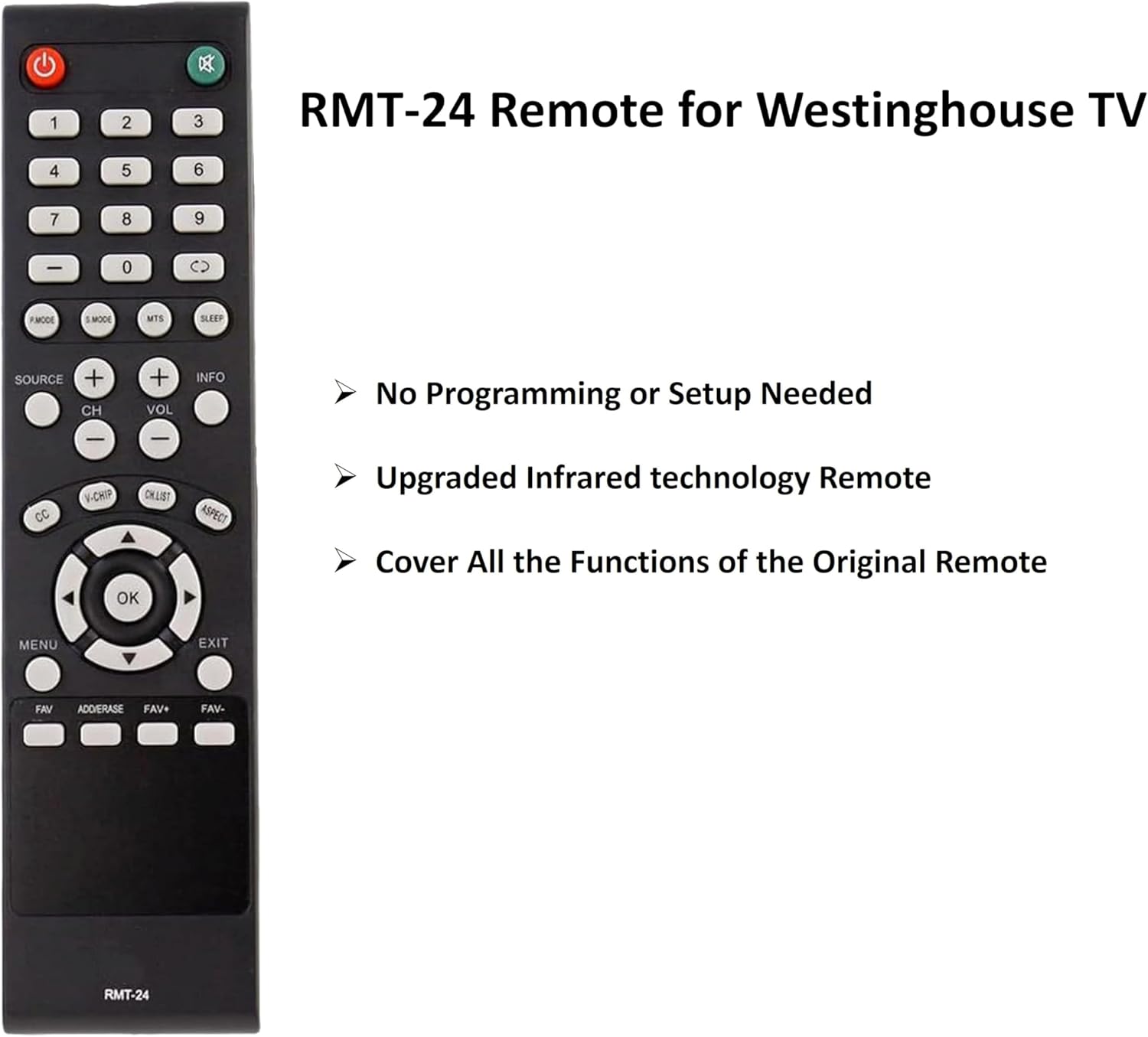
Image 2.1: Front view of the UBay RMT-24 remote control, highlighting its ready-to-use nature without programming.
3. Operating Instructions
The UBay RMT-24 remote control functions identically to the original Westinghouse remote. It uses infrared (IR) technology, requiring a direct line of sight to the TV's IR sensor.
- Power On/Off: Press the Power button (red, top left) to turn the TV on or off.
- Channel Selection: Use the number buttons (0-9) to directly enter channel numbers. Use the CH+ and CH- buttons to navigate channels sequentially.
- Volume Control: Adjust the volume using the VOL+ and VOL- buttons. Press the Mute button (green, top right) to silence the audio.
- Source/Input: Press the SOURCE button to cycle through available input sources (HDMI, AV, etc.).
- Navigation: Use the directional arrow buttons (Up, Down, Left, Right) and the OK button in the center for menu navigation and selection.
- Menu Access: Press the MENU button to access the TV's main menu. Use EXIT to leave menus.
- Other Functions: Buttons such as S.MODE (Sound Mode), MTS (Multi-channel Television Sound), SLEEP, INFO, CC (Closed Caption), V-CHIP, CH.LIST (Channel List), ASPECT, FAV (Favorites), ADD/ERASE, FAV+, and FAV- provide access to specific TV features. Refer to your Westinghouse TV's original manual for detailed explanations of these functions.
Important: Ensure there are no obstructions between the remote control and the TV's IR sensor for proper operation.
4. Compatible TV Models
The UBay RMT-24 remote control is compatible with a wide range of Westinghouse TV models. A partial list includes:
- DW39F1Y1
- DW46F1Y2
- DW50F1Y1
- DWM32H1A1
- DWM32H1G1
- DWM32H1Y1
- DWM40F1A1
- DWM40F1Y1
- DWM40F1Y1C
- DWM40F2G1
- DWM40F3G1
- DWM42F2G1
- DWM48F1A1
- DWM48F1G1
- DWM48F1Y1
- DWM48F1Y1C
- DWM50F1Y1
- DWM50F3G1
- DWM55F1A1
- DWM55F1G1
- DWM55F1Y1
- DWM55F1Y2
- DWM55F2Y1
- EU50F2G1
- EUM24F1G1
- EWM24F1Y1
- WD24FC1360
- WD24FT1360
- WD28HC1160
- WD32HB1120
- WD32HB1120C
- WD32HT1360
- WD40FX1170
- WD40FX1360
- WD40FX1400
- WD40FX1450
- WD50FC1120
- WD50FX1120
- WD55FC1180
- WD55FX1180
This list is not exhaustive. If your original remote was an RMT-24, this replacement should be compatible.
5. Specifications
| Feature | Detail |
|---|---|
| Model Number | RMT-24 |
| Brand | UBay |
| Connectivity Technology | Infrared (IR) |
| Compatible Devices | Westinghouse Televisions |
| Power Source | 2 x AAA Batteries (not included) |
| Color | Black |
| Product Dimensions | 7 x 1.8 x 0.5 inches |
| Item Weight | 2.08 ounces |
6. Troubleshooting
If your UBay RMT-24 remote control is not functioning as expected, follow these troubleshooting steps:
- Check Batteries: Open the battery cover, remove the existing batteries, and replace them with new AAA batteries. Ensure they are inserted with the correct polarity (+/-).
- Check Power Button Response: Point the remote directly at the TV and press the Power button. Observe if the TV responds.
- Reset the Remote: Remove the batteries. Press and hold any button on the remote for 10 seconds to discharge any residual power. Reinsert the batteries. This can clear internal glitches.
- Power Cycle the TV: Unplug your TV from the wall outlet for 30 seconds. Plug it back in. Use the TV's physical power button to turn it on, then attempt to use the remote.
Tips for Troubleshooting:
- Always aim the remote directly at the TV's IR sensor.
- Ensure there are no physical obstructions between the remote and the TV.
- Use fresh, high-quality batteries when troubleshooting.

Image 6.1: The UBay RMT-24 remote control displayed alongside common troubleshooting steps for non-responsive behavior.
7. Maintenance
To ensure the longevity and proper functioning of your remote control:
- Cleaning: Wipe the remote with a soft, dry cloth. For stubborn dirt, slightly dampen the cloth with water or a mild cleaning solution, then wipe dry immediately. Avoid harsh chemicals or abrasive materials.
- Battery Replacement: Replace batteries promptly when the remote's performance degrades or if it stops working. Remove batteries if the remote will not be used for an extended period to prevent leakage.
- Storage: Store the remote in a cool, dry place, away from direct sunlight, extreme temperatures, and high humidity.
- Handling: Avoid dropping the remote or exposing it to excessive force, as this can damage internal components.
8. Warranty and Support
As a replacement remote control, specific warranty details may vary. Please refer to the seller or retailer from whom you purchased this product for information regarding warranty coverage and customer support. For general inquiries or further assistance, you may contact the UBay brand support channels if available.