
1. Introduction
This manual provides comprehensive instructions for the NOYITO CM108 USB Sound Card Chip. This device is a compact, drive-free external sound card module designed to provide audio input and output capabilities for your computer via a standard USB port. It is an ideal solution for systems with damaged or unavailable internal sound cards, or for users requiring an additional audio interface.
2. Product Overview
The NOYITO CM108 is a miniature circuit board featuring the CM108 chip and an external crystal, designed for robust audio processing. It integrates directly into a USB port and provides standard 3.5mm audio jacks for headphones/speakers and a microphone.
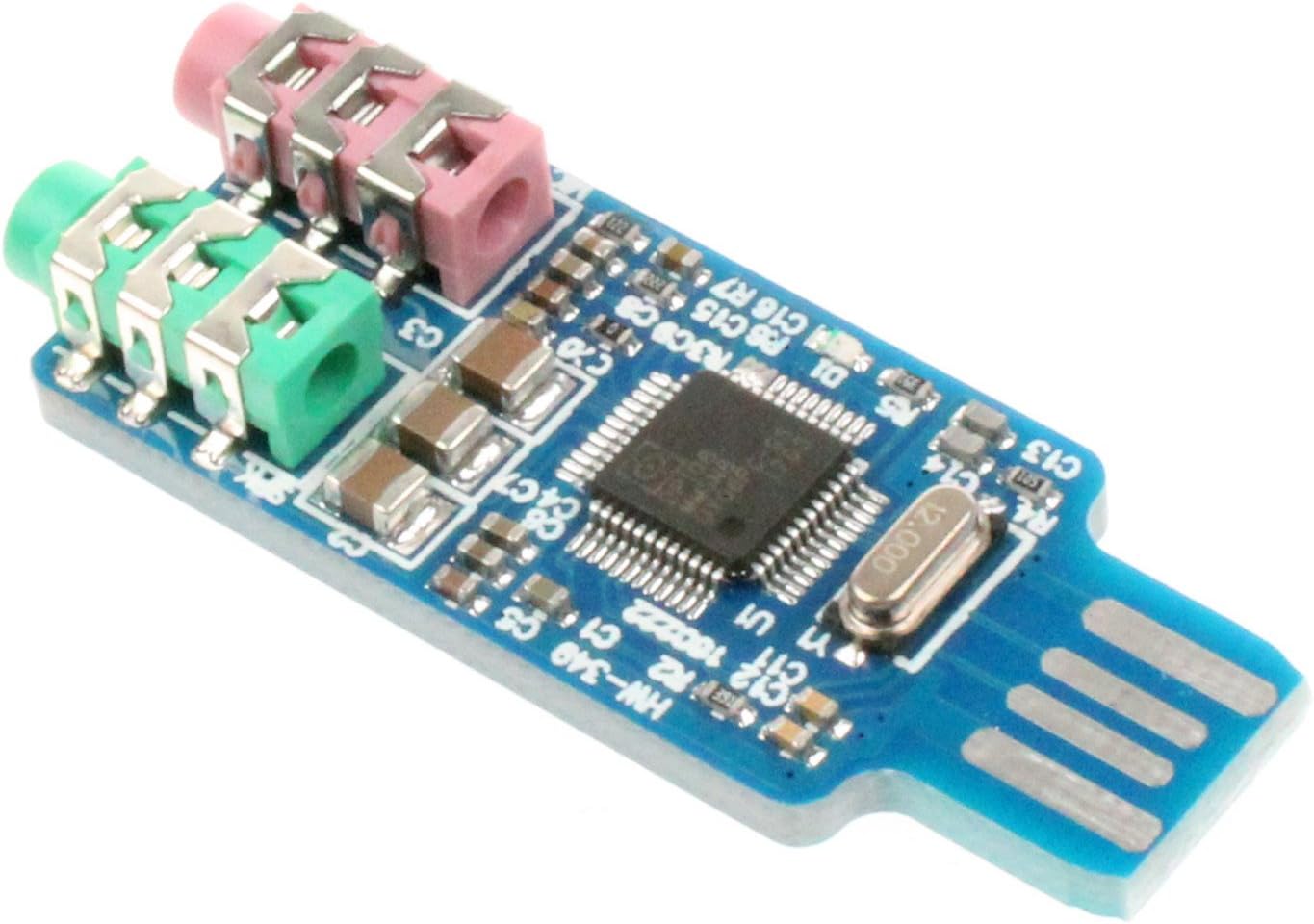
Figure 2.1: Angled view of the NOYITO CM108 USB Sound Card Chip, highlighting its compact design and the integrated audio jacks.
Key Components:
- USB Connector: Standard USB-A interface for connecting to your computer.
- 3.5mm Green Jack: Audio output port for connecting headphones, earphones, or active speakers.
- 3.5mm Pink Jack: Microphone input port for connecting an external microphone.
- CM108 Chip: The main audio processing unit.
- External Crystal: Provides precise timing for the audio chip.

Figure 2.2: Top-down view illustrating the layout of the CM108 chip, external crystal, and the audio input/output jacks.
3. Setup Instructions
The NOYITO CM108 USB Sound Card Chip is designed for plug-and-play operation, requiring no additional driver installation on most modern operating systems.
- Connect to Computer: Insert the USB connector of the CM108 module into an available USB port on your computer. The operating system will typically detect the new hardware automatically.
- Connect Audio Output: Plug your headphones, earphones, or active speakers into the green 3.5mm jack on the CM108 module.
- Connect Microphone (Optional): If you intend to use a microphone, plug it into the pink 3.5mm jack on the CM108 module.
- Select as Default Device:
- Windows: Navigate to 'Sound Settings' (right-click the speaker icon in the taskbar). Under 'Output' and 'Input' devices, select the 'USB Audio Device' or similar entry as your default playback and recording device.
- macOS: Go to 'System Preferences' > 'Sound'. In the 'Output' and 'Input' tabs, select the 'USB Audio Device'.
- Linux: Access your system's audio settings (e.g., PulseAudio Volume Control) and select the 'USB Audio Device' for both output and input.

Figure 3.1: Detailed view of the audio input and output jacks, indicating their respective colors and functions.
4. Operating Instructions
Once the NOYITO CM108 USB Sound Card Chip is set up as your default audio device, it functions like any integrated sound card.
- Audio Playback: Any audio played through your computer (e.g., music, videos, system sounds) will be routed through the green 3.5mm output jack to your connected headphones or speakers.
- Audio Recording: Audio captured by a microphone connected to the pink 3.5mm input jack will be processed by the CM108 chip and available for recording applications on your computer.
- Volume Control: Adjust the playback and recording volume directly through your computer's operating system sound settings or via the volume controls of your connected audio devices.
5. Maintenance
To ensure the longevity and optimal performance of your NOYITO CM108 USB Sound Card Chip, follow these simple maintenance guidelines:
- Keep Dry: Avoid exposing the module to moisture or liquids, as this can cause damage to the electronic components.
- Handle with Care: The module is a bare circuit board. Avoid bending, dropping, or subjecting it to strong impacts.
- Clean Gently: If cleaning is necessary, use a soft, dry cloth. Do not use harsh chemicals or abrasive materials.
- Storage: When not in use, store the module in a clean, dry environment, away from extreme temperatures.
6. Troubleshooting
If you encounter issues with your NOYITO CM108 USB Sound Card Chip, refer to the following troubleshooting steps:
- No Sound Output:
- Ensure the CM108 module is securely plugged into a functional USB port.
- Verify that your headphones/speakers are correctly plugged into the green 3.5mm jack.
- Check your computer's sound settings to confirm that the 'USB Audio Device' is selected as the default playback device.
- Increase the volume levels in your operating system and on your connected audio devices.
- Test with different headphones/speakers to rule out faulty peripherals.
- Microphone Not Working:
- Ensure the microphone is correctly plugged into the pink 3.5mm jack.
- Check your computer's sound settings to confirm that the 'USB Audio Device' is selected as the default recording device.
- Adjust the microphone input level in your operating system's sound settings.
- Verify that your operating system's privacy settings allow applications to access the microphone.
- Test with a different microphone if possible.
- Device Not Recognized:
- Try plugging the CM108 module into a different USB port on your computer.
- Restart your computer.
- Ensure your operating system is up to date.
7. Specifications
| Feature | Specification |
|---|---|
| Product Name | Free drive USB sound card |
| Chip Model | CM108 External Crystal |
| Audio Output | 3.5mm green headphone jack (Stereo) |
| Audio Input | 3.5mm pink microphone jack |
| Hardware Interface | USB |
| Product Dimensions | 1.86 x 0.76 x 0.2 inches (4.72 x 1.93 x 0.51 cm) |
| Item Weight | 0.635 ounces (18 grams) |
| Compatible Devices | Personal Computer |
| Platform Compatibility | Windows XP (and generally modern operating systems like Windows, macOS, Linux) |
8. Warranty and Support
For any product inquiries, technical assistance, or support, please contact NOYITO customer service through the retailer's platform or the official NOYITO support channels. Specific warranty details may vary by region and retailer; please refer to your purchase documentation for more information.