
Oster TSSTTVFDDG-B
Oster TSSTTVFDDG-B French Door Toaster Oven Instruction Manual
Model: TSSTTVFDDG-B
1. Important Safeguards
When using electrical appliances, basic safety precautions should always be followed to reduce the risk of fire, electric shock, and/or injury to persons, including the following:
- Read all instructions before using this product.
- Do not touch hot surfaces. Use handles or knobs.
- To protect against electrical shock, do not immerse cord, plugs, or appliance in water or other liquid.
- Close supervision is necessary when any appliance is used by or near children.
- Unplug from outlet when not in use and before cleaning. Allow to cool before putting on or taking off parts.
- Do not operate any appliance with a damaged cord or plug or after the appliance malfunctions or has been damaged in any manner. Return appliance to the nearest authorized service facility for examination, repair, or adjustment.
- The use of accessory attachments not recommended by the appliance manufacturer may cause injuries.
- Do not use outdoors.
- Do not let cord hang over edge of table or counter, or touch hot surfaces.
- Do not place on or near a hot gas or electric burner, or in a heated oven.
- Extreme caution must be used when moving an appliance containing hot oil or other hot liquids.
- Always attach plug to appliance first, then plug cord into the wall outlet. To disconnect, turn any control to “off,” then remove plug from wall outlet.
- Do not use appliance for other than intended use.
- Oversize foods or metal utensils must not be inserted in a toaster oven as they may create a fire or risk of electric shock.
- A fire may occur if the toaster oven is covered or touching flammable material, including curtains, draperies, walls, and the like, when in operation.
- Do not place any of the following materials in the oven: paper, cardboard, plastic, or any materials not specifically designed for oven use.
- Do not store any materials, other than manufacturer’s recommended accessories, in this oven when not in use.
- Do not place cooking utensils or baking dishes on the glass door.
- Do not cover crumb tray or any part of the oven with metal foil. This will cause overheating of the oven.
2. Product Overview
The Oster TSSTTVFDDG-B French Door Toaster Oven is a versatile countertop appliance designed for various cooking tasks including toasting, baking, broiling, warming, defrosting, and dehydrating. It features a digital control panel and Turbo Convection technology for efficient and even cooking. The extra-large capacity can accommodate two large take-and-bake pizzas, and its unique French door design allows for easy, single-hand opening.

Front view of the Oster TSSTTVFDDG-B French Door Toaster Oven, showcasing its digital control panel and dual doors.
Included Components:
- Oster TSSTTVFDDG-B French Door Toaster Oven
- 2 Oven Racks
- 1 Durable Baking Pan
- Removable Crumb Tray

The included oven racks and baking pan, essential for various cooking functions.
3. Setup
Unpacking and Placement:
- Carefully remove the oven and all accessories from the packaging.
- Remove any packing materials, promotional labels, or tape from the oven.
- Place the oven on a flat, stable, heat-resistant surface. Ensure there is at least 6 inches (15 cm) of clearance on all sides of the oven for proper ventilation.
- Do not place the oven directly against a wall or under cabinets.
Before First Use:
- Wash the oven racks, baking pan, and crumb tray in warm, soapy water. Rinse and dry thoroughly.
- Wipe the interior and exterior of the oven with a damp cloth. Ensure all surfaces are dry before plugging in.
- Plug the power cord into a standard 120V AC electrical outlet.
- It is recommended to run the oven empty on the 'Bake' setting at 450°F (230°C) for approximately 15 minutes to burn off any manufacturing oils. A slight odor or smoke may be present during this initial use; this is normal. Ensure the area is well-ventilated.
4. Operating Instructions
The digital control panel allows you to select various cooking functions and adjust settings. Familiarize yourself with the buttons: Toast, Bake, Broil, Pizza, Warm, Defrost, Dehydrate, Timer, Temp, Clock, Stop/Cancel, and Start.
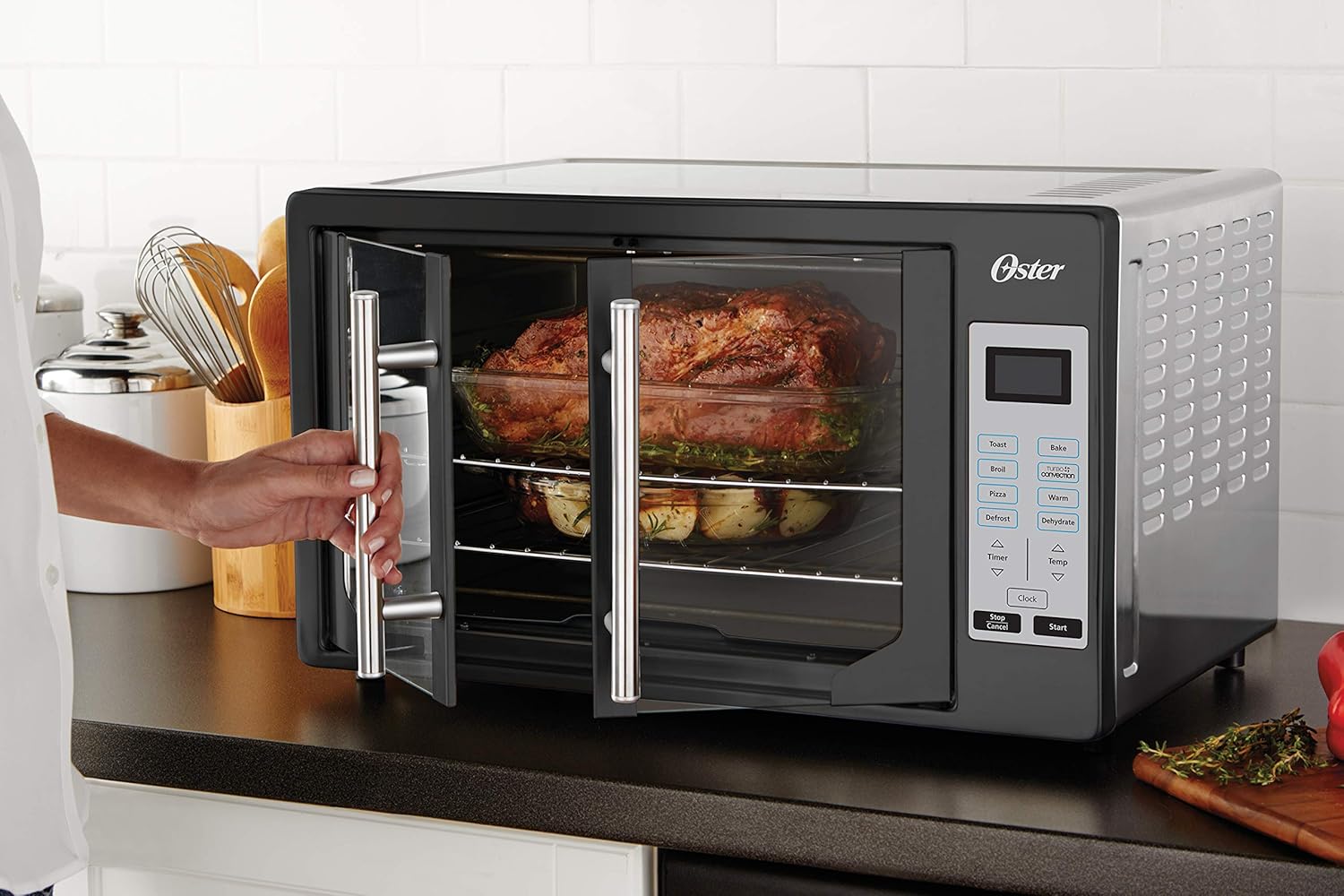
The French doors open simultaneously with a single pull, providing easy access to the oven interior.
General Operation:
- Place food on the appropriate rack or baking pan.
- Close the French doors.
- Select the desired cooking function.
- Adjust temperature and time using the 'Temp' and 'Timer' buttons and the up/down arrows.
- Press 'Start' to begin cooking.
- To cancel or stop cooking at any time, press 'Stop/Cancel'.
Specific Functions:
- Toast: Ideal for bread, bagels, and frozen waffles. Select 'Toast', adjust shade level (light to dark), and press 'Start'.
- Bake: For general baking needs like cookies, cakes, and casseroles. Select 'Bake', set temperature and time, then press 'Start'.
- Broil: Use for browning, grilling, or melting cheese. Select 'Broil', set temperature (usually high), and time. Monitor food closely to prevent burning.
- Pizza: Optimized setting for cooking pizzas. Select 'Pizza', adjust size/doneness if available, and press 'Start'. The oven can fit two large pizzas.

The spacious interior allows for cooking two large pizzas simultaneously on different racks.
- Warm: Keeps cooked food warm without further cooking. Select 'Warm' and set desired time.
- Defrost: Thaws frozen items. Select 'Defrost' and set time based on food type and weight.
- Dehydrate: For drying fruits, vegetables, or making jerky. Select 'Dehydrate', set low temperature and extended time as per recipe.
Timer and Clock:
- Timer: Used to set cooking duration for most functions. The oven will automatically shut off when the timer expires.
- Clock: To set the current time, press the 'Clock' button and use the up/down arrows to adjust hours and minutes. Press 'Clock' again to confirm.
5. Care and Cleaning
Regular cleaning ensures optimal performance and extends the life of your toaster oven. Always unplug the oven and allow it to cool completely before cleaning.
Exterior Cleaning:
- Wipe the exterior surfaces with a damp cloth and mild liquid soap. Do not use abrasive cleaners or scouring pads.
- Dry thoroughly with a soft cloth.
Interior Cleaning:
- Wipe the interior walls with a damp cloth and mild liquid soap. For stubborn stains, a non-abrasive cleaner designed for oven interiors can be used.
- Do not use steel wool pads or abrasive cleaners on the interior.
- Clean the glass doors with a glass cleaner or a damp cloth.
Racks, Baking Pan, and Crumb Tray:
- Remove the oven racks, baking pan, and crumb tray.
- Wash these accessories in warm, soapy water. A soft brush or sponge can be used to remove food residue.
- Rinse thoroughly and dry completely before returning them to the oven.
- The crumb tray should be emptied and cleaned regularly to prevent grease buildup and potential fire hazards.
6. Troubleshooting
If you encounter issues with your Oster French Door Toaster Oven, refer to the following common problems and solutions:
| Problem | Possible Cause | Solution |
|---|---|---|
| Oven does not turn on. | Not plugged in; power outage; circuit breaker tripped. | Ensure oven is securely plugged into a working outlet. Check household circuit breaker. |
| Food not cooking evenly. | Improper rack position; oven overloaded; convection fan issue. | Adjust rack position for optimal heat distribution. Avoid overcrowding the oven. Ensure convection fan is not obstructed. |
| Excessive smoke during operation. | Food residue on heating elements or interior; crumb tray full. | Clean the interior of the oven and empty the crumb tray. Ensure no food is touching heating elements. |
| Digital display not working. | Power interruption; internal malfunction. | Unplug the oven for a few minutes, then plug it back in. If the issue persists, contact customer support. |
| Doors are difficult to open/close. | Hinge mechanism obstruction or wear. | Check for any debris obstructing the door hinges. If the issue persists, contact customer support. |
If the problem persists after attempting these solutions, please contact Oster Customer Service for assistance.
7. Specifications
| Feature | Detail |
|---|---|
| Brand | Oster |
| Model Number | TSSTTVFDDG-B |
| Color | Black |
| Special Feature | French Door, Turbo Convection |
| Control Type | Knob (Digital Interface) |
| Door Style | French Door |
| Included Components | Toaster Oven, 2 Racks, Baking Pan |
| Finish Type | Painted |
| Door Material Type | Tempered Glass |
| Power Source | AC adapter (Standard 120V) |
| Number of Shelves | 2 |
| Size | Extra Large (Fits 2 large take-and-bake pizzas) |
| Product Dimensions | 21.6 x 19.2 x 12.9 inches |
| Item Weight | 22 pounds |
| Material | Stainless Steel (exterior) |
8. Warranty and Support
Oster products are manufactured to high-quality standards and are backed by a limited warranty. Please refer to the warranty card included with your purchase for specific terms and conditions, including the warranty period and coverage details.
Customer Support:
For technical assistance, troubleshooting not covered in this manual, or warranty claims, please contact Oster Customer Service. Contact information can typically be found on the product packaging, the official Oster website, or the warranty card.
When contacting support, please have your product model number (TSSTTVFDDG-B) and proof of purchase readily available.
Related documentsTSSTTVFDDG-B

Ask a question about this manual
Ask about setup, troubleshooting, compatibility, parts, safety, or missing instructions. Manuals+ will review the question and use this page’s manual context to help answer it.