
1. Introduction and Overview
The QNAP QSW-1208-8C-US is a high-performance 12-port unmanaged 10GbE switch designed to instantly upgrade your network environment. It supports both 10GBase-T and NBASE-T standards, allowing for higher network speeds with existing Cat 5E and 6a cables. Featuring a combination of SFP+ (fiber) and RJ45 (copper) ports, including 8 combo ports, it caters to diverse network needs. Compliant with IEEE 802.3az (Energy Efficient Ethernet, EEE), the QSW-1208-8C-US is also energy efficient. Its robust design, high performance, and low latency make it an ideal choice for enhancing home or business networks to support 10GbE connections.

Figure 1.1: Front view of the QNAP QSW-1208-8C-US 10GbE Switch, showing the QNAP logo, status LEDs, and all 12 ports (SFP+ and RJ45).
2. Package Contents
Ensure all items are present in the package:
- QNAP QSW-1208-8C-US 10GbE Switch
- Power Cable
- 19-inch Rack-mount Kit
3. Physical Overview
Familiarize yourself with the various components and ports of the switch.
3.1 Front Panel
The front panel features all network ports and status indicators:
- QNAP Logo: Brand identification.
- Status LEDs: Indicators for power, link activity, and speed for each port.
- SFP+ Ports (1-4): Dedicated 10GbE SFP+ slots for fiber optic connections.
- Combo Ports (5-12): These eight ports offer flexibility, functioning as either 10GbE RJ45 (copper) or SFP+ (fiber) connections. Note that for each combo pair (e.g., 5/6, 7/8), only one type of connection can be active at a time.

Figure 3.1: Detailed view of the front panel, highlighting the SFP+ and RJ45 combo ports, along with status indicators.
3.2 Side Panels
The side panels are designed for heat dissipation and mounting options.
- Cooling Fans: One side features two small fans to maintain optimal operating temperature, contributing to the low acoustic noise design.
- Ventilation Grilles: The opposite side includes ventilation grilles for passive airflow.
- Mounting Holes: Both sides have pre-drilled holes for attaching the included 19-inch rack-mount kit.
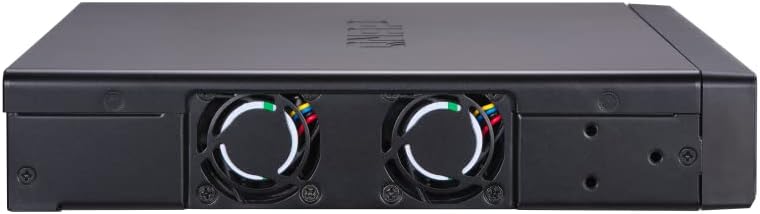
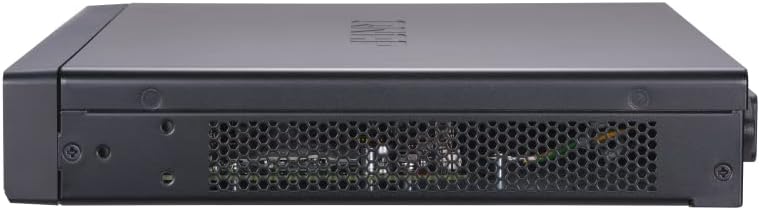
Figure 3.2: Side views of the switch, illustrating the cooling fans and ventilation grilles.
3.3 Rear Panel
The rear panel provides power and management interfaces.
- Power Input: Standard AC power connector for the power cable.
- RS-232 Port: For serial console access (advanced configuration/troubleshooting).
- Kensington Lock Slot: For physical security, allowing the device to be tethered.

Figure 3.3: Rear view of the switch, showing the power input, RS-232 port, and Kensington lock slot.
4. Setup
The QSW-1208-8C-US is a plug-and-play unmanaged switch, requiring no complex software installation for basic operation.
- Power Connection: Connect the provided power cable to the power input on the rear panel of the switch and then to a power outlet.
- Network Connections:
- For 10GbE RJ45 connections, use Cat 6a or Cat 7 cables for optimal performance. Cat 5e cables may support 10GbE over shorter distances due to NBASE-T compatibility.
- For SFP+ fiber connections, insert compatible SFP+ transceivers (not included) into the SFP+ ports (1-4) or the SFP+ slots of the combo ports (5-12), then connect your fiber optic cables.
- Connect your network devices (computers, NAS, servers) to the available ports.
- Rack Mounting (Optional): If desired, attach the included rack-mount brackets to the sides of the switch using the provided screws, then secure the switch into a standard 19-inch server rack.
The switch will automatically detect the connected devices and negotiate the highest possible speed (10G, 5G, 2.5G, 1G, or 100M) based on the capabilities of the connected device and cable type.
5. Operation
As an unmanaged switch, the QSW-1208-8C-US operates automatically once powered on and connected. There is no software interface or configuration required for its core functionality.
- Automatic Speed Negotiation: The switch automatically detects and adjusts to the optimal speed for each connected device (10G/5G/2.5G/1G/100M).
- Enhanced File Transfer: For users frequently moving large files (e.g., video editing, large data backups), the 10GbE connectivity significantly reduces transfer times compared to traditional Gigabit Ethernet.
- Status Monitoring: Observe the front panel LEDs to confirm link status and connection speeds for each port.
6. Maintenance
To ensure long-term reliability and performance of your QNAP QSW-1208-8C-US switch, follow these simple maintenance guidelines:
- Ventilation: Ensure adequate airflow around the switch. Do not block the cooling fans or ventilation grilles on the side panels.
- Cleaning: Periodically clean the exterior of the switch with a soft, dry cloth. Avoid using liquid cleaners or aerosols.
- Firmware: As an unmanaged switch, firmware updates are typically not required or available.
- Power Cycling: In rare cases of network instability, a power cycle (unplugging and replugging the power cable) may resolve issues.
7. Troubleshooting
If you encounter issues with your QNAP QSW-1208-8C-US switch, consider the following common troubleshooting steps:
- No Power:
- Check if the power cable is securely connected to both the switch and the power outlet.
- Verify the power outlet is functional.
- No Link/Slow Speed:
- Ensure network cables are securely plugged into both the switch and the connected device.
- Check the status LEDs on the front panel. If no link light, try a different port or cable.
- Verify that your connected devices (computers, NAS) have 10GbE compatible network interface cards (NICs) or adapters (e.g., USB-C to 10GbE, Thunderbolt 3 to 10GbE) to fully utilize the switch's speed. A Gigabit Ethernet port on your computer will only achieve Gigabit speeds, even when connected to a 10GbE switch.
- For RJ45 connections, ensure you are using appropriate cabling (Cat 6a or higher recommended for 10GbE over longer distances).
- For SFP+ connections, ensure compatible SFP+ transceivers are used and fiber cables are not damaged.
- Intermittent Connectivity:
- Check for loose cable connections.
- Ensure the switch is placed in a well-ventilated area to prevent overheating.
- Try power cycling the switch.
8. Specifications
| Feature | Detail |
|---|---|
| Model | QSW-1208-8C-US |
| Switch Type | Unmanaged |
| Number of Ports | 12 (4 x SFP+, 8 x Combo SFP+/RJ45) |
| Data Transfer Rate | 10GbE / 5GbE / 2.5GbE / 1GbE / 100MbE |
| Switching Capacity | 240 Gbps |
| MAC Address Table Size | 27K |
| Standards | IEEE 802.3az (Energy Efficient Ethernet) |
| Dimensions (LxWxH) | 9.17 x 11.22 x 1.69 inches |
| Item Weight | 4.73 pounds |
| Included Components | 10GbE switch, Power cable, Rack-mount kit |
9. Warranty and Support
For warranty information and technical support, please refer to the official QNAP website or contact your local QNAP reseller. Keep your proof of purchase for warranty claims.

