
Roadie ROADIE 2
Roadie 2 Automatic Tuner/Winder User Manual
Model: ROADIE 2
Introduction
The Roadie 2 is an innovative automatic tuner and string winder designed for string instruments. It combines precision tuning with quick string changes, making it an essential tool for musicians. This manual provides comprehensive instructions for setting up, operating, and maintaining your Roadie 2.
Key features include:
- Incredibly fast and accurate tuning.
- Easy-to-operate precision instrument with high detection accuracy (under 1 cent).
- Reliable tuning even in noisy environments thanks to its vibration sensor.
- Compatibility with most string instruments (electric, acoustic, classical guitars, ukulele, mandolin, banjo). Note: Not compatible with bass guitars.
- Quick string changes using Wind/Unwind mode.
- Support for alternate tunings with 40 preset options and custom preset creation.
- Standalone operation without the need for a smartphone.
Product Overview

The Roadie 2 device, showcasing its compact design and illuminated tuning dial.

Roadie 2 positioned on a guitar headstock, illustrating its use for tuning.
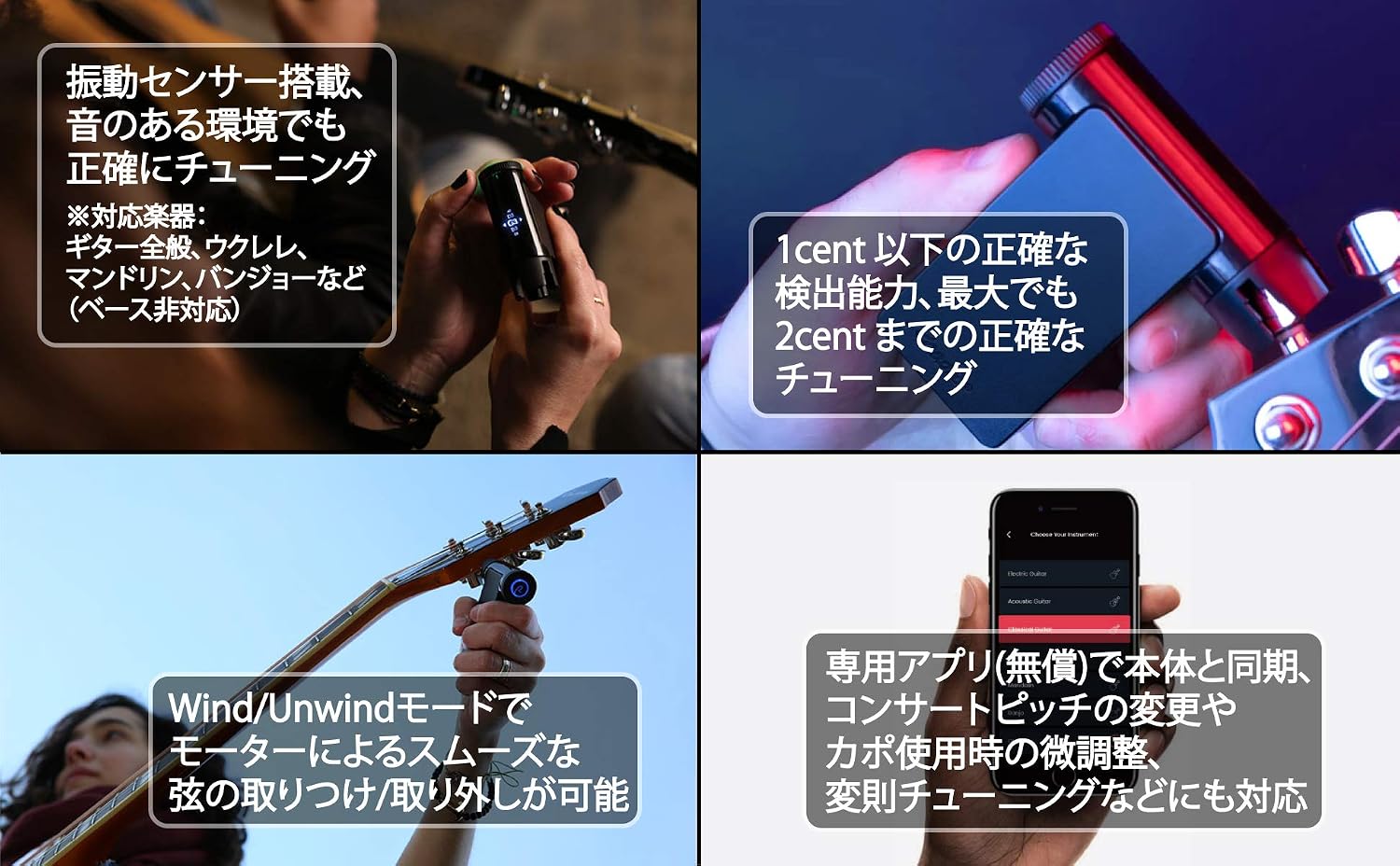
A visual summary of Roadie 2's key features, including vibration sensing, tuning accuracy, string winding, and app connectivity.

The Roadie 2's display showing compatible instrument types: Ukulele, Electric Guitar, and Acoustic Guitar.
Setup
Before using your Roadie 2, ensure it is fully charged. The device operates standalone, but can also connect to a mobile app for advanced features.
Charging the Device
The Roadie 2 comes with a built-in rechargeable lithium polymer battery. Connect the device to a USB power source using the provided cable (Type-C charging is supported).
Initial Power On
Press and hold the main button to power on the device. The display will light up, indicating it's ready for use.
Operating Instructions
Basic Tuning Steps
- Select Instrument: Use the dial on the Roadie 2 to select your instrument type (e.g., Acoustic Guitar, Electric Guitar, Ukulele).
- Attach to Peg: Place the Roadie 2 firmly onto the tuning peg of the string you wish to tune.
- Pluck the String: Pluck the string. The Roadie 2 will detect the vibration and automatically rotate the tuning peg until the string is in tune.
- Confirmation: The device will emit a beep sound and/or display a visual cue when the string is perfectly in tune.
- Repeat: Move the Roadie 2 to the next string and repeat the process until all strings are tuned.

A user demonstrating how to attach the Roadie 2 to an electric guitar's tuning peg for automatic tuning.

A user tuning an acoustic guitar, highlighting the Roadie 2's versatility across different guitar types.
String Changing (Wind/Unwind Mode)
The Roadie 2 can also assist with quick string changes:
- Activate Wind/Unwind mode on the device.
- Attach the Roadie 2 to the tuning peg.
- The motor, capable of up to 60 rotations per minute, will rapidly loosen or tighten the string, making string removal and installation significantly faster.
Advanced Features (with Mobile App)
While Roadie 2 can be used standalone, connecting it to the dedicated "Roadie Tuner" mobile application (available for free) unlocks additional functionalities:
- Concert Pitch Adjustment: Fine-tune the concert pitch (A4 frequency) from 420 Hz to 460 Hz in 1 Hz increments.
- Capo Compensation: Adjust tuning for capo usage.
- Alternate Tunings: Access over 40 preset alternate tunings or create and save your own custom tunings.
Maintenance
To ensure the longevity and optimal performance of your Roadie 2, follow these maintenance guidelines:
- Cleaning: Wipe the device with a soft, dry cloth. Do not use abrasive cleaners or solvents.
- Storage: Store the Roadie 2 in a cool, dry place away from direct sunlight and extreme temperatures.
- Battery Care: For long-term storage, charge the battery to about 50% every few months to prevent deep discharge.
- Avoid Drops: Protect the device from drops and impacts, as this can damage the internal precision mechanisms.
Troubleshooting
If you encounter issues with your Roadie 2, try the following steps:
- Device Not Responding: Ensure the battery is charged. If it's charged and still unresponsive, try resetting the device (refer to the full manual if a reset button is present, otherwise, let the battery drain and recharge).
- Inaccurate Tuning:
- Ensure the Roadie 2 is firmly seated on the tuning peg.
- Pluck the string clearly and consistently.
- Check for excessive background noise; while the vibration sensor helps, extreme noise can still interfere.
- Verify the correct instrument and tuning are selected on the device or app.
- "Wrong String" Error: This error may occur if the device detects a string that is significantly different from the expected pitch for the selected string. Ensure you are plucking the correct string for the current tuning step.
- Motor Not Turning: Check for any obstructions around the tuning peg or the Roadie 2's winder head. Ensure the device is properly aligned.
If problems persist, contact customer support for further assistance.
Specifications
| Model Number | ROADIE 2 |
| Battery Type | 1 Lithium Polymer battery (included) |
| ASIN | B07CBJRDTT |
| First Available Date | April 4, 2018 |
| Tuning Accuracy | Detection accuracy under 1 cent, tuning accuracy up to 2 cents. |
| Concert Pitch Range | 420 Hz - 460 Hz (adjustable in 1 Hz increments) |
| Winding Speed | Up to 60 rotations per minute |
Warranty and Support
For warranty information and customer support, please refer to the official Roadie website or contact the retailer where you purchased the product. Keep your proof of purchase for warranty claims.
Important Note: Roadie 2 is not compatible with bass guitars. For bass instruments, please use the Roadie Bass model.
Related documentsROADIE 2


Ask a question about this manual
Ask about setup, troubleshooting, compatibility, parts, safety, or missing instructions. Manuals+ will review the question and use this page’s manual context to help answer it.