
1. Product Overview
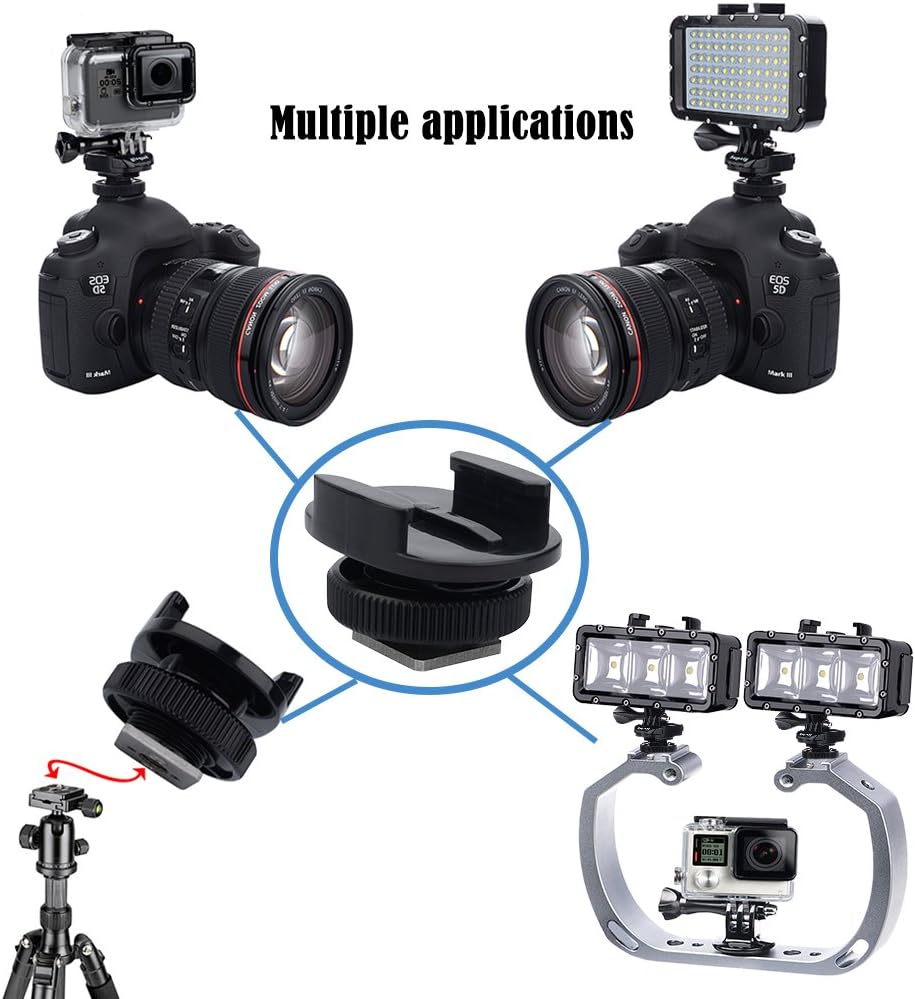
The Suptig Tripod Adapter Cold Shoe Mount (Model RSX-348) is a versatile accessory designed to expand the mounting capabilities of your camera equipment. It allows you to securely attach action cameras (such as GoPro, DJI Osmo, Insta360, Akaso) or other accessories like LED lights to the hot shoe of a DSLR camera. Additionally, its integrated 1/4-inch thread provides compatibility with standard tripods and other mounting equipment, offering flexibility for various photography and videography setups.
2. Key Features
- Multiple Applications: Compatible with Canon, Nikon, and other SLR camera hot shoes. Also compatible with GoPro Hero 13/12/11/10/9/8/7/6/5/4/3/2/1, Hero Session Camera, Suptig Lights, DJI Osmo, Insta360, and Akaso Action Cams.
- Compact and Functional Design: Easily connect Suptig lights or action cameras to SLR cameras.
- Tripod Compatibility: Features a standard 1/4-inch nut at the bottom for direct connection to tripods, enhancing photography experience.
- Durable Construction: Made from highly durable PC material and stainless steel, ensuring resistance to rust, even in marine environments.
- Quick Plug-in Design: Facilitates easy installation of action cameras and Suptig lights onto SLR cameras for seamless video mixing.
3. Package Contents
- 2x Suptig Cold Shoe Mount Adapters
- 1x Microfiber Cleaning Cloth
4. Setup and Installation
4.1 Attaching an Action Camera to a DSLR Hot Shoe
To mount an action camera onto your DSLR, first attach the action camera's standard mount to the top portion of the Suptig cold shoe adapter. Then, slide the base of the adapter into your DSLR camera's hot shoe slot and tighten the locking ring for a secure fit.

4.2 Attaching an LED Light to a DSLR Hot Shoe
Similar to action cameras, an LED video light with a compatible mount can be attached to the Suptig cold shoe adapter. Once the light is secured to the adapter, slide the adapter's base into the DSLR's hot shoe and fasten it by turning the locking ring.
4.3 Connecting to a Tripod or Other Equipment
The base of the Suptig cold shoe mount adapter features a 1/4-inch threaded hole. This allows you to directly screw the adapter onto any standard tripod or other equipment that uses a 1/4-inch screw mount. This is ideal for stable shots or for mounting your action camera in various positions.


4.4 Visual Installation Guide
This video provides a visual guide on how to effectively use the Suptig Cold Shoe Mount Adapter. It shows the process of attaching an action camera to the adapter, then mounting the adapter onto a DSLR camera's hot shoe, and finally, connecting the adapter to a tripod. It also demonstrates attaching an LED light to a DSLR.
5. Operating Instructions
Once the Suptig Tripod Adapter Cold Shoe Mount is securely installed with your desired camera or accessory, operate your equipment as usual. Ensure all connections are tight before use to prevent accidental detachment. The adapter itself does not require any specific operational steps beyond secure attachment.
6. Maintenance and Care
The Suptig Cold Shoe Mount Adapter is constructed from durable PC material and stainless steel, designed to resist rust, even when exposed to water, such as during diving. To maintain its condition, regularly inspect the adapter for any signs of wear or damage. Clean with the provided microfiber cloth or a soft, damp cloth as needed. Avoid using harsh chemicals or abrasive materials that could damage the finish or components.
7. Troubleshooting
- Loose Connection: If the adapter feels loose on the hot shoe or tripod, ensure the locking ring is fully tightened. For tripod connections, verify the 1/4-inch screw is securely fastened.
- Incompatible Device: Ensure your action camera mount or accessory is compatible with the standard GoPro-style two-prong interface on the adapter. For tripod connections, confirm your tripod uses a standard 1/4-inch screw.
- Rust or Corrosion: While designed for durability, prolonged exposure to harsh elements without proper cleaning can affect any metal. Rinse with fresh water after saltwater use and dry thoroughly.
8. Specifications
| Brand | Suptig |
| Model Number | RSX-348 |
| Color | Black |
| Material | PC Material, Stainless Steel |
| Item Dimensions (L x W x H) | 1.77 x 1.18 x 1.37 inches |
| Item Weight | 21.32 g |
| Mounting Type | Tripod Mount, Camera Mount (Cold Shoe) |
| Unit Count | 2.0 Count |
9. Warranty and Support
For warranty information or technical support, please refer to the official Suptig website or contact their customer service directly. Keep your purchase receipt for any warranty claims.