
Fujitsu D-station 52B (FC782B)
Instruction Manual
Introduction
This manual provides essential instructions for the proper setup, operation, and maintenance of your Fujitsu D-station 52B (FC782B) standard type phone. Please read this manual thoroughly before using the device to ensure safe and efficient operation. Keep this manual for future reference.
Product Overview
The Fujitsu D-station 52B (FC782B) is a standard business telephone designed for reliable communication. It features a clear display, programmable function keys, and a standard dial pad.

Figure 1: Overall view of the Fujitsu D-station 52B (FC782B) phone, displaying its main components including the handset, LCD screen, and keypad.

Figure 2: The monochrome LCD display screen, located above the keypad, used for displaying call information, menus, and status messages. The Fujitsu logo is visible below the screen.
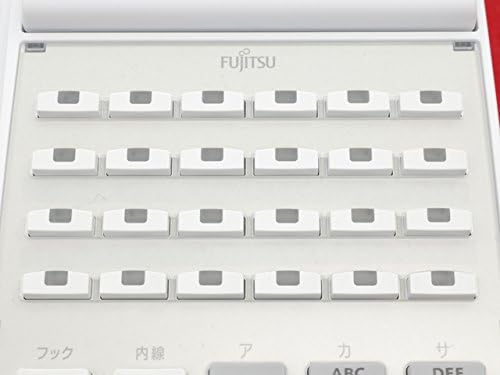
Figure 3: A section of the phone showing multiple rows of programmable function keys. These keys can be customized for speed dial, feature access, or line appearances.

Figure 4: The numeric dial pad with standard 0-9, *, and # keys. Also visible are dedicated function buttons such as 'Hook', 'Internal Line', 'Transfer', 'Mute', 'Hold/Kana/English', and volume/navigation arrows.
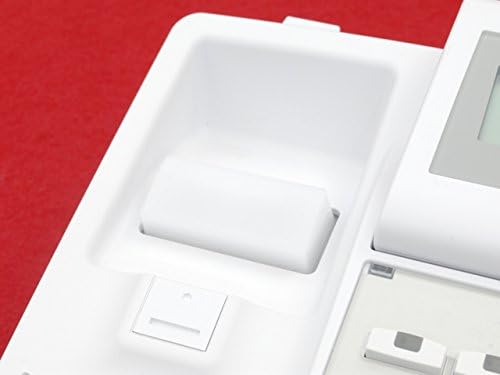
Figure 5: The handset cradle area, showing the mechanism where the handset rests and activates the hook switch.

Figure 6: The earpiece of the phone's handset, featuring a speaker grille for clear audio during calls.
Setup
- Unpacking: Carefully remove all components from the packaging. Verify that all parts are present.
- Connecting the Handset: Plug the coiled handset cord into the designated port on the side or back of the phone base and into the handset.
- Connecting the Phone Line: Connect one end of the telephone line cord to the LINE port on the back of the phone and the other end to your wall telephone jack.
- Connecting Power (if applicable): If your model requires external power, connect the AC adapter to the power port on the phone and then to an electrical outlet.
- Initial Power On: Once all connections are secure, the phone should power on automatically. The display will illuminate.
Operating Instructions
- Making a Call:
- Lift the handset or press the speakerphone button.
- Dial the desired phone number using the numeric keypad.
- Wait for the call to connect.
- Receiving a Call:
- When the phone rings, lift the handset or press the speakerphone button to answer.
- Ending a Call:
- Place the handset back in its cradle or press the speakerphone button again.
- Adjusting Volume: Use the volume control buttons (often indicated by up/down arrows) located near the dial pad to adjust the earpiece or speakerphone volume during a call.
- Using Programmable Keys: The blank keys (refer to Figure 3) can be programmed for various functions such as speed dial, line access, or feature activation. Consult your system administrator for specific programming details.
- Hold Function: Press the 'Hold' button (refer to Figure 4) to place an active call on hold. Press it again to retrieve the call.
- Mute Function: Press the 'Mute' button (refer to Figure 4) to mute your microphone during a call. The other party will not hear you. Press again to unmute.
Maintenance
- Cleaning: Use a soft, dry cloth to clean the phone's exterior. For stubborn dirt, slightly dampen the cloth with water. Do not use harsh chemicals or abrasive cleaners.
- Avoid Liquids: Keep the phone away from liquids and moisture to prevent damage.
- Storage: Store the phone in a cool, dry place away from direct sunlight and extreme temperatures when not in use for extended periods.
Troubleshooting
| Problem | Possible Cause | Solution |
|---|---|---|
| No dial tone | Phone line disconnected or faulty. | Check phone line connection to the wall jack and phone. Try a different phone line if available. |
| Display is blank | No power or power cable loose. | Ensure power adapter is securely connected to the phone and a working electrical outlet. |
| Cannot hear caller / Caller cannot hear me | Volume too low, handset not properly connected, or mute activated. | Adjust volume. Check handset cord connection. Ensure mute function is not active. |
If problems persist after attempting these solutions, please contact your system administrator or technical support.
Specifications
- Brand: Fujitsu
- Model: D-station 52B (FC782B)
- Type: Standard Telephone
- ASIN: B07C9D1DWZ
- Origin: Made in Japan

Figure 7: Product label indicating the model name D-station 52B, certification name FC782B, and manufacturing origin 'MADE IN JAPAN'.
Warranty Information
This product is covered by a limited warranty. Please refer to the warranty card included with your purchase or contact your vendor for specific warranty terms and conditions. Keep your proof of purchase for warranty claims.
Support
For technical assistance, troubleshooting beyond this manual, or service inquiries, please contact your authorized Fujitsu dealer or system administrator. You may also visit the official Fujitsu website for support resources.


